Binance is one of the few exchanges with an official rebind request. Conditions, the step-by-step flow, and the fallback route if it is refused.
Yes, existing Binance users can switch. If the account is within 30 days of signup with no deposit and no trades, you can still add a referral; after that, file Binance's official re-binding application, and if it is refused, close the account and move your KYC to a new one. Bound with referral code FEEOTTER, the Binance rebate is 40% (20% auto-refunded by the exchange plus 20% extra from Fee Otter), so 1,000 USDT of monthly fees returns 400 USDT, against 200 USDT on a typical 20% code (checked October 2026).
Register on Binance with referral code FEEOTTER for a fee rebate of 40% (20% auto-refunded by the exchange plus a 20% extra from Fee Otter). If you already have a Binance account, you can rebind it to the rebate platform (Fee Otter). This guide covers when a code can still be added after signup, how existing users rebind, and how the rebate is paid and calculated.
What do you get by registering on Binance with referral code FEEOTTER?
40% fee rebate: 20% auto-refunded by Binance (charge-first, refund-after) plus a 20% extra from Fee Otter (40% off your fees).
One dashboard: once bound, track every rebate and your available balance on the rebate platform (Fee Otter), and request withdrawals.
A typical KOL code gives a 20% discount; through Fee Otter the rebate is 40%, and you can see every rebate on the data platform.
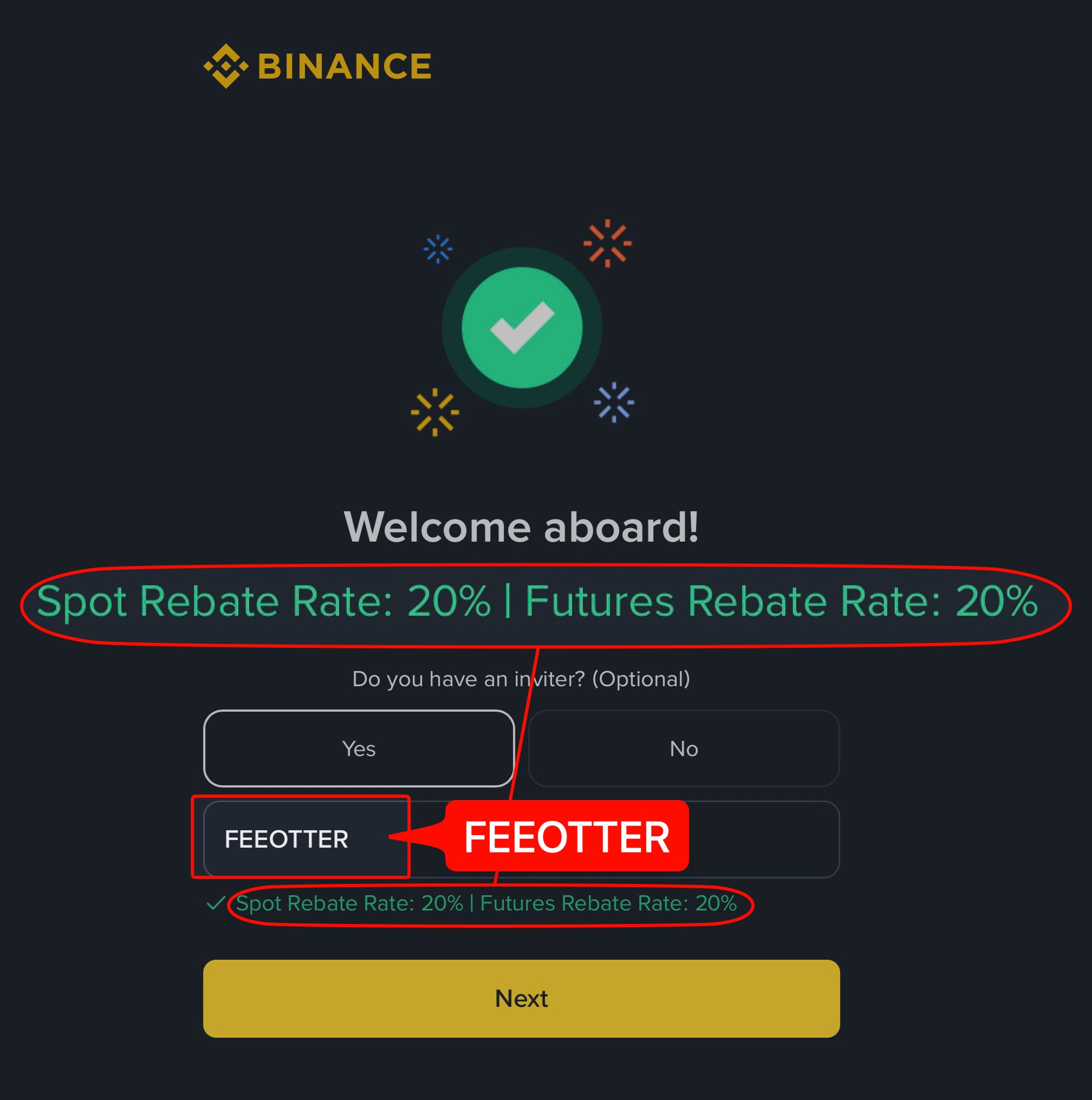
This is the actual Binance signup page opened through our link, with the code already filled in. Plenty of codes that advertise high rebates come without a single screenshot, and people only find out after signing up that no rebate arrives. We put up each exchange's signup page or dashboard so you can check before you register.
How is the Binance rebate paid and calculated? (charge-first, refund-after)
Binance charges the fee as usual, then refunds the rebate to your account.
Example: using Binance's 0.05% USDₚ-M perp taker rate with 2,500 USDT margin at 20x leverage, the notional is 50,000 USDT and the one-side fee is 50,000 × 0.05% = 25 USDT. Bound through Fee Otter, the rebate = 25 × 40% = 10 USDT (20% auto-refunded by the exchange, 20% added by Fee Otter; see the complete fee-rebate guide).
The "extra rebate" comes in two layers. When you bind through Fee Otter, Binance auto-refunds 20% of your fee. On top of that, Fee Otter adds another 20%; that extra slice is Fee Otter's own mechanism.
Rebate rates by exchange (Binance 40%)
The table below lists each exchange's rebate rate through Fee Otter, with Binance highlighted. Live figures are shown on the platform.
Rebate rate by exchange
Exchange
Auto-rebate
Extra rebate
Total
Binance
20%
20%
40%
OKX
20%
20%
Bybit
—
40%
40%
Gate
20%
50%
70%
Bitget
20%
30%
50%
MEXC
20%
40%
60%
BingX
45%
0%
45%
Pionex
15%
35%
50%
KuCoin
60%
0%
60%
Bitfinex
6%
0%
6%
WEEX
60%
10%
70%
XT.COM
60%
10%
70%
HTX
30%
20%
50%
CoinW
60%
0%
60%
Ourbit
50%
20%
70%
Every rate here is fee paid straight back to you. It excludes VIP fee tiers and platform-token discounts such as BNB or GT; those stack on top and only save you more.
Binance normally takes the referral code at signup; afterwards it can only be added within 30 days, before any deposit or trade, and only if you have no referrer (see the add-later check), and once a referrer is set it can't be changed. If your Binance account wasn't registered under referral code FEEOTTER and no longer meets those conditions, the system can't credit rebates to you, so you need to rebind.
Typical situations that call for a rebind:
You signed up without a code, or with a KOL code that pays only 20% to 25%, and now want a higher rebate.
More than 30 days have passed since signup, or you have already deposited or traded, so the official add-later window is closed.
Your original referrer can no longer be reached and rebates have stopped arriving.
Before you rebind: what to prepare
Check your account status first: signup date, whether you have deposited or traded, and whether a referrer is attached decide if the official add-later window is open to you.
Write down both UIDs: note the UID of the old and the new account, since binding and support checks both rely on it. If you are not sure where to find it, see what an exchange UID is and where to find it.
Register with referral code FEEOTTER: always open a new account from the link that carries referral code FEEOTTER and check that the referral field is already filled in before submitting; the full flow is in the Binance registration guide.
Have your Fee Otter account ready: after the rebind, bind the new UID on the rebate platform so your Binance rebates start being recorded.
First check: can you still add the code?
Within 30 days of signup: add the code officially
If your Binance account is less than 30 days old, has no deposits or trades yet and has no referrer, you can add a referral code through Binance's official route without opening a new account. Other conditions: it must be a main account, your KYC must not have been used on another account in the past 180 days, and the account must not be flagged for wash trading. Full conditions: Binance's official Referral Pro FAQ.
How existing Binance users rebind
If the add-later window is closed, use these two methods in order.
Option 1 (recommended): official Rebind Request
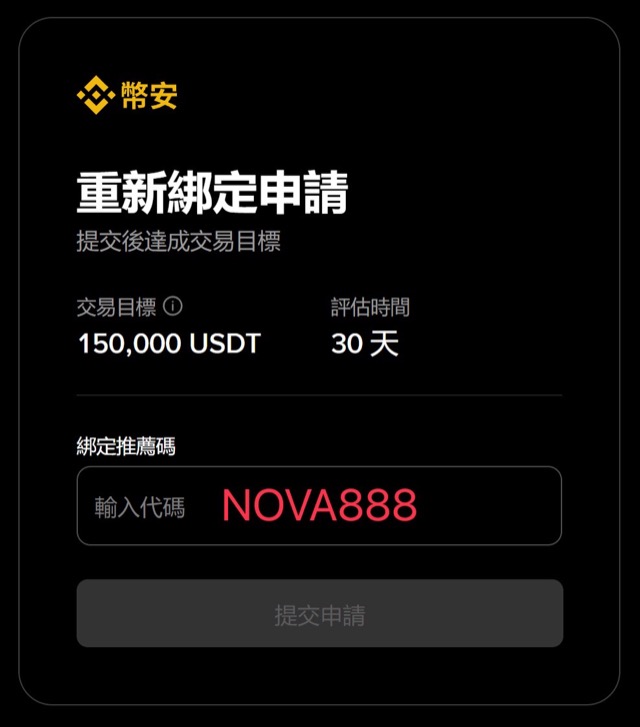
Binance now offers an official rebind entry, so you don't need to close your account or borrow anyone else's identity. Go to www.binance.com/activity/referral/bind-ref, enter referral code FEEOTTER in the referral-code field and submit.
Binance's official Rebind Request page, with the 150,000 USDT trading target, the 30-day evaluation window and the referral-code field.
Eligibility (per Binance's activity rules):
Your account has completed KYC.
No other referral code is bound (you didn't enter a referrer at signup / have no upline).
Your account's total trading volume in the 90 days before submission is under 5,000 USD; if it's higher, leave the account idle for a while first.
After submitting, reach 150,000 USDT of trading volume within the 30-day evaluation window; once approved the rebind completes, and the fees you generate afterwards start accruing rebates.
Option 2: close the old account, transfer KYC after 35 days
To keep your own identity: first register a new account under referral code FEEOTTER, then close your existing Binance account; 35 days after closure, the same KYC (identity verification) can be transferred to the new account to complete the rebind.
Binance's own help page says that if you create another account after closing one, your identity verification may be blocked for 30 days or longer (see Binance's account deletion FAQ).
If anything goes wrong along the way, send support your new account UID (the one registered under referral code FEEOTTER) and we'll help you confirm whether the rebind succeeded.
How much more do you get after rebinding?
The value of a rebind is clearest in numbers. At a USDT-M futures taker fee of 0.05% (Binance official fee schedule) and 2,000,000 USDT of monthly volume, you pay 1,000 USDT in fees a month. Here is what each option returns:
Option
Rebate rate
Monthly rebate
vs a typical 20% code
Typical KOL code
20%
200 USDT
1×
Some KOL codes
25%
250 USDT
1.25×
Referral code FEEOTTER (Fee Otter)
40%
400 USDT
2×
Rebate rates verified on 2026-10-07 (combined rates when bound through Fee Otter; the live platform display prevails) · Methodology
Over a year you collect 2,400 USDT more than with a typical 20% code (200 USDT more per month × 12).
If you are already a VIP on an exchange and want to rebind or register on another exchange, contact support. We can help you apply for special trading benefits or a higher rebate rate.
Once your next trade generates a fee, the rebate record appears on the rebate platform, usually after the exchange's daily report is imported (T+1).
If nothing shows up after two days, send the UID to support and we will help confirm whether the rebind worked.
Common mistakes
Opening the new account without referral code FEEOTTER: if referral code FEEOTTER is not carried at signup, the new account is just another account without a code.
Applying for re-binding with too much recent volume: submitting when the last 90 days exceed 5,000 USD in volume; let the account sit idle for a while first.
Forgetting to bind the UID: finishing the exchange side but never binding the UID on the rebate platform, so no rebates are recorded.
Closing the account before moving assets: before using method two, move the assets out of the old account.
Ready to act? If you do not have an account yet, follow the Binance registration guide and sign up with referral code FEEOTTER. To check where the code goes and what it is worth, read the Binance referral code guide; for how the rebate is calculated and what it pays per month, see the Binance fee rebate guide. After the rebind, bind your UID on the rebate platform and your next trade starts earning.
Need help? Contact support
For any binding or rebate question, or to learn about our exclusive OKX rewards and promotions, reach our support through the channels below.
If you trade at high volume or hold exchange VIP status and need more from your rebate, message support directly and we will talk it through.
Can I add a Binance referral code after signing up?
Yes, with conditions. Within 30 days of signup, before any deposit or trade and with no existing referrer, you can add it under Binance's official rules (see the add-later check); once a referrer is set it can't be changed. If your account no longer meets those conditions, use the rebind methods above.
What are the conditions for the official Rebind Request?
Your account must have completed KYC and have no other referral code bound (no upline); your total trading volume in the 90 days before submission must be under 5,000 USD (if higher, idle the account first). After submitting, reach 150,000 USDT of trading volume within the 30-day evaluation window to be approved. Exact conditions follow Binance's official activity page.
What is the Binance fee rebate?
40%: 20% auto-refunded by the exchange plus a 20% extra from Fee Otter.
When is the Binance rebate paid?
Binance uses charge-first, refund-after: it charges the fee at the trade, then refunds the rebate to your account. Once bound through Fee Otter, these rebates are recorded on the rebate platform (Fee Otter), where you can track them and request withdrawals.
I already have a Binance account. Can I rebind?
Yes. Option 1 (recommended): submit referral code FEEOTTER on Binance's official Rebind Request page (open to accounts that have completed KYC, have no upline and traded under 5,000 USD in the 90 days before submitting), then reach 150,000 USDT of volume within the 30-day evaluation window; Option 2: close your old account and, after 35 days, transfer the same KYC to a new account registered with referral code FEEOTTER.
How long does a Binance rebind take?
Option 1 (the official Rebind Request) comes with a 30-day evaluation window: reach 150,000 USDT of volume within it and, once approved, the rebind is done; Option 2 (closing the account and transferring KYC) requires closing the old account first and waiting 35 days before the KYC can transfer to the new account registered with referral code FEEOTTER.
Do I still get Binance new-user rewards with the code?
Yes. Registering with referral code FEEOTTER still qualifies you for Binance's official new-user rewards (task center, trial funds, etc.; exact contents and amounts follow Binance's own campaign).
How is Binance's rebate different from a KOL code?
A KOL code commonly gives a 20% discount; through Fee Otter the rebate is 40%, and every rebate is visible on the data platform, with withdrawals on request.
After rebinding, when do rebates start?
Once the rebind is done, the fees you generate afterwards start accruing rebates, which you can track on the rebate platform (Fee Otter).



%2C2026-10-05%20%E5%8F%96%E6%A8%A3%3A%0A%20%20%20%20%20%20%20%E5%BA%95%E8%89%B2%20%230E3452%2C%E5%AD%97%E7%AC%A6%20%2303CA9B)%E3%80%82%0A%20%20%20%20%20%20%20%E7%94%A8%20potrace%20%E6%8F%8F%E5%AD%97%E7%AC%A6%E8%BC%AA%E5%BB%93%2C%E6%95%B4%E5%BC%B5%E7%95%AB%E5%B8%83%E7%9B%B4%E6%8E%A5%E6%98%A0%E5%B0%84%E5%88%B0%E9%80%99%E8%A3%A1%E7%9A%84%2032%20%E5%96%AE%E4%BD%8D%20%E2%80%94%E2%80%94%20%E4%B8%8D%E9%87%8D%E6%96%B0%E7%BD%AE%E4%B8%AD%2C%E4%BF%9D%E7%95%99%E5%AE%98%E6%96%B9%E7%9A%84%E7%95%99%E7%99%BD%E6%AF%94%E4%BE%8B%E3%80%82%0A%20%20%20%20%20%20%20%E8%A6%81%E6%94%B9%E8%AB%8B%E9%87%8D%E8%B7%91%E6%8F%8F%E5%9C%96%2C%E4%B8%8D%E8%A6%81%E6%86%91%E5%8D%B0%E8%B1%A1%E8%AA%BF%E3%80%82%20--%3E%0A%20%20%3Crect%20x%3D%221.5%22%20y%3D%221.5%22%20width%3D%2229%22%20height%3D%2229%22%20rx%3D%228%22%20fill%3D%22%230E3452%22%2F%3E%0A%20%20%3Cpath%20fill%3D%22%2303CA9B%22%20d%3D%22M23.02%205.97C22.14%206.02%2021.54%206.07%2021.22%206.1C20.72%206.15%2019.6%206.28%2019.41%206.31C19.31%206.33%2019.1%206.37%2018.94%206.39C18.29%206.5%2017.94%206.57%2017.2%206.73C16.92%206.79%2016%207.03%2015.8%207.09C15.36%207.23%2014.42%207.54%2014.39%207.56C14.38%207.57%2014.3%207.6%2014.23%207.62C13.82%207.76%2012.7%208.28%2012.13%208.6C11.95%208.7%2011.8%208.78%2011.79%208.78C11.7%208.78%2010.42%209.71%209.98%2010.08C9.16%2010.79%208.07%2012.09%207.6%2012.91C7.28%2013.46%207.18%2013.65%207.06%2013.91C6.87%2014.3%206.76%2014.53%206.68%2014.74C6.56%2015.08%206.37%2015.64%206.34%2015.73C6.33%2015.78%206.3%2015.91%206.27%2016C6.06%2016.79%205.93%2017.87%205.94%2018.62L5.95%2019.05L6.69%2019.04C7.78%2019.03%208.57%2018.94%209.73%2018.68C10.18%2018.58%2011.05%2018.33%2011.45%2018.18C11.52%2018.15%2011.7%2018.08%2011.84%2018.03C13.58%2017.38%2015.67%2016.19%2017.55%2014.77C17.8%2014.58%2018.67%2013.89%2018.74%2013.83C18.76%2013.81%2018.94%2013.66%2019.14%2013.48C19.34%2013.31%2019.54%2013.14%2019.58%2013.11C19.61%2013.07%2019.78%2012.92%2019.95%2012.77C20.94%2011.88%2022.24%2010.57%2023.2%209.48C23.68%208.94%2023.69%208.93%2023.86%208.73C23.94%208.63%2024.02%208.54%2024.03%208.53C24.17%208.4%2025.09%207.25%2025.52%206.67C25.67%206.47%2025.81%206.28%2025.83%206.26C25.86%206.23%2025.89%206.19%2025.9%206.16C25.92%206.13%2025.94%206.12%2025.95%206.13C25.98%206.15%2025.3%207.5%2024.99%208.07C24.88%208.28%2024.78%208.45%2024.78%208.46C24.78%208.46%2024.66%208.67%2024.51%208.93C24.24%209.4%2024.17%209.52%2024.07%209.69C24%209.81%2023.72%2010.27%2023.39%2010.8C22.69%2011.91%2021.44%2013.66%2020.74%2014.52C20.25%2015.12%2020.09%2015.31%2019.72%2015.73C19.01%2016.55%2018.19%2017.38%2017.42%2018.08C17.07%2018.39%2016.92%2018.52%2016.5%2018.87C16.37%2018.98%2016.24%2019.09%2016.2%2019.12C15.83%2019.43%2014.7%2020.21%2014.16%2020.54C13.69%2020.82%2012.69%2021.34%2012.41%2021.45C12.33%2021.48%2012.23%2021.52%2012.17%2021.55C12.01%2021.62%2011.45%2021.84%2011.11%2021.95C10.97%2022%2010.05%2022.26%209.84%2022.31C9.23%2022.45%208.97%2022.5%208.56%2022.56C8.43%2022.58%208.25%2022.61%208.16%2022.62C8.06%2022.64%207.79%2022.67%207.56%2022.69C7.32%2022.71%207.12%2022.74%207.12%2022.76C7.12%2022.85%207.58%2023.42%207.97%2023.82C9.2%2025.09%2010.67%2025.8%2012.52%2026.02C16.51%2026.48%2020.99%2024.06%2023.2%2020.25C23.32%2020.05%2023.43%2019.86%2023.46%2019.81C23.51%2019.73%2023.96%2018.81%2024.04%2018.62C24.67%2017.21%2025.19%2015.43%2025.52%2013.67C25.66%2012.9%2025.73%2012.45%2025.81%2011.77C25.99%2010.32%2026.05%209.33%2026.05%207.64C26.05%206.06%2026.04%206.01%2025.97%205.98C25.9%205.95%2023.53%205.94%2023.02%205.97Z%22%2F%3E%0A%3C%2Fsvg%3E%0A)


%2C2026-10-05%20%E5%8F%96%E6%A8%A3%3A%0A%20%20%20%20%20%20%20%E5%BA%95%E8%89%B2%20%23FFFFFF%2C%E5%AD%97%E7%AC%A6%20%235227FF)%E3%80%82%0A%20%20%20%20%20%20%20%E7%94%A8%20potrace%20%E6%8F%8F%E5%AD%97%E7%AC%A6%E8%BC%AA%E5%BB%93%2C%E6%95%B4%E5%BC%B5%E7%95%AB%E5%B8%83%E7%9B%B4%E6%8E%A5%E6%98%A0%E5%B0%84%E5%88%B0%E9%80%99%E8%A3%A1%E7%9A%84%2032%20%E5%96%AE%E4%BD%8D%20%E2%80%94%E2%80%94%20%E4%B8%8D%E9%87%8D%E6%96%B0%E7%BD%AE%E4%B8%AD%2C%E4%BF%9D%E7%95%99%E5%AE%98%E6%96%B9%E7%9A%84%E7%95%99%E7%99%BD%E6%AF%94%E4%BE%8B%E3%80%82%0A%20%20%20%20%20%20%20%E5%AE%98%E6%96%B9%E6%98%AF%E7%99%BD%E5%BA%95%E7%B4%AB%E8%89%B2%E5%AD%97%E7%AC%A6%3B%E7%99%BD%E5%BA%95%E5%8A%A0%E6%B7%A1%E9%82%8A%2C%E5%85%8D%E5%BE%97%E5%9C%A8%E7%99%BD%E8%89%B2%E8%83%8C%E6%99%AF%E4%B8%8A%E6%B6%88%E5%A4%B1%E3%80%82%0A%20%20%20%20%20%20%20%E8%A6%81%E6%94%B9%E8%AB%8B%E9%87%8D%E8%B7%91%E6%8F%8F%E5%9C%96%2C%E4%B8%8D%E8%A6%81%E6%86%91%E5%8D%B0%E8%B1%A1%E8%AA%BF%E3%80%82%20--%3E%0A%20%20%3Crect%20x%3D%221.5%22%20y%3D%221.5%22%20width%3D%2229%22%20height%3D%2229%22%20rx%3D%228%22%20fill%3D%22%23FFFFFF%22%20stroke%3D%22%23E4E4E7%22%2F%3E%0A%20%20%3Cpath%20fill%3D%22%235227FF%22%20d%3D%22M13.31%208.92L13.31%2012.28L9.94%2012.28L6.56%2012.28L6.57%2015.71C6.58%2019.51%206.57%2019.29%206.79%2020.2C7.56%2023.33%2010.21%2025.78%2013.38%2026.31C14.1%2026.43%2014.44%2026.44%2019.24%2026.44L23.91%2026.44L23.91%2023.05L23.91%2019.66L19.2%2019.65L14.48%2019.64L14.28%2019.56C13.89%2019.41%2013.63%2019.16%2013.44%2018.76L13.36%2018.58L13.35%2015.46L13.34%2012.34L18.56%2012.34L23.78%2012.34L23.78%208.95L23.78%205.56L18.55%205.56L13.31%205.56L13.31%208.92Z%22%2F%3E%0A%3C%2Fsvg%3E%0A)

 Telegram · @feeotter