Binance Fee Rebate 2026: 40% Back With Code FEEOTTER
Binance fee cashback with code FEEOTTER: 40% of trading fees refunded (20% automatic + 20% extra). Spot nets 0.06%, futures taker 0.03%. Examples and payouts.
As of 2026-10-22, signing up for Binance with referral code FEEOTTER gets you a 40% fee rebate (20% returned automatically by Binance + 20% extra from Fee Otter). In effective rates for a regular (VIP 0) account, spot drops from 0.10% to 0.06%, and USD-M futures maker from 0.02% to 0.012% and taker from 0.05% to 0.03%. Most referral codes pay 20% (some 25%); on 1,000 USDT of monthly fees, a 20% code returns 200 USDT and Fee Otter returns 400 USDT.
This guide answers four things: what the rebate is, what your volume actually earns you, how to claim it, and what existing account holders can do. Fourteen FAQs at the end.
What is a Binance fee rebate? (charged first, returned later)
Binance charges the full fee at the moment of the trade and returns the rebate afterwards. The rate on your order screen does not get cheaper; the saving comes back to you later. That is the single most common misunderstanding.
There are two layers, from completely different sources:
Layer
Paid by
Rate
Requirement
Layer 1: automatic
Binance
20%
Sign up with referral code
Layer 2: extra
The rebate site (Fee Otter)
20%
Bind your UID on the rebate site
Layer 1 is not automatic just because you used a code. The referrer chooses how much of it to share back with you, and setting that to 0% is entirely permitted. Plenty of YouTubers and influencers do exactly that: you pay the full fee, and all 20% becomes their commission. Sign up with Fee Otter's code and the exchange pays that 20% back to you automatically.Layer 2 is separate: the rebate site passes back part of the commission it receives from the exchange, and most influencers keep that layer too. For how that layer works and why it can exceed 20%, see Automatic vs extra rebate and Why a rebate can exceed 20%.
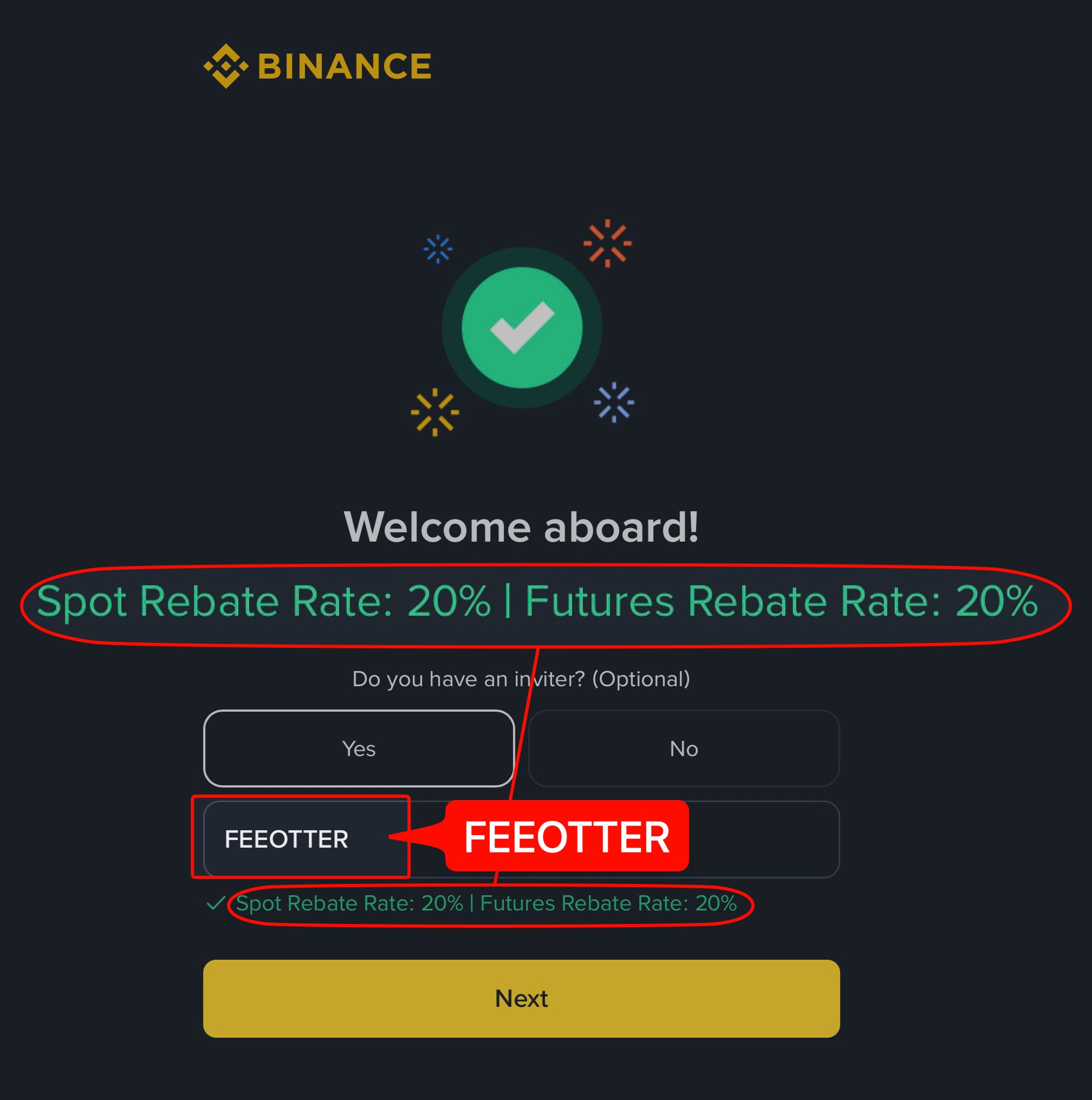
This is the actual Binance signup page opened through our link, with the code already filled in. Plenty of codes that advertise high rebates come without a single screenshot, and people only find out after signing up that no rebate arrives. We put up each exchange's signup page or dashboard so you can check before you register.
First, know what you are paying: Binance's own fees
A rebate is a percentage of the fee, not of your trade size. To work out what you save, you first need to know what you pay. Binance's listed rates for a regular (VIP 0) account:
Futures taker costs 2.5× maker. Every market order is a taker order. At the same volume, someone who works limit orders can pay under half what a market-order trader pays.
BNB discount and rebates stack, but on different bases. BNB discounts the fee first; the rebate is then calculated on the discounted amount. So enabling BNB makes the rebate smaller in absolute terms, though you still come out ahead overall.
VIP levels stack, but only up to VIP 2. Hitting a 30-day volume threshold lowers your rate, and VIP 1 and VIP 2 discounts combine with the rebate. From VIP 3 up, Binance pays no referral commission, so the rebate stops (spot: Binance announcement of 2023-05-31; futures: Referral Pro Mode FAQ; checked 2026-10-22). Most users never get there; high-volume traders should compare both.
This table reflects listed VIP 0 pricing as of October 2026 and may change; current rates are on the Binance official fee schedule.
What you actually pay after the rebate: maker and taker in one table
With the 40% rebate included, VIP 0 effective rates look like this. "With BNB" means paying fees in BNB first (25% off spot, 10% off futures); the rebate is then calculated on the discounted fee actually charged:
An example: 100,000 USDT of spot volume in a month, all market orders, costs 100 USDT in list fees. With BNB deduction that becomes 75 USDT; the 40% rebate then returns 30 USDT (15 automatically from Binance + 15 extra from Fee Otter), so you pay 45 USDT net, or 0.045% of volume. Without BNB it is 100 − 40 = 60 USDT.
Two points Binance does not spell out. First, its Referral Pro Mode FAQ (updated 2026-08-05) does not state the order in which the BNB discount and referral commission apply; the table assumes the rebate is calculated on the fee actually charged. Second, the futures BNB discount only works once BNB is in your USD-M futures account; if the balance runs short, the fee is taken in USDT and that trade gets no discount. For the cheapest way to stack the two, see Binance fee calculator: BNB discount × 40% rebate; high-volume traders should also check Binance VIP fee tiers.
How much can you get? (rates)
Once bound through Fee Otter, the combined Binance rebate is 40%: 20% returned automatically by Binance and 20% extra from Fee Otter.
Rebate rate by exchange
Exchange
Auto-rebate
Extra rebate
Total
Binance
20%
20%
40%
OKX
20%
20%
Bybit
—
40%
40%
Gate
20%
50%
70%
Bitget
20%
30%
50%
MEXC
20%
40%
60%
BingX
45%
0%
45%
Pionex
15%
35%
50%
KuCoin
60%
0%
60%
Bitfinex
6%
0%
6%
WEEX
60%
10%
70%
XT.COM
60%
10%
70%
HTX
30%
20%
50%
CoinW
60%
0%
60%
Ourbit
50%
20%
70%
Every rate here is fee paid straight back to you. It excludes VIP fee tiers and platform-token discounts such as BNB or GT; those stack on top and only save you more.
You do not need large volume for this to be worth it. Any referral code anywhere pays you layer 1, the flat 20%. Through Fee Otter it is 40%: same trades, same fees, 2× back.
Route
Total Binance rebate
Relative
Any other referral code / influencer
20%
baseline
Fee Otter
40%
2×
Here is what comes back at five levels of monthly fees:
Monthly fees
Total rebate
Returned
Equivalent futures volume
100 USDT
40%
40 USDT
~200,000 USDT
500 USDT
40%
200 USDT
~1,000,000 USDT
1,000 USDT
40%
400 USDT
~2,000,000 USDT
2,500 USDT
40%
1,000 USDT
~5,000,000 USDT
5,000 USDT
40%
2,000 USDT
~10,000,000 USDT
The volume column is derived from futures taker at 0.05%. Working limit orders (maker, 0.02%) needs 2.5× the volume for the same fee total. Spot at 0.10% needs half the volume of futures taker.
If you are already a VIP on an exchange and want to rebind or sign up on another one, contact support and we can help you apply for special trading benefits or a higher rebate rate.
Binance registration steps and how to bind
New users, follow this order. If you already have a Binance account, skip to the next section.
1
Register with code FEEOTTER
sign up through our link, which fills in the referral field, or type FEEOTTER into it yourself. This decides your layer-1 20%, and after the account exists it can only be added within 30 days and before any deposit or trade, and a referrer can never be changed. Miss that window and re-binding is the only route.
2
Complete identity verification (KYC)
upload your ID and do the face check in the app; level differences are in the Binance KYC guide.
3
Bind your UID on Fee Otter
copy the numeric UID from your Binance profile and submit it on the rebate platform (Fee Otter). The layer-2 extra 20% is recorded from binding onwards.
4
(Optional) turn on BNB fee deduction
for spot, enable paying fees with BNB in your fee settings; for futures, transfer BNB into your USD-M futures account first.
5
Trade, then check the books
from then on your fees and rebates are posted daily and visible in real time, and you can request a withdrawal once your available balance reaches 1 USDT.
When does the rebate arrive?
How much later is "returned later"? The timeline:
When
What happens
At the trade
Binance charges the full fee
Around T+1
The exchange publishes the previous day's commission report
After the report
We import it, match each row to your UID, compute the rebate
After posting
Your available balance on the rebate site goes up; visible, with withdrawals on request
That timeline is for the layer-2 extra rebate. The layer-1 20% runs on Binance's own rails, under different rules:
Item
Binance 20% (layer 1)
Fee Otter extra rebate (layer 2)
Settlement asset
USDC by default since 2025-02-13, converted hourly (official FAQ)
Denominated in USDT
Lands in
Your Binance Spot account (officially within 6 hours of conversion)
Fee Otter available balance
How it is paid
Credited automatically by Binance; nothing to claim
After the exchange's daily report, around T+1
Where to check
Binance: Wallet → Transaction History (records older than 7 days must be downloaded)
The rebate station, itemised
Three details people miss:
Only trades that actually incur a fee count. A trade with no fee produces no rebate and does not count toward volume.
Records older than 7 days must be downloaded. Binance's on-screen history covers a limited window; download the full records to reconcile.
The two payments live in different places. The official 20% goes to your Binance Spot Account; the extra rebate goes to your available balance on the rebate site. If one looks missing, check which side you are looking at.
Already have a Binance account? Re-bind to claim rebates
A Binance referral code is normally entered when the account is created. It can still be added within 30 days of signup if you have made no deposit or trade and have no referrer, but once a referrer is set it cannot be changed. Existing users outside that window have to re-bind. There are two routes:
The official "re-bind referral" application: the most legitimate route, but it carries a volume condition.
Close the old account and transfer KYC: the cleanest, but there is a 35-day wait.
Expecting the order-screen rate to drop. It does not. Fees are charged in full and returned later.
Skipping the code at sign-up, assuming it can be added later. Only within 30 days of signup and before any deposit or trade. After your first deposit or trade, or after 30 days, it cannot be added.
Binding the wrong UID. The UID is the numeric account ID, not a nickname, email or sub-account number. Bind the master account: sub-account commission rolls up to the master account's UID.
Treating both layers as one payment. The official 20% lands in your exchange account; the extra rebate lands in your available balance on the rebate site.
Is a "40% Binance rebate" or "40% off fees" elsewhere the same as Fee Otter's 40%?
No. Search for Binance rebates and you will find plenty of "up to 40%" and "40% off fees" claims, but many of them reach that number by multiplying in the BNB fee discount. A typical write-up says the code gives 20% off spot and 10% off futures, and then adds BNB to call it "up to 40% off".
Broken down: spot is 1 − 0.8 × 0.75 = 40%, futures is 1 − 0.9 × 0.9 = 19%. The BNB part (25% on spot, 10% on futures) is a platform-token fee reduction Binance gives everyone, with or without a referral code; the code itself only gives 20% on spot and 10% on futures.
Where does 40% come from?
Their 40%Code20+BNB 20your own→ back to you20
Fee Otter 40%Code20+Extra20→ back to you40
Binance spot, per 100 USDT of fees. Turn on BNB and Fee Otter saves you 55.
We don’t win you over with inflated math. We rely on transparent, line-by-line records and automatic daily settlement.
How is this different from an influencer link or another rebate site?
The common offer is "20% off fees", which is layer 1. But whether you actually receive that 20% is set by the referrer, and plenty of codes have it switched off entirely, turning your fees into their commission. Four things separate us:
Whether layer 1 reaches you at all. Sign up with Fee Otter's code and the exchange pays that 20% back to your account automatically; with some codes it is set to 0% and you get nothing.
Whether layer 2 reaches you. It does here, at a published rate.
Whether you can audit it. Every fee and every rebate is itemised, rather than a single number at month end.
Whether you actually get paid. No lock-up: request a payout once your available balance reaches 1 USDT, paid in USDT on BEP20 with a 0.015 USDT network fee on your side.
Binance’s rebate terms are solid, but know these risks before you deposit:
US Department of Justice plea agreement: in November 2023 Binance pleaded guilty to violating US anti-money-laundering and sanctions rules, agreed to pay about $4.3 billion and accepted an independent monitor (DOJ announcement).
Third-party rating: CoinGecko gives Binance a trust score of 10/10; the score weighs volume legitimacy, liquidity, cybersecurity and past incidents, and is not a guarantee for your assets.
Don’t keep long-term or large balances on the exchange: keep only the funds you are actively trading; withdraw money you aren’t trading and anything you hold long term.
Use a cold wallet for long-term holdings: move large, long-term assets to a hardware cold wallet (such as a Ledger) and keep them offline.
Futures and high leverage are high risk: the higher the leverage, the easier it is to be liquidated. Beginners should avoid high leverage and learn the rules with small amounts first.
FAQ
What is the Binance rebate rate?
Through Fee Otter (code FEEOTTER) it is 40% (20% returned automatically by Binance + 20% extra from Fee Otter), checked 2026-10-22.
What is the Binance referral code?
Fee Otter's Binance referral code is FEEOTTER. Enter it in the referral field when you sign up; our dedicated link fills it in for you.
What are Binance's maker and taker fees after the rebate?
At VIP 0 with the 40% rebate: spot goes from 0.10% to 0.06% (0.045% with BNB deduction); USD-M futures maker from 0.02% to 0.012% and taker from 0.05% to 0.03% (about 0.0108% and 0.027% with BNB).
When is the rebate paid?
The official 20% is returned by Binance directly to your exchange account. The extra rebate is imported, matched and posted to your available balance on the rebate site after the exchange's daily report, typically from T+1.
Is this safe? Can you touch my assets?
Binding needs only a UID: no API key, no password, no withdrawal permission. Your assets stay in your own Binance account throughout. The rebate site holds nothing and can move nothing.
I signed up without a code. Can I still get rebates?
Yes. An account under 30 days old with no deposit or trade can add the code directly; otherwise it has to be re-bound. See the re-binding guide.
Can a Binance referral code be added or changed later?
It can be added under conditions, but not changed. Under Binance's official rules, you can add one within 30 days of signup if you have made no deposit or trade, have no referrer and meet the other conditions (main account and so on). Once the referral relationship exists, the referrer cannot be changed.
Does the BNB discount reduce my rebate?
In absolute terms yes, because the rebate is computed on the discounted fee. Your total cost is still lower: a 25% discount followed by a 40% return beats a return with no discount.
Is the rebate rate the same for spot and futures?
The rate is the same, but the underlying fees differ a lot (spot 0.10%, futures taker 0.05%), so the same trade volume produces different rebate amounts.
How is the rebate calculated?
On the fees you actually pay: 20% comes back automatically from Binance and 20% extra from Fee Otter. See how the fee rebate is settled.
Can high-volume traders get a higher rate?
Contact support. If you trade large volume, or you are already a VIP on an exchange, we can help you apply for special trading benefits or a higher rebate rate.
Is there a withdrawal minimum?
Yes: 1 USDT. There is no lock-up; once your available balance reaches 1 USDT you can request a payout in USDT on BEP20, with a 0.015 USDT network fee per payout on your side. The official 20% is credited by Binance to your Spot account automatically, with nothing to claim.
Do sub-account fees count?
They do. Sub-account trading commission is attributed to the master account UID, which is how the exchange's commission report is structured. Bind the master UID and your sub-accounts' fees and rebates are included automatically; there is nothing extra to bind.
How does this compare with a typical influencer deal?
Two layers differ. Layer 1 is the 20% the exchange returns automatically, and with Fee Otter's code the exchange pays that 20% back to your account automatically. Layer 2 is the extra rebate, which most influencers do not share at all; through Fee Otter it is shared at a published rate, itemised and paid out on request.
What you see every day after binding
Illustration · sample data, not a real user
This is what the Rebate history on the rebate dashboard looks like. Data for the previous day refreshes daily at 16:00 (UTC+8), and every rebate shows the exchange, date and amount.
Available balance
38.66 USDT
Total earned
412.80 USDT
By exchange (this month)
Gate 34.44Binance 5.51Bitget 6.82
Rebate history
Date
Exchange
Amount
10/22
Gate
+6.30 USDT
10/22
Binance
+1.20 USDT
10/22
Bitget
+1.76 USDT
10/21
Gate
+4.83 USDT
10/21
Binance
+0.94 USDT
10/20
Gate
+7.14 USDT
10/20
Bitget
+2.20 USDT
10/20
Binance
+1.43 USDT
The available balance is extra rebate Fee Otter has not yet paid you (denominated in USDT) — an amount we owe you; the automatic rebate from the referral code is paid by the exchange straight to your exchange account.
This article is for information and research. It is not investment advice, not asset management, and no return is guaranteed. Binance fee rates, rebate terms and re-binding rules may change; Binance's own announcements and ours prevail. Rates shown are listed VIP 0 pricing as of October 2026.



%2C2026-10-05%20%E5%8F%96%E6%A8%A3%3A%0A%20%20%20%20%20%20%20%E5%BA%95%E8%89%B2%20%230E3452%2C%E5%AD%97%E7%AC%A6%20%2303CA9B)%E3%80%82%0A%20%20%20%20%20%20%20%E7%94%A8%20potrace%20%E6%8F%8F%E5%AD%97%E7%AC%A6%E8%BC%AA%E5%BB%93%2C%E6%95%B4%E5%BC%B5%E7%95%AB%E5%B8%83%E7%9B%B4%E6%8E%A5%E6%98%A0%E5%B0%84%E5%88%B0%E9%80%99%E8%A3%A1%E7%9A%84%2032%20%E5%96%AE%E4%BD%8D%20%E2%80%94%E2%80%94%20%E4%B8%8D%E9%87%8D%E6%96%B0%E7%BD%AE%E4%B8%AD%2C%E4%BF%9D%E7%95%99%E5%AE%98%E6%96%B9%E7%9A%84%E7%95%99%E7%99%BD%E6%AF%94%E4%BE%8B%E3%80%82%0A%20%20%20%20%20%20%20%E8%A6%81%E6%94%B9%E8%AB%8B%E9%87%8D%E8%B7%91%E6%8F%8F%E5%9C%96%2C%E4%B8%8D%E8%A6%81%E6%86%91%E5%8D%B0%E8%B1%A1%E8%AA%BF%E3%80%82%20--%3E%0A%20%20%3Crect%20x%3D%221.5%22%20y%3D%221.5%22%20width%3D%2229%22%20height%3D%2229%22%20rx%3D%228%22%20fill%3D%22%230E3452%22%2F%3E%0A%20%20%3Cpath%20fill%3D%22%2303CA9B%22%20d%3D%22M23.02%205.97C22.14%206.02%2021.54%206.07%2021.22%206.1C20.72%206.15%2019.6%206.28%2019.41%206.31C19.31%206.33%2019.1%206.37%2018.94%206.39C18.29%206.5%2017.94%206.57%2017.2%206.73C16.92%206.79%2016%207.03%2015.8%207.09C15.36%207.23%2014.42%207.54%2014.39%207.56C14.38%207.57%2014.3%207.6%2014.23%207.62C13.82%207.76%2012.7%208.28%2012.13%208.6C11.95%208.7%2011.8%208.78%2011.79%208.78C11.7%208.78%2010.42%209.71%209.98%2010.08C9.16%2010.79%208.07%2012.09%207.6%2012.91C7.28%2013.46%207.18%2013.65%207.06%2013.91C6.87%2014.3%206.76%2014.53%206.68%2014.74C6.56%2015.08%206.37%2015.64%206.34%2015.73C6.33%2015.78%206.3%2015.91%206.27%2016C6.06%2016.79%205.93%2017.87%205.94%2018.62L5.95%2019.05L6.69%2019.04C7.78%2019.03%208.57%2018.94%209.73%2018.68C10.18%2018.58%2011.05%2018.33%2011.45%2018.18C11.52%2018.15%2011.7%2018.08%2011.84%2018.03C13.58%2017.38%2015.67%2016.19%2017.55%2014.77C17.8%2014.58%2018.67%2013.89%2018.74%2013.83C18.76%2013.81%2018.94%2013.66%2019.14%2013.48C19.34%2013.31%2019.54%2013.14%2019.58%2013.11C19.61%2013.07%2019.78%2012.92%2019.95%2012.77C20.94%2011.88%2022.24%2010.57%2023.2%209.48C23.68%208.94%2023.69%208.93%2023.86%208.73C23.94%208.63%2024.02%208.54%2024.03%208.53C24.17%208.4%2025.09%207.25%2025.52%206.67C25.67%206.47%2025.81%206.28%2025.83%206.26C25.86%206.23%2025.89%206.19%2025.9%206.16C25.92%206.13%2025.94%206.12%2025.95%206.13C25.98%206.15%2025.3%207.5%2024.99%208.07C24.88%208.28%2024.78%208.45%2024.78%208.46C24.78%208.46%2024.66%208.67%2024.51%208.93C24.24%209.4%2024.17%209.52%2024.07%209.69C24%209.81%2023.72%2010.27%2023.39%2010.8C22.69%2011.91%2021.44%2013.66%2020.74%2014.52C20.25%2015.12%2020.09%2015.31%2019.72%2015.73C19.01%2016.55%2018.19%2017.38%2017.42%2018.08C17.07%2018.39%2016.92%2018.52%2016.5%2018.87C16.37%2018.98%2016.24%2019.09%2016.2%2019.12C15.83%2019.43%2014.7%2020.21%2014.16%2020.54C13.69%2020.82%2012.69%2021.34%2012.41%2021.45C12.33%2021.48%2012.23%2021.52%2012.17%2021.55C12.01%2021.62%2011.45%2021.84%2011.11%2021.95C10.97%2022%2010.05%2022.26%209.84%2022.31C9.23%2022.45%208.97%2022.5%208.56%2022.56C8.43%2022.58%208.25%2022.61%208.16%2022.62C8.06%2022.64%207.79%2022.67%207.56%2022.69C7.32%2022.71%207.12%2022.74%207.12%2022.76C7.12%2022.85%207.58%2023.42%207.97%2023.82C9.2%2025.09%2010.67%2025.8%2012.52%2026.02C16.51%2026.48%2020.99%2024.06%2023.2%2020.25C23.32%2020.05%2023.43%2019.86%2023.46%2019.81C23.51%2019.73%2023.96%2018.81%2024.04%2018.62C24.67%2017.21%2025.19%2015.43%2025.52%2013.67C25.66%2012.9%2025.73%2012.45%2025.81%2011.77C25.99%2010.32%2026.05%209.33%2026.05%207.64C26.05%206.06%2026.04%206.01%2025.97%205.98C25.9%205.95%2023.53%205.94%2023.02%205.97Z%22%2F%3E%0A%3C%2Fsvg%3E%0A)


%2C2026-10-05%20%E5%8F%96%E6%A8%A3%3A%0A%20%20%20%20%20%20%20%E5%BA%95%E8%89%B2%20%23FFFFFF%2C%E5%AD%97%E7%AC%A6%20%235227FF)%E3%80%82%0A%20%20%20%20%20%20%20%E7%94%A8%20potrace%20%E6%8F%8F%E5%AD%97%E7%AC%A6%E8%BC%AA%E5%BB%93%2C%E6%95%B4%E5%BC%B5%E7%95%AB%E5%B8%83%E7%9B%B4%E6%8E%A5%E6%98%A0%E5%B0%84%E5%88%B0%E9%80%99%E8%A3%A1%E7%9A%84%2032%20%E5%96%AE%E4%BD%8D%20%E2%80%94%E2%80%94%20%E4%B8%8D%E9%87%8D%E6%96%B0%E7%BD%AE%E4%B8%AD%2C%E4%BF%9D%E7%95%99%E5%AE%98%E6%96%B9%E7%9A%84%E7%95%99%E7%99%BD%E6%AF%94%E4%BE%8B%E3%80%82%0A%20%20%20%20%20%20%20%E5%AE%98%E6%96%B9%E6%98%AF%E7%99%BD%E5%BA%95%E7%B4%AB%E8%89%B2%E5%AD%97%E7%AC%A6%3B%E7%99%BD%E5%BA%95%E5%8A%A0%E6%B7%A1%E9%82%8A%2C%E5%85%8D%E5%BE%97%E5%9C%A8%E7%99%BD%E8%89%B2%E8%83%8C%E6%99%AF%E4%B8%8A%E6%B6%88%E5%A4%B1%E3%80%82%0A%20%20%20%20%20%20%20%E8%A6%81%E6%94%B9%E8%AB%8B%E9%87%8D%E8%B7%91%E6%8F%8F%E5%9C%96%2C%E4%B8%8D%E8%A6%81%E6%86%91%E5%8D%B0%E8%B1%A1%E8%AA%BF%E3%80%82%20--%3E%0A%20%20%3Crect%20x%3D%221.5%22%20y%3D%221.5%22%20width%3D%2229%22%20height%3D%2229%22%20rx%3D%228%22%20fill%3D%22%23FFFFFF%22%20stroke%3D%22%23E4E4E7%22%2F%3E%0A%20%20%3Cpath%20fill%3D%22%235227FF%22%20d%3D%22M13.31%208.92L13.31%2012.28L9.94%2012.28L6.56%2012.28L6.57%2015.71C6.58%2019.51%206.57%2019.29%206.79%2020.2C7.56%2023.33%2010.21%2025.78%2013.38%2026.31C14.1%2026.43%2014.44%2026.44%2019.24%2026.44L23.91%2026.44L23.91%2023.05L23.91%2019.66L19.2%2019.65L14.48%2019.64L14.28%2019.56C13.89%2019.41%2013.63%2019.16%2013.44%2018.76L13.36%2018.58L13.35%2015.46L13.34%2012.34L18.56%2012.34L23.78%2012.34L23.78%208.95L23.78%205.56L18.55%205.56L13.31%205.56L13.31%208.92Z%22%2F%3E%0A%3C%2Fsvg%3E%0A)

 Telegram · @feeotter