KuCoin Rebind Guide (2026): No Code Backfill, and When You Can Still Switch
KuCoin only accepts a referral code at sign-up and has no public backfill or rebind channel; new users must verify their identity and one person can verify only one account. Which existing users can still move to Fee Otter's code, the steps and an asset-move checklist; KuCoin returns 60% automatically once switched.
You can't rebind an existing KuCoin account: KuCoin accepts a referral code only at sign-up and has no public way to add or change one later, and since one person can verify only one account, an account already verified in your name can't be moved to our code by opening a new one. An old account that never completed verification may still have a route: ask support first, then sign up with a new email through the dedicated link, subject to KuCoin's review. Accounts opened with our code get 60% back automatically from KuCoin, three times a typical 20% code (checked October 2026).
Why sign up on KuCoin with our code?
60% automatic rebate: KuCoin returns it straight to your account, on spot and futures alike.
Nothing to request: Fee Otter adds no extra rebate, and KuCoin settles the whole 60%.
Automatic binding check: bind your UID on Fee Otter and we confirm it against KuCoin's referral list, usually within 5 minutes.
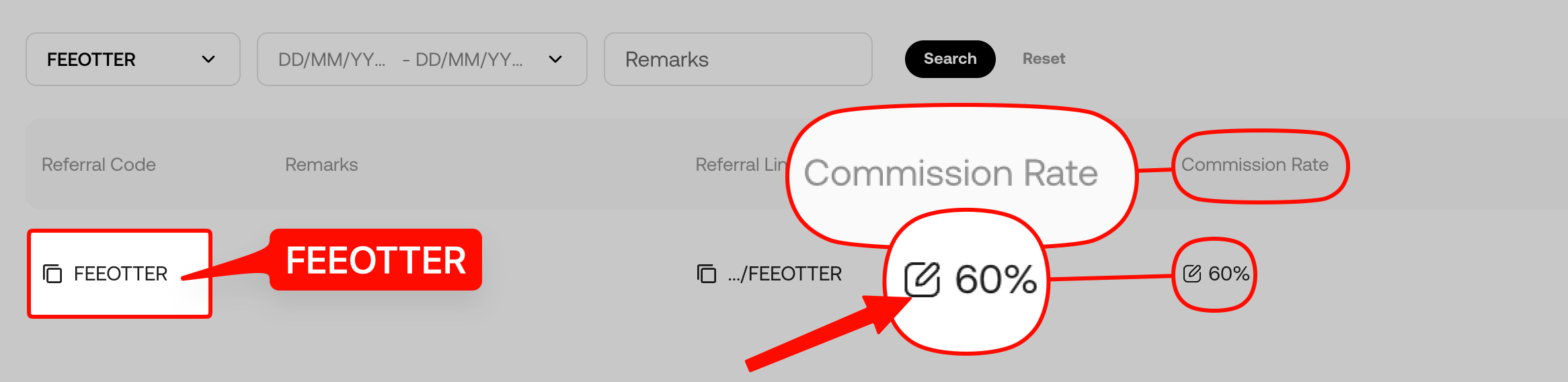
This is a real screenshot of our KuCoin referral code in our affiliate dashboard. Plenty of codes that advertise high rebates come without a single screenshot, and people only find out after signing up that no rebate arrives. We put up each exchange's signup page or dashboard so you can check before you register.
Rebate rates at a glance
Rebate rate by exchange
Exchange
Auto-rebate
Extra rebate
Total
KuCoin
60%
0%
60%
Binance
20%
20%
40%
OKX
20%
20%
Bybit
—
40%
40%
Gate
20%
50%
70%
Bitget
20%
30%
50%
MEXC
20%
40%
60%
BingX
45%
0%
45%
Pionex
15%
35%
50%
Bitfinex
6%
0%
6%
WEEX
60%
10%
70%
XT.COM
60%
10%
70%
HTX
30%
20%
50%
CoinW
60%
0%
60%
Ourbit
50%
20%
70%
Every rate here is fee paid straight back to you. It excludes VIP fee tiers and platform-token discounts such as BNB or GT; those stack on top and only save you more.
The code goes in at sign-up only: KuCoin's sign-up guide says that once an account is registered the invitation code is no longer valid, and KuCoin can't add one manually.
One verified account per person: the same guide states that one person can verify only one KuCoin account.
Unverified old accounts are restricted: accounts opened before the rule that were never verified can only sell crypto, close futures and margin positions, and redeem from KuCoin Earn.
Most referral codes pass on about 20%, and the referrer keeps the rest.
Which case are you?
Situation
Can you move to our code?
What to do
No KuCoin account yet
Yes
Sign up through the dedicated link
Old account that was never verified
Possibly; KuCoin's review decides
Ask support first, then register with a new email through the dedicated link and verify the new account
Old account already verified in your name
No public channel at the moment
Contact support about your case
The second case rests on the one-verified-account rule: if your old account was never verified, you haven't used that one verification. Whether the new account passes is still up to KuCoin's review, so ask support before you start.
Is rebinding worth it? Run the numbers first
Using KuCoin's regular futures rates (maker 0.02%, taker 0.06%) and a 70% taker / 30% maker mix, the blended rate is 0.048%. The old account uses a typical 20% code; the new one uses FEEOTTER at 60%:
Monthly futures volume
Monthly fees
Old account (20%) back per month
New account (60%) back per month
Extra per year
100,000 USDT
48 USDT
9.6 USDT
28.8 USDT
230.4 USDT
500,000 USDT
240 USDT
48 USDT
144 USDT
1,152 USDT
2,000,000 USDT
960 USDT
192 USDT
576 USDT
4,608 USDT
Rate source: KuCoin's official futures API, checked 2026-10-13. If the old account had no code at all, it gets 0 back each month and the whole 60% column is your gain. On KuCoin, though, rebinding only works if the old account never completed verification, so check which case you are first.
Old account never verified: steps
Contact support and explain that your old account was never verified.
Have an email address or phone number never used on KuCoin ready.
Register through the dedicated link. Our KuCoin referral code is FEEOTTER and it is built into the link.
Once you bind the new account's UID, we check it against KuCoin's referral list and confirm automatically that the account sits under our code; the profile page usually shows the binding as successful within 5 minutes. A successful binding means KuCoin will return 60% of the new account's fees automatically.
Asset-move checklist for the old account
Close futures and margin positions, cancel open orders and redeem from Earn on the old account.
Get a deposit address on the new account and check that the coin and network match.
Send a small test amount first, then the rest once it arrives. For an unverified account, the daily withdrawal limit is whatever the withdrawal page shows.
Check that the old account is empty and everything has arrived in the new one.
Common rebind mistakes
Using an email or phone number already registered on KuCoin; the system won't let you sign up with it again.
Not using the dedicated link, so the referral code field is empty.
Opening a new account when the old one is already verified in your name; under the one-account rule the new account can't be verified with the same identity.
Forgetting to bind the new account's UID on Fee Otter after switching, leaving the old UID bound.
Risks to know before using KuCoin
Before you switch, know these points:
US enforcement record: in January 2025 KuCoin pleaded guilty in the US to operating an unlicensed money transmitting business, agreed to pay more than $297 million, and agreed to leave the US market for at least two years (US Department of Justice).
Don't keep long-term or large balances on the exchange: keep only the funds you are actively trading on KuCoin; withdraw money you aren't trading and anything you hold long term.
Use a cold wallet for long-term holdings: move large, long-term assets to a hardware cold wallet (such as a Ledger) and keep them offline.
Futures and high leverage are high risk: KuCoin offers up to 125x on futures. Beginners should avoid high leverage and learn the rules with small amounts first.
FAQ
Can I add a KuCoin referral code later?
No. It can only be entered at sign-up; an existing account can't have one added, and KuCoin won't add it manually.
My account is already verified. Can I still move to your code?
There is no public channel at the moment. One person can verify only one KuCoin account, so a new account can't be verified with the same identity. Contact support if you have questions.
How much is the KuCoin fee rebate?
60% for accounts opened with our code, all returned by KuCoin automatically, the same for spot and futures. Fee Otter adds no extra rebate.
Do I have to verify my identity again after switching?
Yes. The new account must be verified in your own name, which only works if you haven't verified another KuCoin account.
For information only, not investment advice. Rules and rebate rates may change; KuCoin's official sources and the Fee Otter platform are authoritative.



%2C2026-10-05%20%E5%8F%96%E6%A8%A3%3A%0A%20%20%20%20%20%20%20%E5%BA%95%E8%89%B2%20%230E3452%2C%E5%AD%97%E7%AC%A6%20%2303CA9B)%E3%80%82%0A%20%20%20%20%20%20%20%E7%94%A8%20potrace%20%E6%8F%8F%E5%AD%97%E7%AC%A6%E8%BC%AA%E5%BB%93%2C%E6%95%B4%E5%BC%B5%E7%95%AB%E5%B8%83%E7%9B%B4%E6%8E%A5%E6%98%A0%E5%B0%84%E5%88%B0%E9%80%99%E8%A3%A1%E7%9A%84%2032%20%E5%96%AE%E4%BD%8D%20%E2%80%94%E2%80%94%20%E4%B8%8D%E9%87%8D%E6%96%B0%E7%BD%AE%E4%B8%AD%2C%E4%BF%9D%E7%95%99%E5%AE%98%E6%96%B9%E7%9A%84%E7%95%99%E7%99%BD%E6%AF%94%E4%BE%8B%E3%80%82%0A%20%20%20%20%20%20%20%E8%A6%81%E6%94%B9%E8%AB%8B%E9%87%8D%E8%B7%91%E6%8F%8F%E5%9C%96%2C%E4%B8%8D%E8%A6%81%E6%86%91%E5%8D%B0%E8%B1%A1%E8%AA%BF%E3%80%82%20--%3E%0A%20%20%3Crect%20x%3D%221.5%22%20y%3D%221.5%22%20width%3D%2229%22%20height%3D%2229%22%20rx%3D%228%22%20fill%3D%22%230E3452%22%2F%3E%0A%20%20%3Cpath%20fill%3D%22%2303CA9B%22%20d%3D%22M23.02%205.97C22.14%206.02%2021.54%206.07%2021.22%206.1C20.72%206.15%2019.6%206.28%2019.41%206.31C19.31%206.33%2019.1%206.37%2018.94%206.39C18.29%206.5%2017.94%206.57%2017.2%206.73C16.92%206.79%2016%207.03%2015.8%207.09C15.36%207.23%2014.42%207.54%2014.39%207.56C14.38%207.57%2014.3%207.6%2014.23%207.62C13.82%207.76%2012.7%208.28%2012.13%208.6C11.95%208.7%2011.8%208.78%2011.79%208.78C11.7%208.78%2010.42%209.71%209.98%2010.08C9.16%2010.79%208.07%2012.09%207.6%2012.91C7.28%2013.46%207.18%2013.65%207.06%2013.91C6.87%2014.3%206.76%2014.53%206.68%2014.74C6.56%2015.08%206.37%2015.64%206.34%2015.73C6.33%2015.78%206.3%2015.91%206.27%2016C6.06%2016.79%205.93%2017.87%205.94%2018.62L5.95%2019.05L6.69%2019.04C7.78%2019.03%208.57%2018.94%209.73%2018.68C10.18%2018.58%2011.05%2018.33%2011.45%2018.18C11.52%2018.15%2011.7%2018.08%2011.84%2018.03C13.58%2017.38%2015.67%2016.19%2017.55%2014.77C17.8%2014.58%2018.67%2013.89%2018.74%2013.83C18.76%2013.81%2018.94%2013.66%2019.14%2013.48C19.34%2013.31%2019.54%2013.14%2019.58%2013.11C19.61%2013.07%2019.78%2012.92%2019.95%2012.77C20.94%2011.88%2022.24%2010.57%2023.2%209.48C23.68%208.94%2023.69%208.93%2023.86%208.73C23.94%208.63%2024.02%208.54%2024.03%208.53C24.17%208.4%2025.09%207.25%2025.52%206.67C25.67%206.47%2025.81%206.28%2025.83%206.26C25.86%206.23%2025.89%206.19%2025.9%206.16C25.92%206.13%2025.94%206.12%2025.95%206.13C25.98%206.15%2025.3%207.5%2024.99%208.07C24.88%208.28%2024.78%208.45%2024.78%208.46C24.78%208.46%2024.66%208.67%2024.51%208.93C24.24%209.4%2024.17%209.52%2024.07%209.69C24%209.81%2023.72%2010.27%2023.39%2010.8C22.69%2011.91%2021.44%2013.66%2020.74%2014.52C20.25%2015.12%2020.09%2015.31%2019.72%2015.73C19.01%2016.55%2018.19%2017.38%2017.42%2018.08C17.07%2018.39%2016.92%2018.52%2016.5%2018.87C16.37%2018.98%2016.24%2019.09%2016.2%2019.12C15.83%2019.43%2014.7%2020.21%2014.16%2020.54C13.69%2020.82%2012.69%2021.34%2012.41%2021.45C12.33%2021.48%2012.23%2021.52%2012.17%2021.55C12.01%2021.62%2011.45%2021.84%2011.11%2021.95C10.97%2022%2010.05%2022.26%209.84%2022.31C9.23%2022.45%208.97%2022.5%208.56%2022.56C8.43%2022.58%208.25%2022.61%208.16%2022.62C8.06%2022.64%207.79%2022.67%207.56%2022.69C7.32%2022.71%207.12%2022.74%207.12%2022.76C7.12%2022.85%207.58%2023.42%207.97%2023.82C9.2%2025.09%2010.67%2025.8%2012.52%2026.02C16.51%2026.48%2020.99%2024.06%2023.2%2020.25C23.32%2020.05%2023.43%2019.86%2023.46%2019.81C23.51%2019.73%2023.96%2018.81%2024.04%2018.62C24.67%2017.21%2025.19%2015.43%2025.52%2013.67C25.66%2012.9%2025.73%2012.45%2025.81%2011.77C25.99%2010.32%2026.05%209.33%2026.05%207.64C26.05%206.06%2026.04%206.01%2025.97%205.98C25.9%205.95%2023.53%205.94%2023.02%205.97Z%22%2F%3E%0A%3C%2Fsvg%3E%0A)


%2C2026-10-05%20%E5%8F%96%E6%A8%A3%3A%0A%20%20%20%20%20%20%20%E5%BA%95%E8%89%B2%20%23FFFFFF%2C%E5%AD%97%E7%AC%A6%20%235227FF)%E3%80%82%0A%20%20%20%20%20%20%20%E7%94%A8%20potrace%20%E6%8F%8F%E5%AD%97%E7%AC%A6%E8%BC%AA%E5%BB%93%2C%E6%95%B4%E5%BC%B5%E7%95%AB%E5%B8%83%E7%9B%B4%E6%8E%A5%E6%98%A0%E5%B0%84%E5%88%B0%E9%80%99%E8%A3%A1%E7%9A%84%2032%20%E5%96%AE%E4%BD%8D%20%E2%80%94%E2%80%94%20%E4%B8%8D%E9%87%8D%E6%96%B0%E7%BD%AE%E4%B8%AD%2C%E4%BF%9D%E7%95%99%E5%AE%98%E6%96%B9%E7%9A%84%E7%95%99%E7%99%BD%E6%AF%94%E4%BE%8B%E3%80%82%0A%20%20%20%20%20%20%20%E5%AE%98%E6%96%B9%E6%98%AF%E7%99%BD%E5%BA%95%E7%B4%AB%E8%89%B2%E5%AD%97%E7%AC%A6%3B%E7%99%BD%E5%BA%95%E5%8A%A0%E6%B7%A1%E9%82%8A%2C%E5%85%8D%E5%BE%97%E5%9C%A8%E7%99%BD%E8%89%B2%E8%83%8C%E6%99%AF%E4%B8%8A%E6%B6%88%E5%A4%B1%E3%80%82%0A%20%20%20%20%20%20%20%E8%A6%81%E6%94%B9%E8%AB%8B%E9%87%8D%E8%B7%91%E6%8F%8F%E5%9C%96%2C%E4%B8%8D%E8%A6%81%E6%86%91%E5%8D%B0%E8%B1%A1%E8%AA%BF%E3%80%82%20--%3E%0A%20%20%3Crect%20x%3D%221.5%22%20y%3D%221.5%22%20width%3D%2229%22%20height%3D%2229%22%20rx%3D%228%22%20fill%3D%22%23FFFFFF%22%20stroke%3D%22%23E4E4E7%22%2F%3E%0A%20%20%3Cpath%20fill%3D%22%235227FF%22%20d%3D%22M13.31%208.92L13.31%2012.28L9.94%2012.28L6.56%2012.28L6.57%2015.71C6.58%2019.51%206.57%2019.29%206.79%2020.2C7.56%2023.33%2010.21%2025.78%2013.38%2026.31C14.1%2026.43%2014.44%2026.44%2019.24%2026.44L23.91%2026.44L23.91%2023.05L23.91%2019.66L19.2%2019.65L14.48%2019.64L14.28%2019.56C13.89%2019.41%2013.63%2019.16%2013.44%2018.76L13.36%2018.58L13.35%2015.46L13.34%2012.34L18.56%2012.34L23.78%2012.34L23.78%208.95L23.78%205.56L18.55%205.56L13.31%205.56L13.31%208.92Z%22%2F%3E%0A%3C%2Fsvg%3E%0A)

 Telegram · @feeotter