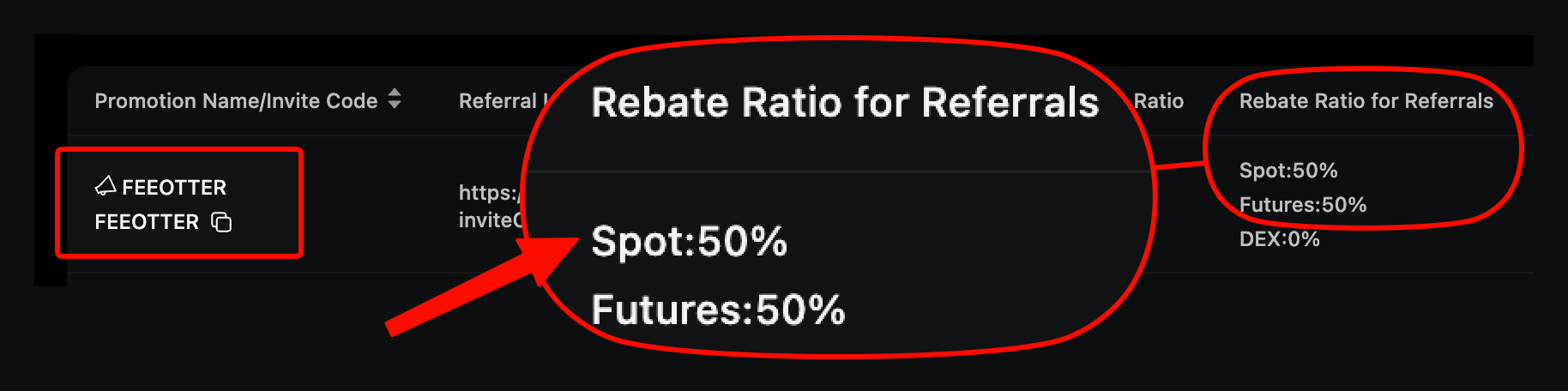
On Ourbit the referral code can only be entered at sign-up; an existing account cannot add or change one. To switch to Fee Otter, sign up again through our link (code FEEOTTER already included) with an email or phone number not yet registered on Ourbit, then bind the new account's UID on Fee Otter. After the switch Ourbit returns 50% automatically and Fee Otter adds 20%, 70% in total, 3.5× a typical 20% code (checked October 2026).
Ourbit is one of the cheapest exchanges to switch on: you can trade and withdraw without KYC, and unverified accounts can withdraw 30 BTC per 24 hours, so the new account is usable right after sign-up with no verification wait. What takes time is closing the old account's positions and moving the assets. Follow the order below and you can do it in one go.
What do you get by signing up on Ourbit with our code?
- 50% auto-rebate: returned by Ourbit straight to your account, the same on spot and futures.
- 20% extra rebate: settled daily by Fee Otter once your UID is bound, 70% in total.
- One rebate dashboard: every rebate is visible there, and you can request withdrawals.
When do you need to switch?
| Your situation | Switch? |
|---|
| You did not enter a code when you signed up on Ourbit | Yes. A code cannot be added after the account exists |
| You entered someone else's code with a lower rate | Yes. A bound referral relationship cannot be changed |
| You signed up with FEEOTTER but haven't bound your UID | No switch needed; just bind your UID on Fee Otter |
| You are not sure which code you used | Bind your UID on Fee Otter first, see the review result, then decide |
Most codes give you around 20%; the rest of the commission stays with the referrer.
Is switching worth it? Worked example
Using Ourbit's regular futures rates (maker 0.02%, taker 0.04%) and a 70% taker / 30% maker mix, the blended rate is 0.034%. The old account uses a typical 20% code; the new one uses FEEOTTER at 70%:
| Monthly futures volume | Monthly fees | Old account (20%) back per month | New account (70%) back per month | Extra per year |
|---|
| 100,000 USDT | 34 USDT | 6.8 USDT | 23.8 USDT | 204 USDT |
| 500,000 USDT | 170 USDT | 34 USDT | 119 USDT | 1,020 USDT |
| 2,000,000 USDT | 680 USDT | 136 USDT | 476 USDT | 4,080 USDT |
Rate source: Ourbit's official futures API (BTC_USDT perpetual), checked 2026-10-13. If the old account had no code at all, it gets 0 back each month, and the whole 70% column is your gain.
How to switch an existing Ourbit account
- Get an email or phone number not yet registered on Ourbit.
- Sign up again through our referral link. Our Ourbit code is FEEOTTER and is already in the link; check the field has the code before you submit.
- Close the old account's positions and move your assets to the new account (see the checklist below).
- Bind the new account's UID on the Fee Otter rebate site.
For identity verification or other account questions, contact support and we will walk you through it one to one.
Need help? Contact support
For any binding or rebate question, or to learn about our exclusive OKX rewards and promotions, reach our support through the channels below.
If you trade at high volume or hold exchange VIP status and need more from your rebate, message support directly and we will talk it through.
How do you confirm the switch worked?
Once the new account starts trading and pays a fee, we review it at 16:00 (UTC+8) the next day, and when it passes the status on the rebate site changes to "Verified". If you trade large volumes and want to confirm before your first trade, contact support and we will check it by hand. The switch is done once binding passes and your first rebate arrives.
Checklist for moving assets from the old account
- Close the old account's futures positions and cancel open orders.
- Get a deposit address on the new account and make sure the coin and network match.
- Send a small test amount first, then the rest once it arrives.
- Check the old account is empty and everything has arrived in the new one.
Unverified accounts can withdraw 30 BTC per 24 hours. If the old account holds more than that and never did advanced verification, withdraw in several rounds, or complete advanced verification first (limit 200 BTC) and then move it.
Common switching mistakes
- Using an email or phone number already registered on Ourbit; the system will not let you register again.
- Not using our link, so the code field is empty.
- Clicking someone else's referral link while signing up the new account, so the later code overwrites ours.
- Forgetting to bind the new account's UID on Fee Otter after switching, so the old UID is still the one bound.
- Moving assets before closing positions: with positions still open the assets cannot all be moved, so close first.
Risks to know before using Ourbit
Ourbit's fees do have an edge, but know this before you use it:
- No major financial licence: Ourbit is registered in the British Virgin Islands and is not supervised by a major financial regulator. Its CoinGecko trust score is 8/10. On Trustpilot some users report slow withdrawal reviews and frozen accounts (few reviews, for reference only).
- Don't keep long-term or large holdings on an exchange: Ourbit is for funds you are actively trading. Withdraw money you are not using or plan to hold long term.
- Use a cold wallet for long-term holdings: move large, long-term assets to a hardware wallet (such as Ledger) and keep them offline.
- Futures and high leverage are high risk: Ourbit offers up to 500× on major futures such as BTC and ETH. Beginners should avoid high leverage and start small.
In short, Ourbit is a tool for active trading; keep long-term, large holdings in a cold wallet.
FAQ
Can I add an Ourbit code later?
No. It can only be entered at sign-up; existing accounts cannot add one.
What is the Ourbit fee rebate?
70% in total when bound through Fee Otter: 50% returned automatically by Ourbit and 20% extra from Fee Otter.
When does the rebate start after switching?
Layer 1, 50%, comes back from Ourbit as soon as the new account trades. Layer 2 starts once your UID passes review.
Do I have to verify my identity again?
No. Ourbit lets you trade and withdraw without KYC, so the new account is usable right after sign-up; if you need a higher withdrawal limit later, complete KYC on the new account. Under Ourbit's official KYC levels, unverified accounts can withdraw 30 BTC per 24 hours, rising to 200 BTC after advanced verification. For other verification questions, contact support.
Do I need to close the old account?
Switching itself does not require closing the old account; you just sign up with a new email or phone number. Whether you keep the old account after moving the assets is up to you.
Further reading
This article is for information only and is not investment advice. Rules and rebate rates may change; Ourbit's official announcements and the rates shown on Fee Otter prevail.



%2C2026-10-05%20%E5%8F%96%E6%A8%A3%3A%0A%20%20%20%20%20%20%20%E5%BA%95%E8%89%B2%20%230E3452%2C%E5%AD%97%E7%AC%A6%20%2303CA9B)%E3%80%82%0A%20%20%20%20%20%20%20%E7%94%A8%20potrace%20%E6%8F%8F%E5%AD%97%E7%AC%A6%E8%BC%AA%E5%BB%93%2C%E6%95%B4%E5%BC%B5%E7%95%AB%E5%B8%83%E7%9B%B4%E6%8E%A5%E6%98%A0%E5%B0%84%E5%88%B0%E9%80%99%E8%A3%A1%E7%9A%84%2032%20%E5%96%AE%E4%BD%8D%20%E2%80%94%E2%80%94%20%E4%B8%8D%E9%87%8D%E6%96%B0%E7%BD%AE%E4%B8%AD%2C%E4%BF%9D%E7%95%99%E5%AE%98%E6%96%B9%E7%9A%84%E7%95%99%E7%99%BD%E6%AF%94%E4%BE%8B%E3%80%82%0A%20%20%20%20%20%20%20%E8%A6%81%E6%94%B9%E8%AB%8B%E9%87%8D%E8%B7%91%E6%8F%8F%E5%9C%96%2C%E4%B8%8D%E8%A6%81%E6%86%91%E5%8D%B0%E8%B1%A1%E8%AA%BF%E3%80%82%20--%3E%0A%20%20%3Crect%20x%3D%221.5%22%20y%3D%221.5%22%20width%3D%2229%22%20height%3D%2229%22%20rx%3D%228%22%20fill%3D%22%230E3452%22%2F%3E%0A%20%20%3Cpath%20fill%3D%22%2303CA9B%22%20d%3D%22M23.02%205.97C22.14%206.02%2021.54%206.07%2021.22%206.1C20.72%206.15%2019.6%206.28%2019.41%206.31C19.31%206.33%2019.1%206.37%2018.94%206.39C18.29%206.5%2017.94%206.57%2017.2%206.73C16.92%206.79%2016%207.03%2015.8%207.09C15.36%207.23%2014.42%207.54%2014.39%207.56C14.38%207.57%2014.3%207.6%2014.23%207.62C13.82%207.76%2012.7%208.28%2012.13%208.6C11.95%208.7%2011.8%208.78%2011.79%208.78C11.7%208.78%2010.42%209.71%209.98%2010.08C9.16%2010.79%208.07%2012.09%207.6%2012.91C7.28%2013.46%207.18%2013.65%207.06%2013.91C6.87%2014.3%206.76%2014.53%206.68%2014.74C6.56%2015.08%206.37%2015.64%206.34%2015.73C6.33%2015.78%206.3%2015.91%206.27%2016C6.06%2016.79%205.93%2017.87%205.94%2018.62L5.95%2019.05L6.69%2019.04C7.78%2019.03%208.57%2018.94%209.73%2018.68C10.18%2018.58%2011.05%2018.33%2011.45%2018.18C11.52%2018.15%2011.7%2018.08%2011.84%2018.03C13.58%2017.38%2015.67%2016.19%2017.55%2014.77C17.8%2014.58%2018.67%2013.89%2018.74%2013.83C18.76%2013.81%2018.94%2013.66%2019.14%2013.48C19.34%2013.31%2019.54%2013.14%2019.58%2013.11C19.61%2013.07%2019.78%2012.92%2019.95%2012.77C20.94%2011.88%2022.24%2010.57%2023.2%209.48C23.68%208.94%2023.69%208.93%2023.86%208.73C23.94%208.63%2024.02%208.54%2024.03%208.53C24.17%208.4%2025.09%207.25%2025.52%206.67C25.67%206.47%2025.81%206.28%2025.83%206.26C25.86%206.23%2025.89%206.19%2025.9%206.16C25.92%206.13%2025.94%206.12%2025.95%206.13C25.98%206.15%2025.3%207.5%2024.99%208.07C24.88%208.28%2024.78%208.45%2024.78%208.46C24.78%208.46%2024.66%208.67%2024.51%208.93C24.24%209.4%2024.17%209.52%2024.07%209.69C24%209.81%2023.72%2010.27%2023.39%2010.8C22.69%2011.91%2021.44%2013.66%2020.74%2014.52C20.25%2015.12%2020.09%2015.31%2019.72%2015.73C19.01%2016.55%2018.19%2017.38%2017.42%2018.08C17.07%2018.39%2016.92%2018.52%2016.5%2018.87C16.37%2018.98%2016.24%2019.09%2016.2%2019.12C15.83%2019.43%2014.7%2020.21%2014.16%2020.54C13.69%2020.82%2012.69%2021.34%2012.41%2021.45C12.33%2021.48%2012.23%2021.52%2012.17%2021.55C12.01%2021.62%2011.45%2021.84%2011.11%2021.95C10.97%2022%2010.05%2022.26%209.84%2022.31C9.23%2022.45%208.97%2022.5%208.56%2022.56C8.43%2022.58%208.25%2022.61%208.16%2022.62C8.06%2022.64%207.79%2022.67%207.56%2022.69C7.32%2022.71%207.12%2022.74%207.12%2022.76C7.12%2022.85%207.58%2023.42%207.97%2023.82C9.2%2025.09%2010.67%2025.8%2012.52%2026.02C16.51%2026.48%2020.99%2024.06%2023.2%2020.25C23.32%2020.05%2023.43%2019.86%2023.46%2019.81C23.51%2019.73%2023.96%2018.81%2024.04%2018.62C24.67%2017.21%2025.19%2015.43%2025.52%2013.67C25.66%2012.9%2025.73%2012.45%2025.81%2011.77C25.99%2010.32%2026.05%209.33%2026.05%207.64C26.05%206.06%2026.04%206.01%2025.97%205.98C25.9%205.95%2023.53%205.94%2023.02%205.97Z%22%2F%3E%0A%3C%2Fsvg%3E%0A)


%2C2026-10-05%20%E5%8F%96%E6%A8%A3%3A%0A%20%20%20%20%20%20%20%E5%BA%95%E8%89%B2%20%23FFFFFF%2C%E5%AD%97%E7%AC%A6%20%235227FF)%E3%80%82%0A%20%20%20%20%20%20%20%E7%94%A8%20potrace%20%E6%8F%8F%E5%AD%97%E7%AC%A6%E8%BC%AA%E5%BB%93%2C%E6%95%B4%E5%BC%B5%E7%95%AB%E5%B8%83%E7%9B%B4%E6%8E%A5%E6%98%A0%E5%B0%84%E5%88%B0%E9%80%99%E8%A3%A1%E7%9A%84%2032%20%E5%96%AE%E4%BD%8D%20%E2%80%94%E2%80%94%20%E4%B8%8D%E9%87%8D%E6%96%B0%E7%BD%AE%E4%B8%AD%2C%E4%BF%9D%E7%95%99%E5%AE%98%E6%96%B9%E7%9A%84%E7%95%99%E7%99%BD%E6%AF%94%E4%BE%8B%E3%80%82%0A%20%20%20%20%20%20%20%E5%AE%98%E6%96%B9%E6%98%AF%E7%99%BD%E5%BA%95%E7%B4%AB%E8%89%B2%E5%AD%97%E7%AC%A6%3B%E7%99%BD%E5%BA%95%E5%8A%A0%E6%B7%A1%E9%82%8A%2C%E5%85%8D%E5%BE%97%E5%9C%A8%E7%99%BD%E8%89%B2%E8%83%8C%E6%99%AF%E4%B8%8A%E6%B6%88%E5%A4%B1%E3%80%82%0A%20%20%20%20%20%20%20%E8%A6%81%E6%94%B9%E8%AB%8B%E9%87%8D%E8%B7%91%E6%8F%8F%E5%9C%96%2C%E4%B8%8D%E8%A6%81%E6%86%91%E5%8D%B0%E8%B1%A1%E8%AA%BF%E3%80%82%20--%3E%0A%20%20%3Crect%20x%3D%221.5%22%20y%3D%221.5%22%20width%3D%2229%22%20height%3D%2229%22%20rx%3D%228%22%20fill%3D%22%23FFFFFF%22%20stroke%3D%22%23E4E4E7%22%2F%3E%0A%20%20%3Cpath%20fill%3D%22%235227FF%22%20d%3D%22M13.31%208.92L13.31%2012.28L9.94%2012.28L6.56%2012.28L6.57%2015.71C6.58%2019.51%206.57%2019.29%206.79%2020.2C7.56%2023.33%2010.21%2025.78%2013.38%2026.31C14.1%2026.43%2014.44%2026.44%2019.24%2026.44L23.91%2026.44L23.91%2023.05L23.91%2019.66L19.2%2019.65L14.48%2019.64L14.28%2019.56C13.89%2019.41%2013.63%2019.16%2013.44%2018.76L13.36%2018.58L13.35%2015.46L13.34%2012.34L18.56%2012.34L23.78%2012.34L23.78%208.95L23.78%205.56L18.55%205.56L13.31%205.56L13.31%208.92Z%22%2F%3E%0A%3C%2Fsvg%3E%0A)
 Telegram · @feeotter