Pionex Rebind Guide 2026: Add Referral Code FEEOTTER Within 14 or 3 Days
Add referral code FEEOTTER to an existing Pionex account: 14 days from signup, or 3 if you used bots. Web and app steps, the manual-trade question, UID binding.
Pionex is one of the few exchanges that lets you add referral code FEEOTTER after signing up, from your account settings, within a window counted from your registration date: 14 days if you have not used trading bots, only 3 days if you have. Once a code is bound or the window has passed it cannot be changed, and the only route is to close the old account and register a new one through our link (checked September 2026). After binding, bind your UID on Fee Otter for a 50% rebate in total (15% automatic from the exchange + 35% extra from Fee Otter).
Key takeaways
Referral code: FEEOTTER. It is all uppercase, so copy and paste it rather than typing it.
No bots used yet: 14 days from registration to add the code.
Bots already used: only 3 days from registration. Grid, DCA, arbitrage and other trading tools all count.
Safest approach: bind before your first trade. Pionex's official article says manual trading does not count, but some Chinese-language guides say manual and bot trades both do.
Once bound, the code cannot be changed or removed. If you already used someone else's code or missed the window, Pionex does not allow a change. The way out is to close the old account and register a new one through our link right away: the new account only needs KYC Level 1 to trade normally, and you finish KYC Level 2 once 30 days have passed since the closure (confirmed by Pionex support in September 2026; steps below).
After binding, bind your UID on Fee Otter. Fee Otter's extra 35% counts fees from that point on and is not retroactive.
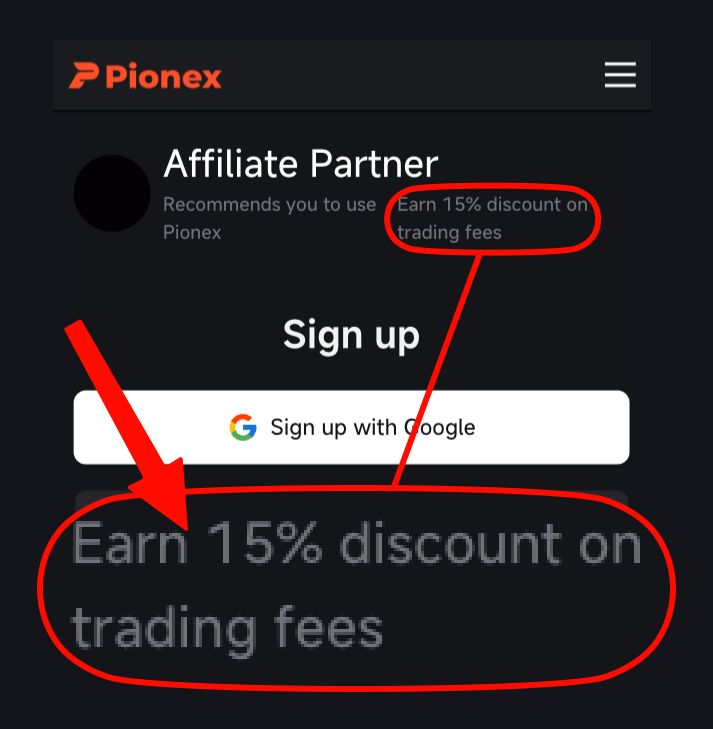
This is the actual Pionex signup page opened through our link, with the code already filled in. Plenty of codes that advertise high rebates come without a single screenshot, and people only find out after signing up that no rebate arrives. We put up each exchange's signup page or dashboard so you can check before you register.
According to Pionex's official Help Center article Refill Referral Code, how long you have depends on whether you have used a trading tool:
Your account
Deadline
Counted from
Has not used any trading tool (trading bot)
14 days
Registration date
Has used a trading tool (grid, DCA, arbitrage bots, etc.)
3 days
Registration date
Already bound to a referral code
Cannot be changed
n/a
Both deadlines run from registration, not from the day you start a bot. The safe order is to bind our code first, then start your first bot.
KYC and deposits do not matter: verifying your identity or funding the account neither shortens nor extends the window.
Does manual trading count? The sources disagree
Pionex's official article states that only trading tools shorten the window to 3 days; manual trading does not. Some Chinese-language guides, however, quote the condition as placing orders manually or with a bot, meaning manual trades would count too. With both versions in circulation, our advice is to play it safe: treat any trade, manual or bot, as putting you on the 3-day clock, and bind our code before your first trade.
Registered less than 3 days ago: bind now; you are safe under either reading. Registered 3 to 14 days ago and only traded manually: under the official wording you can still add the code, so try it; if the system does not accept it, contact our support.
How to bind on the website
Menu names vary by version and interface language. If you cannot find an item, look for "Invitation code", "Referral" or similar wording.
Log in to Pionex on the web and click your avatar in the top-right corner.
Open Account settings (shown as the account overview in some versions).
Find the Invitation code item and click Bind.
Paste our Pionex referral code, FEEOTTER, and confirm.
How to bind in the app
Open the Pionex app and go to Account (in some versions, the "Pionex" tab at the bottom).
Tap your avatar or Settings, then Account.
Tap Referrer invitation code.
Paste our Pionex referral code, FEEOTTER, and confirm.
Either way, copy and paste the code instead of typing it, and check it once more before you submit. Once bound, the code cannot be changed or removed, so a typo cannot be undone.
After binding: bind your UID on Fee Otter
Binding the referral code on Pionex is only the first step. You also need to bind your Pionex UID on the Fee Otter rebate site so the rebate is credited to you.
On the Fee Otter rebate site, choose Pionex, paste the UID and submit.
Trade as usual. Manual orders and bots both count.
Binding needs only the UID: no API key, password or withdrawal permission. Your assets stay in your own Pionex account throughout.
Rebates are not retroactive: fees paid before the code and UID are bound are not rebated, and Fee Otter only counts fees generated after you bind your UID. That is why both steps are worth doing early. If you run grid bots, a small first rebate is normal: each grid fill is small, so the fee on it, and the rebate, is small too. The difference shows up as the fills add up.
Missed the window, or already bound to someone else's code?
A Pionex referral code cannot be changed or removed once bound, and it cannot be added after the window closes. In both cases, the way to rebind is to close the old account and register again through our link. You don't have to wait 30 days to register: sign up right after closing, and the new account can trade as soon as it passes KYC Level 1. The 30-day wait applies only to the new account's KYC Level 2. We confirmed this process with Pionex support in September 2026; their email reply, translated from Chinese:
"Our current process requires you to first close the account that has completed KYC Level 2, then wait 30 days before verification can be completed on a new account."
"If the new account successfully binds a referral code and the code's owner has set up a rebate, you will receive the rebate as normal."
Pionex support, September 2026
Our question to Pionex support and their reply (September 2026, in Chinese): close the old account, register again with a different referral code after 30 days, and the new account receives that code's rebate as normal.
Steps: close the old account, re-register right away
Make sure you really can't add the code: if you are still within 14 days of signup without bots, or 3 days with bots, use the steps above instead; there is no need to close anything.
Empty the old account: move all assets out, stop every trading bot and close your positions.
Close the old account that completed KYC Level 2: this applies whether it used someone else's code or none at all. If you can't find the option, contact Pionex support.
Register through our link right after closing: no 30-day wait. Sign up through the Fee Otter referral link and check that the referral field shows FEEOTTER. If you miss the field, the new account gets the same late-entry window as above (14 days without bots, 3 with).
Complete KYC Level 1: just your country or region and your name as it appears on your ID. The new account only needs KYC Level 1 to trade normally. What each level asks for and its withdrawal limits are in Pionex's official KYC levels guide.
Finish KYC Level 2 once the old account has been closed for 30 days: ID document and face verification. This is the step support means by "wait 30 days before verification can be completed on a new account".
Bind the new account's UID on Fee Otter: same as the "After binding" section above.
The "ask support to transfer your KYC" trick no longer works
A KOL tutorial from early 2025 says you can register a new account with a new email, then fill in a form asking Pionex support to move the old account's KYC straight to it, with no 30-day wait. We put exactly that request to Pionex support in September 2026.
Pionex support replied (September 2026, translated from Chinese): "Sorry, we do not support this service."
Pionex support's reply (September 2026, in Chinese): the KYC transfer a KOL described is not supported; the current process is to close the account that completed KYC Level 2 and wait 30 days before a new account can be verified.
Support also restated that the current process is the 30-day closure above. That wait applies only to the new account's KYC Level 2, not to registering or trading; the old tutorial's KYC transfer does not skip it.
If you're not sure which route applies to you, contact our support and we'll go through it based on your account.
Need help? Contact support
For any binding or rebate question, or to learn about our exclusive OKX rewards and promotions, reach our support through the channels below.
If you trade at high volume or hold exchange VIP status and need more from your rebate, message support directly and we will talk it through.
With our code, the Pionex rebate is 50% (15% auto-rebate from Pionex + 35% extra from Fee Otter). Pionex returns the 15% automatically on spot and futures, since it is set on the code itself. Fee Otter settles the extra 35% daily after you bind your UID. The table below shows the rate for each exchange:
Rebate rate by exchange
Exchange
Auto-rebate
Extra rebate
Total
Pionex
15%
35%
50%
Binance
20%
20%
40%
OKX
20%
20%
Bybit
—
40%
40%
Gate
20%
50%
70%
Bitget
20%
30%
50%
MEXC
20%
40%
60%
BingX
45%
0%
45%
KuCoin
60%
0%
60%
Bitfinex
6%
0%
6%
WEEX
60%
10%
70%
XT.COM
60%
10%
70%
HTX
30%
20%
50%
CoinW
60%
0%
60%
Ourbit
50%
20%
70%
Every rate here is fee paid straight back to you. It excludes VIP fee tiers and platform-token discounts such as BNB or GT; those stack on top and only save you more.
Settled rebates are added to your available balance on the rebate site, with every entry itemised; see how fee rebates are settled. Payouts work like this:
On-chain USDT on BNB Smart Chain (BEP20): the only payout method, sent to an address you own; an exchange deposit address works too if you pick the BSC (BEP20) network there and mind that exchange's minimum deposit.
Minimum and fee: 1 USDT minimum per request, a 0.015 USDT network fee borne by you, no cap on requests (one in progress at a time); every payout can be checked on BscScan.
Common mistakes
Starting a bot first and thinking about the code later: once you have used a trading tool, the window shrinks from 14 days to 3 days after registration. Bind the code, then start the bot.
Assuming the deadline runs from your first trade: both the 14 days and the 3 days run from the registration date.
Typing the code and getting it wrong: it cannot be changed after binding, so paste the code.
"Invalid invitation code": check that you are logged in to Pionex, not Pionex.US. They are separate platforms and their codes do not work across each other. Then paste the code again.
Adding the code but not binding the UID on Fee Otter: without the UID, the rebate is not credited to you.
FAQ
Can I add a Pionex referral code after registering?
Yes. An account that has not used any trading tool (trading bot) can add one within 14 days of registration; one that has used a trading tool has only 3 days from registration.
I have only traded manually. Is my deadline 14 days or 3 days?
Pionex's official article says manual trading does not count, so it is still 14 days; some Chinese-language guides say manual and bot trades both count. To be safe, treat any trade as putting you on the 3-day clock and bind before your first trade.
Can I still add the code after KYC or a deposit?
Yes. KYC and deposits do not affect the deadline; only the registration date and whether you have used a trading tool do.
Can I switch to a different code after binding?
Not directly. A Pionex referral code cannot be changed or removed once bound. To move under our code you have to close the old account that completed KYC Level 2 and register a new account through our link. You can register right after closing, trade once the new account passes KYC Level 1, and finish KYC Level 2 after 30 days (confirmed by Pionex support in September 2026).
Can Pionex support transfer my KYC to a new account?
No. Pionex support replied in September 2026 that it does not offer this service, so the "fill in a form to transfer your KYC" method that circulates online no longer applies. The current process is to close the old account and register a new one right away: KYC Level 1 is enough to trade, and KYC Level 2 can be completed 30 days after the closure.
After closing the old account, do I have to wait 30 days to trade on the new one?
No. The 30 days only apply to the new account's KYC Level 2 (ID document and face verification). The new account only needs KYC Level 1 to trade normally; KYC Level 1 is just your country or region and your name as it appears on your ID.
Are fees paid before binding rebated?
No. The rebate is not retroactive: Fee Otter only counts fees generated after you bind your UID, so bind it on the rebate site as soon as you have added the code.
Why do I see "Invalid invitation code"?
The most common reason is being on Pionex.US. Pionex and Pionex.US are separate platforms and their codes do not work across each other; once you are sure you are on Pionex, paste the code again.
Does binding my UID need an API key?
No. Only the UID is needed: no API key, password or withdrawal permission.
For information only, not investment advice. The late-entry rules are summarised from Pionex's official help article, and fees are standard listed rates verified on 2026-09-24; Pionex's latest announcements and the Fee Otter platform's live figures prevail.



 Telegram · @feeotter


%2C2026-10-05%20%E5%8F%96%E6%A8%A3%3A%0A%20%20%20%20%20%20%20%E5%BA%95%E8%89%B2%20%230E3452%2C%E5%AD%97%E7%AC%A6%20%2303CA9B)%E3%80%82%0A%20%20%20%20%20%20%20%E7%94%A8%20potrace%20%E6%8F%8F%E5%AD%97%E7%AC%A6%E8%BC%AA%E5%BB%93%2C%E6%95%B4%E5%BC%B5%E7%95%AB%E5%B8%83%E7%9B%B4%E6%8E%A5%E6%98%A0%E5%B0%84%E5%88%B0%E9%80%99%E8%A3%A1%E7%9A%84%2032%20%E5%96%AE%E4%BD%8D%20%E2%80%94%E2%80%94%20%E4%B8%8D%E9%87%8D%E6%96%B0%E7%BD%AE%E4%B8%AD%2C%E4%BF%9D%E7%95%99%E5%AE%98%E6%96%B9%E7%9A%84%E7%95%99%E7%99%BD%E6%AF%94%E4%BE%8B%E3%80%82%0A%20%20%20%20%20%20%20%E8%A6%81%E6%94%B9%E8%AB%8B%E9%87%8D%E8%B7%91%E6%8F%8F%E5%9C%96%2C%E4%B8%8D%E8%A6%81%E6%86%91%E5%8D%B0%E8%B1%A1%E8%AA%BF%E3%80%82%20--%3E%0A%20%20%3Crect%20x%3D%221.5%22%20y%3D%221.5%22%20width%3D%2229%22%20height%3D%2229%22%20rx%3D%228%22%20fill%3D%22%230E3452%22%2F%3E%0A%20%20%3Cpath%20fill%3D%22%2303CA9B%22%20d%3D%22M23.02%205.97C22.14%206.02%2021.54%206.07%2021.22%206.1C20.72%206.15%2019.6%206.28%2019.41%206.31C19.31%206.33%2019.1%206.37%2018.94%206.39C18.29%206.5%2017.94%206.57%2017.2%206.73C16.92%206.79%2016%207.03%2015.8%207.09C15.36%207.23%2014.42%207.54%2014.39%207.56C14.38%207.57%2014.3%207.6%2014.23%207.62C13.82%207.76%2012.7%208.28%2012.13%208.6C11.95%208.7%2011.8%208.78%2011.79%208.78C11.7%208.78%2010.42%209.71%209.98%2010.08C9.16%2010.79%208.07%2012.09%207.6%2012.91C7.28%2013.46%207.18%2013.65%207.06%2013.91C6.87%2014.3%206.76%2014.53%206.68%2014.74C6.56%2015.08%206.37%2015.64%206.34%2015.73C6.33%2015.78%206.3%2015.91%206.27%2016C6.06%2016.79%205.93%2017.87%205.94%2018.62L5.95%2019.05L6.69%2019.04C7.78%2019.03%208.57%2018.94%209.73%2018.68C10.18%2018.58%2011.05%2018.33%2011.45%2018.18C11.52%2018.15%2011.7%2018.08%2011.84%2018.03C13.58%2017.38%2015.67%2016.19%2017.55%2014.77C17.8%2014.58%2018.67%2013.89%2018.74%2013.83C18.76%2013.81%2018.94%2013.66%2019.14%2013.48C19.34%2013.31%2019.54%2013.14%2019.58%2013.11C19.61%2013.07%2019.78%2012.92%2019.95%2012.77C20.94%2011.88%2022.24%2010.57%2023.2%209.48C23.68%208.94%2023.69%208.93%2023.86%208.73C23.94%208.63%2024.02%208.54%2024.03%208.53C24.17%208.4%2025.09%207.25%2025.52%206.67C25.67%206.47%2025.81%206.28%2025.83%206.26C25.86%206.23%2025.89%206.19%2025.9%206.16C25.92%206.13%2025.94%206.12%2025.95%206.13C25.98%206.15%2025.3%207.5%2024.99%208.07C24.88%208.28%2024.78%208.45%2024.78%208.46C24.78%208.46%2024.66%208.67%2024.51%208.93C24.24%209.4%2024.17%209.52%2024.07%209.69C24%209.81%2023.72%2010.27%2023.39%2010.8C22.69%2011.91%2021.44%2013.66%2020.74%2014.52C20.25%2015.12%2020.09%2015.31%2019.72%2015.73C19.01%2016.55%2018.19%2017.38%2017.42%2018.08C17.07%2018.39%2016.92%2018.52%2016.5%2018.87C16.37%2018.98%2016.24%2019.09%2016.2%2019.12C15.83%2019.43%2014.7%2020.21%2014.16%2020.54C13.69%2020.82%2012.69%2021.34%2012.41%2021.45C12.33%2021.48%2012.23%2021.52%2012.17%2021.55C12.01%2021.62%2011.45%2021.84%2011.11%2021.95C10.97%2022%2010.05%2022.26%209.84%2022.31C9.23%2022.45%208.97%2022.5%208.56%2022.56C8.43%2022.58%208.25%2022.61%208.16%2022.62C8.06%2022.64%207.79%2022.67%207.56%2022.69C7.32%2022.71%207.12%2022.74%207.12%2022.76C7.12%2022.85%207.58%2023.42%207.97%2023.82C9.2%2025.09%2010.67%2025.8%2012.52%2026.02C16.51%2026.48%2020.99%2024.06%2023.2%2020.25C23.32%2020.05%2023.43%2019.86%2023.46%2019.81C23.51%2019.73%2023.96%2018.81%2024.04%2018.62C24.67%2017.21%2025.19%2015.43%2025.52%2013.67C25.66%2012.9%2025.73%2012.45%2025.81%2011.77C25.99%2010.32%2026.05%209.33%2026.05%207.64C26.05%206.06%2026.04%206.01%2025.97%205.98C25.9%205.95%2023.53%205.94%2023.02%205.97Z%22%2F%3E%0A%3C%2Fsvg%3E%0A)


%2C2026-10-05%20%E5%8F%96%E6%A8%A3%3A%0A%20%20%20%20%20%20%20%E5%BA%95%E8%89%B2%20%23FFFFFF%2C%E5%AD%97%E7%AC%A6%20%235227FF)%E3%80%82%0A%20%20%20%20%20%20%20%E7%94%A8%20potrace%20%E6%8F%8F%E5%AD%97%E7%AC%A6%E8%BC%AA%E5%BB%93%2C%E6%95%B4%E5%BC%B5%E7%95%AB%E5%B8%83%E7%9B%B4%E6%8E%A5%E6%98%A0%E5%B0%84%E5%88%B0%E9%80%99%E8%A3%A1%E7%9A%84%2032%20%E5%96%AE%E4%BD%8D%20%E2%80%94%E2%80%94%20%E4%B8%8D%E9%87%8D%E6%96%B0%E7%BD%AE%E4%B8%AD%2C%E4%BF%9D%E7%95%99%E5%AE%98%E6%96%B9%E7%9A%84%E7%95%99%E7%99%BD%E6%AF%94%E4%BE%8B%E3%80%82%0A%20%20%20%20%20%20%20%E5%AE%98%E6%96%B9%E6%98%AF%E7%99%BD%E5%BA%95%E7%B4%AB%E8%89%B2%E5%AD%97%E7%AC%A6%3B%E7%99%BD%E5%BA%95%E5%8A%A0%E6%B7%A1%E9%82%8A%2C%E5%85%8D%E5%BE%97%E5%9C%A8%E7%99%BD%E8%89%B2%E8%83%8C%E6%99%AF%E4%B8%8A%E6%B6%88%E5%A4%B1%E3%80%82%0A%20%20%20%20%20%20%20%E8%A6%81%E6%94%B9%E8%AB%8B%E9%87%8D%E8%B7%91%E6%8F%8F%E5%9C%96%2C%E4%B8%8D%E8%A6%81%E6%86%91%E5%8D%B0%E8%B1%A1%E8%AA%BF%E3%80%82%20--%3E%0A%20%20%3Crect%20x%3D%221.5%22%20y%3D%221.5%22%20width%3D%2229%22%20height%3D%2229%22%20rx%3D%228%22%20fill%3D%22%23FFFFFF%22%20stroke%3D%22%23E4E4E7%22%2F%3E%0A%20%20%3Cpath%20fill%3D%22%235227FF%22%20d%3D%22M13.31%208.92L13.31%2012.28L9.94%2012.28L6.56%2012.28L6.57%2015.71C6.58%2019.51%206.57%2019.29%206.79%2020.2C7.56%2023.33%2010.21%2025.78%2013.38%2026.31C14.1%2026.43%2014.44%2026.44%2019.24%2026.44L23.91%2026.44L23.91%2023.05L23.91%2019.66L19.2%2019.65L14.48%2019.64L14.28%2019.56C13.89%2019.41%2013.63%2019.16%2013.44%2018.76L13.36%2018.58L13.35%2015.46L13.34%2012.34L18.56%2012.34L23.78%2012.34L23.78%208.95L23.78%205.56L18.55%205.56L13.31%205.56L13.31%208.92Z%22%2F%3E%0A%3C%2Fsvg%3E%0A)
