How to rebind a Bitget account: close it, wait out the 30-day cooldown and re-register via the dedicated link, plus the mainland-China KYC path where support can lift the cooldown within a business day.
You can't add or change a referral code on Bitget after signup, so an existing user rebinds by closing the account, waiting out the 30-day cooldown, then signing up again with the same email through the dedicated link (code FEEOTTER). With mainland-China KYC, support can lift the cooldown so the rebind happens the same business day. After rebinding, the fee rebate is 50% (checked October 2026).
Register on Bitget with our referral code FEEOTTER for a fee rebate of 50% (20% auto-refunded by the exchange plus a 30% extra from Fee Otter). If you already have a Bitget account, you can rebind it to the rebate platform (Fee Otter). This guide covers why a code can't be added after signup, how existing users rebind, and how the rebate is paid and calculated.
Compared with the most common 20% referral codes, our code pays 50% when you bind through Fee Otter, 2.5 times as much. On 1,000 USDT of monthly fees, a typical 20% code returns 200 USDT, while ours returns 500 USDT, or 300 USDT more every month.
What do you get by registering on Bitget with our code?
50% fee rebate: 20% auto-refunded by Bitget (charge-first, refund-after) plus a 30% extra from Fee Otter.
One dashboard: once bound, track every rebate and your available balance on the rebate platform (Fee Otter), and request withdrawals.
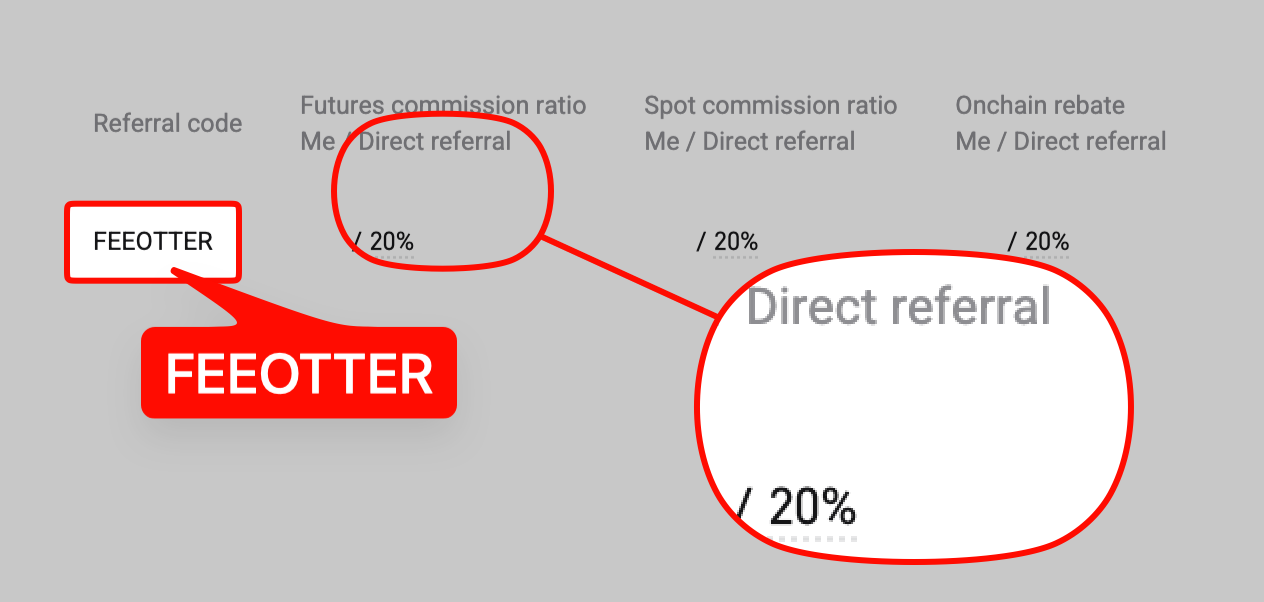
This is a real screenshot of our Bitget referral code in our affiliate dashboard. Plenty of codes that advertise high rebates come without a single screenshot, and people only find out after signing up that no rebate arrives. We put up each exchange's signup page or dashboard so you can check before you register.
How is the Bitget rebate paid and calculated? (charge-first, refund-after)
Bitget charges the fee as usual, then refunds the rebate to your funding account.
Example: using Bitget's 0.06% perp taker rate with 2,500 USDT margin at 20x leverage, the notional is 50,000 USDT and the one-side fee is 50,000 × 0.06% = 30 USDT. Bound through Fee Otter, the rebate = 30 × 50% = 15 USDT (20% auto-refunded by the exchange, 30% added by Fee Otter; see the complete fee-rebate guide).
Rebate rates by exchange (Bitget 50%)
The table below lists each exchange's rebate rate through Fee Otter, with Bitget highlighted. Live figures are shown on the platform.
Rebate rate by exchange
Exchange
Auto-rebate
Extra rebate
Total
Bitget
20%
30%
50%
Binance
20%
20%
40%
OKX
20%
20%
Bybit
—
40%
40%
Gate
20%
50%
70%
MEXC
20%
40%
60%
BingX
45%
0%
45%
Pionex
15%
35%
50%
KuCoin
60%
0%
60%
Bitfinex
6%
0%
6%
WEEX
60%
10%
70%
XT.COM
60%
10%
70%
HTX
30%
20%
50%
CoinW
60%
0%
60%
Ourbit
50%
20%
70%
Every rate here is fee paid straight back to you. It excludes VIP fee tiers and platform-token discounts such as BNB or GT; those stack on top and only save you more.
Bitget publishes no official way to add a referral code after signup, so in practice the code has to be entered at first signup; it generally can't be added or changed afterwards (Bitget also doesn't let you look up the code you registered with). If your Bitget account wasn't registered under our code, the system can't credit rebates to you, so you need to rebind under our code.
In any of these cases your old account earns nothing through Fee Otter, so rebinding is worth it:
You used someone else's code: codes from KOLs or friends usually pass on only 20%, and the rest of the commission stays with the referrer.
You entered no code at all: sign up directly on the website and none of your fees comes back.
Your volume has grown: at 1 million USDT of futures a month, rebinding returns 2,160 USDT more a year than a typical code (worked out below).
Before you rebind
Allow for the 30-day cooling-off period: for 30 days after closing, the same phone number, email or ID cannot register again (China-KYC users can ask support to lift it).
Before closing: move the old account's assets out, close positions and note the old account's UID (China-KYC users give it to support).
Recommended: close the account, wait out the 30-day cooldown, then re-register
Close your existing account, wait out the 30-day cooldown, then re-register with the same email via the dedicated link. Bitget's rule is that for 30 days after closure, the same phone number, email or ID can't be used to register a new account (see Bitget's account closure guide).
Faster for China-KYC: after closing your account, contact support with your new account UID (registered under our code) and your old UID; we can lift the 30-day cooldown and rebind the same business day.
How to confirm the rebind worked
Find the new account's UID: after logging in to Bitget, open Account or the profile center; the UID sits next to your avatar. More in what an exchange UID is and where to find it.
Bind the UID on Fee Otter: log in to the Fee Otter rebate site, choose Bitget, paste the new UID and submit. You only need the UID, no password or API key.
Wait for verification: the system checks that the UID sits under our code; once it passes, the binding is live.
Trade, then check the rebate records: rebates usually appear in Fee Otter's records the next day or within a few days; seeing them means the rebind worked.
How much more do you get after rebinding?
When you bind through Fee Otter, Bitget futures pay a 50% rebate. Bitget's regular-user (VIP 0) list rates:
Figures in USDT; the yearly extra is 50% minus 20%. Example: 1 million USDT of futures a month, all taker, means monthly fees = 1,000,000 × 0.06% = 600 USDT. A typical 20% code returns 120 USDT; ours returns 300 USDT. Taker 0.06% × (1 − 50%) = 0.03%, exactly half the list price.
On the same 600 USDT of monthly fees, a typical 20% code returns 1,440 USDT a year; ours returns 3,600 USDT, which is 2,160 USDT more.
If you are already a VIP on an exchange and want to rebind or register on another exchange, contact support. We can help you apply for special trading benefits or a higher rebate rate.
Signing up with the same email during the cooling-off period: re-registering requires the full 30 days, during which the same phone number, email or ID can't open a new account.
Giving support only one UID (China KYC): provide both the new and the old account's UID.
Signing up without our code: it can't be added afterwards, so check that the referral field is already filled in before submitting.
Forgetting to bind the UID, or binding the old one: rebates start accruing only once the new account's UID is bound.
Summary
On the same volume, rebinding gets you 50%, and the sooner you switch, the more you keep. Close the old account, re-register through the dedicated link, then bind the new UID on Fee Otter. Rebind methods for each exchange are in the referral code late-entry and rebind rules table.
Need help? Contact support
For any binding or rebate question, or to learn about our exclusive OKX rewards and promotions, reach our support through the channels below.
If you trade at high volume or hold exchange VIP status and need more from your rebate, message support directly and we will talk it through.
Can I add a Bitget referral code after signing up?
There is no officially published way to do so. The code has to be entered at first signup and generally can't be added or changed afterwards, and the platform doesn't let you look up your own code. If you already have an account, use the rebind methods above.
What is the Bitget fee rebate?
50%: 20% auto-refunded by the exchange plus a 30% extra from Fee Otter.
When is the Bitget rebate paid?
Bitget uses charge-first, refund-after: it charges the fee at the trade, then refunds the rebate to your funding account. Once bound through Fee Otter, these rebates are recorded on the rebate platform (Fee Otter), where you can track them and request withdrawals.
I already have a Bitget account. Can I rebind?
Yes. The recommended route is to close the account, wait 30 days and re-register with the same email via the dedicated link. China-KYC users can contact support to lift the cooldown.
Is there a faster rebind for China-KYC accounts?
Yes. After closing your account, contact support with your new account UID (registered under our code) and old UID to lift the 30-day cooldown and rebind the same business day.
How is Bitget's rebate different from a KOL code?
On 1,000 USDT of monthly fees, a typical 20% code returns 200 USDT; through Fee Otter the rebate is 50% (500 USDT), and every rebate is visible on one dashboard, with withdrawals on request.
Do I still get Bitget new-user rewards with the code?
Yes. Registering with our code still qualifies you for Bitget's official new-user rewards (such as trial funds; exact contents and amounts follow Bitget's own campaign).
After rebinding, when do rebates start?
Once you are bound through Fee Otter, the fees you generate afterwards start accruing rebates, which you can track on the rebate platform (Fee Otter).



%2C2026-10-05%20%E5%8F%96%E6%A8%A3%3A%0A%20%20%20%20%20%20%20%E5%BA%95%E8%89%B2%20%230E3452%2C%E5%AD%97%E7%AC%A6%20%2303CA9B)%E3%80%82%0A%20%20%20%20%20%20%20%E7%94%A8%20potrace%20%E6%8F%8F%E5%AD%97%E7%AC%A6%E8%BC%AA%E5%BB%93%2C%E6%95%B4%E5%BC%B5%E7%95%AB%E5%B8%83%E7%9B%B4%E6%8E%A5%E6%98%A0%E5%B0%84%E5%88%B0%E9%80%99%E8%A3%A1%E7%9A%84%2032%20%E5%96%AE%E4%BD%8D%20%E2%80%94%E2%80%94%20%E4%B8%8D%E9%87%8D%E6%96%B0%E7%BD%AE%E4%B8%AD%2C%E4%BF%9D%E7%95%99%E5%AE%98%E6%96%B9%E7%9A%84%E7%95%99%E7%99%BD%E6%AF%94%E4%BE%8B%E3%80%82%0A%20%20%20%20%20%20%20%E8%A6%81%E6%94%B9%E8%AB%8B%E9%87%8D%E8%B7%91%E6%8F%8F%E5%9C%96%2C%E4%B8%8D%E8%A6%81%E6%86%91%E5%8D%B0%E8%B1%A1%E8%AA%BF%E3%80%82%20--%3E%0A%20%20%3Crect%20x%3D%221.5%22%20y%3D%221.5%22%20width%3D%2229%22%20height%3D%2229%22%20rx%3D%228%22%20fill%3D%22%230E3452%22%2F%3E%0A%20%20%3Cpath%20fill%3D%22%2303CA9B%22%20d%3D%22M23.02%205.97C22.14%206.02%2021.54%206.07%2021.22%206.1C20.72%206.15%2019.6%206.28%2019.41%206.31C19.31%206.33%2019.1%206.37%2018.94%206.39C18.29%206.5%2017.94%206.57%2017.2%206.73C16.92%206.79%2016%207.03%2015.8%207.09C15.36%207.23%2014.42%207.54%2014.39%207.56C14.38%207.57%2014.3%207.6%2014.23%207.62C13.82%207.76%2012.7%208.28%2012.13%208.6C11.95%208.7%2011.8%208.78%2011.79%208.78C11.7%208.78%2010.42%209.71%209.98%2010.08C9.16%2010.79%208.07%2012.09%207.6%2012.91C7.28%2013.46%207.18%2013.65%207.06%2013.91C6.87%2014.3%206.76%2014.53%206.68%2014.74C6.56%2015.08%206.37%2015.64%206.34%2015.73C6.33%2015.78%206.3%2015.91%206.27%2016C6.06%2016.79%205.93%2017.87%205.94%2018.62L5.95%2019.05L6.69%2019.04C7.78%2019.03%208.57%2018.94%209.73%2018.68C10.18%2018.58%2011.05%2018.33%2011.45%2018.18C11.52%2018.15%2011.7%2018.08%2011.84%2018.03C13.58%2017.38%2015.67%2016.19%2017.55%2014.77C17.8%2014.58%2018.67%2013.89%2018.74%2013.83C18.76%2013.81%2018.94%2013.66%2019.14%2013.48C19.34%2013.31%2019.54%2013.14%2019.58%2013.11C19.61%2013.07%2019.78%2012.92%2019.95%2012.77C20.94%2011.88%2022.24%2010.57%2023.2%209.48C23.68%208.94%2023.69%208.93%2023.86%208.73C23.94%208.63%2024.02%208.54%2024.03%208.53C24.17%208.4%2025.09%207.25%2025.52%206.67C25.67%206.47%2025.81%206.28%2025.83%206.26C25.86%206.23%2025.89%206.19%2025.9%206.16C25.92%206.13%2025.94%206.12%2025.95%206.13C25.98%206.15%2025.3%207.5%2024.99%208.07C24.88%208.28%2024.78%208.45%2024.78%208.46C24.78%208.46%2024.66%208.67%2024.51%208.93C24.24%209.4%2024.17%209.52%2024.07%209.69C24%209.81%2023.72%2010.27%2023.39%2010.8C22.69%2011.91%2021.44%2013.66%2020.74%2014.52C20.25%2015.12%2020.09%2015.31%2019.72%2015.73C19.01%2016.55%2018.19%2017.38%2017.42%2018.08C17.07%2018.39%2016.92%2018.52%2016.5%2018.87C16.37%2018.98%2016.24%2019.09%2016.2%2019.12C15.83%2019.43%2014.7%2020.21%2014.16%2020.54C13.69%2020.82%2012.69%2021.34%2012.41%2021.45C12.33%2021.48%2012.23%2021.52%2012.17%2021.55C12.01%2021.62%2011.45%2021.84%2011.11%2021.95C10.97%2022%2010.05%2022.26%209.84%2022.31C9.23%2022.45%208.97%2022.5%208.56%2022.56C8.43%2022.58%208.25%2022.61%208.16%2022.62C8.06%2022.64%207.79%2022.67%207.56%2022.69C7.32%2022.71%207.12%2022.74%207.12%2022.76C7.12%2022.85%207.58%2023.42%207.97%2023.82C9.2%2025.09%2010.67%2025.8%2012.52%2026.02C16.51%2026.48%2020.99%2024.06%2023.2%2020.25C23.32%2020.05%2023.43%2019.86%2023.46%2019.81C23.51%2019.73%2023.96%2018.81%2024.04%2018.62C24.67%2017.21%2025.19%2015.43%2025.52%2013.67C25.66%2012.9%2025.73%2012.45%2025.81%2011.77C25.99%2010.32%2026.05%209.33%2026.05%207.64C26.05%206.06%2026.04%206.01%2025.97%205.98C25.9%205.95%2023.53%205.94%2023.02%205.97Z%22%2F%3E%0A%3C%2Fsvg%3E%0A)


%2C2026-10-05%20%E5%8F%96%E6%A8%A3%3A%0A%20%20%20%20%20%20%20%E5%BA%95%E8%89%B2%20%23FFFFFF%2C%E5%AD%97%E7%AC%A6%20%235227FF)%E3%80%82%0A%20%20%20%20%20%20%20%E7%94%A8%20potrace%20%E6%8F%8F%E5%AD%97%E7%AC%A6%E8%BC%AA%E5%BB%93%2C%E6%95%B4%E5%BC%B5%E7%95%AB%E5%B8%83%E7%9B%B4%E6%8E%A5%E6%98%A0%E5%B0%84%E5%88%B0%E9%80%99%E8%A3%A1%E7%9A%84%2032%20%E5%96%AE%E4%BD%8D%20%E2%80%94%E2%80%94%20%E4%B8%8D%E9%87%8D%E6%96%B0%E7%BD%AE%E4%B8%AD%2C%E4%BF%9D%E7%95%99%E5%AE%98%E6%96%B9%E7%9A%84%E7%95%99%E7%99%BD%E6%AF%94%E4%BE%8B%E3%80%82%0A%20%20%20%20%20%20%20%E5%AE%98%E6%96%B9%E6%98%AF%E7%99%BD%E5%BA%95%E7%B4%AB%E8%89%B2%E5%AD%97%E7%AC%A6%3B%E7%99%BD%E5%BA%95%E5%8A%A0%E6%B7%A1%E9%82%8A%2C%E5%85%8D%E5%BE%97%E5%9C%A8%E7%99%BD%E8%89%B2%E8%83%8C%E6%99%AF%E4%B8%8A%E6%B6%88%E5%A4%B1%E3%80%82%0A%20%20%20%20%20%20%20%E8%A6%81%E6%94%B9%E8%AB%8B%E9%87%8D%E8%B7%91%E6%8F%8F%E5%9C%96%2C%E4%B8%8D%E8%A6%81%E6%86%91%E5%8D%B0%E8%B1%A1%E8%AA%BF%E3%80%82%20--%3E%0A%20%20%3Crect%20x%3D%221.5%22%20y%3D%221.5%22%20width%3D%2229%22%20height%3D%2229%22%20rx%3D%228%22%20fill%3D%22%23FFFFFF%22%20stroke%3D%22%23E4E4E7%22%2F%3E%0A%20%20%3Cpath%20fill%3D%22%235227FF%22%20d%3D%22M13.31%208.92L13.31%2012.28L9.94%2012.28L6.56%2012.28L6.57%2015.71C6.58%2019.51%206.57%2019.29%206.79%2020.2C7.56%2023.33%2010.21%2025.78%2013.38%2026.31C14.1%2026.43%2014.44%2026.44%2019.24%2026.44L23.91%2026.44L23.91%2023.05L23.91%2019.66L19.2%2019.65L14.48%2019.64L14.28%2019.56C13.89%2019.41%2013.63%2019.16%2013.44%2018.76L13.36%2018.58L13.35%2015.46L13.34%2012.34L18.56%2012.34L23.78%2012.34L23.78%208.95L23.78%205.56L18.55%205.56L13.31%205.56L13.31%208.92Z%22%2F%3E%0A%3C%2Fsvg%3E%0A)

 Telegram · @feeotter