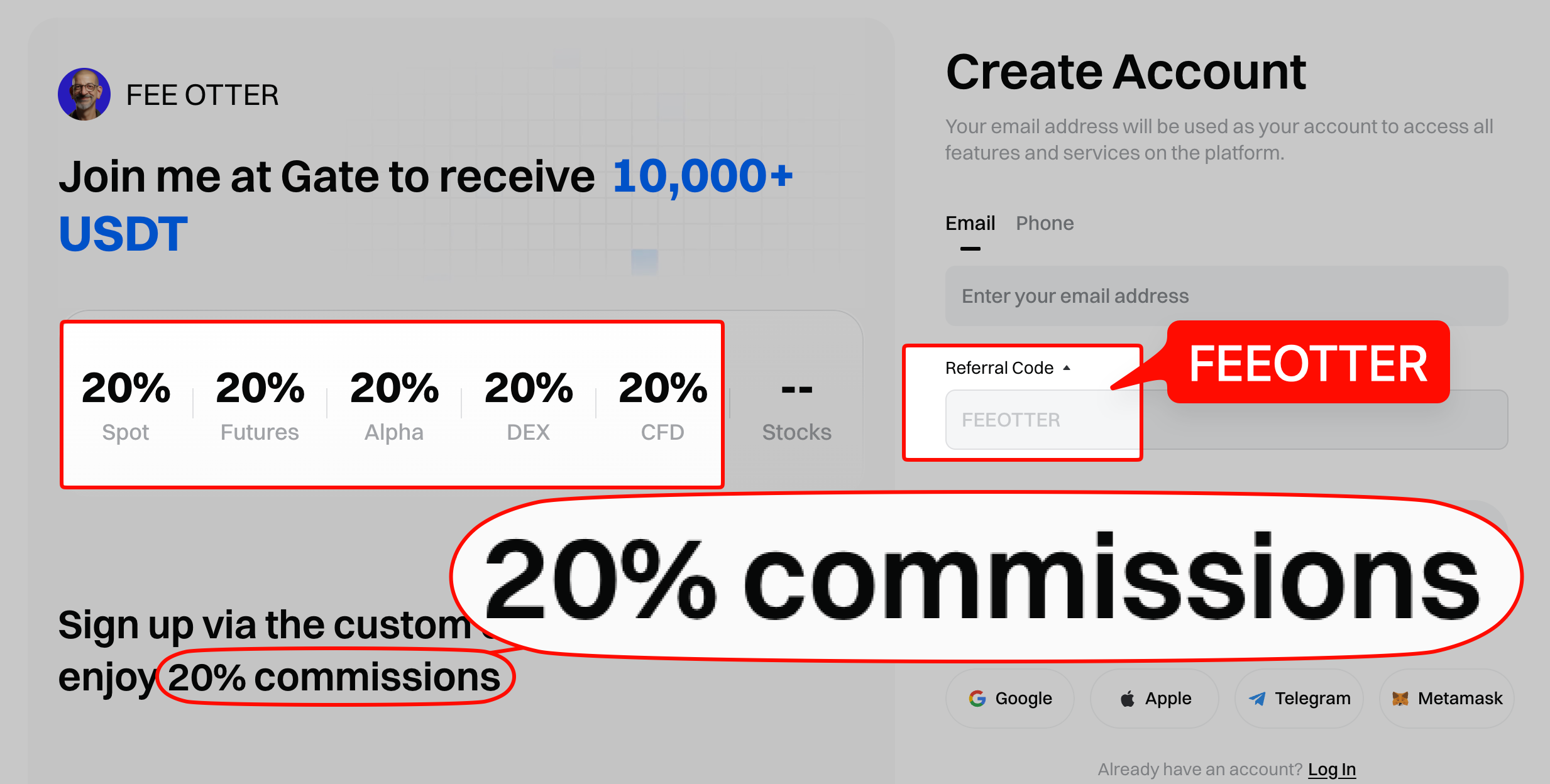
An existing Gate account can't add or change its referral code, so to rebind you register again with a new email through the dedicated link (code FEEOTTER is filled in for you). One KYC document covers up to five Gate accounts; bind the new UID on Fee Otter and your futures rebate is 70% (checked October 2026).
Register on Gate with our referral code, FEEOTTER, for a fee rebate of 70% (20% auto-refunded by the exchange plus a 50% extra from Fee Otter), 3.5 times the 20% that common referral codes return. If you already have a Gate account, you can rebind it to the rebate platform (Fee Otter). This guide covers why a code can't be added after signup, how existing users rebind, how the rebate is calculated, and the rates across exchanges.
The most common referral codes return only 20%; ours returns 70% when you bind through Fee Otter, 3.5 times as much. On 1,000 USDT of monthly fees, a typical 20% code returns 200 USDT, while ours returns 700 USDT, 500 USDT more every month. An existing Gate account can't change its code; rebinding means registering again with a new email, step by step below.
What do you get by registering on Gate through Fee Otter?
- 70% fee rebate: 20% auto-refunded by the exchange plus a 50% extra from Fee Otter, 3.5 times the 20% that common referral codes return.
- One dashboard: once bound, track every rebate and your available balance on the rebate platform (Fee Otter), and request withdrawals.
- Referral code FEEOTTER: pre-filled by the dedicated registration link.
How is the Gate rebate calculated? (a reproducible example)
Formula: rebate = your monthly fees × the rebate rate.
Example: using Gate's 0.05% perp taker rate with 2,500 USDT margin at 20x leverage, the notional is 50,000 USDT and the one-side fee is 50,000 × 0.05% = 25 USDT. At the 70% futures rate, the rebate = 25 × 70% = 17.5 USDT (20% auto-refunded by the exchange, 50% added by Fee Otter; see the complete fee-rebate guide).
If you already have VIP status on an exchange and want to rebind or sign up on another one, contact our support. We can help you apply for special trading perks or a higher rebate rate.
Rebate rates by exchange (Gate 70%)
The table below lists the current rebate rate on each exchange, with Gate in the first row. Live figures are shown on the platform.
When do you need to rebind?
Gate only lets you enter a referral code at signup; it can't be added afterwards. If your Gate account wasn't registered under our code, the system can't credit rebates to you, so you need to rebind.
Under Gate's official referral rules, each user can sign up through only one referral method. In any of these cases your old account earns nothing from Fee Otter's code, so rebinding is worth it:
- You used someone else's code: codes from KOLs or friends pass on whatever share the referrer sets.
- You entered no code at all: sign up directly on the website without a code and none of your fees ever comes back.
- You entered a different code: if the code used at signup wasn't ours, FEEOTTER, the account isn't bound to Fee Otter.
- Your volume has grown: the more you pay in fees, the wider the gap between 20% and 70%. At 1 million USDT of futures volume a month, the difference is about 3,000 USDT a year (worked out below).
Before you rebind
The rebind itself takes a few minutes. Have these ready first and it goes smoothly:
- A new email never registered on Gate: this is the key step; an old email just logs you back into the old account.
- A passkey or Google Authenticator: Gate doesn't require a phone number, so the new account can use either for two-step verification.
- Check the referral code: the dedicated link fills in FEEOTTER, so confirm the referral field shows it before you submit. Details in Gate referral code explained.
- Sort out the old account's assets and positions: decide what moves to the new account and close open futures and orders first; then copy the new account's deposit address and withdraw from the old one.
- A Fee Otter account: once the new account exists you bind its UID on the rebate site so rebates start accruing.
To see what to fill in on each signup screen, follow the Gate registration guide alongside this one.
How existing Gate users rebind
Recommended: re-register with a different email
One Gate KYC document can register up to five accounts, so just sign up again with a new email via the dedicated link, which fills in the referral code FEEOTTER. Binding a phone number isn't required; after registering you can use a passkey or Google Authenticator instead.
How to confirm the rebind worked
After the new account is created, check two things: the referral sits under our code, and rebates actually reach you. Go through these four steps:
- Find the new account's UID: after logging in to Gate, the UID (sometimes labelled "User ID") is on the account info page; tap to copy. Where each exchange shows it: what an exchange UID is and where to find it.
- Bind the UID on Fee Otter: log in to the Fee Otter rebate site, choose Gate, paste the new UID and submit. Only the UID is needed, no password or API key.
- Wait for verification: the system checks Gate's referral back office to confirm the UID sits under Fee Otter's code; once it passes, the binding is live.
- Trade, then check the rebate records: after you trade on the new account, rebates usually appear in Fee Otter's records the next day or within a few days, each with its amount and rate.
The rebind is complete once verification passes and your first rebate shows up. If verification fails, the new account most likely didn't pick up our code at signup; contact support below and we'll check.
How much more do you get after rebinding?
When you bind through Fee Otter, the Gate rebate is 70% on futures and 65% on spot. The rebate is a percentage of fees, so start with Gate's regular-user (VIP 0) list rates:
| Market | Maker | Taker |
|---|
| Spot | 0.10% | 0.10% |
| USDT-margined perpetuals | 0.02% | 0.05% |
Fees verified on 2026-09-24. Source: Gate official fee announcement · Methodology
By monthly fees: the yearly difference
| Monthly fees | Typical 20% code | Fee Otter's code (70%) | Extra per month | Extra per year vs typical code |
|---|
| 100 USDT | 20 | 70 | 50 | 600 |
| 500 USDT | 100 | 350 | 250 | 3,000 |
| 1,000 USDT | 200 | 700 | 500 | 6,000 |
| 5,000 USDT | 1,000 | 3,500 | 2,500 | 30,000 |
Figures in USDT; the yearly extra is 70% minus 20%.
Worked example: 1 million USDT of futures a month
If every trade is a market order (taker), monthly fees = 1,000,000 × 0.05% = 500 USDT. A typical 20% code returns 100 USDT; ours returns 350 USDT. As an effective rate, taker 0.05% × (1 − 70%) = 0.015%, just 30% of the list price.
On the same 500 USDT of monthly fees, a typical 20% code returns 1,200 USDT a year; ours returns 4,200 USDT. The extra 3,000 USDT comes down to which code you entered at signup.
Rates and settlement are covered in the Gate fee rebate guide. To weigh Gate against other high-rebate exchanges, see Gate vs Bitget fee rebate compared and MEXC vs Gate fee rebate compared.
Most common rebind mistakes
- Signing up with the old email: it already has an account and takes you back to the old referral; use an email never used on Gate.
- Forgetting to bind the UID on Fee Otter: with only the code and no UID binding, the rebate is incomplete and you can't see records.
- Binding the old account's UID: after rebinding you trade on the new account, so bind the new UID.
- Still trading on the old account: its referral hasn't changed, so fees paid there don't earn a Fee Otter rebate.
Summary
You can't add a code to an old Gate account, but registering again with a new email through the dedicated link (code FEEOTTER), then binding the new UID on Fee Otter, lifts your rebate from a typical code's 20% to 70%.
For late-entry deadlines and rebind methods on every exchange we support, see the referral code late-entry and rebind rules table; to compare rebates first, see the crypto exchange fee rebate comparison.
FAQ
Can I add a Gate referral code after signing up?
No. Gate only lets you enter a code at signup; it can't be added or changed afterwards. If you already have an account, use the rebind method above (re-register with a new email).
What is the Gate fee rebate?
70% on futures: 20% auto-refunded by the exchange plus a 50% extra from Fee Otter. On spot it is 65%.
How many Gate accounts can one KYC open?
Up to five. One KYC document can register up to five accounts, so existing users just re-register with a new email through the dedicated link to rebind.
I already have a Gate account. Can I rebind?
Yes. The most recommended way is to re-register with a new email via the dedicated link, which fills in the code. A phone number isn't required; use a passkey or Google Authenticator.
How is Gate's rebate different from a KOL code?
Through Fee Otter the Gate futures rebate is 70%, and every rebate is visible on one dashboard, with withdrawals on request.
Do I still get Gate new-user rewards with the code?
Yes. Registering with our code still qualifies you for Gate's official new-user rewards (such as trial funds and task rewards; exact contents and amounts follow Gate's own campaign).
After rebinding, when do rebates start?
Once you are bound through Fee Otter, the fees you generate afterwards start accruing rebates, which you can track on the rebate platform (Fee Otter).
After rebinding Gate, how do I confirm the rebate reaches me?
Check your rebate records on Fee Otter. Once the new UID is bound and verified, trade on the new account; rebates usually appear the next day or within a few days, and seeing them means the rebind worked.
Gate rebate and rebind rules may change; Gate official and platform announcements are authoritative.



%2C2026-10-05%20%E5%8F%96%E6%A8%A3%3A%0A%20%20%20%20%20%20%20%E5%BA%95%E8%89%B2%20%230E3452%2C%E5%AD%97%E7%AC%A6%20%2303CA9B)%E3%80%82%0A%20%20%20%20%20%20%20%E7%94%A8%20potrace%20%E6%8F%8F%E5%AD%97%E7%AC%A6%E8%BC%AA%E5%BB%93%2C%E6%95%B4%E5%BC%B5%E7%95%AB%E5%B8%83%E7%9B%B4%E6%8E%A5%E6%98%A0%E5%B0%84%E5%88%B0%E9%80%99%E8%A3%A1%E7%9A%84%2032%20%E5%96%AE%E4%BD%8D%20%E2%80%94%E2%80%94%20%E4%B8%8D%E9%87%8D%E6%96%B0%E7%BD%AE%E4%B8%AD%2C%E4%BF%9D%E7%95%99%E5%AE%98%E6%96%B9%E7%9A%84%E7%95%99%E7%99%BD%E6%AF%94%E4%BE%8B%E3%80%82%0A%20%20%20%20%20%20%20%E8%A6%81%E6%94%B9%E8%AB%8B%E9%87%8D%E8%B7%91%E6%8F%8F%E5%9C%96%2C%E4%B8%8D%E8%A6%81%E6%86%91%E5%8D%B0%E8%B1%A1%E8%AA%BF%E3%80%82%20--%3E%0A%20%20%3Crect%20x%3D%221.5%22%20y%3D%221.5%22%20width%3D%2229%22%20height%3D%2229%22%20rx%3D%228%22%20fill%3D%22%230E3452%22%2F%3E%0A%20%20%3Cpath%20fill%3D%22%2303CA9B%22%20d%3D%22M23.02%205.97C22.14%206.02%2021.54%206.07%2021.22%206.1C20.72%206.15%2019.6%206.28%2019.41%206.31C19.31%206.33%2019.1%206.37%2018.94%206.39C18.29%206.5%2017.94%206.57%2017.2%206.73C16.92%206.79%2016%207.03%2015.8%207.09C15.36%207.23%2014.42%207.54%2014.39%207.56C14.38%207.57%2014.3%207.6%2014.23%207.62C13.82%207.76%2012.7%208.28%2012.13%208.6C11.95%208.7%2011.8%208.78%2011.79%208.78C11.7%208.78%2010.42%209.71%209.98%2010.08C9.16%2010.79%208.07%2012.09%207.6%2012.91C7.28%2013.46%207.18%2013.65%207.06%2013.91C6.87%2014.3%206.76%2014.53%206.68%2014.74C6.56%2015.08%206.37%2015.64%206.34%2015.73C6.33%2015.78%206.3%2015.91%206.27%2016C6.06%2016.79%205.93%2017.87%205.94%2018.62L5.95%2019.05L6.69%2019.04C7.78%2019.03%208.57%2018.94%209.73%2018.68C10.18%2018.58%2011.05%2018.33%2011.45%2018.18C11.52%2018.15%2011.7%2018.08%2011.84%2018.03C13.58%2017.38%2015.67%2016.19%2017.55%2014.77C17.8%2014.58%2018.67%2013.89%2018.74%2013.83C18.76%2013.81%2018.94%2013.66%2019.14%2013.48C19.34%2013.31%2019.54%2013.14%2019.58%2013.11C19.61%2013.07%2019.78%2012.92%2019.95%2012.77C20.94%2011.88%2022.24%2010.57%2023.2%209.48C23.68%208.94%2023.69%208.93%2023.86%208.73C23.94%208.63%2024.02%208.54%2024.03%208.53C24.17%208.4%2025.09%207.25%2025.52%206.67C25.67%206.47%2025.81%206.28%2025.83%206.26C25.86%206.23%2025.89%206.19%2025.9%206.16C25.92%206.13%2025.94%206.12%2025.95%206.13C25.98%206.15%2025.3%207.5%2024.99%208.07C24.88%208.28%2024.78%208.45%2024.78%208.46C24.78%208.46%2024.66%208.67%2024.51%208.93C24.24%209.4%2024.17%209.52%2024.07%209.69C24%209.81%2023.72%2010.27%2023.39%2010.8C22.69%2011.91%2021.44%2013.66%2020.74%2014.52C20.25%2015.12%2020.09%2015.31%2019.72%2015.73C19.01%2016.55%2018.19%2017.38%2017.42%2018.08C17.07%2018.39%2016.92%2018.52%2016.5%2018.87C16.37%2018.98%2016.24%2019.09%2016.2%2019.12C15.83%2019.43%2014.7%2020.21%2014.16%2020.54C13.69%2020.82%2012.69%2021.34%2012.41%2021.45C12.33%2021.48%2012.23%2021.52%2012.17%2021.55C12.01%2021.62%2011.45%2021.84%2011.11%2021.95C10.97%2022%2010.05%2022.26%209.84%2022.31C9.23%2022.45%208.97%2022.5%208.56%2022.56C8.43%2022.58%208.25%2022.61%208.16%2022.62C8.06%2022.64%207.79%2022.67%207.56%2022.69C7.32%2022.71%207.12%2022.74%207.12%2022.76C7.12%2022.85%207.58%2023.42%207.97%2023.82C9.2%2025.09%2010.67%2025.8%2012.52%2026.02C16.51%2026.48%2020.99%2024.06%2023.2%2020.25C23.32%2020.05%2023.43%2019.86%2023.46%2019.81C23.51%2019.73%2023.96%2018.81%2024.04%2018.62C24.67%2017.21%2025.19%2015.43%2025.52%2013.67C25.66%2012.9%2025.73%2012.45%2025.81%2011.77C25.99%2010.32%2026.05%209.33%2026.05%207.64C26.05%206.06%2026.04%206.01%2025.97%205.98C25.9%205.95%2023.53%205.94%2023.02%205.97Z%22%2F%3E%0A%3C%2Fsvg%3E%0A)


%2C2026-10-05%20%E5%8F%96%E6%A8%A3%3A%0A%20%20%20%20%20%20%20%E5%BA%95%E8%89%B2%20%23FFFFFF%2C%E5%AD%97%E7%AC%A6%20%235227FF)%E3%80%82%0A%20%20%20%20%20%20%20%E7%94%A8%20potrace%20%E6%8F%8F%E5%AD%97%E7%AC%A6%E8%BC%AA%E5%BB%93%2C%E6%95%B4%E5%BC%B5%E7%95%AB%E5%B8%83%E7%9B%B4%E6%8E%A5%E6%98%A0%E5%B0%84%E5%88%B0%E9%80%99%E8%A3%A1%E7%9A%84%2032%20%E5%96%AE%E4%BD%8D%20%E2%80%94%E2%80%94%20%E4%B8%8D%E9%87%8D%E6%96%B0%E7%BD%AE%E4%B8%AD%2C%E4%BF%9D%E7%95%99%E5%AE%98%E6%96%B9%E7%9A%84%E7%95%99%E7%99%BD%E6%AF%94%E4%BE%8B%E3%80%82%0A%20%20%20%20%20%20%20%E5%AE%98%E6%96%B9%E6%98%AF%E7%99%BD%E5%BA%95%E7%B4%AB%E8%89%B2%E5%AD%97%E7%AC%A6%3B%E7%99%BD%E5%BA%95%E5%8A%A0%E6%B7%A1%E9%82%8A%2C%E5%85%8D%E5%BE%97%E5%9C%A8%E7%99%BD%E8%89%B2%E8%83%8C%E6%99%AF%E4%B8%8A%E6%B6%88%E5%A4%B1%E3%80%82%0A%20%20%20%20%20%20%20%E8%A6%81%E6%94%B9%E8%AB%8B%E9%87%8D%E8%B7%91%E6%8F%8F%E5%9C%96%2C%E4%B8%8D%E8%A6%81%E6%86%91%E5%8D%B0%E8%B1%A1%E8%AA%BF%E3%80%82%20--%3E%0A%20%20%3Crect%20x%3D%221.5%22%20y%3D%221.5%22%20width%3D%2229%22%20height%3D%2229%22%20rx%3D%228%22%20fill%3D%22%23FFFFFF%22%20stroke%3D%22%23E4E4E7%22%2F%3E%0A%20%20%3Cpath%20fill%3D%22%235227FF%22%20d%3D%22M13.31%208.92L13.31%2012.28L9.94%2012.28L6.56%2012.28L6.57%2015.71C6.58%2019.51%206.57%2019.29%206.79%2020.2C7.56%2023.33%2010.21%2025.78%2013.38%2026.31C14.1%2026.43%2014.44%2026.44%2019.24%2026.44L23.91%2026.44L23.91%2023.05L23.91%2019.66L19.2%2019.65L14.48%2019.64L14.28%2019.56C13.89%2019.41%2013.63%2019.16%2013.44%2018.76L13.36%2018.58L13.35%2015.46L13.34%2012.34L18.56%2012.34L23.78%2012.34L23.78%208.95L23.78%205.56L18.55%205.56L13.31%205.56L13.31%208.92Z%22%2F%3E%0A%3C%2Fsvg%3E%0A)

 Telegram · @feeotter