To register on Binance you go through six steps, and the account itself takes a few minutes: open the binance.com signup page through Fee Otter's dedicated link (referral code FEEOTTER), enter your email or phone and set a password, expand the "Referral ID" field and check that referral code FEEOTTER is already filled in, complete KYC (ID plus face scan, required before you can deposit or trade; Binance says review usually takes under 48 hours), deposit and turn on BNB fee deduction, then bind your UID on Fee Otter. You must be 18 or older, and residents of the US, Canada, the Netherlands and the other places on Binance's prohibited list can't sign up. The referral relationship can't be changed once it's set. Bound through Fee Otter, the rebate is 40% (20% automatic + 20% Fee Otter extra), double a typical 20% referral code (checked October 2026).
What does the Binance signup page look like?
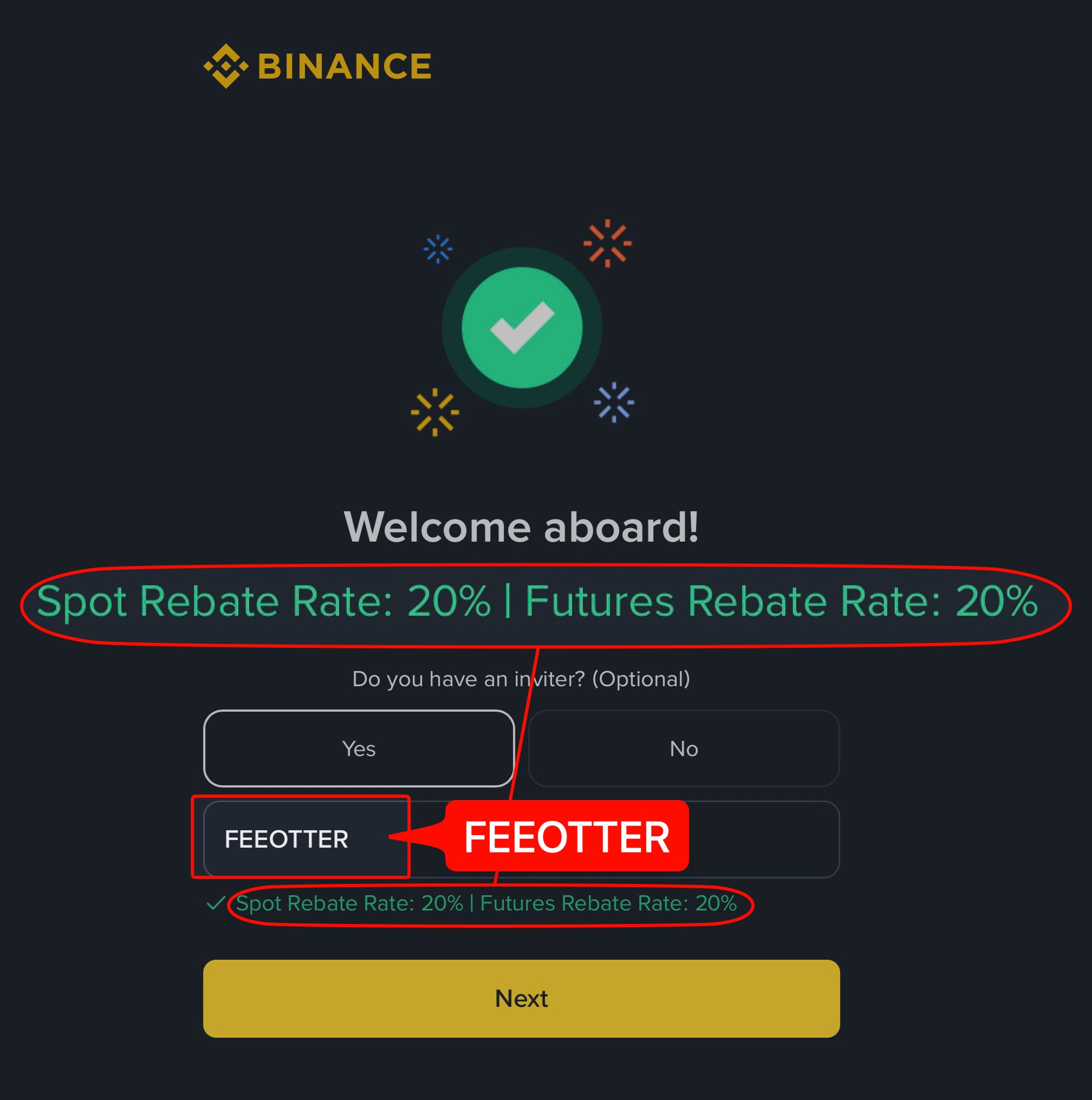
The Binance signup page has one main field: email or phone number. You can also create an account directly with Google or Apple. The referral code field sits below the main field and is collapsed by default. The English interface calls it "Referral ID (Optional)". When you arrive through our dedicated link, referral code FEEOTTER is filled in automatically, but you can't see it while the field is collapsed. Always expand it and check once before you submit. Half of the people who miss the code simply never opened this field.
Also watch out for regional sites such as Binance.US and Binance TR. They are separately operated platforms, and their accounts and referral relationships are separate from binance.com. Referral code FEEOTTER and rebates apply only to binance.com.
Who can register on Binance? Age, location and number of accounts
Binance's Terms of Use (effective 2026-07-21) require individual users to be at least 18, or the age of majority where they live if that is higher. The terms also point to a List of Prohibited Countries (updated 2026-01-05). People on it can't sign up for binance.com:
| How the restriction applies | Countries or regions |
|---|
| Located, resident, established in, or a citizen of | United States |
| Located, resident or established in | Canada, Netherlands |
| Located, resident or established in | Cuba, North Korea, Iran, Crimea, and the so-called Donetsk and Luhansk People's Republics |
Checked: 2026-10-18 (Binance's official List of Prohibited Countries and Terms of Use)
Binance can update the list at any time. The terms also say that if you travel to a listed location, the service may not work and your access may be blocked.
On the number of accounts, Binance's identity verification guide says that if you already have a verified personal account, the only ways to keep funds separate are an entity account or up to 5 sub-accounts under your personal account. You can't change the account type (personal or entity) after registering, so pick carefully.
What do you need before signing up?
- An email address or phone number you use regularly, to receive verification codes.
- A password: Binance requires at least 8 characters, with at least one uppercase letter and one number.
- One of your national ID card, passport, or driver's license, plus a phone with a working camera (for the face scan).
- An authenticator app (for example, Google Authenticator), so you can set up 2FA right after signup.
- Confirmation that you are signing up on binance.com, not a regional site.
Binance signup steps
Step 1: Open the binance.com signup page through the dedicated link
Tap the signup button in this article. The link already carries referral code FEEOTTER. If you sign up directly in the app instead, the code is not filled in for you.
Step 2: Enter your email or phone number and set a password
Binance sends a 6-digit verification code to your inbox or phone, and its guide says to enter it within 30 minutes. Quick signup with Google, Apple or Telegram also works, but you still need to check the referral code field before the account is created.
Step 3: Expand "Referral ID" and check that it is filled in
This step decides all of your future rebates. According to Binance's signup guide, when you arrive through a referral link the code fills in automatically and a green tick with "Linked" appears next to it; if the code shows as invalid, you can edit it or enter another. Once a Binance referral relationship is set, it can't be changed or removed.
Step 4: Complete identity verification
See the next section. Binance requires identity verification before you can deposit or trade.
Step 5: Deposit and turn on BNB fee deduction
After you deposit, go to the fee settings and turn on "Use BNB to pay for fees". Spot fees drop by 25% right away, and futures get a discount too. This is separate from the rebate, and you can have both at the same time.
Step 6: Bind your UID on Fee Otter
Log in to Binance and tap your avatar in the top-right corner. The string of numbers under your nickname is your UID, with a copy button next to it. Go to the Fee Otter rebate dashboard, choose Binance, paste your UID, and submit.
Signing up in the app vs on the website
The fields and rules are the same on both. What differs is where you start and how the referral code gets filled in:
| Item | Website | App |
|---|
| Where to start | Enter your email or phone on the binance.com homepage and click "Sign Up" | Open the app, tap "Sign up", then "Create a Binance Account" |
| Signup methods | Email, phone, Google, Apple, Telegram | Email, phone, Google, Apple, Telegram |
| Referral code | Filled in automatically when you arrive through our link | Not filled in if you open the app directly; type it yourself |
| After the account is created | A reminder that you must verify your identity before trading | Tapping "Next" takes you straight to identity verification |
Based on Binance's official website signup guide and app signup guide (both updated 2025-11-24), checked 2026-10-18.
Binance KYC: what do you need?
Binance requires identity verification before you can deposit or trade. That is different from exchanges such as WEEX and XT.COM, where you can trade without verifying. Prepare:
- A valid ID: national ID card, passport, or driver's license, with all four corners visible, no glare, and no cropping.
- Face verification: a liveness check with your phone camera. Make sure the lighting is good.
- Matching details: your name and date of birth must match your ID exactly. A mismatch is the most common reason for rejection.
According to Binance's identity verification guide (updated 2026-06-05), on the website you go to your avatar, then "Account", "Identification" and "Get Verified". The process is:
- Choose your country of residence, the document's issuing country and the document type.
- Upload the front and back of the document, either from your computer or by scanning a QR code to use your phone (whether manual upload is offered depends on the country).
- Do the liveness check: allow camera access, take off hats and glasses, turn off filters and make sure the lighting is good.
- Confirm your personal details and submit. You can't change them once confirmed, and don't refresh the browser during the process.
Binance says review usually finishes within 48 hours, though some cases take longer, and you get a notification when it passes. Older accounts that never verified are switched to "Withdraw Only", which allows only withdrawals, cancelling orders, closing positions and redemptions. Each person can have only one verified personal account, which is why rebinding on Binance is more work than on other exchanges (see "Already have an account" below).
Stuck during Binance signup? Common problems and fixes
| Problem | Likely cause | What to do |
|---|
| No verification code | The email went to spam, the address has a typo, or your phone isn't receiving texts | Check the spam folder and the spelling; the code is valid for 30 minutes, so don't keep resending; you can also sign up with the other method (email or phone) |
| Password won't submit | It doesn't meet the rules | At least 8 characters, with one uppercase letter and one number |
| Referral code shows as invalid | A typo or an expired link | Binance says you can edit it or enter another; reopening our link from this page is the safest fix |
| Email or phone already in use | You registered on Binance before | Use "Forgot password" to get into the old account; whether it can be rebound is covered under "Already have a Binance account?" below |
| KYC rejected | Name or date of birth doesn't match the ID, or the photo has glare or is cropped | Enter details exactly as on the ID and retake the photo with all four corners visible |
| Verified but can't withdraw | Causes Binance lists: no face verification, logins from multiple IP addresses, too few security methods | Turn on at least three authentication methods before withdrawing (for example passkeys, Binance Authenticator, SMS) under "Profile" → "Security" |
| Can't connect or service blocked | You are in a location on the prohibited list | See "Who can register on Binance?" above |
Based on Binance's signup guides, identity verification guide and Why Do I Need to Complete Identity Verification (updated 2026-04-02), checked 2026-10-18. The rows on missing codes and an email already in use are general practice; those official pages don't list them point by point.
Who is Binance for?
Binance is the largest exchange in the world by volume. It has the deepest liquidity and the widest range of coins and products, with spot, futures, and earn products all in one account. It suits you if you place large orders, need depth on less common assets, or want products you rarely find elsewhere, such as Hong Kong stocks and pre-IPO offerings.
The rebate is 40%, lower than Gate or XT.COM. But paying spot fees with BNB cuts them by 25%, one of the biggest platform-token discounts among the exchanges we cover. On Binance, referral code FEEOTTER is an affiliate code, so it is not subject to the 12-month limit on futures rebates under the Tier 0 referral program.
What are Binance's fees?
These are the list fees for regular Binance users (VIP 0). Spot is where most people use BNB deduction. Futures is where the rebate amounts are largest:
| Trade type | Maker | Taker | Platform token discount |
|---|
| Spot | 0.10% | 0.10% | BNB: 25% off spot, 10% off futures |
| USDT-margined futures | 0.02% | 0.05% |
Fees verified: 2026-10-18 (Binance official fee page) · Data sources and methodology
This table shows list prices as checked on 2026-10-18. Binance may change them. For the latest fees, see the Binance official fee page.
How does Binance's net fee compare with similar exchanges?
The list fee is only the starting point. The "net taker" fee after you bind for rebates is what you actually pay on every futures market order (net fee = list fee × (1 − rebate rate)):
| Exchange | Futures taker list fee | Net taker |
|---|
| Binance | 0.05% | 0.03% |
| OKX | 0.05% | 0.04% |
| Bybit | 0.055% | 0.033% |
| Gate | 0.05% | 0.015% |
On net taker alone, Gate (0.015%) is lower than Binance (0.03%). The reasons to choose Binance are usually outside fees: products, liquidity, or features you already use.
Data from the September 2026 Exchange Fee and Rebate Index (fees verified 2026-09-24). OKX is a 20% auto-rebate + exclusive rewards.
What is the cheapest way to place your first futures order?
Take 2,500 USDT of margin at 20x leverage. The notional position is 50,000 USDT. Fees are charged on the notional position, not the margin. On Binance:
- Market order (taker 0.05%): the opening fee is 25 USDT. After binding, 10 USDT comes back, so you pay 15 USDT.
- Filled limit order (maker 0.02%): the opening fee is 10 USDT. 4 USDT comes back, so you pay 6 USDT.
Counting opening and closing as one round trip, you pay 30 USDT with market orders and 12 USDT with limit orders. Use limit orders when you can, then add the rebate on top. That is the most direct way to save on Binance.
Spot orders: BNB deduction plus the rebate
Take a 10,000 USDT spot market order at VIP 0:
- Without BNB deduction: the fee is 10,000 × 0.10% = 10 USDT. The 40% rebate (20% automatic + 20% Fee Otter extra) returns 4 USDT, so you pay 6 USDT.
- With BNB deduction: the rate drops to 0.075%, so the fee is 7.5 USDT. The rebate is based on the fee you actually pay, so 3 USDT comes back and you pay 4.5 USDT.
The two multiply rather than add: 0.10% × (1 − 25%) × (1 − 40%) = 0.045%. At 1,000,000 USDT of spot volume a month, your monthly fees fall from 1,000 USDT to 450 USDT.
How is the rebate calculated after you sign up with a referral code?
The Binance rebate has two layers. The 20% from the referral code is refunded automatically by Binance. After you bind your UID, Fee Otter adds another 20%, for a total of 40%. On Binance, referral code FEEOTTER is an affiliate code, so it is not subject to the Tier 0 referral program rule that "futures rebates last only 12 months".
Based on 500 USDT in monthly fees, you get back 200 USDT. Turn on BNB deduction first so the fees themselves are lower, then let the rebate refund part of them. The two stack.
If you are already a VIP on an exchange and want to rebind or sign up on another exchange, contact support. We can help you apply for special trading benefits or a higher rebate rate.
How much can you save in a month?
Here are three trading volumes, calculated with Binance's futures list taker fee:
| Monthly futures volume | Monthly fees | Refund with a typical 20% code | Refund with Fee Otter (40%) |
|---|
| 100,000 USDT | 50 | 10 | 20 |
| 500,000 USDT | 250 | 50 | 100 |
| 2,000,000 USDT | 1,000 | 200 | 400 |
All figures assume market orders (taker 0.05%), in USDT per month.
When does the rebate arrive, and where can you see it?
The two layers arrive separately. The first layer, 20%, is paid by Binance itself. Since 2025-02-13 it has been paid in USDC to your spot account by default. Many people think they never received it, when they just didn't check the spot account. The second layer is calculated by Fee Otter. After the exchange publishes its daily report, each trade is matched to your UID, and the amount is usually added to your available balance on the rebate dashboard on T+1. You can see the amount and rate for every entry and request a withdrawal at any time.
The most common mistakes new Binance users make
- Depositing first, then remembering the referral code. According to the Binance official referral program FAQ (updated 2026-08-05), adding a code after signup requires all of these: you signed up within the last 30 days, you have not deposited or traded, you have no existing referral relationship, it is a parent account, your KYC details have not been used on another account in the past 180 days, and you are not flagged as a wash trader. The moment you deposit, that option closes.
- Not opening the collapsed referral code field. Not seeing the code doesn't mean it was applied. Open the field and check before you submit.
- Signing up on a regional site. Binance.US and Binance TR are separate platforms, and referral code FEEOTTER does not apply there.
- Thinking the rebate never arrived. Since 2025-02-13, the 20% Binance refunds automatically has been paid in USDC to your spot account by default. Check the spot account first.
- Entering the referral code but not binding your UID. The referral code only covers the first 20% layer. You need to bind your UID on the rebate dashboard to get the second layer.
The first thing to do after signup
- Turn on two-factor authentication (2FA): most stolen accounts are not the result of a hacked platform. They come from reused passwords without 2FA. Binance also says you need at least three authentication methods turned on before you can withdraw.
- Turn on BNB deduction: the 0.10% spot fee becomes 0.075%, and the rebate stacks on top.
- Bind your UID: rebates count only from fees generated after you bind. They are not retroactive, so bind as early as you can.
Already have a Binance account?
If your account meets the conditions above (signed up within 30 days, no deposits or trades, no referrer and so on), you can add referral code FEEOTTER directly. If it doesn't, there are two rebind methods, in this order: Option 1 (recommended), Binance's official "rebinding request", for accounts with no referrer; Option 2, closing the old account and transferring your KYC after 35 days. For the conditions and steps of the add-later check and both methods, see the Binance rebind guide for existing users. Before you try Option 2, know one official rule: Binance's referral FAQ says that if the system detects an account was closed to open a new one for referral benefits, Binance reserves the right to end all referral commissions on the new account.
Binance compared with other exchanges
Risks to know before using Binance
Binance’s rebate terms are good, but know these risks before you deposit:
- US Department of Justice plea agreement: in November 2023 Binance pleaded guilty to violating US anti-money-laundering and sanctions rules, agreed to pay about $4.3 billion and accepted an independent monitor (DOJ announcement).
- Third-party rating: CoinGecko gives Binance a trust score of 10/10; the score weighs volume legitimacy, liquidity, cybersecurity and past incidents, and is not a guarantee for your assets.
- Don’t keep long-term or large balances on the exchange: keep only the funds you are actively trading; withdraw money you aren’t trading and anything you hold long term.
- Use a cold wallet for long-term holdings: move large, long-term assets to a hardware cold wallet (such as a Ledger) and keep them offline.
- Futures and high leverage are high risk: the higher the leverage, the easier it is to be liquidated. Beginners should avoid high leverage and learn the rules with small amounts first.
FAQ
How do I register on Binance, and how long does it take?
Open binance.com through our link, enter your email or phone, type the 6-digit code, set a password, check the referral code and submit. The account is ready in a few minutes. Identity verification comes next; Binance says review usually takes under 48 hours, and once it passes you can deposit and trade.
How old do you have to be, and which countries can't sign up?
Individuals must be 18 or older (or the age of majority where they live, if higher). Residents of the US, Canada, the Netherlands, Cuba, North Korea, Iran, Crimea and the other listed regions can't register. Regional sites such as Binance.US and Binance TR are separate platforms, and referral code FEEOTTER doesn't work there.
Do you have to complete KYC on Binance?
Yes. New users must complete identity verification (ID plus face scan) before they can deposit or trade.
Can I open two Binance accounts?
You can have only one verified personal account. To keep funds separate, Binance's answer is sub-accounts (up to 5) or a separate entity account.
Can you add a referral code after signing up for Binance?
Only if you signed up within 30 days, have not deposited or traded, have no referrer, and your KYC details have not been used on another account in the past 180 days. Once you deposit, you can't. For other cases, see the rebind guide.
Where does Binance's automatic rebate go?
Since 2025-02-13 it has been paid in USDC to your spot account by default. The extra rebate from Fee Otter is added to your available balance on the rebate dashboard, where you can check it and request a withdrawal.
Do you need to give an API key to bind your UID?
No. We only need your UID. No API key, password, or withdrawal permission is required, and your assets stay in your own Binance account the whole time.
Will Binance referral code FEEOTTER pay for only 12 months?
No. Referral code FEEOTTER is a Binance affiliate code, so it is not subject to the Tier 0 referral program rule that "futures rebates last 12 months".



%2C2026-10-05%20%E5%8F%96%E6%A8%A3%3A%0A%20%20%20%20%20%20%20%E5%BA%95%E8%89%B2%20%230E3452%2C%E5%AD%97%E7%AC%A6%20%2303CA9B)%E3%80%82%0A%20%20%20%20%20%20%20%E7%94%A8%20potrace%20%E6%8F%8F%E5%AD%97%E7%AC%A6%E8%BC%AA%E5%BB%93%2C%E6%95%B4%E5%BC%B5%E7%95%AB%E5%B8%83%E7%9B%B4%E6%8E%A5%E6%98%A0%E5%B0%84%E5%88%B0%E9%80%99%E8%A3%A1%E7%9A%84%2032%20%E5%96%AE%E4%BD%8D%20%E2%80%94%E2%80%94%20%E4%B8%8D%E9%87%8D%E6%96%B0%E7%BD%AE%E4%B8%AD%2C%E4%BF%9D%E7%95%99%E5%AE%98%E6%96%B9%E7%9A%84%E7%95%99%E7%99%BD%E6%AF%94%E4%BE%8B%E3%80%82%0A%20%20%20%20%20%20%20%E8%A6%81%E6%94%B9%E8%AB%8B%E9%87%8D%E8%B7%91%E6%8F%8F%E5%9C%96%2C%E4%B8%8D%E8%A6%81%E6%86%91%E5%8D%B0%E8%B1%A1%E8%AA%BF%E3%80%82%20--%3E%0A%20%20%3Crect%20x%3D%221.5%22%20y%3D%221.5%22%20width%3D%2229%22%20height%3D%2229%22%20rx%3D%228%22%20fill%3D%22%230E3452%22%2F%3E%0A%20%20%3Cpath%20fill%3D%22%2303CA9B%22%20d%3D%22M23.02%205.97C22.14%206.02%2021.54%206.07%2021.22%206.1C20.72%206.15%2019.6%206.28%2019.41%206.31C19.31%206.33%2019.1%206.37%2018.94%206.39C18.29%206.5%2017.94%206.57%2017.2%206.73C16.92%206.79%2016%207.03%2015.8%207.09C15.36%207.23%2014.42%207.54%2014.39%207.56C14.38%207.57%2014.3%207.6%2014.23%207.62C13.82%207.76%2012.7%208.28%2012.13%208.6C11.95%208.7%2011.8%208.78%2011.79%208.78C11.7%208.78%2010.42%209.71%209.98%2010.08C9.16%2010.79%208.07%2012.09%207.6%2012.91C7.28%2013.46%207.18%2013.65%207.06%2013.91C6.87%2014.3%206.76%2014.53%206.68%2014.74C6.56%2015.08%206.37%2015.64%206.34%2015.73C6.33%2015.78%206.3%2015.91%206.27%2016C6.06%2016.79%205.93%2017.87%205.94%2018.62L5.95%2019.05L6.69%2019.04C7.78%2019.03%208.57%2018.94%209.73%2018.68C10.18%2018.58%2011.05%2018.33%2011.45%2018.18C11.52%2018.15%2011.7%2018.08%2011.84%2018.03C13.58%2017.38%2015.67%2016.19%2017.55%2014.77C17.8%2014.58%2018.67%2013.89%2018.74%2013.83C18.76%2013.81%2018.94%2013.66%2019.14%2013.48C19.34%2013.31%2019.54%2013.14%2019.58%2013.11C19.61%2013.07%2019.78%2012.92%2019.95%2012.77C20.94%2011.88%2022.24%2010.57%2023.2%209.48C23.68%208.94%2023.69%208.93%2023.86%208.73C23.94%208.63%2024.02%208.54%2024.03%208.53C24.17%208.4%2025.09%207.25%2025.52%206.67C25.67%206.47%2025.81%206.28%2025.83%206.26C25.86%206.23%2025.89%206.19%2025.9%206.16C25.92%206.13%2025.94%206.12%2025.95%206.13C25.98%206.15%2025.3%207.5%2024.99%208.07C24.88%208.28%2024.78%208.45%2024.78%208.46C24.78%208.46%2024.66%208.67%2024.51%208.93C24.24%209.4%2024.17%209.52%2024.07%209.69C24%209.81%2023.72%2010.27%2023.39%2010.8C22.69%2011.91%2021.44%2013.66%2020.74%2014.52C20.25%2015.12%2020.09%2015.31%2019.72%2015.73C19.01%2016.55%2018.19%2017.38%2017.42%2018.08C17.07%2018.39%2016.92%2018.52%2016.5%2018.87C16.37%2018.98%2016.24%2019.09%2016.2%2019.12C15.83%2019.43%2014.7%2020.21%2014.16%2020.54C13.69%2020.82%2012.69%2021.34%2012.41%2021.45C12.33%2021.48%2012.23%2021.52%2012.17%2021.55C12.01%2021.62%2011.45%2021.84%2011.11%2021.95C10.97%2022%2010.05%2022.26%209.84%2022.31C9.23%2022.45%208.97%2022.5%208.56%2022.56C8.43%2022.58%208.25%2022.61%208.16%2022.62C8.06%2022.64%207.79%2022.67%207.56%2022.69C7.32%2022.71%207.12%2022.74%207.12%2022.76C7.12%2022.85%207.58%2023.42%207.97%2023.82C9.2%2025.09%2010.67%2025.8%2012.52%2026.02C16.51%2026.48%2020.99%2024.06%2023.2%2020.25C23.32%2020.05%2023.43%2019.86%2023.46%2019.81C23.51%2019.73%2023.96%2018.81%2024.04%2018.62C24.67%2017.21%2025.19%2015.43%2025.52%2013.67C25.66%2012.9%2025.73%2012.45%2025.81%2011.77C25.99%2010.32%2026.05%209.33%2026.05%207.64C26.05%206.06%2026.04%206.01%2025.97%205.98C25.9%205.95%2023.53%205.94%2023.02%205.97Z%22%2F%3E%0A%3C%2Fsvg%3E%0A)


%2C2026-10-05%20%E5%8F%96%E6%A8%A3%3A%0A%20%20%20%20%20%20%20%E5%BA%95%E8%89%B2%20%23FFFFFF%2C%E5%AD%97%E7%AC%A6%20%235227FF)%E3%80%82%0A%20%20%20%20%20%20%20%E7%94%A8%20potrace%20%E6%8F%8F%E5%AD%97%E7%AC%A6%E8%BC%AA%E5%BB%93%2C%E6%95%B4%E5%BC%B5%E7%95%AB%E5%B8%83%E7%9B%B4%E6%8E%A5%E6%98%A0%E5%B0%84%E5%88%B0%E9%80%99%E8%A3%A1%E7%9A%84%2032%20%E5%96%AE%E4%BD%8D%20%E2%80%94%E2%80%94%20%E4%B8%8D%E9%87%8D%E6%96%B0%E7%BD%AE%E4%B8%AD%2C%E4%BF%9D%E7%95%99%E5%AE%98%E6%96%B9%E7%9A%84%E7%95%99%E7%99%BD%E6%AF%94%E4%BE%8B%E3%80%82%0A%20%20%20%20%20%20%20%E5%AE%98%E6%96%B9%E6%98%AF%E7%99%BD%E5%BA%95%E7%B4%AB%E8%89%B2%E5%AD%97%E7%AC%A6%3B%E7%99%BD%E5%BA%95%E5%8A%A0%E6%B7%A1%E9%82%8A%2C%E5%85%8D%E5%BE%97%E5%9C%A8%E7%99%BD%E8%89%B2%E8%83%8C%E6%99%AF%E4%B8%8A%E6%B6%88%E5%A4%B1%E3%80%82%0A%20%20%20%20%20%20%20%E8%A6%81%E6%94%B9%E8%AB%8B%E9%87%8D%E8%B7%91%E6%8F%8F%E5%9C%96%2C%E4%B8%8D%E8%A6%81%E6%86%91%E5%8D%B0%E8%B1%A1%E8%AA%BF%E3%80%82%20--%3E%0A%20%20%3Crect%20x%3D%221.5%22%20y%3D%221.5%22%20width%3D%2229%22%20height%3D%2229%22%20rx%3D%228%22%20fill%3D%22%23FFFFFF%22%20stroke%3D%22%23E4E4E7%22%2F%3E%0A%20%20%3Cpath%20fill%3D%22%235227FF%22%20d%3D%22M13.31%208.92L13.31%2012.28L9.94%2012.28L6.56%2012.28L6.57%2015.71C6.58%2019.51%206.57%2019.29%206.79%2020.2C7.56%2023.33%2010.21%2025.78%2013.38%2026.31C14.1%2026.43%2014.44%2026.44%2019.24%2026.44L23.91%2026.44L23.91%2023.05L23.91%2019.66L19.2%2019.65L14.48%2019.64L14.28%2019.56C13.89%2019.41%2013.63%2019.16%2013.44%2018.76L13.36%2018.58L13.35%2015.46L13.34%2012.34L18.56%2012.34L23.78%2012.34L23.78%208.95L23.78%205.56L18.55%205.56L13.31%205.56L13.31%208.92Z%22%2F%3E%0A%3C%2Fsvg%3E%0A)

 Telegram · @feeotter