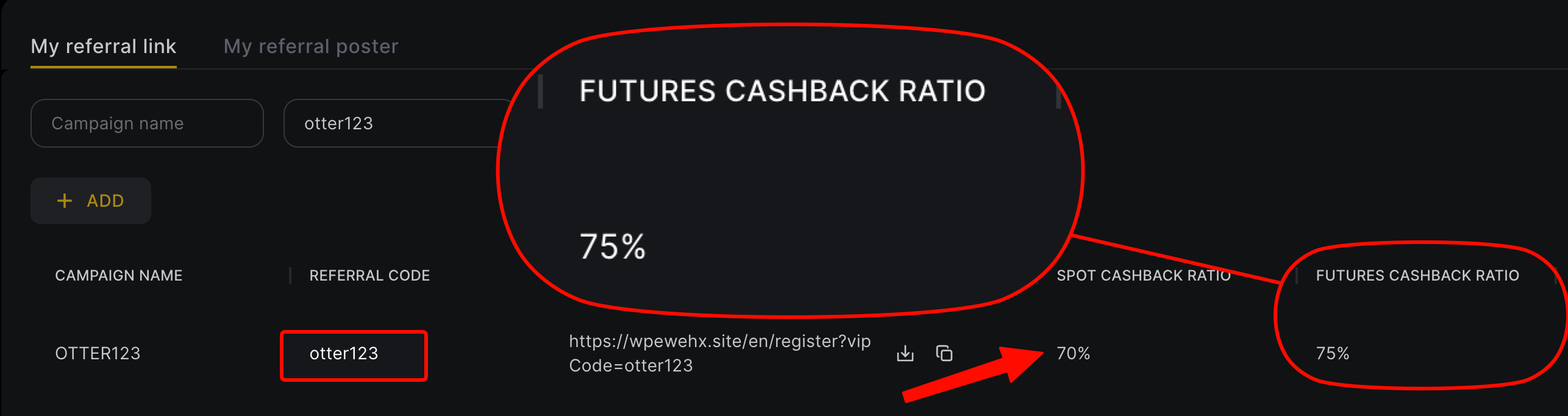
A WEEX referral code can't be added after signup, so existing users rebind by registering a new account with a phone number or email never used on WEEX, using code otter123, and then binding the new UID on the rebate platform (Fee Otter). WEEX doesn't require KYC, and if your old account is verified, the new account can ask in-app support to transfer it. After rebinding, the futures rebate is 70% (60% automatic from WEEX plus 10% extra from Fee Otter) and spot is 45% (checked October 2026).
Compared with the most common 20% referral codes, our code pays 3.5 times as much when you bind through Fee Otter: 70%. On 1,000 USDT of monthly fees, a typical 20% code returns 200 USDT, while ours returns 700 USDT, or 500 USDT more every month.
What do you get by registering on WEEX with our code?
- 70% fee rebate: when bound through Fee Otter, a 60% automatic rebate from WEEX plus a 10% extra from Fee Otter.
- One dashboard: once bound, track every rebate and your available balance on the rebate platform (Fee Otter), and request withdrawals.
- Sign up through the dedicated registration link (our code, otter123, is built into the link).
Most WEEX codes in circulation pass on only about 20%; through Fee Otter you get 70%, and every rebate shows up on the data platform.
How is the WEEX rebate calculated? (a reproducible example)
Formula: rebate = your monthly fees × the rebate rate (70% on WEEX).
Example: using WEEX's listed 0.08% perp taker rate with 2,500 USDT margin at 20x leverage, the notional is 50,000 USDT and the one-side fee is 50,000 × 0.08% = 40 USDT. At 70%, the rebate = 40 × 70% = 28 USDT (a 60% automatic rebate plus 10% added by Fee Otter; see the complete fee-rebate guide).
WEEX's listed perp taker rate is on the high side, but VIP levels bring it down (the 50% WXT futures discount was a limited-time event that has ended), and spot maker and taker are both 0.1% (the 0% spot maker rate in 2025 was a promotion that has ended), so weigh rate and rebate together; see the WEEX fee rebate guide.
Fee rebate rates by exchange (WEEX 70%)
The table below compares the rebate rate for each exchange. Live figures are shown on the platform.
When do you need to rebind?
WEEX only lets you enter a referral code at signup; it can't be added afterwards. If your WEEX account wasn't registered under our code, the system can't credit rebates to you, so you need to rebind under our code.
In any of these cases your old account earns nothing through Fee Otter, so rebinding is worth it:
- You used someone else's code: most KOL codes give you only 20% and keep the rest of the commission.
- You entered no code at all: sign up directly on the website and none of your fees comes back.
- You mainly trade futures: WEEX's futures taker list rate is 0.08%, so the fee base is large and the gap between rebate rates grows with it.
Before you rebind
- A phone number or email never registered on WEEX: an old one just logs you back into the old account.
- Use the dedicated link: it fills in our code, otter123. Details in WEEX referral code explained.
- If the old account is KYC-verified: after rebinding, contact support from the new account (top right of the WEEX app) to transfer KYC; the account also works without KYC.
- Sort out the old account's assets and positions: close open futures and orders first, then copy the new account's deposit address and withdraw from the old one.
For what to fill in on each signup screen, see the WEEX registration guide.
How existing WEEX users rebind
Recommended: re-register with a different phone number or email
Register again with a phone number or email that has never been used on WEEX via the dedicated link, check that the referral field shows otter123, then bind the new account's UID on the rebate platform. KYC is not mandatory on WEEX, and an unverified new account works normally. Note that accounts without KYC have a lower daily withdrawal allowance, with the actual limit shown on WEEX's official pages.
Old account already KYC-verified?
You can transfer the KYC to the new account: from the new account, contact support via the top-right of the WEEX app and follow the steps they give you. Once transferred, the new account is verified. KYC steps, rejection reasons and withdrawal limits by level are in our WEEX KYC guide.
How to confirm the rebind worked
- Find the new account's UID: after logging in to WEEX, tap the avatar at the top right; the UID sits right below your email. More in what an exchange UID is and where to find it.
- Bind the UID on Fee Otter: log in to the Fee Otter rebate site, choose WEEX, paste the new UID and submit. You only need the UID, no password or API key.
- Wait for verification: the system checks that the UID sits under our code; once it passes, the binding is live.
- Trade, then check the rebate records: rebates usually appear in Fee Otter's records the next day or within a few days, each with its amount and rate.
How much more do you get after rebinding?
When you bind through Fee Otter, the WEEX rebate is 70% (60% automatic from WEEX plus a 10% extra from Fee Otter). WEEX's regular-user (VIP 0) list rates are below (futures rates also in WEEX's official futures fee article):
| Market | Maker | Taker |
|---|
| Spot | 0.10% | 0.10% |
| USDT perpetuals | 0.02% | 0.08% |
Fees verified on 2026-09-24. Source: WEEX official fee schedule · Methodology
| Monthly futures fees | Typical 20% code | Fee Otter (70%) | Extra per year vs typical code |
|---|
| 100 USDT | 20 | 70 | 600 |
| 500 USDT | 100 | 350 | 3,000 |
| 1,000 USDT | 200 | 700 | 6,000 |
| 5,000 USDT | 1,000 | 3,500 | 30,000 |
Figures in USDT; the yearly extra is 70% minus 20%. Example: 1 million USDT of futures a month, all taker, means monthly fees = 1,000,000 × 0.08% = 800 USDT. A typical 20% code returns 160 USDT; ours returns 560 USDT. Taker 0.08% × (1 − 70%) = 0.024%, below the 0.05% list rate of other exchanges.
On the same 800 USDT of monthly futures fees, a typical 20% code returns 1,920 USDT a year; ours returns 6,720 USDT, which is 4,800 USDT more.
If you are already a VIP on an exchange and want to rebind or sign up on another exchange, contact our support. We can help you apply for special trading benefits or a higher rebate rate.
Fees and rebates are covered in more detail in the WEEX fee rebate guide. To compare with other exchanges, see WEEX vs Bitget fee rebate compared and WEEX vs XT.COM fee rebate compared.
Old account vs new account: what moves and what stays
A rebind on WEEX means a second account, not a transfer of the old one. Only your assets and (optionally) your KYC move over; everything else starts fresh on the new account. Check each row before you start so nothing is left behind:
| Item | Moves to the new account? | What to do |
|---|
| Balances (USDT, coins) | Only if you withdraw them | Withdraw from the old account to the new account's deposit address (steps below) |
| Open futures positions and orders | No | Close positions and cancel orders first; margin locked in positions cannot be withdrawn |
| KYC verification | Optional | Contact support from the new account to transfer it, or trade without KYC at a lower daily withdrawal allowance |
| Referrer | No, and that is the point | The new account is under our code if you signed up through the dedicated link; the old account keeps its old referrer |
| VIP level and 30-day volume | No | Both are calculated per account, so the new account starts at the regular-user (VIP 0) rates shown above |
| API keys, bots and copy-trading | No | Create new API keys on the new account, reconnect bots, re-follow traders, then delete the old keys |
| Rebates on Fee Otter | From the new UID onward | Bind the new UID; fees on the new account accrue rebates from then on |
Moving your funds safely: a six-step checklist
- Close and cancel: close open futures positions and cancel open orders on the old account, then move futures margin back to the spot (funding) account.
- Copy the new deposit address: on the new account open Assets → Deposit, choose the coin and the network, and copy the address (plus the memo or tag if the coin needs one).
- Withdraw on the same network: on the old account withdraw the same coin on the same network. A mismatched network is the most common way funds get lost in a move.
- Send a small test first: withdraw a small amount, wait until it arrives, then send the rest. The network fee is tiny next to the risk of a wrong address.
- Mind the daily allowance: if the old account has no KYC, its daily withdrawal allowance may cap how much you can move in one day, so a large balance can take more than one day. The exact limit is on WEEX's official withdrawal limit table.
- Keep the old account secure until it is empty: leave 2FA on, and only stop using it once the balance is zero and every open order is gone.
Rates and rules for WEEX at a glance (referral code, rebate rate, list fees and the rebind route) are on the WEEX fact sheet, and terms such as KYC transfer and VIP tier are defined in the glossary.
Most common rebind mistakes
- Signing up with the old phone number or email: it just logs you back into the old account, with the same referral.
- Asking support for a KYC transfer from the old account: contact support from the new account, top right of the app.
- Forgetting to bind the UID, or binding the old one: rebates start accruing only once the new account's UID is bound.
Rebind rules on other exchanges
Rebind methods for the other exchanges we support are in the referral code late-entry and rebind rules table.
FAQ
Can I add a WEEX referral code after signing up?
No. WEEX only lets you enter a code at signup; it can't be added or changed afterwards. If you already have an account, use the rebind method above (re-register with a new phone number or email).
What is the WEEX fee rebate?
70% when bound through Fee Otter: a 60% automatic rebate from WEEX plus a 10% extra from Fee Otter.
Do I have to redo KYC to rebind?
No. KYC isn't mandatory on WEEX, so an unverified new account trades normally (accounts without KYC have a lower daily withdrawal allowance, with the actual limit shown on WEEX's official pages); if the old account was verified, contact support from the new account in the app to transfer the KYC.
Is the WEEX code uppercase or lowercase?
Our WEEX code is otter123, all lowercase. It is built into the dedicated link, so registering via the link fills it in for you.
I already have a WEEX account. Can I rebind?
Yes. Register again with a phone number or email never used on WEEX via the dedicated link, check that the referral field shows otter123, and bind the new UID on the rebate platform.
How is WEEX's rebate different from a KOL code?
Most codes pass on only about 20%; through Fee Otter it is 70%, and every rebate is visible on one dashboard, with withdrawals on request.
After rebinding, when do rebates start?
Once you are bound through Fee Otter, the fees you generate afterwards start accruing rebates, which you can track on the rebate platform (Fee Otter); see how the rebate is settled.
After rebinding WEEX, how do I confirm the rebate reaches me?
Check your rebate records on Fee Otter. Once the new UID is bound and verified, trade on the new account; rebates usually appear the next day or within a few days, and seeing them means the rebind worked.
WEEX rebate and rebind rules may change; WEEX official and platform announcements are authoritative.



%2C2026-10-05%20%E5%8F%96%E6%A8%A3%3A%0A%20%20%20%20%20%20%20%E5%BA%95%E8%89%B2%20%230E3452%2C%E5%AD%97%E7%AC%A6%20%2303CA9B)%E3%80%82%0A%20%20%20%20%20%20%20%E7%94%A8%20potrace%20%E6%8F%8F%E5%AD%97%E7%AC%A6%E8%BC%AA%E5%BB%93%2C%E6%95%B4%E5%BC%B5%E7%95%AB%E5%B8%83%E7%9B%B4%E6%8E%A5%E6%98%A0%E5%B0%84%E5%88%B0%E9%80%99%E8%A3%A1%E7%9A%84%2032%20%E5%96%AE%E4%BD%8D%20%E2%80%94%E2%80%94%20%E4%B8%8D%E9%87%8D%E6%96%B0%E7%BD%AE%E4%B8%AD%2C%E4%BF%9D%E7%95%99%E5%AE%98%E6%96%B9%E7%9A%84%E7%95%99%E7%99%BD%E6%AF%94%E4%BE%8B%E3%80%82%0A%20%20%20%20%20%20%20%E8%A6%81%E6%94%B9%E8%AB%8B%E9%87%8D%E8%B7%91%E6%8F%8F%E5%9C%96%2C%E4%B8%8D%E8%A6%81%E6%86%91%E5%8D%B0%E8%B1%A1%E8%AA%BF%E3%80%82%20--%3E%0A%20%20%3Crect%20x%3D%221.5%22%20y%3D%221.5%22%20width%3D%2229%22%20height%3D%2229%22%20rx%3D%228%22%20fill%3D%22%230E3452%22%2F%3E%0A%20%20%3Cpath%20fill%3D%22%2303CA9B%22%20d%3D%22M23.02%205.97C22.14%206.02%2021.54%206.07%2021.22%206.1C20.72%206.15%2019.6%206.28%2019.41%206.31C19.31%206.33%2019.1%206.37%2018.94%206.39C18.29%206.5%2017.94%206.57%2017.2%206.73C16.92%206.79%2016%207.03%2015.8%207.09C15.36%207.23%2014.42%207.54%2014.39%207.56C14.38%207.57%2014.3%207.6%2014.23%207.62C13.82%207.76%2012.7%208.28%2012.13%208.6C11.95%208.7%2011.8%208.78%2011.79%208.78C11.7%208.78%2010.42%209.71%209.98%2010.08C9.16%2010.79%208.07%2012.09%207.6%2012.91C7.28%2013.46%207.18%2013.65%207.06%2013.91C6.87%2014.3%206.76%2014.53%206.68%2014.74C6.56%2015.08%206.37%2015.64%206.34%2015.73C6.33%2015.78%206.3%2015.91%206.27%2016C6.06%2016.79%205.93%2017.87%205.94%2018.62L5.95%2019.05L6.69%2019.04C7.78%2019.03%208.57%2018.94%209.73%2018.68C10.18%2018.58%2011.05%2018.33%2011.45%2018.18C11.52%2018.15%2011.7%2018.08%2011.84%2018.03C13.58%2017.38%2015.67%2016.19%2017.55%2014.77C17.8%2014.58%2018.67%2013.89%2018.74%2013.83C18.76%2013.81%2018.94%2013.66%2019.14%2013.48C19.34%2013.31%2019.54%2013.14%2019.58%2013.11C19.61%2013.07%2019.78%2012.92%2019.95%2012.77C20.94%2011.88%2022.24%2010.57%2023.2%209.48C23.68%208.94%2023.69%208.93%2023.86%208.73C23.94%208.63%2024.02%208.54%2024.03%208.53C24.17%208.4%2025.09%207.25%2025.52%206.67C25.67%206.47%2025.81%206.28%2025.83%206.26C25.86%206.23%2025.89%206.19%2025.9%206.16C25.92%206.13%2025.94%206.12%2025.95%206.13C25.98%206.15%2025.3%207.5%2024.99%208.07C24.88%208.28%2024.78%208.45%2024.78%208.46C24.78%208.46%2024.66%208.67%2024.51%208.93C24.24%209.4%2024.17%209.52%2024.07%209.69C24%209.81%2023.72%2010.27%2023.39%2010.8C22.69%2011.91%2021.44%2013.66%2020.74%2014.52C20.25%2015.12%2020.09%2015.31%2019.72%2015.73C19.01%2016.55%2018.19%2017.38%2017.42%2018.08C17.07%2018.39%2016.92%2018.52%2016.5%2018.87C16.37%2018.98%2016.24%2019.09%2016.2%2019.12C15.83%2019.43%2014.7%2020.21%2014.16%2020.54C13.69%2020.82%2012.69%2021.34%2012.41%2021.45C12.33%2021.48%2012.23%2021.52%2012.17%2021.55C12.01%2021.62%2011.45%2021.84%2011.11%2021.95C10.97%2022%2010.05%2022.26%209.84%2022.31C9.23%2022.45%208.97%2022.5%208.56%2022.56C8.43%2022.58%208.25%2022.61%208.16%2022.62C8.06%2022.64%207.79%2022.67%207.56%2022.69C7.32%2022.71%207.12%2022.74%207.12%2022.76C7.12%2022.85%207.58%2023.42%207.97%2023.82C9.2%2025.09%2010.67%2025.8%2012.52%2026.02C16.51%2026.48%2020.99%2024.06%2023.2%2020.25C23.32%2020.05%2023.43%2019.86%2023.46%2019.81C23.51%2019.73%2023.96%2018.81%2024.04%2018.62C24.67%2017.21%2025.19%2015.43%2025.52%2013.67C25.66%2012.9%2025.73%2012.45%2025.81%2011.77C25.99%2010.32%2026.05%209.33%2026.05%207.64C26.05%206.06%2026.04%206.01%2025.97%205.98C25.9%205.95%2023.53%205.94%2023.02%205.97Z%22%2F%3E%0A%3C%2Fsvg%3E%0A)


%2C2026-10-05%20%E5%8F%96%E6%A8%A3%3A%0A%20%20%20%20%20%20%20%E5%BA%95%E8%89%B2%20%23FFFFFF%2C%E5%AD%97%E7%AC%A6%20%235227FF)%E3%80%82%0A%20%20%20%20%20%20%20%E7%94%A8%20potrace%20%E6%8F%8F%E5%AD%97%E7%AC%A6%E8%BC%AA%E5%BB%93%2C%E6%95%B4%E5%BC%B5%E7%95%AB%E5%B8%83%E7%9B%B4%E6%8E%A5%E6%98%A0%E5%B0%84%E5%88%B0%E9%80%99%E8%A3%A1%E7%9A%84%2032%20%E5%96%AE%E4%BD%8D%20%E2%80%94%E2%80%94%20%E4%B8%8D%E9%87%8D%E6%96%B0%E7%BD%AE%E4%B8%AD%2C%E4%BF%9D%E7%95%99%E5%AE%98%E6%96%B9%E7%9A%84%E7%95%99%E7%99%BD%E6%AF%94%E4%BE%8B%E3%80%82%0A%20%20%20%20%20%20%20%E5%AE%98%E6%96%B9%E6%98%AF%E7%99%BD%E5%BA%95%E7%B4%AB%E8%89%B2%E5%AD%97%E7%AC%A6%3B%E7%99%BD%E5%BA%95%E5%8A%A0%E6%B7%A1%E9%82%8A%2C%E5%85%8D%E5%BE%97%E5%9C%A8%E7%99%BD%E8%89%B2%E8%83%8C%E6%99%AF%E4%B8%8A%E6%B6%88%E5%A4%B1%E3%80%82%0A%20%20%20%20%20%20%20%E8%A6%81%E6%94%B9%E8%AB%8B%E9%87%8D%E8%B7%91%E6%8F%8F%E5%9C%96%2C%E4%B8%8D%E8%A6%81%E6%86%91%E5%8D%B0%E8%B1%A1%E8%AA%BF%E3%80%82%20--%3E%0A%20%20%3Crect%20x%3D%221.5%22%20y%3D%221.5%22%20width%3D%2229%22%20height%3D%2229%22%20rx%3D%228%22%20fill%3D%22%23FFFFFF%22%20stroke%3D%22%23E4E4E7%22%2F%3E%0A%20%20%3Cpath%20fill%3D%22%235227FF%22%20d%3D%22M13.31%208.92L13.31%2012.28L9.94%2012.28L6.56%2012.28L6.57%2015.71C6.58%2019.51%206.57%2019.29%206.79%2020.2C7.56%2023.33%2010.21%2025.78%2013.38%2026.31C14.1%2026.43%2014.44%2026.44%2019.24%2026.44L23.91%2026.44L23.91%2023.05L23.91%2019.66L19.2%2019.65L14.48%2019.64L14.28%2019.56C13.89%2019.41%2013.63%2019.16%2013.44%2018.76L13.36%2018.58L13.35%2015.46L13.34%2012.34L18.56%2012.34L23.78%2012.34L23.78%208.95L23.78%205.56L18.55%205.56L13.31%205.56L13.31%208.92Z%22%2F%3E%0A%3C%2Fsvg%3E%0A)

 Telegram · @feeotter