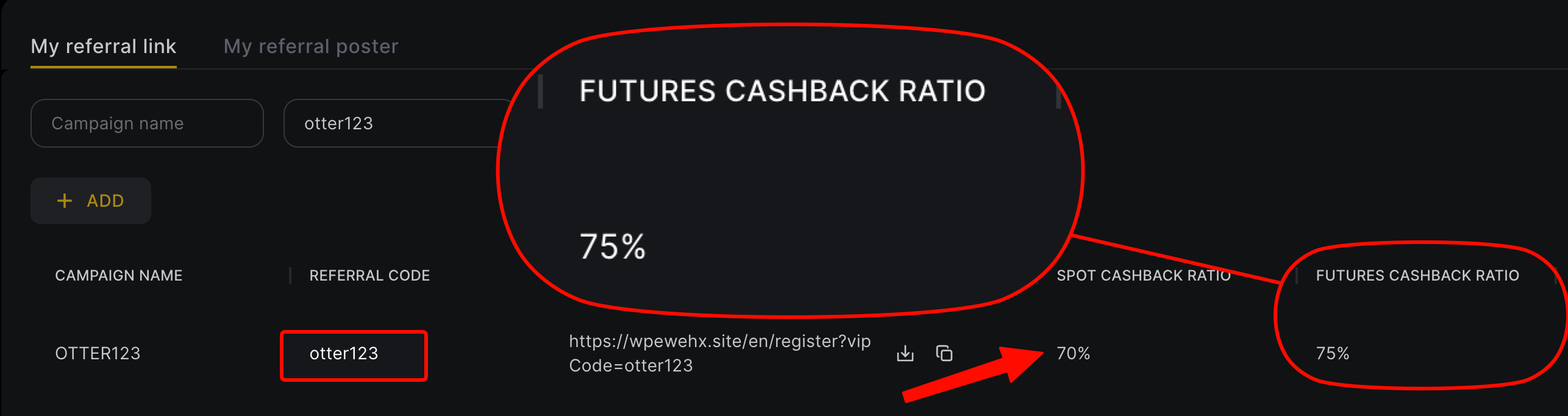
To sign up for WEEX, open the official signup page through our dedicated link, which carries referral code otter123 (all lowercase); enter your email or phone, get the verification code, set a password, deposit, then bind your UID on Fee Otter. The Referral code field is collapsed by default, so expand it and check the code before you submit. KYC is optional on WEEX: you can trade without it, with a lower withdrawal limit. Through Fee Otter, the WEEX rebate is 70% (60% automatic from WEEX + 10% extra from Fee Otter), 3.5 times a typical 20% code (checked October 2026).
What does the WEEX signup page look like?
The WEEX "Create your account" form has a single Email/Phone field, with a "Referral code" field below it that is collapsed by default. Below the form are three quick signup options: Google, Apple, and Telegram.
What do you need before signing up?
- An email address or phone number that has never been registered on WEEX. You can also use Google, Apple, or Telegram.
- You can do KYC later. Prepare an ID only if you want a higher withdrawal limit from the start.
- An authenticator app. For an account without KYC, 2FA is your most important line of defense.
WEEX signup steps
Step 1: Open the WEEX signup page through the dedicated link
The link already carries our referral code, otter123.
Step 2: Enter your email or phone number
One field accepts both email and phone number. If you want to use quick signup with Google, Apple, or Telegram, expand Referral code first and check that it is filled in before you tap.
Step 3: Get the verification code and set a password
Enter the code sent to your email or phone, then set a password.
Step 4: Decide whether to do KYC
See the next section.
Step 5: Bind your UID
Tap your avatar in the top-right corner. Your UID is right under your email. Go to the Fee Otter rebate dashboard, choose WEEX, and paste it in.
WEEX KYC: can you skip it?
Yes. WEEX does not require KYC. Unverified accounts can trade and bind for rebates. The difference is a lower daily withdrawal limit for accounts without KYC. The actual limit is whatever the WEEX official page shows. Verify when you need a higher withdrawal limit; the steps, review time and limits by VIP level are in our WEEX KYC guide.
If you have an older verified WEEX account, you don't need to redo KYC on the new one. From your new account, contact support through the top-right corner of the app, and they can transfer your KYC over.
Who is WEEX for?
WEEX is a futures-focused exchange that doesn't require KYC and charges 0.1% on VIP0 spot maker and taker orders. It suits you if you don't want to verify your identity and mainly trade futures.
The futures taker fee of 0.08% is on the high side among the exchanges we cover, but the rebate is 70%. The WXT promotion that cut futures fees by 50% has ended.
What are WEEX's fees?
These are the list fees for regular WEEX users. Spot maker and taker are both 0.1%, and the futures taker fee is on the high side:
| Trade type | Maker | Taker | Notes |
|---|
| Spot | 0.10% | 0.10% | The 0% maker promotion in 2025 has ended |
| USDT-margined futures | 0.02% | 0.08% | On the high side |
Fees verified: 2026-09-24 (WEEX official fee page; spot rechecked 2026-10-07) · Data sources and methodology
Market orders are always taker. WEEX's futures taker list fee really is on the high side, but VIP tiers can bring it down (WEEX once ran a limited-time promotion that cut futures fees by 50% for WXT holders, and it has ended). Spot maker orders also pay 0.1%, or 0.055% after the 45% rebate. This table shows VIP0 list prices as of September 21, 2026. WEEX may change them. For the latest fees, see the WEEX official fee guide. For the full fee table by VIP tier, see the WEEX official fee page.
How does WEEX's net fee compare with similar exchanges?
The list fee is only the starting point. The "net taker" fee after you bind for rebates is what you actually pay on every futures market order (net fee = list fee × (1 − rebate rate)):
| Exchange | Futures taker list fee | Net taker after binding |
|---|
| WEEX | 0.08% | 0.024% |
| XT.COM | 0.06% | 0.018% |
| Gate | 0.05% | 0.015% |
| Bitget | 0.06% | 0.03% |
On net taker alone, Gate (0.015%) is lower than WEEX (0.024%). The reasons to choose WEEX are usually outside fees: products, liquidity, or features you already use.
Data from the September 2026 Exchange Fee and Rebate Index (fees verified 2026-09-24). OKX is a 20% auto-rebate + exclusive rewards.
What is the cheapest way to place your first futures order?
Take 2,500 USDT of margin at 20x leverage. The notional position is 50,000 USDT. Fees are charged on the notional position, not the margin. On WEEX:
- Market order (taker 0.08%): the opening fee is 40 USDT. After binding, 28 USDT comes back, so you pay 12 USDT.
- Filled limit order (maker 0.02%): the opening fee is 10 USDT. After binding, 7 USDT comes back, so you pay 3 USDT.
Counting opening and closing as one round trip, you pay 24 USDT with market orders and 6 USDT with limit orders. Use limit orders when you can, then add the rebate on top. That is the most direct way to save on WEEX.
How is the rebate calculated after you sign up with a referral code?
The WEEX rebate works like this: with our referral code, WEEX automatically refunds 60% on futures and 35% on spot. After you bind your UID, Fee Otter adds an extra 10%, for a total of 70% on futures and 45% on spot. The WXT promotion that cut futures fees by 50% has ended.
Based on 500 USDT in monthly futures fees: you get back 350 USDT. After binding, the 0.08% futures taker fee drops to 0.024%.
How much can you save in a month?
Here are three trading volumes, calculated with WEEX's futures list taker fee:
| Monthly futures volume | Monthly fees | Refund with a typical 20% code | Refund with Fee Otter (70%) |
|---|
| 100,000 USDT | 80 | 16 | 56 |
| 500,000 USDT | 400 | 80 | 280 |
| 2,000,000 USDT | 1,600 | 320 | 1,120 |
All figures assume market orders (taker 0.08%), in USDT per month.
If you're already a VIP on an exchange and want to rebind or sign up on another one, contact support: we can help you apply for special trading benefits or a higher rebate rate.
When does the rebate arrive, and where can you see it?
With Fee Otter's code, WEEX automatically refunds 60% on futures and 35% on spot. The extra rebate is calculated trade by trade by Fee Otter after the daily report is published, and is usually added to your available balance on the rebate dashboard on T+1. Because WEEX's futures taker fee is on the high side, the same volume generates more fees, and the amount refunded grows with it.
The most common mistakes new WEEX users make
- Using quick signup without expanding Referral code. Confirm the code is in the field first, then tap Google, Apple, or Telegram.
- "Signing up again" with an old phone number or email. That just logs you back in to the old account.
- Giving up after seeing the 0.08% futures taker fee. It is on the high end, but the rebate is 70%, and the net fee after binding is 0.024%.
The first thing to do after signup
- Bind your UID: once bound, the WEEX rebate totals 70%.
- Turn on two-factor authentication: for an account without KYC, 2FA matters even more.
- Check whether the withdrawal limit is enough: if it isn't, do KYC then. You don't need to do it at the start.
Already have a WEEX account?
WEEX doesn't let you add a code after signup. Sign up again through a dedicated link with a phone number or email that has never been registered on WEEX. If your old account completed KYC, contact support from the new account to transfer it. For details, see the WEEX rebind guide for existing users.
WEEX compared with other exchanges
Risks to know before using WEEX
WEEX's rebate terms are solid, but know these risks before you deposit:
- Oversight and ratings: WEEX was founded in 2018; its CoinGecko trust score is 8/10 with no security incidents recorded in the past 12 months. Unlike a broker overseen by a major financial regulator, though, balances there carry no deposit-insurance-style protection.
- Don't keep long-term or large balances on the exchange: keep only the funds you are actively trading on WEEX; withdraw money you aren't trading and anything you hold long term.
- Use a cold wallet for long-term holdings: move large, long-term assets to a hardware cold wallet (such as a Ledger) and keep them offline.
- Futures and high leverage are high risk: WEEX offers up to 400x on futures (BTC and other major contracts). Beginners should avoid high leverage and learn the rules with small amounts first.
FAQ
Is the WEEX referral code uppercase or lowercase?
Lowercase: otter123. Enter it exactly as the link fills it in; do not switch it to uppercase.
Can you trade on WEEX without KYC?
Yes, and you can bind for rebates too. Unverified accounts have a lower daily withdrawal limit. The limit is whatever the official page shows.
Does signing up with Google, Apple, or Telegram carry the referral code?
Before you tap, expand Referral code and check that it is filled in. If it is empty, sign up with email through the dedicated link instead.
Can you add a referral code after signing up for WEEX?
No. You can only rebind, by signing up again with a phone number or email that has never been registered.
Do you need to give an API key to bind your UID?
No. We only need your UID.
What is the WEEX withdrawal limit without KYC?
Whatever the WEEX official page shows. Complete KYC when you need a higher limit.
Can you transfer your WEEX KYC from an old account?
Yes. From the new account, contact support through the top-right corner of the app to transfer it.
Is the WEEX WXT discount still available?
The 50% WXT discount on futures fees was a limited-time promotion, and it has ended.



%2C2026-10-05%20%E5%8F%96%E6%A8%A3%3A%0A%20%20%20%20%20%20%20%E5%BA%95%E8%89%B2%20%230E3452%2C%E5%AD%97%E7%AC%A6%20%2303CA9B)%E3%80%82%0A%20%20%20%20%20%20%20%E7%94%A8%20potrace%20%E6%8F%8F%E5%AD%97%E7%AC%A6%E8%BC%AA%E5%BB%93%2C%E6%95%B4%E5%BC%B5%E7%95%AB%E5%B8%83%E7%9B%B4%E6%8E%A5%E6%98%A0%E5%B0%84%E5%88%B0%E9%80%99%E8%A3%A1%E7%9A%84%2032%20%E5%96%AE%E4%BD%8D%20%E2%80%94%E2%80%94%20%E4%B8%8D%E9%87%8D%E6%96%B0%E7%BD%AE%E4%B8%AD%2C%E4%BF%9D%E7%95%99%E5%AE%98%E6%96%B9%E7%9A%84%E7%95%99%E7%99%BD%E6%AF%94%E4%BE%8B%E3%80%82%0A%20%20%20%20%20%20%20%E8%A6%81%E6%94%B9%E8%AB%8B%E9%87%8D%E8%B7%91%E6%8F%8F%E5%9C%96%2C%E4%B8%8D%E8%A6%81%E6%86%91%E5%8D%B0%E8%B1%A1%E8%AA%BF%E3%80%82%20--%3E%0A%20%20%3Crect%20x%3D%221.5%22%20y%3D%221.5%22%20width%3D%2229%22%20height%3D%2229%22%20rx%3D%228%22%20fill%3D%22%230E3452%22%2F%3E%0A%20%20%3Cpath%20fill%3D%22%2303CA9B%22%20d%3D%22M23.02%205.97C22.14%206.02%2021.54%206.07%2021.22%206.1C20.72%206.15%2019.6%206.28%2019.41%206.31C19.31%206.33%2019.1%206.37%2018.94%206.39C18.29%206.5%2017.94%206.57%2017.2%206.73C16.92%206.79%2016%207.03%2015.8%207.09C15.36%207.23%2014.42%207.54%2014.39%207.56C14.38%207.57%2014.3%207.6%2014.23%207.62C13.82%207.76%2012.7%208.28%2012.13%208.6C11.95%208.7%2011.8%208.78%2011.79%208.78C11.7%208.78%2010.42%209.71%209.98%2010.08C9.16%2010.79%208.07%2012.09%207.6%2012.91C7.28%2013.46%207.18%2013.65%207.06%2013.91C6.87%2014.3%206.76%2014.53%206.68%2014.74C6.56%2015.08%206.37%2015.64%206.34%2015.73C6.33%2015.78%206.3%2015.91%206.27%2016C6.06%2016.79%205.93%2017.87%205.94%2018.62L5.95%2019.05L6.69%2019.04C7.78%2019.03%208.57%2018.94%209.73%2018.68C10.18%2018.58%2011.05%2018.33%2011.45%2018.18C11.52%2018.15%2011.7%2018.08%2011.84%2018.03C13.58%2017.38%2015.67%2016.19%2017.55%2014.77C17.8%2014.58%2018.67%2013.89%2018.74%2013.83C18.76%2013.81%2018.94%2013.66%2019.14%2013.48C19.34%2013.31%2019.54%2013.14%2019.58%2013.11C19.61%2013.07%2019.78%2012.92%2019.95%2012.77C20.94%2011.88%2022.24%2010.57%2023.2%209.48C23.68%208.94%2023.69%208.93%2023.86%208.73C23.94%208.63%2024.02%208.54%2024.03%208.53C24.17%208.4%2025.09%207.25%2025.52%206.67C25.67%206.47%2025.81%206.28%2025.83%206.26C25.86%206.23%2025.89%206.19%2025.9%206.16C25.92%206.13%2025.94%206.12%2025.95%206.13C25.98%206.15%2025.3%207.5%2024.99%208.07C24.88%208.28%2024.78%208.45%2024.78%208.46C24.78%208.46%2024.66%208.67%2024.51%208.93C24.24%209.4%2024.17%209.52%2024.07%209.69C24%209.81%2023.72%2010.27%2023.39%2010.8C22.69%2011.91%2021.44%2013.66%2020.74%2014.52C20.25%2015.12%2020.09%2015.31%2019.72%2015.73C19.01%2016.55%2018.19%2017.38%2017.42%2018.08C17.07%2018.39%2016.92%2018.52%2016.5%2018.87C16.37%2018.98%2016.24%2019.09%2016.2%2019.12C15.83%2019.43%2014.7%2020.21%2014.16%2020.54C13.69%2020.82%2012.69%2021.34%2012.41%2021.45C12.33%2021.48%2012.23%2021.52%2012.17%2021.55C12.01%2021.62%2011.45%2021.84%2011.11%2021.95C10.97%2022%2010.05%2022.26%209.84%2022.31C9.23%2022.45%208.97%2022.5%208.56%2022.56C8.43%2022.58%208.25%2022.61%208.16%2022.62C8.06%2022.64%207.79%2022.67%207.56%2022.69C7.32%2022.71%207.12%2022.74%207.12%2022.76C7.12%2022.85%207.58%2023.42%207.97%2023.82C9.2%2025.09%2010.67%2025.8%2012.52%2026.02C16.51%2026.48%2020.99%2024.06%2023.2%2020.25C23.32%2020.05%2023.43%2019.86%2023.46%2019.81C23.51%2019.73%2023.96%2018.81%2024.04%2018.62C24.67%2017.21%2025.19%2015.43%2025.52%2013.67C25.66%2012.9%2025.73%2012.45%2025.81%2011.77C25.99%2010.32%2026.05%209.33%2026.05%207.64C26.05%206.06%2026.04%206.01%2025.97%205.98C25.9%205.95%2023.53%205.94%2023.02%205.97Z%22%2F%3E%0A%3C%2Fsvg%3E%0A)


%2C2026-10-05%20%E5%8F%96%E6%A8%A3%3A%0A%20%20%20%20%20%20%20%E5%BA%95%E8%89%B2%20%23FFFFFF%2C%E5%AD%97%E7%AC%A6%20%235227FF)%E3%80%82%0A%20%20%20%20%20%20%20%E7%94%A8%20potrace%20%E6%8F%8F%E5%AD%97%E7%AC%A6%E8%BC%AA%E5%BB%93%2C%E6%95%B4%E5%BC%B5%E7%95%AB%E5%B8%83%E7%9B%B4%E6%8E%A5%E6%98%A0%E5%B0%84%E5%88%B0%E9%80%99%E8%A3%A1%E7%9A%84%2032%20%E5%96%AE%E4%BD%8D%20%E2%80%94%E2%80%94%20%E4%B8%8D%E9%87%8D%E6%96%B0%E7%BD%AE%E4%B8%AD%2C%E4%BF%9D%E7%95%99%E5%AE%98%E6%96%B9%E7%9A%84%E7%95%99%E7%99%BD%E6%AF%94%E4%BE%8B%E3%80%82%0A%20%20%20%20%20%20%20%E5%AE%98%E6%96%B9%E6%98%AF%E7%99%BD%E5%BA%95%E7%B4%AB%E8%89%B2%E5%AD%97%E7%AC%A6%3B%E7%99%BD%E5%BA%95%E5%8A%A0%E6%B7%A1%E9%82%8A%2C%E5%85%8D%E5%BE%97%E5%9C%A8%E7%99%BD%E8%89%B2%E8%83%8C%E6%99%AF%E4%B8%8A%E6%B6%88%E5%A4%B1%E3%80%82%0A%20%20%20%20%20%20%20%E8%A6%81%E6%94%B9%E8%AB%8B%E9%87%8D%E8%B7%91%E6%8F%8F%E5%9C%96%2C%E4%B8%8D%E8%A6%81%E6%86%91%E5%8D%B0%E8%B1%A1%E8%AA%BF%E3%80%82%20--%3E%0A%20%20%3Crect%20x%3D%221.5%22%20y%3D%221.5%22%20width%3D%2229%22%20height%3D%2229%22%20rx%3D%228%22%20fill%3D%22%23FFFFFF%22%20stroke%3D%22%23E4E4E7%22%2F%3E%0A%20%20%3Cpath%20fill%3D%22%235227FF%22%20d%3D%22M13.31%208.92L13.31%2012.28L9.94%2012.28L6.56%2012.28L6.57%2015.71C6.58%2019.51%206.57%2019.29%206.79%2020.2C7.56%2023.33%2010.21%2025.78%2013.38%2026.31C14.1%2026.43%2014.44%2026.44%2019.24%2026.44L23.91%2026.44L23.91%2023.05L23.91%2019.66L19.2%2019.65L14.48%2019.64L14.28%2019.56C13.89%2019.41%2013.63%2019.16%2013.44%2018.76L13.36%2018.58L13.35%2015.46L13.34%2012.34L18.56%2012.34L23.78%2012.34L23.78%208.95L23.78%205.56L18.55%205.56L13.31%205.56L13.31%208.92Z%22%2F%3E%0A%3C%2Fsvg%3E%0A)

 Telegram · @feeotter