To register on Bitget, follow six steps: open the official signup page through Fee Otter's dedicated link, enter your email or phone and set a password, expand the referral code field and check that it shows FEEOTTER, pass the puzzle check and enter the 6-digit code, complete KYC (ID plus face scan), then deposit, turn on BGB fee deduction and bind your UID on Fee Otter. Signing up is free and needs no documents, but since 2024 Bitget has required identity verification before you can deposit, trade or withdraw; review usually finishes within 60 minutes (checked 2026-10-18). Exchange accounts have no public way to add a code later, so a missed code means closing the account and waiting 30 days to start over. With this code, Bitget pays a 50% futures rebate (20% automatic from Bitget + 30% Fee Otter extra), 2.5 times a typical 20% referral code.
This guide follows Bitget's help center articles on registration, identity verification and account closure, plus its Terms of Use: who can sign up, what to prepare, how the app and website differ, how long each step takes, how to fix common errors, and what to do if you already have an account.
Who can register on Bitget? Countries, age and account limits
The Prohibited Countries in Bitget's Terms of Use are Austria, Belarus, Canada, Crimea, Cuba, Donetsk, France, Germany, Hong Kong, Iran, Japan, Kazakhstan, Luhansk, Malaysia, North Korea, Russia, Singapore, Sudan, the United States (including Puerto Rico, Guam and its other territories), Iraq, Libya, Yemen, Afghanistan, the Central African Republic, the Democratic Republic of the Congo, Guinea-Bissau, Haiti, Lebanon, Somalia, South Sudan and Thailand (Bitget Terms of Use, last updated 2026-10-16, checked 2026-10-18).
- Age: individual users must be at least 18 (clause 2.2).
- Accounts: clause 2.5 says you may register only if you don't already have an account, and the verification FAQ says each user can verify only one Bitget account. If you need several trading accounts, Bitget suggests subaccounts under your verified main account.
- Email and phone: you pick one at signup and can link the other later.
- Indonesia: the blocking-request list published by OJK's Satgas PASTI in June 2026 includes Bitget Limited (OJK release).
Travel matters too: the terms say that if you travel to a Prohibited Country, services may be unavailable and your access may be blocked, including your view of open orders and positions. They also forbid using a VPN to change your IP address to get around the restriction.
Bitget's prohibited list is longer than most exchanges'. Germany, France, Austria, Japan, Thailand and Malaysia are all on it, so check the list before you sign up.
What does the Bitget signup page look like?
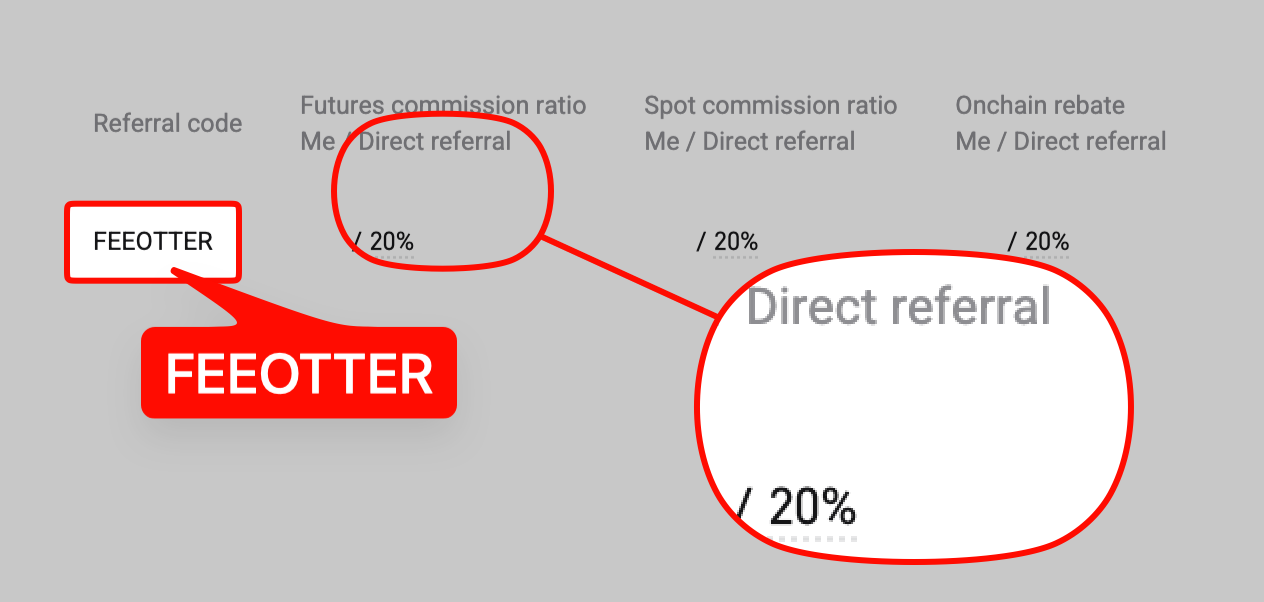
The Bitget signup page labels the field "Referral code", and it is collapsed by default. When you arrive through our dedicated link, the code FEEOTTER is filled in automatically. Open the field and check before you submit.
Keep two products clearly apart: the Bitget exchange and Bitget Wallet. The claim you see online that "you can add a referral code within 7 days of signup" is a wallet rule. It does not apply to exchange accounts.
What do you need before signing up?
- An email address or phone number: you can only choose one at signup, so make sure you can receive mail or SMS on it.
- A password that meets the rules: 8 to 32 characters, with at least one number, one uppercase letter and one special character.
- An ID document and a phone with a camera: for identity verification. Your details must match your ID.
- Make sure you are signing up for the Bitget exchange, not Bitget Wallet. They are different products with different referral code rules.
- If you plan to use BGB fee deduction, buy a little BGB after you deposit and turn the deduction on.
Bitget signup steps
Step 1: Open the Bitget signup page through the dedicated link
The link already includes our code FEEOTTER. If you open the site yourself, click Sign Up at the top right of the homepage; in the app, tap Get Started on the welcome screen, then Sign Up. Check that the URL is Bitget's official domain to avoid phishing sites.
Step 2: Enter your email or phone and set a password
Choose email or phone and tick the box to accept the User Agreement and Privacy Policy. The password must be 8 to 32 characters with at least one number, one uppercase letter and one special character. You can also sign up with Google, Telegram or a wallet.
Step 3: Expand the referral code field and check that it shows FEEOTTER
The field is collapsed by default, so you can't see whether the code was applied until you open it. There is no fix if this step is wrong, so double-check it.
Step 4: Pass the puzzle check and enter the 6-digit code
After you click Next, solve the puzzle, then enter the 6-digit code sent to your email or phone and click Sign Up. Once you log in, turn on two-factor authentication (2FA) under Security right away.
Step 5: Complete identity verification
An unverified account can't deposit, trade or withdraw. Details are in the KYC section below.
Step 6: Deposit, turn on BGB deduction and bind your UID
Hold BGB and turn on deduction to get 20% off spot fees. Your UID is next to your avatar under Account or your profile. Go to the Fee Otter rebate dashboard, choose Bitget, and paste it in.
Bitget sign up on the app vs the website: what's different?
Both let you sign up with email or phone, both have the optional referral code field, and both send a 6-digit code. Bitget's official web and app signup guides differ in these points:
| Item | Website | App |
|---|
| Entry point | Sign Up at the top right of the homepage | Welcome screen: Get Started → Sign Up |
| Order of fields | Account, referral code and terms first; password on the next page | Account, password and referral code on one page, then Create account |
| Phone number | The guide says to enter it without the country code | Not specified in the guide |
| Bot check | Puzzle captcha | Not mentioned in the guide |
| One-tap signup | Google, Telegram, wallet | Not listed in the guide |
| Turning on 2FA | Avatar → Security | Top-left menu → profile → Security |
Based on Bitget's website signup guide and app signup guide, checked 2026-10-18; button names may change between versions.
How long do Bitget signup and KYC take?
Signup itself is just entering details, verifying and setting a password, and Bitget gives no time for it. The time goes into KYC and a few waiting periods:
| Stage | Time |
|---|
| KYC review | Usually within 60 minutes; after that, open a ticket with your UID |
| KYC attempts | Up to 5 in 24 hours; if all fail, wait another 24 hours |
| Resetting identity verification | About 1 business day; the account is temporarily unverified and can't deposit or trade |
| Closing an account | Reviewed within 24 hours of the request |
| Signing up again after closing | Wait 30 days to reuse the same phone, email or ID |
| Fee Otter rebate credited | Usually T+1 to your withdrawable balance on the rebate dashboard |
Sources: Bitget verification FAQ, Bitget account deletion guide, checked 2026-10-18.
Bitget KYC: what do you need?
Bitget identity verification is an ID plus a face scan, and your details must match your ID. According to the official verification FAQ, deposits and trading have required verification since January 1, 2024; under the June 4, 2024 announcement, users without level 1 verification have also been unable to withdraw (on-chain or internal transfer) since July 20, 2024.
- One verified account per person: using the same ID on a second account gets rejected. Subaccounts can't be verified on their own; they inherit the main account's access.
- Daily attempt limit: up to 5 in 24 hours.
- Withdrawal limit: after verification, VIP 0 can withdraw 3 million USDT per 24 hours, and higher VIP levels get more.
- Name corrections: if your verified name doesn't match your legal name, use Edit Name on the verification page and upload supporting documents.
Within 30 days of closing a Bitget account, you can't open a new one with the same phone number, email or ID, and your verified identity data is permanently deleted. Get the referral code right the first time.
Sources: Bitget verification FAQ, Bitget official account closure guide, checked 2026-10-18. For each verification level, see the Bitget KYC guide; other exchanges' rules are in our exchange KYC comparison.
Bitget signup problems: no verification code, KYC failed
| What you see | Usual cause | What to do |
|---|
| No verification code | Filtered as spam, or the email or phone was mistyped | Check spam, confirm the entry and retry; if it still doesn't come, open a ticket |
| Password keeps getting rejected | It doesn't meet the rules | 8 to 32 characters with a number, an uppercase letter and a special character |
| KYC rejected because the ID is already used | The same ID verified another Bitget account | One verified account per person; use subaccounts if you need more |
| KYC failed 5 times in a day | Daily limit reached | Wait 24 hours, read the rejection reason and retake the photos |
| No KYC result after 60 minutes | Queue or manual review | Open a ticket with your UID |
| Blocked when signing up again right after closing | 30-day cooldown on the same phone, email and ID | Wait the full 30 days |
| Can't find the "add a code within 7 days" option | That is a Bitget Wallet rule | Exchange accounts have no way to add a code later |
If you are in a Prohibited Country, you may be unable to log in or use services. That is the regional restriction in the terms, not an account error.
Who is Bitget for?
Bitget is known for copy trading. It has a full set of lead-trader and copy-trading features and a complete futures lineup. It suits you if you want to copy trade or mainly trade futures.
The futures rebate is 50%, and BGB cuts spot fees by 20%. The futures taker fee of 0.06% is higher than at most exchanges, so the net fee after the rebate is what matters when you compare.
What are Bitget's fees?
These are the list fees for regular Bitget users:
| Trade type | Maker | Taker | Platform token discount |
|---|
| Spot | 0.10% | 0.10% | 20% off with BGB (spot and margin only) |
| USDT-margined futures | 0.02% | 0.06% |
Fees verified: 2026-09-24 (Bitget official fee page) · Data sources and methodology
This table shows list prices as of September 2026. Bitget may change them. For the latest fees, see the Bitget official fee page.
How does Bitget's net fee compare with similar exchanges?
The list fee is only the starting point. The "net taker" fee after you bind for rebates is what you actually pay on every futures market order (net fee = list fee × (1 − rebate rate)):
| Exchange | Futures taker list fee | Rebate rate | Net taker after rebate |
|---|
| Bitget | 0.06% | 50% | 0.03% |
| Binance | 0.05% | 40% | 0.03% |
| Bybit | 0.055% | 40% | 0.033% |
| Gate | 0.05% | 70% | 0.015% |
On net taker alone, Gate (0.015%) is lower than Bitget (0.03%). The reasons to choose Bitget are usually outside fees: products, liquidity, or features you already use.
Data from the September 2026 Exchange Fee and Rebate Index (fees verified 2026-09-24). OKX is a 20% auto-rebate + exclusive rewards.
What is the cheapest way to place your first futures order?
Take 2,500 USDT of margin at 20x leverage. The notional position is 50,000 USDT. Fees are charged on the notional position, not the margin. On Bitget:
- Market order (taker 0.06%): the opening fee is 30 USDT. After binding, the 50% rebate refunds 15 USDT, so you pay 15 USDT.
- Filled limit order (maker 0.02%): the opening fee is 10 USDT. The rebate refunds 5 USDT, so you pay 5 USDT.
Counting opening and closing as one round trip, you pay 30 USDT with market orders and 10 USDT with limit orders. Use limit orders when you can, then add the rebate on top. That is the most direct way to save on Bitget.
How is the rebate calculated after you sign up with a referral code?
The Bitget rebate works like this: the 20% from the referral code is refunded automatically by Bitget. After you bind your UID, Fee Otter adds an extra rebate, for a total of 50%.
Based on 500 USDT in monthly futures fees, a 50% rebate gets back 250 USDT. Bitget's futures taker fee of 0.06% is higher than at most exchanges. After a 50% rebate, the net fee is 0.03%.
How much can you save in a month?
Here are three trading volumes, calculated with Bitget's futures list taker fee:
| Monthly futures volume | Monthly fees | Refund with a typical 20% code | Refund with Fee Otter (50%) |
|---|
| 100,000 USDT | 60 | 12 | 30 |
| 500,000 USDT | 300 | 60 | 150 |
| 2,000,000 USDT | 1,200 | 240 | 600 |
All figures assume market orders (taker 0.06%), in USDT per month.
If you are already a VIP at an exchange and want to rebind or sign up at another exchange, contact support. We can help you apply for special trading benefits or a higher rebate rate.
When does the rebate arrive, and where can you see it?
Bitget is also "charged in full, then refunded". The 20% from the referral code is refunded to your account by Bitget under its own rules. The extra rebate is calculated trade by trade by Fee Otter after the daily report is published, and is usually added to your available balance on the rebate dashboard on T+1. Fees from copy trading show up in the details as well.
The most common mistakes new Bitget users make
- Applying the wallet's rules to the exchange. "Add a code within 7 days" is a Bitget Wallet rule. Exchange accounts have no way to add a code after signup.
- Not expanding the referral code field. While it is collapsed, you can't tell whether the code was applied.
- Thinking the same ID can verify a second account. Bitget allows one verified account per person; use subaccounts to keep funds separate.
- Rushing into copy trading before binding your UID. Fees from copy trading earn rebates too, but only from the time you bind.
- Not moving your assets out before closing the account. After closing, you can't log in to the old account again; empty the balance and close positions and Earn subscriptions first.
The first thing to do after signup
- Bind your UID: especially if you plan to copy trade. Bind first, then copy, so the copy-trading fees count toward your rebate.
- Turn on BGB deduction: the 0.10% spot fee becomes 0.08%, and the rebate stacks on top.
- Turn on two-factor authentication.
Already have a Bitget account?
The Bitget exchange has no way to add a code after signup. To rebind, close the old account, wait out the 30-day cooldown, and sign up again through a dedicated link. For details, see the Bitget rebind guide for existing users.
Bitget compared with other exchanges
Risks to know before using Bitget
Bitget's futures and copy-trading features are well built, but know these risks before you deposit:
- Registration and regulation: Bitget is registered in Seychelles (CoinGecko) and holds registrations or licences in some countries, but its regulatory status differs by region. In February 2025 Japan's FSA asked Apple and Google to remove the Bitget app because it is not registered in Japan (The Block). Check that your region is supported before signing up.
- September 2026 security incident: on 24 September 2026 Bitget's hot wallets were breached; the loss is estimated at about US$350-390 million (Bitget is still updating the figure), with North Korean hackers the suspected culprits (CNBC). Bitget says its 5,500 BTC Protection Fund covers the loss; withdrawals were paused and, per its official notice, resume in phases from 28 September.
- Keep only active trading funds there: an exchange is for money you are actively trading; withdraw idle funds and anything you hold long term.
- Use a cold wallet for long-term holdings: move large, long-term assets to a hardware cold wallet (such as a Ledger) and keep them offline.
- Futures and high leverage are high risk: leverage magnifies gains and losses alike. Beginners should avoid high leverage and learn the rules with small amounts first.
FAQ
How do I register on Bitget?
Open the signup page through the dedicated link, enter your email or phone and a password, expand the referral code field to check it shows FEEOTTER, pass the puzzle check and enter the 6-digit code, then complete identity verification. You can sign up on the website or in the app.
Do I need KYC to sign up for Bitget?
Signing up needs no documents, but without identity verification you can't deposit, trade or withdraw. Review usually finishes within 60 minutes.
Can I add a referral code after joining Bitget?
Not on an exchange account. The "add within 7 days" rule you see online is for Bitget Wallet. If you missed the code, the only way is to close the account, wait 30 days and sign up again through the dedicated link.
Which countries can't register on Bitget?
Under the Terms of Use, they include the US, Canada, Hong Kong, Singapore, Japan, Germany, France, Austria, Thailand, Malaysia, Russia, Belarus, Kazakhstan, North Korea and Iran, among others. The terms carry the full list.
How many Bitget accounts can one person have?
Each user can verify only one Bitget account, and using the same ID on a second account gets rejected. If you need several trading accounts, open subaccounts under the main account.
How long after closing a Bitget account can I sign up again?
The closure is reviewed within 24 hours, and for the next 30 days you can't open a new account with the same phone number, email or ID.



%2C2026-10-05%20%E5%8F%96%E6%A8%A3%3A%0A%20%20%20%20%20%20%20%E5%BA%95%E8%89%B2%20%230E3452%2C%E5%AD%97%E7%AC%A6%20%2303CA9B)%E3%80%82%0A%20%20%20%20%20%20%20%E7%94%A8%20potrace%20%E6%8F%8F%E5%AD%97%E7%AC%A6%E8%BC%AA%E5%BB%93%2C%E6%95%B4%E5%BC%B5%E7%95%AB%E5%B8%83%E7%9B%B4%E6%8E%A5%E6%98%A0%E5%B0%84%E5%88%B0%E9%80%99%E8%A3%A1%E7%9A%84%2032%20%E5%96%AE%E4%BD%8D%20%E2%80%94%E2%80%94%20%E4%B8%8D%E9%87%8D%E6%96%B0%E7%BD%AE%E4%B8%AD%2C%E4%BF%9D%E7%95%99%E5%AE%98%E6%96%B9%E7%9A%84%E7%95%99%E7%99%BD%E6%AF%94%E4%BE%8B%E3%80%82%0A%20%20%20%20%20%20%20%E8%A6%81%E6%94%B9%E8%AB%8B%E9%87%8D%E8%B7%91%E6%8F%8F%E5%9C%96%2C%E4%B8%8D%E8%A6%81%E6%86%91%E5%8D%B0%E8%B1%A1%E8%AA%BF%E3%80%82%20--%3E%0A%20%20%3Crect%20x%3D%221.5%22%20y%3D%221.5%22%20width%3D%2229%22%20height%3D%2229%22%20rx%3D%228%22%20fill%3D%22%230E3452%22%2F%3E%0A%20%20%3Cpath%20fill%3D%22%2303CA9B%22%20d%3D%22M23.02%205.97C22.14%206.02%2021.54%206.07%2021.22%206.1C20.72%206.15%2019.6%206.28%2019.41%206.31C19.31%206.33%2019.1%206.37%2018.94%206.39C18.29%206.5%2017.94%206.57%2017.2%206.73C16.92%206.79%2016%207.03%2015.8%207.09C15.36%207.23%2014.42%207.54%2014.39%207.56C14.38%207.57%2014.3%207.6%2014.23%207.62C13.82%207.76%2012.7%208.28%2012.13%208.6C11.95%208.7%2011.8%208.78%2011.79%208.78C11.7%208.78%2010.42%209.71%209.98%2010.08C9.16%2010.79%208.07%2012.09%207.6%2012.91C7.28%2013.46%207.18%2013.65%207.06%2013.91C6.87%2014.3%206.76%2014.53%206.68%2014.74C6.56%2015.08%206.37%2015.64%206.34%2015.73C6.33%2015.78%206.3%2015.91%206.27%2016C6.06%2016.79%205.93%2017.87%205.94%2018.62L5.95%2019.05L6.69%2019.04C7.78%2019.03%208.57%2018.94%209.73%2018.68C10.18%2018.58%2011.05%2018.33%2011.45%2018.18C11.52%2018.15%2011.7%2018.08%2011.84%2018.03C13.58%2017.38%2015.67%2016.19%2017.55%2014.77C17.8%2014.58%2018.67%2013.89%2018.74%2013.83C18.76%2013.81%2018.94%2013.66%2019.14%2013.48C19.34%2013.31%2019.54%2013.14%2019.58%2013.11C19.61%2013.07%2019.78%2012.92%2019.95%2012.77C20.94%2011.88%2022.24%2010.57%2023.2%209.48C23.68%208.94%2023.69%208.93%2023.86%208.73C23.94%208.63%2024.02%208.54%2024.03%208.53C24.17%208.4%2025.09%207.25%2025.52%206.67C25.67%206.47%2025.81%206.28%2025.83%206.26C25.86%206.23%2025.89%206.19%2025.9%206.16C25.92%206.13%2025.94%206.12%2025.95%206.13C25.98%206.15%2025.3%207.5%2024.99%208.07C24.88%208.28%2024.78%208.45%2024.78%208.46C24.78%208.46%2024.66%208.67%2024.51%208.93C24.24%209.4%2024.17%209.52%2024.07%209.69C24%209.81%2023.72%2010.27%2023.39%2010.8C22.69%2011.91%2021.44%2013.66%2020.74%2014.52C20.25%2015.12%2020.09%2015.31%2019.72%2015.73C19.01%2016.55%2018.19%2017.38%2017.42%2018.08C17.07%2018.39%2016.92%2018.52%2016.5%2018.87C16.37%2018.98%2016.24%2019.09%2016.2%2019.12C15.83%2019.43%2014.7%2020.21%2014.16%2020.54C13.69%2020.82%2012.69%2021.34%2012.41%2021.45C12.33%2021.48%2012.23%2021.52%2012.17%2021.55C12.01%2021.62%2011.45%2021.84%2011.11%2021.95C10.97%2022%2010.05%2022.26%209.84%2022.31C9.23%2022.45%208.97%2022.5%208.56%2022.56C8.43%2022.58%208.25%2022.61%208.16%2022.62C8.06%2022.64%207.79%2022.67%207.56%2022.69C7.32%2022.71%207.12%2022.74%207.12%2022.76C7.12%2022.85%207.58%2023.42%207.97%2023.82C9.2%2025.09%2010.67%2025.8%2012.52%2026.02C16.51%2026.48%2020.99%2024.06%2023.2%2020.25C23.32%2020.05%2023.43%2019.86%2023.46%2019.81C23.51%2019.73%2023.96%2018.81%2024.04%2018.62C24.67%2017.21%2025.19%2015.43%2025.52%2013.67C25.66%2012.9%2025.73%2012.45%2025.81%2011.77C25.99%2010.32%2026.05%209.33%2026.05%207.64C26.05%206.06%2026.04%206.01%2025.97%205.98C25.9%205.95%2023.53%205.94%2023.02%205.97Z%22%2F%3E%0A%3C%2Fsvg%3E%0A)


%2C2026-10-05%20%E5%8F%96%E6%A8%A3%3A%0A%20%20%20%20%20%20%20%E5%BA%95%E8%89%B2%20%23FFFFFF%2C%E5%AD%97%E7%AC%A6%20%235227FF)%E3%80%82%0A%20%20%20%20%20%20%20%E7%94%A8%20potrace%20%E6%8F%8F%E5%AD%97%E7%AC%A6%E8%BC%AA%E5%BB%93%2C%E6%95%B4%E5%BC%B5%E7%95%AB%E5%B8%83%E7%9B%B4%E6%8E%A5%E6%98%A0%E5%B0%84%E5%88%B0%E9%80%99%E8%A3%A1%E7%9A%84%2032%20%E5%96%AE%E4%BD%8D%20%E2%80%94%E2%80%94%20%E4%B8%8D%E9%87%8D%E6%96%B0%E7%BD%AE%E4%B8%AD%2C%E4%BF%9D%E7%95%99%E5%AE%98%E6%96%B9%E7%9A%84%E7%95%99%E7%99%BD%E6%AF%94%E4%BE%8B%E3%80%82%0A%20%20%20%20%20%20%20%E5%AE%98%E6%96%B9%E6%98%AF%E7%99%BD%E5%BA%95%E7%B4%AB%E8%89%B2%E5%AD%97%E7%AC%A6%3B%E7%99%BD%E5%BA%95%E5%8A%A0%E6%B7%A1%E9%82%8A%2C%E5%85%8D%E5%BE%97%E5%9C%A8%E7%99%BD%E8%89%B2%E8%83%8C%E6%99%AF%E4%B8%8A%E6%B6%88%E5%A4%B1%E3%80%82%0A%20%20%20%20%20%20%20%E8%A6%81%E6%94%B9%E8%AB%8B%E9%87%8D%E8%B7%91%E6%8F%8F%E5%9C%96%2C%E4%B8%8D%E8%A6%81%E6%86%91%E5%8D%B0%E8%B1%A1%E8%AA%BF%E3%80%82%20--%3E%0A%20%20%3Crect%20x%3D%221.5%22%20y%3D%221.5%22%20width%3D%2229%22%20height%3D%2229%22%20rx%3D%228%22%20fill%3D%22%23FFFFFF%22%20stroke%3D%22%23E4E4E7%22%2F%3E%0A%20%20%3Cpath%20fill%3D%22%235227FF%22%20d%3D%22M13.31%208.92L13.31%2012.28L9.94%2012.28L6.56%2012.28L6.57%2015.71C6.58%2019.51%206.57%2019.29%206.79%2020.2C7.56%2023.33%2010.21%2025.78%2013.38%2026.31C14.1%2026.43%2014.44%2026.44%2019.24%2026.44L23.91%2026.44L23.91%2023.05L23.91%2019.66L19.2%2019.65L14.48%2019.64L14.28%2019.56C13.89%2019.41%2013.63%2019.16%2013.44%2018.76L13.36%2018.58L13.35%2015.46L13.34%2012.34L18.56%2012.34L23.78%2012.34L23.78%208.95L23.78%205.56L18.55%205.56L13.31%205.56L13.31%208.92Z%22%2F%3E%0A%3C%2Fsvg%3E%0A)

 Telegram · @feeotter