By Chang Xu·Pionex referral codePionexreferral codefee rebate
Pionex Referral Code FEEOTTER: 50% Rebate (2026)
Pionex referral code FEEOTTER: 50% rebate on spot and futures (15% auto + 35% Fee Otter extra). Where to enter it, fee maths and the refill window.
Fee Otter's Pionex referral code is FEEOTTER (all uppercase), built into the dedicated link; at signup it goes on the same step as your password. Sign up with it and bind your UID, and the rebate is 50% on spot and futures (15% auto-rebate from the exchange + 35% extra from Fee Otter), 2.5 times a typical 20% code (checked October 2026). Forgot to enter it? An account with no trades can add it within 14 days; once you have placed an order or run a bot, you have 3 days. Full rates and evidence: referral codes and rebate rates for every exchange we support.
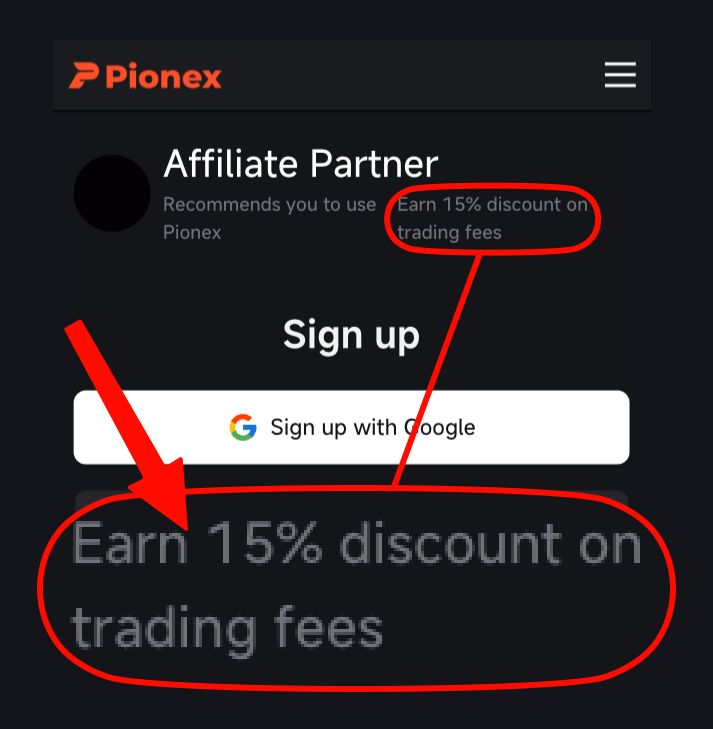
Our Pionex referral code (invite code) is FEEOTTER, all uppercase, and it is built into the dedicated link. Sign up with it and Pionex's sign-up page shows "Earn 15% discount on trading fees"; that 15% is rebated automatically by Pionex.
Pionex is best known for its built-in trading bots, which carry no subscription fee; you pay only the normal trading fee. Sign up with Fee Otter's code and bind your Pionex UID, and the rebate is 50% on spot and futures. The referral codes you commonly find mostly pay 20%, some 25%, so Fee Otter's code pays 2.5× a typical 20% code. On 1,000 USDT of monthly futures fees, a common 20% code returns 200 USDT; Fee Otter's code returns 500 USDT.
This is the actual Pionex signup page opened through our link, with the code already filled in. Plenty of codes that advertise high rebates come without a single screenshot, and people only find out after signing up that no rebate arrives. We put up each exchange's signup page or dashboard so you can check before you register.
What kind of exchange is Pionex?
Pionex has operated since 2019 and is built around automated trading bots: more than 16 of them by its own count, including spot grid and futures grid. The bots have no subscription fee, but every order they place pays the normal trading fee; see the official Pionex blog.
A grid bot earns by buying low and selling high over and over inside a range, so it fills a lot of orders and the fees add up. For bot users, fees are the real long-run cost, and they are what the rebate is calculated on.
Fees verified on 2026-10-18 (Pionex's official fee schedule). · Methodology
Who can sign up with a Pionex referral code? Age, location and what you need
Under the Pionex Terms of Service (effective 2024-07-09), individuals must be at least 18 to open an account. Residents or nationals of mainland China, Hong Kong, the United States, Singapore, Afghanistan, Cuba, Iran, North Korea, Syria, the United Kingdom, Canada, the Netherlands, Spain and France can't use the service.
No phone binding, no KYC, and no Pionex services at all
Iran, North Korea, Central African Republic, Cuba, Crimea, Donetsk, Lebanon, Libya, Luhansk, Somalia, South Sudan, Sudan, Venezuela, Yemen, Afghanistan, DR Congo, Zimbabwe, Singapore, China, Hong Kong, Guam, Puerto Rico, Hawaii, Canada, United States, United Kingdom, France, Netherlands, Japan
No phone binding, but KYC and normal use are possible
Syria, Austria
Checked: 2026-10-18 (Pionex Terms of Service and Help Center list). The two documents differ: the terms include Spain and the list doesn't; the list includes Japan and the terms don't; Syria is restricted in the terms but the list says KYC is possible. Go by the stricter of the two before you sign up.
What you need: an email address or phone number, and a password of at least 8 characters containing letters and numbers (per the official registration guide). Pionex runs "one person, one KYC": no sub-accounts and no shared accounts. KYC has two levels: LV.1 asks for your country of residence and full legal name, and LV.2 asks for document photos and a liveness check. You can't edit the name you submit at LV.1, but if it's wrong you can go straight to LV.2, and the highest level's details count (per the official KYC guide, 2026-08-05). The full steps are in the Pionex KYC guide.
How is the Pionex rebate calculated?
On Pionex, the rebate through Fee Otter comes in two parts: 15% is returned automatically by Pionex, and the other 35% is settled daily by Fee Otter, which you track and request withdrawals for on the rebate site:
Who pays: Pionex returns 15% on spot and futures automatically; the rate is set on our code and shown on the sign-up page. Fee Otter pays the other 35%: sign up with Fee Otter's code, bind your Pionex UID on the rebate site, and we calculate it on the fees your account generates.
How much: spot and futures are both 50% (15% auto-rebate from the exchange + 35% extra from Fee Otter).
Settlement: Fee Otter's 35% is settled daily; for payout timing and where to claim it, see how rebates are settled.
The Pionex rate in the table below applies to both spot and futures:
Rebate rate by exchange
Exchange
Auto-rebate
Extra rebate
Total
Pionex
15%
35%
50%
Binance
20%
20%
40%
OKX
20%
20%
Bybit
—
40%
40%
Gate
20%
50%
70%
Bitget
20%
30%
50%
MEXC
20%
40%
60%
BingX
45%
0%
45%
KuCoin
60%
0%
60%
Bitfinex
6%
0%
6%
WEEX
60%
10%
70%
XT.COM
60%
10%
70%
HTX
30%
20%
50%
CoinW
60%
0%
60%
Ourbit
50%
20%
70%
Every rate here is fee paid straight back to you. It excludes VIP fee tiers and platform-token discounts such as BNB or GT; those stack on top and only save you more.
Pionex's Referral Rules v3 (effective 2025-08-01) set two limits for non-KOL referrers: once an invitee reaches VIP2 or above the referrer no longer gets the full commission, and trades made more than 365 days after signup earn no commission. FEEOTTER is on KOL terms, so neither limit applies: the rate stays the same after VIP2 and after the first year.
How much more does Fee Otter's code pay than a typical 20% or 25% code?
When bound through Fee Otter, the Pionex rebate is 50% on both spot and futures. Against the 20% and 25% referral codes common online:
Rebate via Fee Otter
vs a typical 20% code
vs a 25% code
50% (15% auto + 35% Fee Otter extra)
2.5×
2×
On 1,000 USDT of monthly futures fees, a typical 20% code returns 200 USDT while Fee Otter's code returns 500 USDT, 3,600 USDT more a year; against a 25% code (250 USDT a month), that is 3,000 USDT more a year. Spot is rebated at the same 50%. If you're already a VIP on an exchange and want to switch your binding or sign up elsewhere, contact support; we can help request special trading perks or a higher rebate rate.
Grid traders see a bigger gap: grid bots fill many orders and fees pile up quickly, so the difference in rebate rate grows with them. The formula: monthly fees × (Fee Otter's code rate − the other code's rate) × 12 = the yearly difference. For example, 300 USDT of monthly futures fees at 50% against a typical 20% code: 300 × 30% × 12 = 1,080 USDT.
How much comes back each month?
Using Pionex's perpetual rates (maker 0.02%, taker 0.05%) at 70% taker fills, the blended rate is 0.041%:
Monthly futures volume
Monthly fee
Each 10% of rebate is worth
100,000 USDT
41 USDT
4.1 USDT
500,000 USDT
205 USDT
20.5 USDT
2,000,000 USDT
820 USDT
82 USDT
Multiply the monthly fee by Pionex's 50% futures rebate and that is your monthly rebate. To plug in your own volume and maker/taker mix, use the fee rebate calculator.
Sign-up and binding steps
Open the Pionex signup page with the button above and check that the referral code field is filled in.
Start trading: manual orders and bots both count; the rebate is calculated on fees from the moment you bind.
Step by step on the app and the website
The website and the app use the same sign-up form; the referral field sits on the same step as the password and is marked optional:
Open Pionex's official sign-up page through the button on this page and the code fills in automatically. If you start from the Pionex site or app yourself, the code is not filled in, so start from the button instead.
Choose email or phone sign-up (Google and Apple accounts also work) and enter the verification code you receive; it is valid for only 5 minutes.
Set your password and, on the same screen, check that the referral field is filled in.
After logging in, turn on two-factor authentication (2FA), then complete KYC.
Copy your Pionex UID from the account avatar or profile page and bind it on the Fee Otter rebate site.
According to the Pionex Help Center's registration guide (checked 2026-10-18), on the website you start from "Sign up" at the top right and can register with Google, Apple, LINE, Telegram, email or phone. In the app you start from "Pionex" → "Sign up", enter your email to get a code, then set a password. Pionex marks the referral code as optional, so the form submits even with the field empty. Look at it before you submit.
If you left the code out at sign-up and are still inside the refill window, the Pionex Help Center's Refill Referral Code article (checked 2026-10-18) gives the entry point: on the website, Avatar → Dashboard → Set; in the app, Pionex → Avatar → Referral Code. Enter the code and confirm.
How do I check the code was applied?
If the code did not stick, you get no rebate. Check it this way:
At sign-up: with our code, the sign-up page shows "Earn 15% discount on trading fees". That 15% is Pionex's automatic rebate.
Bind your UID on Fee Otter: enter your Pionex UID on the Fee Otter rebate site. Once your Pionex account starts trading and pays a fee, we review it automatically at 16:00 (UTC+8) the next day. When it passes, the status changes to "Verified".
To check it yourself: on the website, Avatar → Dashboard shows the code you are bound to in the referral code field, and the "i" next to it shows the spot and futures fee discount rates; in the app it is under Pionex → Avatar → Referral Code. Pionex shows only the code, not who the referrer is. The 15% comes back after the fact: trades are charged at the standard rate, and the cashback is paid in USDT to your main account, where it appears in the USDT funding history.
If you trade large volumes and want to confirm before your first trade, contact support and we will check it by hand. If the code did not stick, see the Pionex rebinding guide for your options.
The six ways people get this wrong
Assuming it can be added any time. Pionex's refill has a deadline (next section); after that, the code can no longer be added.
Submitting without checking the field. Once a referral code is submitted it cannot be changed or removed, so make sure it is filled in first.
Never binding the UID. The code alone brings only Pionex's automatic 15%; the other 35% only starts accruing once your Pionex UID is bound, so bind it on the rebate site right after signing up. The sooner you bind, the sooner it starts.
Starting a bot first and thinking about the code later: once you have created a bot or placed a trade, the refill window shrinks from 14 days to 72 hours. Check the code before you launch your first bot.
Typing it wrong: the code FEEOTTER is in capitals, and typing by hand invites mistakes. Use the dedicated link so it fills in automatically.
Waiting too long to deposit: under Pionex's Referral Rules v3, the invitee must make a first deposit and trade within 30 calendar days of signing up for the referrer to earn commission; if the first deposit comes later, none of the later trades count. The rules also define a valid user as one who has registered and deposited at least 100 USDT. Both Pionex's 15% and Fee Otter's 35% come out of that commission, so deposit and trade within 30 days of signing up; what actually gets credited is shown in your Fee Otter settlement details.
Already have a Pionex account?
Per the Pionex Help Center's Refill Referral Code article (checked 2026-10-18): an account that registered without a referral code can add one within 14 days of signing up, or within 3 days (72 hours) if it has already placed manual or bot trades. The refill is done from the avatar menu on the website or app, and once submitted it cannot be changed. After the deadline, support can't add it from the back end either. Codes from other platforms such as Pionex.US can't be linked on pionex.com. For the step-by-step on the website and in the app, and how the deadline is counted, see the Pionex rebind guide.
A bound code cannot be changed, so an account that already entered someone else's code, or whose window has passed, can no longer switch to our code. The route Pionex describes is to close the old account, wait out the 30-day cooling-off period, then register again with our code. Closing is irreversible: withdraw your assets first, and trade history and verification data don't carry over. The steps are in the Pionex rebind guide. For other questions, contact support and we'll explain your options based on your account.
What you see every day after binding
Illustration · sample data, not a real user
This is what the Rebate history on the rebate dashboard looks like. Data for the previous day refreshes daily at 16:00 (UTC+8), and every rebate shows the exchange, date and amount.
Available balance
38.66 USDT
Total earned
412.80 USDT
By exchange (this month)
Gate 34.44Binance 5.51Bitget 6.82
Rebate history
Date
Exchange
Amount
10/22
Gate
+6.30 USDT
10/22
Binance
+1.20 USDT
10/22
Bitget
+1.76 USDT
10/21
Gate
+4.83 USDT
10/21
Binance
+0.94 USDT
10/20
Gate
+7.14 USDT
10/20
Bitget
+2.20 USDT
10/20
Binance
+1.43 USDT
The available balance is extra rebate Fee Otter has not yet paid you (denominated in USDT) — an amount we owe you; the automatic rebate from the referral code is paid by the exchange straight to your exchange account.
Still within 14 days? Add it today. If you signed up in the last two weeks and haven't started a bot or placed a trade, there is still time to add Fee Otter's code; the moment you launch your first bot or place your first order, the window drops to 72 hours. After adding it, remember to bind your UID on the rebate site.
Pionex rebates paid by Fee Otter are paid out like this:
On-chain USDT on BNB Smart Chain (BEP20): the only payout method, sent to an address you own; an exchange deposit address works too if you pick the BSC (BEP20) network there and mind that exchange's minimum deposit.
Minimum and fee: 1 USDT minimum per request, a 0.015 USDT network fee borne by you, no cap on requests (one in progress at a time); every payout can be checked on BscScan.
Get started: no Pionex account yet? Sign up with code FEEOTTER and the rebate is 50%, 2.5× a typical 20% code. Follow the Pionex registration guide step by step and bind your UID on the rebate site afterwards; an account under 14 days old with no bot or trade yet can still add the code now.
FAQ
Are the Pionex referral code and invite code the same thing?
Yes. Referral code and invite code mean the same field entered at signup; Pionex's code is FEEOTTER, built into the dedicated link.
How much more does Fee Otter's code pay than a typical Pionex code?
The referral codes you commonly find mostly pay 20%, some 25%. Fee Otter's code pays a Pionex rebate of 50% on spot and futures (15% auto-rebate from the exchange + 35% extra from Fee Otter). On 1,000 USDT of monthly futures fees, that is 500 USDT back each month.
Do grid bot trades earn a rebate?
Yes. Orders a bot places are ordinary spot or futures fills on your account, they pay the normal fee, and the rebate is calculated on those fees.
What do I do after using the code?
Bind your Pionex UID on the Fee Otter rebate site. The code decides which referrer your account belongs to and brings Pionex's automatic 15%; the other 35% only starts once your UID is bound.
Can I add a Pionex referral code after signing up?
Yes, within a deadline: per the Pionex Help Center's refill article, you can add one within 14 days of signing up, or within 3 days if the account has already placed manual or bot trades. Once submitted, it cannot be changed.
Does signing up with Fee Otter's code cost more in fees?
No. Fees follow Pionex's public schedule (spot 0.05%, futures maker 0.02% / taker 0.05%); the referral code only decides how much of that comes back to you.
Does Pionex spot trading earn a rebate too?
Yes. Spot gets the same 50% as futures: Pionex returns 15% automatically and Fee Otter settles the other 35% once your UID is bound.
Do I need to finish KYC before entering the referral code?
No. The code goes in on the sign-up form, on the same step as the password; KYC comes after the account is created. Pionex's own guide adds that KYC and Google Authenticator should be set up before running bots, and per the Pionex fee page the daily withdrawal limit is 0 USDT without verification, 20,000 USDT at level 1 and 1,000,000 USDT at level 2.
Can I use a Pionex.US referral code on pionex.com?
No. The Pionex Help Center says pionex.com accepts only codes from the same platform; codes from Pionex.US and other platforms can't be linked. With our dedicated link, the code fills in for you.
Which countries can't sign up for Pionex?
The Terms of Service list mainland China, Hong Kong, the US, Singapore, the UK, Canada, the Netherlands, Spain, France and others; the Help Center list adds places such as Japan. The two don't fully match, so go by the stricter one; see "Who can sign up with a Pionex referral code?" above.
Information only, not investment advice. Rebate rates and exchange rules can change; Pionex's official site and the live Fee Otter platform are authoritative.



%2C2026-10-05%20%E5%8F%96%E6%A8%A3%3A%0A%20%20%20%20%20%20%20%E5%BA%95%E8%89%B2%20%230E3452%2C%E5%AD%97%E7%AC%A6%20%2303CA9B)%E3%80%82%0A%20%20%20%20%20%20%20%E7%94%A8%20potrace%20%E6%8F%8F%E5%AD%97%E7%AC%A6%E8%BC%AA%E5%BB%93%2C%E6%95%B4%E5%BC%B5%E7%95%AB%E5%B8%83%E7%9B%B4%E6%8E%A5%E6%98%A0%E5%B0%84%E5%88%B0%E9%80%99%E8%A3%A1%E7%9A%84%2032%20%E5%96%AE%E4%BD%8D%20%E2%80%94%E2%80%94%20%E4%B8%8D%E9%87%8D%E6%96%B0%E7%BD%AE%E4%B8%AD%2C%E4%BF%9D%E7%95%99%E5%AE%98%E6%96%B9%E7%9A%84%E7%95%99%E7%99%BD%E6%AF%94%E4%BE%8B%E3%80%82%0A%20%20%20%20%20%20%20%E8%A6%81%E6%94%B9%E8%AB%8B%E9%87%8D%E8%B7%91%E6%8F%8F%E5%9C%96%2C%E4%B8%8D%E8%A6%81%E6%86%91%E5%8D%B0%E8%B1%A1%E8%AA%BF%E3%80%82%20--%3E%0A%20%20%3Crect%20x%3D%221.5%22%20y%3D%221.5%22%20width%3D%2229%22%20height%3D%2229%22%20rx%3D%228%22%20fill%3D%22%230E3452%22%2F%3E%0A%20%20%3Cpath%20fill%3D%22%2303CA9B%22%20d%3D%22M23.02%205.97C22.14%206.02%2021.54%206.07%2021.22%206.1C20.72%206.15%2019.6%206.28%2019.41%206.31C19.31%206.33%2019.1%206.37%2018.94%206.39C18.29%206.5%2017.94%206.57%2017.2%206.73C16.92%206.79%2016%207.03%2015.8%207.09C15.36%207.23%2014.42%207.54%2014.39%207.56C14.38%207.57%2014.3%207.6%2014.23%207.62C13.82%207.76%2012.7%208.28%2012.13%208.6C11.95%208.7%2011.8%208.78%2011.79%208.78C11.7%208.78%2010.42%209.71%209.98%2010.08C9.16%2010.79%208.07%2012.09%207.6%2012.91C7.28%2013.46%207.18%2013.65%207.06%2013.91C6.87%2014.3%206.76%2014.53%206.68%2014.74C6.56%2015.08%206.37%2015.64%206.34%2015.73C6.33%2015.78%206.3%2015.91%206.27%2016C6.06%2016.79%205.93%2017.87%205.94%2018.62L5.95%2019.05L6.69%2019.04C7.78%2019.03%208.57%2018.94%209.73%2018.68C10.18%2018.58%2011.05%2018.33%2011.45%2018.18C11.52%2018.15%2011.7%2018.08%2011.84%2018.03C13.58%2017.38%2015.67%2016.19%2017.55%2014.77C17.8%2014.58%2018.67%2013.89%2018.74%2013.83C18.76%2013.81%2018.94%2013.66%2019.14%2013.48C19.34%2013.31%2019.54%2013.14%2019.58%2013.11C19.61%2013.07%2019.78%2012.92%2019.95%2012.77C20.94%2011.88%2022.24%2010.57%2023.2%209.48C23.68%208.94%2023.69%208.93%2023.86%208.73C23.94%208.63%2024.02%208.54%2024.03%208.53C24.17%208.4%2025.09%207.25%2025.52%206.67C25.67%206.47%2025.81%206.28%2025.83%206.26C25.86%206.23%2025.89%206.19%2025.9%206.16C25.92%206.13%2025.94%206.12%2025.95%206.13C25.98%206.15%2025.3%207.5%2024.99%208.07C24.88%208.28%2024.78%208.45%2024.78%208.46C24.78%208.46%2024.66%208.67%2024.51%208.93C24.24%209.4%2024.17%209.52%2024.07%209.69C24%209.81%2023.72%2010.27%2023.39%2010.8C22.69%2011.91%2021.44%2013.66%2020.74%2014.52C20.25%2015.12%2020.09%2015.31%2019.72%2015.73C19.01%2016.55%2018.19%2017.38%2017.42%2018.08C17.07%2018.39%2016.92%2018.52%2016.5%2018.87C16.37%2018.98%2016.24%2019.09%2016.2%2019.12C15.83%2019.43%2014.7%2020.21%2014.16%2020.54C13.69%2020.82%2012.69%2021.34%2012.41%2021.45C12.33%2021.48%2012.23%2021.52%2012.17%2021.55C12.01%2021.62%2011.45%2021.84%2011.11%2021.95C10.97%2022%2010.05%2022.26%209.84%2022.31C9.23%2022.45%208.97%2022.5%208.56%2022.56C8.43%2022.58%208.25%2022.61%208.16%2022.62C8.06%2022.64%207.79%2022.67%207.56%2022.69C7.32%2022.71%207.12%2022.74%207.12%2022.76C7.12%2022.85%207.58%2023.42%207.97%2023.82C9.2%2025.09%2010.67%2025.8%2012.52%2026.02C16.51%2026.48%2020.99%2024.06%2023.2%2020.25C23.32%2020.05%2023.43%2019.86%2023.46%2019.81C23.51%2019.73%2023.96%2018.81%2024.04%2018.62C24.67%2017.21%2025.19%2015.43%2025.52%2013.67C25.66%2012.9%2025.73%2012.45%2025.81%2011.77C25.99%2010.32%2026.05%209.33%2026.05%207.64C26.05%206.06%2026.04%206.01%2025.97%205.98C25.9%205.95%2023.53%205.94%2023.02%205.97Z%22%2F%3E%0A%3C%2Fsvg%3E%0A)


%2C2026-10-05%20%E5%8F%96%E6%A8%A3%3A%0A%20%20%20%20%20%20%20%E5%BA%95%E8%89%B2%20%23FFFFFF%2C%E5%AD%97%E7%AC%A6%20%235227FF)%E3%80%82%0A%20%20%20%20%20%20%20%E7%94%A8%20potrace%20%E6%8F%8F%E5%AD%97%E7%AC%A6%E8%BC%AA%E5%BB%93%2C%E6%95%B4%E5%BC%B5%E7%95%AB%E5%B8%83%E7%9B%B4%E6%8E%A5%E6%98%A0%E5%B0%84%E5%88%B0%E9%80%99%E8%A3%A1%E7%9A%84%2032%20%E5%96%AE%E4%BD%8D%20%E2%80%94%E2%80%94%20%E4%B8%8D%E9%87%8D%E6%96%B0%E7%BD%AE%E4%B8%AD%2C%E4%BF%9D%E7%95%99%E5%AE%98%E6%96%B9%E7%9A%84%E7%95%99%E7%99%BD%E6%AF%94%E4%BE%8B%E3%80%82%0A%20%20%20%20%20%20%20%E5%AE%98%E6%96%B9%E6%98%AF%E7%99%BD%E5%BA%95%E7%B4%AB%E8%89%B2%E5%AD%97%E7%AC%A6%3B%E7%99%BD%E5%BA%95%E5%8A%A0%E6%B7%A1%E9%82%8A%2C%E5%85%8D%E5%BE%97%E5%9C%A8%E7%99%BD%E8%89%B2%E8%83%8C%E6%99%AF%E4%B8%8A%E6%B6%88%E5%A4%B1%E3%80%82%0A%20%20%20%20%20%20%20%E8%A6%81%E6%94%B9%E8%AB%8B%E9%87%8D%E8%B7%91%E6%8F%8F%E5%9C%96%2C%E4%B8%8D%E8%A6%81%E6%86%91%E5%8D%B0%E8%B1%A1%E8%AA%BF%E3%80%82%20--%3E%0A%20%20%3Crect%20x%3D%221.5%22%20y%3D%221.5%22%20width%3D%2229%22%20height%3D%2229%22%20rx%3D%228%22%20fill%3D%22%23FFFFFF%22%20stroke%3D%22%23E4E4E7%22%2F%3E%0A%20%20%3Cpath%20fill%3D%22%235227FF%22%20d%3D%22M13.31%208.92L13.31%2012.28L9.94%2012.28L6.56%2012.28L6.57%2015.71C6.58%2019.51%206.57%2019.29%206.79%2020.2C7.56%2023.33%2010.21%2025.78%2013.38%2026.31C14.1%2026.43%2014.44%2026.44%2019.24%2026.44L23.91%2026.44L23.91%2023.05L23.91%2019.66L19.2%2019.65L14.48%2019.64L14.28%2019.56C13.89%2019.41%2013.63%2019.16%2013.44%2018.76L13.36%2018.58L13.35%2015.46L13.34%2012.34L18.56%2012.34L23.78%2012.34L23.78%208.95L23.78%205.56L18.55%205.56L13.31%205.56L13.31%208.92Z%22%2F%3E%0A%3C%2Fsvg%3E%0A)

 Telegram · @feeotter