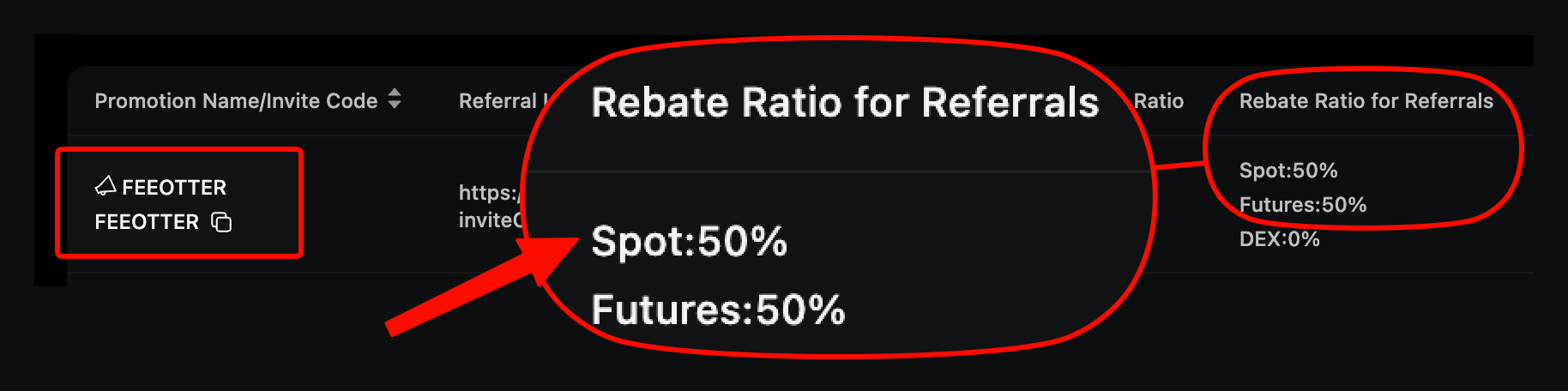
Signing up on Ourbit takes five steps: open our link, enter your email or phone, check the referral code is FEEOTTER, confirm the verification code and set a password, then bind your UID on Fee Otter. With referral code FEEOTTER, Ourbit automatically returns 50% of your fees, and once your UID is bound Fee Otter adds a 20% extra rebate, 70% in total. That is 3.5× a typical 20% code (checked October 2026).
Unlike most exchanges, Ourbit lets you trade and withdraw without KYC; unverified accounts can withdraw 30 BTC per 24 hours. So the step that matters most at sign-up is not verification but checking that the code went in: Ourbit cannot add a code after sign-up, and if you miss it the only fix is to start over with a new email.
What do I need before signing up?
- An email or phone number not yet registered on Ourbit.
- Our referral link (code FEEOTTER already included).
- If you will later withdraw more than 30 BTC per 24 hours, an ID document for advanced verification. For trading and smaller withdrawals you can skip it for now.
Ourbit sign-up steps
Step 1: Open the sign-up page through our link
Tap the button above or our referral link and the code fills in automatically. Don't click anyone else's referral link before you finish; the later one overwrites the earlier one.
Step 2: Enter your email or phone number
Enter the email or phone number you will log in with. It is also where password resets and verification codes go, so use one you will keep.
Step 3: Check the code is FEEOTTER
Before you submit, check the code field says FEEOTTER. If it is empty, type FEEOTTER yourself; the code can only be entered at sign-up and cannot be added later.
Step 4: Enter the verification code and set a password
Enter the code you receive and set a password, and the account is created. We suggest turning on two-step verification in the security settings next, for extra protection on withdrawals.
Step 5: Bind your UID on Fee Otter
Find your UID (a number) on your Ourbit profile page and bind it on the Fee Otter rebate site. Once your Ourbit account starts trading and pays a fee, we review it at 16:00 (UTC+8) the next day; when it passes, the status changes to "Verified" and the 20% extra rebate starts accruing. If you trade large volumes and want to check first, contact support. For what a UID is and where to find it, see what an exchange UID is.
Do I need KYC?
| Level | What it needs | Withdrawal limit per 24 hours |
|---|
| Unverified | Nothing | 30 BTC |
| Advanced | Basic details + face verification | 200 BTC |
Source: Ourbit KYC levels (2026-08-25 version). Ourbit also says KYC unlocks some trading permissions, earn products and event trial funds. The referral code is bound at sign-up, so KYC does not affect your rebate either way. Verification steps are in the Ourbit KYC guide.
How is the rebate calculated after sign-up?
Ourbit returns layer 1, 50%, to your account automatically. Fee Otter settles layer 2, 20%, daily, once your UID is bound.
What does Ourbit charge?
| Type | Maker | Taker | After a 70% rebate |
|---|
| Spot | 0% | 0% | 0% |
| Futures | 0.02% | 0.04% | maker 0.006%, taker 0.012% |
Sources: Ourbit's official spot and futures APIs (checked 2026-10-13) and the Ourbit announcement of 3 September 2024. Spot is free, so the rebate in practice comes from futures.
How do I place the cheapest first futures order?
The futures maker fee, 0.02%, is half the taker fee of 0.04%. Use limit orders where you can, and add the rebate on top: at 70%, maker costs 0.006% and taker 0.012%. Why they differ is explained in maker and taker fees.
A real order: open 20× on 500 USDT of margin, a 10,000 USDT position, with market orders in and out. Fees are 10,000 × 0.04% × 2 = 8 USDT. With your UID bound, 70% comes back and you pay 2.4 USDT. If both sides fill as limit orders instead, the fee is 4 USDT and you pay 1.2 USDT.
If you are already a VIP at an exchange and want to switch or sign up elsewhere, contact support; we can apply for special trading benefits or a higher rebate rate for you.
Common beginner mistakes on Ourbit
- Not using our link and submitting with an empty code field.
- Signing up first and adding the code later: Ourbit does not allow it.
- Forgetting to bind your UID: without it you get only layer 1, 50%, and miss Fee Otter's extra rebate.
- Pasting the wrong UID: the UID is a number, not a nickname or email. Check it against your Ourbit profile page before binding.
- Starting with high leverage: Ourbit goes up to 500×. Start with low leverage and small amounts to learn ordering and liquidation rules.
Already have an Ourbit account?
An existing account cannot add a code. Sign up again through our link with an email or phone number not yet registered on Ourbit. Steps are in the Ourbit rebinding guide.
Risks to know before using Ourbit
Ourbit's fees really are low, but know this before you trade:
- No major financial licence: Ourbit is registered in the British Virgin Islands and is not supervised by a major financial regulator. Its CoinGecko trust score is 8/10. On Trustpilot some users report slow withdrawal reviews and frozen accounts (few reviews, for reference only).
- Don't keep long-term or large holdings on an exchange: Ourbit is for funds you are actively trading. Withdraw money you are not using or plan to hold long term.
- Use a cold wallet for long-term holdings: move large, long-term assets to a hardware wallet (such as Ledger) and keep them offline.
- Futures and high leverage are high risk: Ourbit offers up to 500× on major futures such as BTC and ETH. Beginners should avoid high leverage and start small.
In short, Ourbit is for active trading; keep long-term, large holdings in a cold wallet.
FAQ
What is Fee Otter's Ourbit referral code?
FEEOTTER, already built into our link.
Can I add the code after signing up on Ourbit?
No, the code can only be entered at sign-up. If you missed it, sign up again through our link with a new email or phone number.
Do I have to do KYC on Ourbit?
Not necessarily. Unverified accounts can trade and withdraw 30 BTC per 24 hours; for more, complete advanced verification and the limit rises to 200 BTC.
Do I need to give an API key to bind my UID?
No. Binding needs only your UID; Fee Otter never asks for your API key or password.
Request it on the rebate site. It is paid as an on-chain USDT transfer (BNB Smart Chain, BEP20) to your own address; the minimum is 1 USDT per withdrawal and the 0.015 USDT network fee is yours.
This article is for information only and is not investment advice. Fees and rebate rates may change; Ourbit's official announcements and the rates shown on Fee Otter prevail.



%2C2026-10-05%20%E5%8F%96%E6%A8%A3%3A%0A%20%20%20%20%20%20%20%E5%BA%95%E8%89%B2%20%230E3452%2C%E5%AD%97%E7%AC%A6%20%2303CA9B)%E3%80%82%0A%20%20%20%20%20%20%20%E7%94%A8%20potrace%20%E6%8F%8F%E5%AD%97%E7%AC%A6%E8%BC%AA%E5%BB%93%2C%E6%95%B4%E5%BC%B5%E7%95%AB%E5%B8%83%E7%9B%B4%E6%8E%A5%E6%98%A0%E5%B0%84%E5%88%B0%E9%80%99%E8%A3%A1%E7%9A%84%2032%20%E5%96%AE%E4%BD%8D%20%E2%80%94%E2%80%94%20%E4%B8%8D%E9%87%8D%E6%96%B0%E7%BD%AE%E4%B8%AD%2C%E4%BF%9D%E7%95%99%E5%AE%98%E6%96%B9%E7%9A%84%E7%95%99%E7%99%BD%E6%AF%94%E4%BE%8B%E3%80%82%0A%20%20%20%20%20%20%20%E8%A6%81%E6%94%B9%E8%AB%8B%E9%87%8D%E8%B7%91%E6%8F%8F%E5%9C%96%2C%E4%B8%8D%E8%A6%81%E6%86%91%E5%8D%B0%E8%B1%A1%E8%AA%BF%E3%80%82%20--%3E%0A%20%20%3Crect%20x%3D%221.5%22%20y%3D%221.5%22%20width%3D%2229%22%20height%3D%2229%22%20rx%3D%228%22%20fill%3D%22%230E3452%22%2F%3E%0A%20%20%3Cpath%20fill%3D%22%2303CA9B%22%20d%3D%22M23.02%205.97C22.14%206.02%2021.54%206.07%2021.22%206.1C20.72%206.15%2019.6%206.28%2019.41%206.31C19.31%206.33%2019.1%206.37%2018.94%206.39C18.29%206.5%2017.94%206.57%2017.2%206.73C16.92%206.79%2016%207.03%2015.8%207.09C15.36%207.23%2014.42%207.54%2014.39%207.56C14.38%207.57%2014.3%207.6%2014.23%207.62C13.82%207.76%2012.7%208.28%2012.13%208.6C11.95%208.7%2011.8%208.78%2011.79%208.78C11.7%208.78%2010.42%209.71%209.98%2010.08C9.16%2010.79%208.07%2012.09%207.6%2012.91C7.28%2013.46%207.18%2013.65%207.06%2013.91C6.87%2014.3%206.76%2014.53%206.68%2014.74C6.56%2015.08%206.37%2015.64%206.34%2015.73C6.33%2015.78%206.3%2015.91%206.27%2016C6.06%2016.79%205.93%2017.87%205.94%2018.62L5.95%2019.05L6.69%2019.04C7.78%2019.03%208.57%2018.94%209.73%2018.68C10.18%2018.58%2011.05%2018.33%2011.45%2018.18C11.52%2018.15%2011.7%2018.08%2011.84%2018.03C13.58%2017.38%2015.67%2016.19%2017.55%2014.77C17.8%2014.58%2018.67%2013.89%2018.74%2013.83C18.76%2013.81%2018.94%2013.66%2019.14%2013.48C19.34%2013.31%2019.54%2013.14%2019.58%2013.11C19.61%2013.07%2019.78%2012.92%2019.95%2012.77C20.94%2011.88%2022.24%2010.57%2023.2%209.48C23.68%208.94%2023.69%208.93%2023.86%208.73C23.94%208.63%2024.02%208.54%2024.03%208.53C24.17%208.4%2025.09%207.25%2025.52%206.67C25.67%206.47%2025.81%206.28%2025.83%206.26C25.86%206.23%2025.89%206.19%2025.9%206.16C25.92%206.13%2025.94%206.12%2025.95%206.13C25.98%206.15%2025.3%207.5%2024.99%208.07C24.88%208.28%2024.78%208.45%2024.78%208.46C24.78%208.46%2024.66%208.67%2024.51%208.93C24.24%209.4%2024.17%209.52%2024.07%209.69C24%209.81%2023.72%2010.27%2023.39%2010.8C22.69%2011.91%2021.44%2013.66%2020.74%2014.52C20.25%2015.12%2020.09%2015.31%2019.72%2015.73C19.01%2016.55%2018.19%2017.38%2017.42%2018.08C17.07%2018.39%2016.92%2018.52%2016.5%2018.87C16.37%2018.98%2016.24%2019.09%2016.2%2019.12C15.83%2019.43%2014.7%2020.21%2014.16%2020.54C13.69%2020.82%2012.69%2021.34%2012.41%2021.45C12.33%2021.48%2012.23%2021.52%2012.17%2021.55C12.01%2021.62%2011.45%2021.84%2011.11%2021.95C10.97%2022%2010.05%2022.26%209.84%2022.31C9.23%2022.45%208.97%2022.5%208.56%2022.56C8.43%2022.58%208.25%2022.61%208.16%2022.62C8.06%2022.64%207.79%2022.67%207.56%2022.69C7.32%2022.71%207.12%2022.74%207.12%2022.76C7.12%2022.85%207.58%2023.42%207.97%2023.82C9.2%2025.09%2010.67%2025.8%2012.52%2026.02C16.51%2026.48%2020.99%2024.06%2023.2%2020.25C23.32%2020.05%2023.43%2019.86%2023.46%2019.81C23.51%2019.73%2023.96%2018.81%2024.04%2018.62C24.67%2017.21%2025.19%2015.43%2025.52%2013.67C25.66%2012.9%2025.73%2012.45%2025.81%2011.77C25.99%2010.32%2026.05%209.33%2026.05%207.64C26.05%206.06%2026.04%206.01%2025.97%205.98C25.9%205.95%2023.53%205.94%2023.02%205.97Z%22%2F%3E%0A%3C%2Fsvg%3E%0A)


%2C2026-10-05%20%E5%8F%96%E6%A8%A3%3A%0A%20%20%20%20%20%20%20%E5%BA%95%E8%89%B2%20%23FFFFFF%2C%E5%AD%97%E7%AC%A6%20%235227FF)%E3%80%82%0A%20%20%20%20%20%20%20%E7%94%A8%20potrace%20%E6%8F%8F%E5%AD%97%E7%AC%A6%E8%BC%AA%E5%BB%93%2C%E6%95%B4%E5%BC%B5%E7%95%AB%E5%B8%83%E7%9B%B4%E6%8E%A5%E6%98%A0%E5%B0%84%E5%88%B0%E9%80%99%E8%A3%A1%E7%9A%84%2032%20%E5%96%AE%E4%BD%8D%20%E2%80%94%E2%80%94%20%E4%B8%8D%E9%87%8D%E6%96%B0%E7%BD%AE%E4%B8%AD%2C%E4%BF%9D%E7%95%99%E5%AE%98%E6%96%B9%E7%9A%84%E7%95%99%E7%99%BD%E6%AF%94%E4%BE%8B%E3%80%82%0A%20%20%20%20%20%20%20%E5%AE%98%E6%96%B9%E6%98%AF%E7%99%BD%E5%BA%95%E7%B4%AB%E8%89%B2%E5%AD%97%E7%AC%A6%3B%E7%99%BD%E5%BA%95%E5%8A%A0%E6%B7%A1%E9%82%8A%2C%E5%85%8D%E5%BE%97%E5%9C%A8%E7%99%BD%E8%89%B2%E8%83%8C%E6%99%AF%E4%B8%8A%E6%B6%88%E5%A4%B1%E3%80%82%0A%20%20%20%20%20%20%20%E8%A6%81%E6%94%B9%E8%AB%8B%E9%87%8D%E8%B7%91%E6%8F%8F%E5%9C%96%2C%E4%B8%8D%E8%A6%81%E6%86%91%E5%8D%B0%E8%B1%A1%E8%AA%BF%E3%80%82%20--%3E%0A%20%20%3Crect%20x%3D%221.5%22%20y%3D%221.5%22%20width%3D%2229%22%20height%3D%2229%22%20rx%3D%228%22%20fill%3D%22%23FFFFFF%22%20stroke%3D%22%23E4E4E7%22%2F%3E%0A%20%20%3Cpath%20fill%3D%22%235227FF%22%20d%3D%22M13.31%208.92L13.31%2012.28L9.94%2012.28L6.56%2012.28L6.57%2015.71C6.58%2019.51%206.57%2019.29%206.79%2020.2C7.56%2023.33%2010.21%2025.78%2013.38%2026.31C14.1%2026.43%2014.44%2026.44%2019.24%2026.44L23.91%2026.44L23.91%2023.05L23.91%2019.66L19.2%2019.65L14.48%2019.64L14.28%2019.56C13.89%2019.41%2013.63%2019.16%2013.44%2018.76L13.36%2018.58L13.35%2015.46L13.34%2012.34L18.56%2012.34L23.78%2012.34L23.78%208.95L23.78%205.56L18.55%205.56L13.31%205.56L13.31%208.92Z%22%2F%3E%0A%3C%2Fsvg%3E%0A)
 Telegram · @feeotter