By Chang Xu·Bybitadd referral codeaffiliate IDfee rebate
Bybit: Add a Referral Code Within 14 Days (Affiliate ID 163627)
Forgot your Bybit referral code? Within 14 days you can join Fee Otter under Join an Affiliate’s Community. The form takes numbers only: enter 163627, not the signup code FEEOTTER.
Forgot to enter a referral code when you signed up for Bybit? You can still add one within 14 days of signup under "Join an Affiliate's Community" in your account. The field takes numbers only, so you enter affiliate ID 163627 rather than the signup code FEEOTTER. Once bound to Fee Otter the fee rebate is 40%, and after 14 days the only route left is a rebind (checked October 2026). This guide follows Bybit's official help article to cover the conditions, the website steps, how to check who you are bound to, and what to do after the 14 days.
Quick answer
Deadline: within 14 days of signup. Later requests are not accepted.
Enter affiliate ID 163627: the field hints say "Affiliate ID only" and "Numbers only", so the signup code FEEOTTER is rejected.
Main accounts only, and the account must not have any referrer or affiliate yet.
Once added, it cannot be cancelled or changed. Double-check 163627 before you submit.
No "Join an Affiliate's Community" button? Then you don't qualify; see the Bybit rebind guide instead.
Bind your UID on Fee Otter afterwards: rebates count fees from the moment you bind, not before.
Counted from your signup date; from day 15 requests are refused.
Main account
Subaccounts cannot add a code.
No referrer yet
You entered no affiliate code and no user referral code at signup.
Affiliate codes only
Referral codes that regular users generate in the app (Referral Program) are not supported. Fee Otter is a Bybit affiliate, so this condition is met.
Not a market-maker or institutional account
Those account types are not supported.
Not in a restricted region
Bybit notes you may be unable to join an affiliate's community "due to regulatory reasons". Under the Bybit Affiliate Program Terms, residents of Hong Kong, mainland China, the EU, the UK, the US, Singapore, Canada, Australia and certain other regions cannot receive rebates through an affiliate.
Bybit also says: if you don't see "Join an Affiliate's Community" on the Account Info page, you don't meet the conditions above. The button itself tells you whether you qualify.
How to add the code (website)
Log in to Bybit on the web, hover over Profile in the top-right corner and open your Account page.
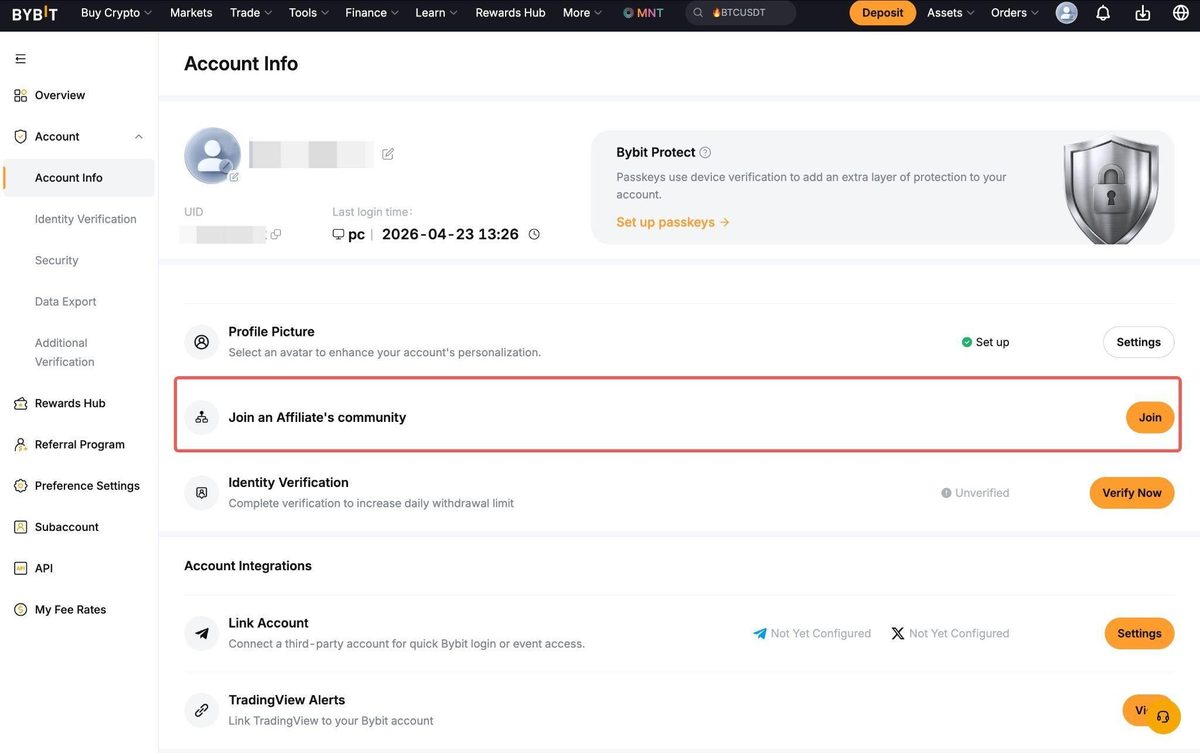
On the Account Info tab, click Join an Affiliate's Community. You can also open the official request form directly after logging in.
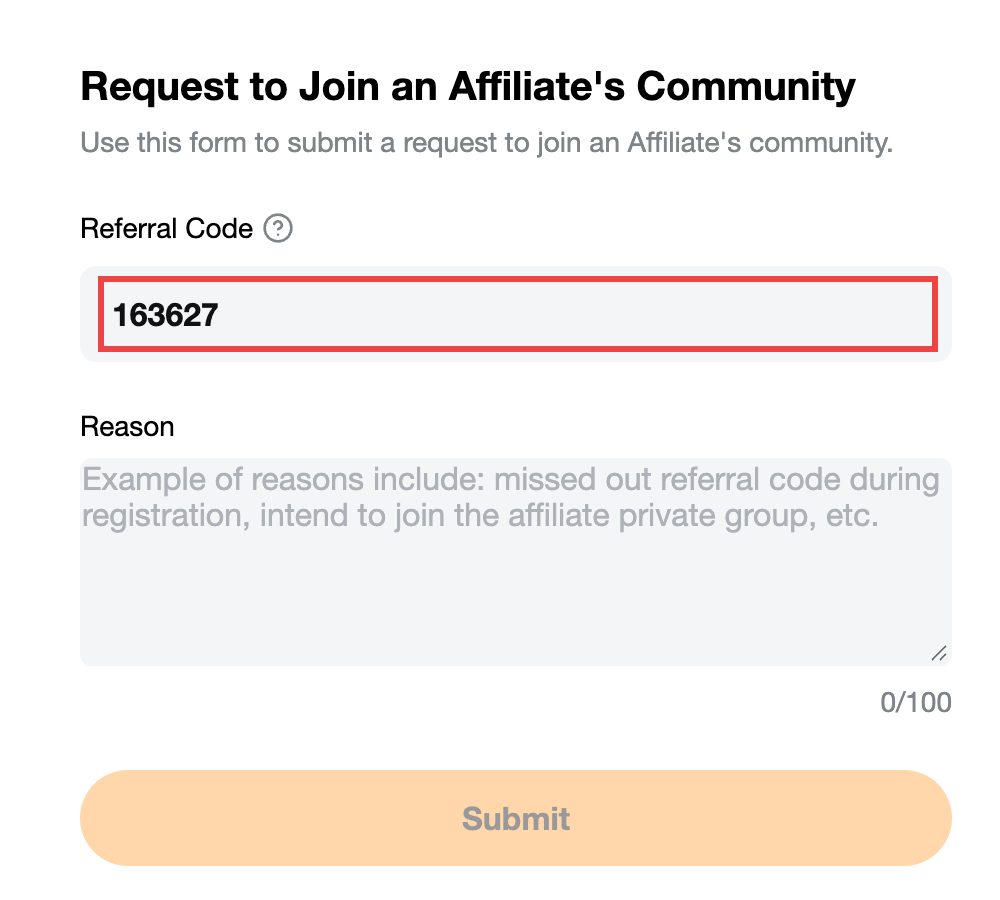
Enter 163627 in the "Referral Code" field and a short reason, for example "Forgot to enter the code at signup" (up to 100 characters).
Read and acknowledge the disclaimer, then click Submit.
When it succeeds you are sent back to Account Info, and you're done.
The Join an Affiliate's community entry on Account Info; click Join on the right (image: Bybit help article)Enter 163627 in the Referral Code field (red box added by Fee Otter; captured 2026-09-28)
The help article also has an app tab, but where the entry sits changes between app versions. The website path is the most stable, so use a desktop or mobile browser.
Why 163627 and not the signup code?
The same referral relationship takes a different value in two places:
Where
What to enter
"Referral code (optional)" on the signup page
Referral code FEEOTTER (filled in automatically when you use the dedicated link)
The request form within 14 days of signup
163627 (Fee Otter's affiliate ID, numbers only)
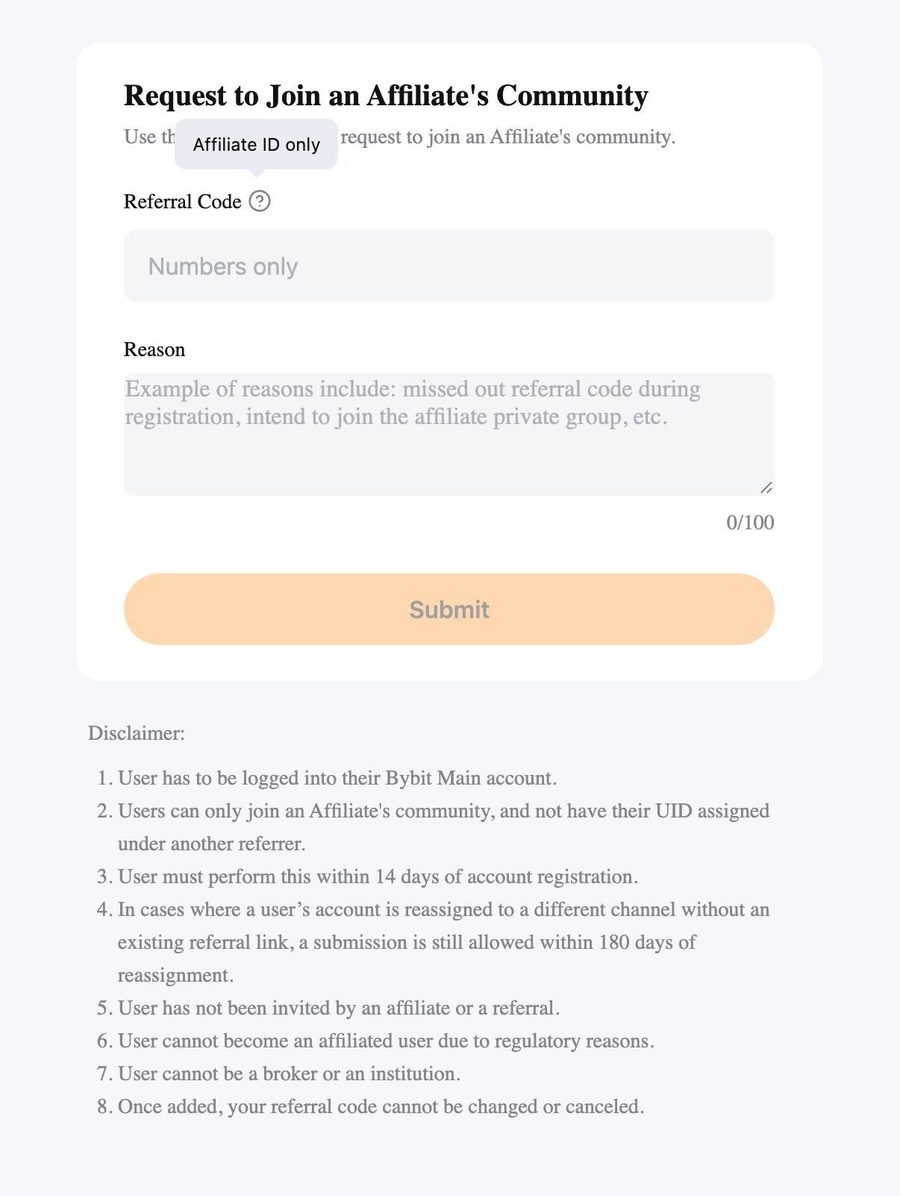
The form field is labelled "Referral Code", but its tooltip says "Affiliate ID only" and the input says "Numbers only". 163627 is the affiliate ID behind our dedicated link: open the dedicated link and the address you land on carries affiliate_id=163627.
The tooltip next to the field reads "Affiliate ID only" and the input says "Numbers only" (image: Bybit help article)
How to check which affiliate you are bound to
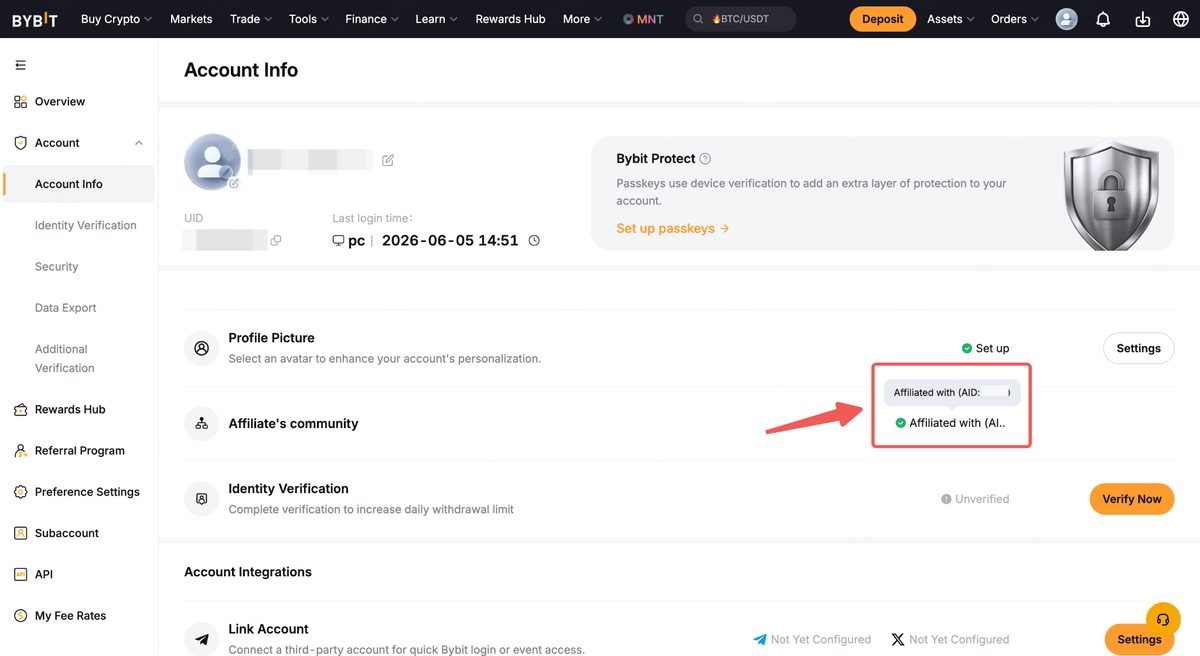
Go to Account Info and click the affiliate row to see the details. After a successful request it usually shows 163627.
After a successful request, Account Info shows "Affiliated with (AID: …)"; hover to see the full ID (image: Bybit help article)
Bybit also notes that some affiliates' IDs are hidden on that page because of their privacy settings. Not seeing an ID doesn't mean the request failed, and it doesn't affect your membership. The most direct way to confirm you are with Fee Otter is to bind your UID on the rebate dashboard: if it is approved, your account is under us.
After adding the code: bind your UID on Fee Otter
Adding the code only tells Bybit you belong to Fee Otter. You still need to bind your Bybit UID on the rebate dashboard before rebates are paid to you. Rebates count only fees generated after you bind your UID, not earlier ones, so add the code and bind your UID as early as you can. Binding needs only your UID: no API key, password or withdrawal permission.
The Bybit rebate rate is 40%, as shown below:
Rebate rate by exchange
Exchange
Auto-rebate
Extra rebate
Total
Bybit
—
40%
40%
Binance
20%
20%
40%
OKX
20%
20%
Gate
20%
50%
70%
Bitget
20%
30%
50%
MEXC
20%
40%
60%
BingX
45%
0%
45%
Pionex
15%
35%
50%
KuCoin
60%
0%
60%
Bitfinex
6%
0%
6%
WEEX
60%
10%
70%
XT.COM
60%
10%
70%
HTX
30%
20%
50%
CoinW
60%
0%
60%
Ourbit
50%
20%
70%
Every rate here is fee paid straight back to you. It excludes VIP fee tiers and platform-token discounts such as BNB or GT; those stack on top and only save you more.
The request form is only open for 14 days, and a code you are already bound to cannot be changed. In both cases you can rebind instead:
Option 1 (try first): register a new account through the dedicated link and verify it with an ID type you haven't used yet (a driving licence, passport and national ID can each verify one account).
Option 2: register a new, unverified account through the dedicated link, then move your old account's KYC over.
Option 3: if the account was registered on or after 1 September 2025 and hasn't traded for 180 days, log in through the dedicated link and then resume trading.
Can I still add a referral code after signing up for Bybit?
Yes, but only within 14 days of signup, on a main account with no referrer yet, and only for an affiliate code. For Fee Otter, enter affiliate ID 163627 in the form.
Why won't the form accept the signup code?
The request form takes only a numeric affiliate ID. The signup code FEEOTTER is made of letters, so enter 163627 instead.
Can I switch to a different affiliate after adding the code?
No. Bybit says a code cannot be cancelled or changed once added, so make sure you enter 163627.
I can't find the "Join an Affiliate's Community" button
Per Bybit, a missing button means you don't meet the conditions. The usual reasons are that more than 14 days have passed, the account already has a referrer, or you are logged in to a subaccount. Use the methods in the rebind guide instead.
Will I get rebates on fees paid before adding the code?
No. Fee Otter only counts fees generated after you bind your UID, so bind it on the rebate dashboard as soon as you've added the code.
Can I add a friend's referral code?
No. Referral codes from Bybit's Referral Program (generated by regular users) are not supported; only affiliate codes are.
Need help? Contact support
For any binding or rebate question, or to learn about our exclusive OKX rewards and promotions, reach our support through the channels below.
If you trade at high volume or hold exchange VIP status and need more from your rebate, message support directly and we will talk it through.
This article is for information only and is not investment advice. The rules come from Bybit's official help article (updated 2026-06-05), and the form field hints were checked on 2026-09-27. Bybit's latest announcements and the figures shown live on Fee Otter take precedence.



%2C2026-10-05%20%E5%8F%96%E6%A8%A3%3A%0A%20%20%20%20%20%20%20%E5%BA%95%E8%89%B2%20%230E3452%2C%E5%AD%97%E7%AC%A6%20%2303CA9B)%E3%80%82%0A%20%20%20%20%20%20%20%E7%94%A8%20potrace%20%E6%8F%8F%E5%AD%97%E7%AC%A6%E8%BC%AA%E5%BB%93%2C%E6%95%B4%E5%BC%B5%E7%95%AB%E5%B8%83%E7%9B%B4%E6%8E%A5%E6%98%A0%E5%B0%84%E5%88%B0%E9%80%99%E8%A3%A1%E7%9A%84%2032%20%E5%96%AE%E4%BD%8D%20%E2%80%94%E2%80%94%20%E4%B8%8D%E9%87%8D%E6%96%B0%E7%BD%AE%E4%B8%AD%2C%E4%BF%9D%E7%95%99%E5%AE%98%E6%96%B9%E7%9A%84%E7%95%99%E7%99%BD%E6%AF%94%E4%BE%8B%E3%80%82%0A%20%20%20%20%20%20%20%E8%A6%81%E6%94%B9%E8%AB%8B%E9%87%8D%E8%B7%91%E6%8F%8F%E5%9C%96%2C%E4%B8%8D%E8%A6%81%E6%86%91%E5%8D%B0%E8%B1%A1%E8%AA%BF%E3%80%82%20--%3E%0A%20%20%3Crect%20x%3D%221.5%22%20y%3D%221.5%22%20width%3D%2229%22%20height%3D%2229%22%20rx%3D%228%22%20fill%3D%22%230E3452%22%2F%3E%0A%20%20%3Cpath%20fill%3D%22%2303CA9B%22%20d%3D%22M23.02%205.97C22.14%206.02%2021.54%206.07%2021.22%206.1C20.72%206.15%2019.6%206.28%2019.41%206.31C19.31%206.33%2019.1%206.37%2018.94%206.39C18.29%206.5%2017.94%206.57%2017.2%206.73C16.92%206.79%2016%207.03%2015.8%207.09C15.36%207.23%2014.42%207.54%2014.39%207.56C14.38%207.57%2014.3%207.6%2014.23%207.62C13.82%207.76%2012.7%208.28%2012.13%208.6C11.95%208.7%2011.8%208.78%2011.79%208.78C11.7%208.78%2010.42%209.71%209.98%2010.08C9.16%2010.79%208.07%2012.09%207.6%2012.91C7.28%2013.46%207.18%2013.65%207.06%2013.91C6.87%2014.3%206.76%2014.53%206.68%2014.74C6.56%2015.08%206.37%2015.64%206.34%2015.73C6.33%2015.78%206.3%2015.91%206.27%2016C6.06%2016.79%205.93%2017.87%205.94%2018.62L5.95%2019.05L6.69%2019.04C7.78%2019.03%208.57%2018.94%209.73%2018.68C10.18%2018.58%2011.05%2018.33%2011.45%2018.18C11.52%2018.15%2011.7%2018.08%2011.84%2018.03C13.58%2017.38%2015.67%2016.19%2017.55%2014.77C17.8%2014.58%2018.67%2013.89%2018.74%2013.83C18.76%2013.81%2018.94%2013.66%2019.14%2013.48C19.34%2013.31%2019.54%2013.14%2019.58%2013.11C19.61%2013.07%2019.78%2012.92%2019.95%2012.77C20.94%2011.88%2022.24%2010.57%2023.2%209.48C23.68%208.94%2023.69%208.93%2023.86%208.73C23.94%208.63%2024.02%208.54%2024.03%208.53C24.17%208.4%2025.09%207.25%2025.52%206.67C25.67%206.47%2025.81%206.28%2025.83%206.26C25.86%206.23%2025.89%206.19%2025.9%206.16C25.92%206.13%2025.94%206.12%2025.95%206.13C25.98%206.15%2025.3%207.5%2024.99%208.07C24.88%208.28%2024.78%208.45%2024.78%208.46C24.78%208.46%2024.66%208.67%2024.51%208.93C24.24%209.4%2024.17%209.52%2024.07%209.69C24%209.81%2023.72%2010.27%2023.39%2010.8C22.69%2011.91%2021.44%2013.66%2020.74%2014.52C20.25%2015.12%2020.09%2015.31%2019.72%2015.73C19.01%2016.55%2018.19%2017.38%2017.42%2018.08C17.07%2018.39%2016.92%2018.52%2016.5%2018.87C16.37%2018.98%2016.24%2019.09%2016.2%2019.12C15.83%2019.43%2014.7%2020.21%2014.16%2020.54C13.69%2020.82%2012.69%2021.34%2012.41%2021.45C12.33%2021.48%2012.23%2021.52%2012.17%2021.55C12.01%2021.62%2011.45%2021.84%2011.11%2021.95C10.97%2022%2010.05%2022.26%209.84%2022.31C9.23%2022.45%208.97%2022.5%208.56%2022.56C8.43%2022.58%208.25%2022.61%208.16%2022.62C8.06%2022.64%207.79%2022.67%207.56%2022.69C7.32%2022.71%207.12%2022.74%207.12%2022.76C7.12%2022.85%207.58%2023.42%207.97%2023.82C9.2%2025.09%2010.67%2025.8%2012.52%2026.02C16.51%2026.48%2020.99%2024.06%2023.2%2020.25C23.32%2020.05%2023.43%2019.86%2023.46%2019.81C23.51%2019.73%2023.96%2018.81%2024.04%2018.62C24.67%2017.21%2025.19%2015.43%2025.52%2013.67C25.66%2012.9%2025.73%2012.45%2025.81%2011.77C25.99%2010.32%2026.05%209.33%2026.05%207.64C26.05%206.06%2026.04%206.01%2025.97%205.98C25.9%205.95%2023.53%205.94%2023.02%205.97Z%22%2F%3E%0A%3C%2Fsvg%3E%0A)


%2C2026-10-05%20%E5%8F%96%E6%A8%A3%3A%0A%20%20%20%20%20%20%20%E5%BA%95%E8%89%B2%20%23FFFFFF%2C%E5%AD%97%E7%AC%A6%20%235227FF)%E3%80%82%0A%20%20%20%20%20%20%20%E7%94%A8%20potrace%20%E6%8F%8F%E5%AD%97%E7%AC%A6%E8%BC%AA%E5%BB%93%2C%E6%95%B4%E5%BC%B5%E7%95%AB%E5%B8%83%E7%9B%B4%E6%8E%A5%E6%98%A0%E5%B0%84%E5%88%B0%E9%80%99%E8%A3%A1%E7%9A%84%2032%20%E5%96%AE%E4%BD%8D%20%E2%80%94%E2%80%94%20%E4%B8%8D%E9%87%8D%E6%96%B0%E7%BD%AE%E4%B8%AD%2C%E4%BF%9D%E7%95%99%E5%AE%98%E6%96%B9%E7%9A%84%E7%95%99%E7%99%BD%E6%AF%94%E4%BE%8B%E3%80%82%0A%20%20%20%20%20%20%20%E5%AE%98%E6%96%B9%E6%98%AF%E7%99%BD%E5%BA%95%E7%B4%AB%E8%89%B2%E5%AD%97%E7%AC%A6%3B%E7%99%BD%E5%BA%95%E5%8A%A0%E6%B7%A1%E9%82%8A%2C%E5%85%8D%E5%BE%97%E5%9C%A8%E7%99%BD%E8%89%B2%E8%83%8C%E6%99%AF%E4%B8%8A%E6%B6%88%E5%A4%B1%E3%80%82%0A%20%20%20%20%20%20%20%E8%A6%81%E6%94%B9%E8%AB%8B%E9%87%8D%E8%B7%91%E6%8F%8F%E5%9C%96%2C%E4%B8%8D%E8%A6%81%E6%86%91%E5%8D%B0%E8%B1%A1%E8%AA%BF%E3%80%82%20--%3E%0A%20%20%3Crect%20x%3D%221.5%22%20y%3D%221.5%22%20width%3D%2229%22%20height%3D%2229%22%20rx%3D%228%22%20fill%3D%22%23FFFFFF%22%20stroke%3D%22%23E4E4E7%22%2F%3E%0A%20%20%3Cpath%20fill%3D%22%235227FF%22%20d%3D%22M13.31%208.92L13.31%2012.28L9.94%2012.28L6.56%2012.28L6.57%2015.71C6.58%2019.51%206.57%2019.29%206.79%2020.2C7.56%2023.33%2010.21%2025.78%2013.38%2026.31C14.1%2026.43%2014.44%2026.44%2019.24%2026.44L23.91%2026.44L23.91%2023.05L23.91%2019.66L19.2%2019.65L14.48%2019.64L14.28%2019.56C13.89%2019.41%2013.63%2019.16%2013.44%2018.76L13.36%2018.58L13.35%2015.46L13.34%2012.34L18.56%2012.34L23.78%2012.34L23.78%208.95L23.78%205.56L18.55%205.56L13.31%205.56L13.31%208.92Z%22%2F%3E%0A%3C%2Fsvg%3E%0A)

 Telegram · @feeotter