OKX fee rebates through Fee Otter are a 20% auto-rebate + exclusive rewards: sign up with invite code FEEOTTER (already built into our link) and OKX pays back 20% of your trading fees, so 1,000 USDT in monthly fees returns 200 USDT. Ask support about our exclusive OKX rewards and promotions (checked October 2026).
What is an OKX fee rebate? (charged first, returned later)
OKX charges first and returns later: you pay the full fee at the moment of the trade, and the rebate comes back afterwards. The rate you see on the order ticket does not get cheaper; the savings arrive after the fact. That is the single most common misunderstanding.
Where the OKX rebate comes from:
| Layer | Who pays it | Rate | Requirement |
|---|
| Auto rebate | OKX | 20% | Sign up with our referral code |
| Exclusive rewards and promotions | The rebate site (Fee Otter) | Depends on the promotion | Bind your UID, then ask support |
That 20% is not automatic just because you used a code. The referrer decides how much of it to pass on, and setting it to 0% is perfectly legitimate, and plenty of YouTuber and KOL codes are configured exactly that way: you still pay the full fee, and the entire 20% becomes their commission. Sign up with our code and OKX pays that 20% back to you automatically. We also run our exclusive OKX rewards and promotions; contact support for details.
What is the OKX rebate?
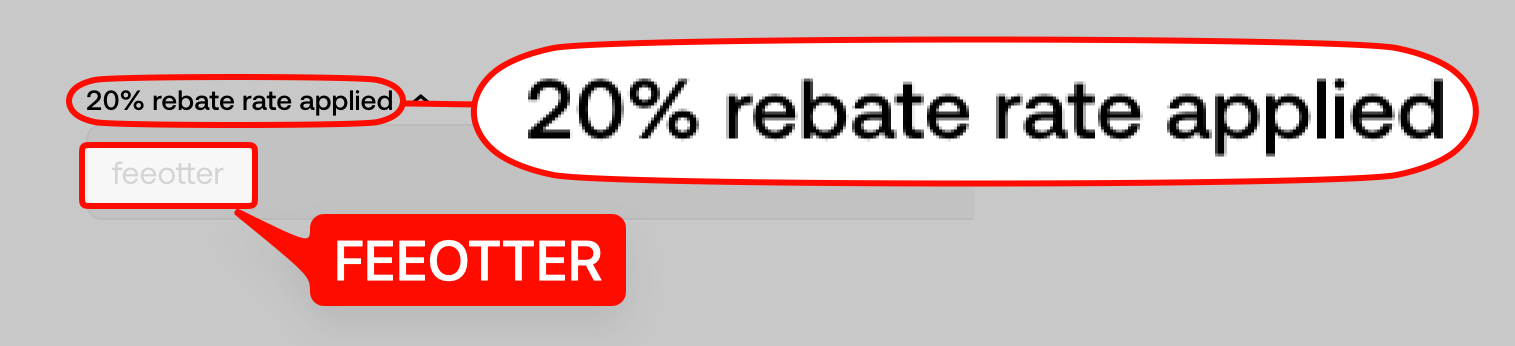
The OKX column shows the 20% auto-rebate that OKX refunds straight to your exchange account; click it to see our exclusive OKX rewards and promotions and how to reach support.
To hear about our exclusive OKX rewards and promotions, contact support. Once you are bound, the rebate dashboard shows every amount that actually posts to your available balance.
First, know what you are paying: OKX's list fees
A rebate is a percentage of the fee, not of the notional you trade. OKX's list rates for regular users:
| Product | Maker | Taker |
|---|
| Spot | 0.080% | 0.100% |
| Perpetual futures | 0.020% | 0.050% |
Three things people trip over:
- OKX's spot maker fee is cheaper than most. 0.08% rather than the usual 0.1%, so makers are a fifth better off on OKX spot before any rebate.
- The futures taker fee is 2.5× the maker fee. Every market order is a taker order. At the same notional, someone who works limit orders can pay roughly two fifths of what a market-order trader pays.
- OKB no longer lowers fees. OKX's official FAQ (updated 2026-09-09) says there is currently no OKB fee discount, and fee tiers depend only on 30-day volume and assets. The rebate is calculated on the fee you actually pay.
The table reflects regular-user list pricing as of September 2026 and OKX may change it; for current rates see the official OKX fee page.
Fees verified on 2026-09-24. Source: OKX official fee schedule · Methodology
How much can you get back?
Fee Otter has one rebate rate per exchange. There are no tiers.
The 20% in the OKX column is the auto-rebate OKX refunds to you directly; click it for details of our exclusive rewards and promotions and how to reach support.
What is that 20% worth? Five worked examples
The table below counts the 20% auto-rebate, which OKX pays automatically when you sign up with our code.
| Monthly fees | Back (20%) | Equivalent futures notional | Equivalent spot notional |
|---|
| 100 USDT | 20 USDT | ~200,000 USDT | ~100,000 USDT |
| 500 USDT | 100 USDT | ~1m USDT | ~500,000 USDT |
| 1,000 USDT | 200 USDT | ~2m USDT | ~1m USDT |
| 2,500 USDT | 500 USDT | ~5m USDT | ~2.5m USDT |
| 5,000 USDT | 1,000 USDT | ~10m USDT | ~5m USDT |
The two notional columns are back-solved from the 0.05% futures taker and 0.1% spot taker rates; posting limit orders (0.02% / 0.08% maker) needs more notional for the same fee total.
More useful is what the same fee turns into through a different channel:
| Channel | What comes back to you |
|---|
| No referral code at signup | 0% |
| A code with the kickback set to 0% (many KOL codes) | 0% |
| Fee Otter (our code) | 20% auto-rebate + exclusive rewards |
If you are already a VIP on an exchange and want to rebind or sign up on another exchange, contact support. We can help you apply for special trading benefits and exclusive rewards.
OKX registration steps and how to bind your UID
New users, follow this order. If you already have an OKX account, skip to the rebinding section.
Step 1: register with the referral code
Register through the link on this site. The OKX referral code is FEEOTTER, and it is already built into the link. This step decides your 20% auto rebate, and it cannot be added after the account is open; get it wrong and rebinding is your only route.
Step 2: complete KYC
Accounts without KYC are feature-limited and cannot generate a calculable rebate. Usually minutes to a day.
Step 3: find your OKX UID
Log in, click your avatar in the top right. The UID is a plain string of digits under your account name. It is the only thing binding requires: no API key, no password.
Step 4: bind the UID on the rebate site
Go to the Fee Otter rebate dashboard, choose OKX, paste the UID and submit. We reconcile it against the invitee list the exchange reports to us, and it goes live once matched.
Step 5: trade, then check the books
From then on your daily fees and rebates post automatically and are visible in the dashboard, and you can request a withdrawal of your available balance at any time. The per-row history is the most reliable answer to "what rate am I actually on": those are amounts that posted, not advertising.
When does the rebate arrive?
How long is the "later" in "charged first, returned later"? The actual timeline:
| Point in time | What happens |
|---|
| At the trade | OKX charges the full fee |
| Around T+1 | The exchange produces the previous day's invitee and commission data |
| After it lands | We import it, match each row to your UID, compute the rebate |
| After posting | Your available balance on the rebate site increases; visible, with withdrawals on request |
That path describes how the rebate site settles. OKX's 20% auto-rebate travels through OKX's own plumbing and follows different rules:
| Item | OKX's official 20% auto-rebate | Fee Otter rebate site |
|---|
| Who pays it | OKX, no application needed | Fee Otter |
| Where it lands | Your OKX account | Your Fee Otter available balance |
| Settlement cycle and currency | Per OKX's own rules | Denominated in USDT, around T+1 |
| Where to check | OKX account statement / referral records | The rebate dashboard, row by row |
The 20% auto-rebate's settlement cycle, currency and payout route are OKX's to set and may change; the official OKX documentation prevails. Two details that catch people out:
- Only trades that actually generate a fee count. A trade with no fee produces no rebate and no volume credit.
- The two amounts live in different places. The official 20% goes to your OKX account; rebate-site credits go to your available balance on the rebate site. If one looks missing, check which side you are looking at.
Already have an OKX account? Rebind to claim rebates
An OKX referral code can only be entered at signup and cannot be added afterwards. That said, OKX has more than one rebinding route: an official re-binding application, the 180-day dormant-account recall, and others, each with its own conditions. For the full conditions, steps and risks see the OKX rebinding guide.
Five mistakes people make
- Stopping at the 20%. Besides the 20% auto-rebate, we run our exclusive OKX rewards and promotions; ask support.
- Expecting the order-ticket fee to drop. It does not. Charged first, returned later.
- Binding the wrong UID. The UID is a numeric account ID, not a nickname or an email. Sub-account commission rolls up to the master account's UID, so binding the master account is enough.
- Skipping the code at signup, assuming it can be added later. It cannot, but OKX has more rebinding routes than most, so it is worth trying.
- Treating two credits as one payment. The official 20% goes to the exchange account, rebate-site credits to your available balance on the rebate site. Check them separately.
How is this different from a KOL or another rebate site?
The familiar pitch is "use my code for a 20% fee discount", which makes every channel sound identical. But whether you get that 20% at all is the referrer's setting, and many codes simply have it switched off. Three things separate the offers:
- Whether the 20% actually reaches you. With our code that 20% always lands in your account. Some codes are set to 0% and you get nothing.
- Whether the books are auditable. Every fee and every rebate is listed row by row, not one number at month end.
- Whether you actually get paid. You can request a withdrawal of your available balance at any time, with no minimum-threshold lockup.
For how to evaluate a rebate site, see How to choose a crypto rebate site.
How OKX compares
Risks to know before using OKX
OKX’s rebate terms are good, but know these risks before you deposit:
- US guilty plea and penalties: in February 2025 the Seychelles company that operates OKX pleaded guilty in the US to operating an unlicensed money transmitting business and agreed to pay more than $500 million in penalties and forfeiture (SDNY announcement).
- Third-party rating: CoinGecko gives OKX a trust score of 10/10; the score weighs volume legitimacy, liquidity, cybersecurity and past incidents, and is not a guarantee for your assets.
- Don’t keep long-term or large balances on the exchange: keep only the funds you are actively trading; withdraw money you aren’t trading and anything you hold long term.
- Use a cold wallet for long-term holdings: move large, long-term assets to a hardware cold wallet (such as a Ledger) and keep them offline.
- Futures and high leverage are high risk: the higher the leverage, the easier it is to be liquidated. Beginners should avoid high leverage and learn the rules with small amounts first.
FAQ
What is the maximum OKX rebate?
OKX is a 20% auto-rebate + exclusive rewards: the 20% is refunded to your account by OKX directly; for the exclusive rewards, contact support.
What else is there besides the 20%?
We also run our exclusive OKX rewards and promotions; contact support for details.
When is the OKX rebate paid?
The official 20% is returned directly to your exchange account by OKX. Rebate-site credits are imported, matched and posted to your available balance on the rebate site after the exchange's daily report, typically from T+1 onwards.
Is this safe? Can you touch my assets?
Binding needs only your UID: no API key, no password, no withdrawal permission. Your assets stay in your own OKX account; the rebate site neither custodies nor can move them.
I signed up without a code. Can I still get rebates?
Yes, through rebinding. OKX has more than one route; see the rebinding guide.
Does holding OKB lower my fees?
No. OKX's official FAQ says there is currently no OKB fee discount, and fee tiers depend only on 30-day volume and assets. To lower your cost, rely on VIP level and the rebate.
Is the rebate rate the same for spot and futures?
The rate is the same, but the underlying fee rates differ a lot (spot taker 0.1%, futures taker 0.05%), so the same notional generates different rebate amounts: spot returns twice as much as futures.
How is the rebate rate set?
Fee Otter has one rate per exchange. For OKX it is the 20% auto-rebate plus exclusive rewards. For how settlement works, see How fee rebates are settled.
Does the 20% ever stop?
As long as the account sits under our code, it stays.
Is there a withdrawal minimum?
There is no lockup. Your available balance accrues on the rebate site, and you can request a withdrawal whenever you like.
Do sub-account fees count?
Yes. Sub-account trading commission is attributed to the master account's UID; that is how the exchange's commission report is structured. Bind the master account UID and everything your sub-accounts generate is included, with no separate binding needed.
How do I find out what I actually receive?
Two places: your OKX account shows the official 20%, and the rebate dashboard lists fees and posted amounts row by row. To ask before binding, contact support.



%2C2026-10-05%20%E5%8F%96%E6%A8%A3%3A%0A%20%20%20%20%20%20%20%E5%BA%95%E8%89%B2%20%230E3452%2C%E5%AD%97%E7%AC%A6%20%2303CA9B)%E3%80%82%0A%20%20%20%20%20%20%20%E7%94%A8%20potrace%20%E6%8F%8F%E5%AD%97%E7%AC%A6%E8%BC%AA%E5%BB%93%2C%E6%95%B4%E5%BC%B5%E7%95%AB%E5%B8%83%E7%9B%B4%E6%8E%A5%E6%98%A0%E5%B0%84%E5%88%B0%E9%80%99%E8%A3%A1%E7%9A%84%2032%20%E5%96%AE%E4%BD%8D%20%E2%80%94%E2%80%94%20%E4%B8%8D%E9%87%8D%E6%96%B0%E7%BD%AE%E4%B8%AD%2C%E4%BF%9D%E7%95%99%E5%AE%98%E6%96%B9%E7%9A%84%E7%95%99%E7%99%BD%E6%AF%94%E4%BE%8B%E3%80%82%0A%20%20%20%20%20%20%20%E8%A6%81%E6%94%B9%E8%AB%8B%E9%87%8D%E8%B7%91%E6%8F%8F%E5%9C%96%2C%E4%B8%8D%E8%A6%81%E6%86%91%E5%8D%B0%E8%B1%A1%E8%AA%BF%E3%80%82%20--%3E%0A%20%20%3Crect%20x%3D%221.5%22%20y%3D%221.5%22%20width%3D%2229%22%20height%3D%2229%22%20rx%3D%228%22%20fill%3D%22%230E3452%22%2F%3E%0A%20%20%3Cpath%20fill%3D%22%2303CA9B%22%20d%3D%22M23.02%205.97C22.14%206.02%2021.54%206.07%2021.22%206.1C20.72%206.15%2019.6%206.28%2019.41%206.31C19.31%206.33%2019.1%206.37%2018.94%206.39C18.29%206.5%2017.94%206.57%2017.2%206.73C16.92%206.79%2016%207.03%2015.8%207.09C15.36%207.23%2014.42%207.54%2014.39%207.56C14.38%207.57%2014.3%207.6%2014.23%207.62C13.82%207.76%2012.7%208.28%2012.13%208.6C11.95%208.7%2011.8%208.78%2011.79%208.78C11.7%208.78%2010.42%209.71%209.98%2010.08C9.16%2010.79%208.07%2012.09%207.6%2012.91C7.28%2013.46%207.18%2013.65%207.06%2013.91C6.87%2014.3%206.76%2014.53%206.68%2014.74C6.56%2015.08%206.37%2015.64%206.34%2015.73C6.33%2015.78%206.3%2015.91%206.27%2016C6.06%2016.79%205.93%2017.87%205.94%2018.62L5.95%2019.05L6.69%2019.04C7.78%2019.03%208.57%2018.94%209.73%2018.68C10.18%2018.58%2011.05%2018.33%2011.45%2018.18C11.52%2018.15%2011.7%2018.08%2011.84%2018.03C13.58%2017.38%2015.67%2016.19%2017.55%2014.77C17.8%2014.58%2018.67%2013.89%2018.74%2013.83C18.76%2013.81%2018.94%2013.66%2019.14%2013.48C19.34%2013.31%2019.54%2013.14%2019.58%2013.11C19.61%2013.07%2019.78%2012.92%2019.95%2012.77C20.94%2011.88%2022.24%2010.57%2023.2%209.48C23.68%208.94%2023.69%208.93%2023.86%208.73C23.94%208.63%2024.02%208.54%2024.03%208.53C24.17%208.4%2025.09%207.25%2025.52%206.67C25.67%206.47%2025.81%206.28%2025.83%206.26C25.86%206.23%2025.89%206.19%2025.9%206.16C25.92%206.13%2025.94%206.12%2025.95%206.13C25.98%206.15%2025.3%207.5%2024.99%208.07C24.88%208.28%2024.78%208.45%2024.78%208.46C24.78%208.46%2024.66%208.67%2024.51%208.93C24.24%209.4%2024.17%209.52%2024.07%209.69C24%209.81%2023.72%2010.27%2023.39%2010.8C22.69%2011.91%2021.44%2013.66%2020.74%2014.52C20.25%2015.12%2020.09%2015.31%2019.72%2015.73C19.01%2016.55%2018.19%2017.38%2017.42%2018.08C17.07%2018.39%2016.92%2018.52%2016.5%2018.87C16.37%2018.98%2016.24%2019.09%2016.2%2019.12C15.83%2019.43%2014.7%2020.21%2014.16%2020.54C13.69%2020.82%2012.69%2021.34%2012.41%2021.45C12.33%2021.48%2012.23%2021.52%2012.17%2021.55C12.01%2021.62%2011.45%2021.84%2011.11%2021.95C10.97%2022%2010.05%2022.26%209.84%2022.31C9.23%2022.45%208.97%2022.5%208.56%2022.56C8.43%2022.58%208.25%2022.61%208.16%2022.62C8.06%2022.64%207.79%2022.67%207.56%2022.69C7.32%2022.71%207.12%2022.74%207.12%2022.76C7.12%2022.85%207.58%2023.42%207.97%2023.82C9.2%2025.09%2010.67%2025.8%2012.52%2026.02C16.51%2026.48%2020.99%2024.06%2023.2%2020.25C23.32%2020.05%2023.43%2019.86%2023.46%2019.81C23.51%2019.73%2023.96%2018.81%2024.04%2018.62C24.67%2017.21%2025.19%2015.43%2025.52%2013.67C25.66%2012.9%2025.73%2012.45%2025.81%2011.77C25.99%2010.32%2026.05%209.33%2026.05%207.64C26.05%206.06%2026.04%206.01%2025.97%205.98C25.9%205.95%2023.53%205.94%2023.02%205.97Z%22%2F%3E%0A%3C%2Fsvg%3E%0A)


%2C2026-10-05%20%E5%8F%96%E6%A8%A3%3A%0A%20%20%20%20%20%20%20%E5%BA%95%E8%89%B2%20%23FFFFFF%2C%E5%AD%97%E7%AC%A6%20%235227FF)%E3%80%82%0A%20%20%20%20%20%20%20%E7%94%A8%20potrace%20%E6%8F%8F%E5%AD%97%E7%AC%A6%E8%BC%AA%E5%BB%93%2C%E6%95%B4%E5%BC%B5%E7%95%AB%E5%B8%83%E7%9B%B4%E6%8E%A5%E6%98%A0%E5%B0%84%E5%88%B0%E9%80%99%E8%A3%A1%E7%9A%84%2032%20%E5%96%AE%E4%BD%8D%20%E2%80%94%E2%80%94%20%E4%B8%8D%E9%87%8D%E6%96%B0%E7%BD%AE%E4%B8%AD%2C%E4%BF%9D%E7%95%99%E5%AE%98%E6%96%B9%E7%9A%84%E7%95%99%E7%99%BD%E6%AF%94%E4%BE%8B%E3%80%82%0A%20%20%20%20%20%20%20%E5%AE%98%E6%96%B9%E6%98%AF%E7%99%BD%E5%BA%95%E7%B4%AB%E8%89%B2%E5%AD%97%E7%AC%A6%3B%E7%99%BD%E5%BA%95%E5%8A%A0%E6%B7%A1%E9%82%8A%2C%E5%85%8D%E5%BE%97%E5%9C%A8%E7%99%BD%E8%89%B2%E8%83%8C%E6%99%AF%E4%B8%8A%E6%B6%88%E5%A4%B1%E3%80%82%0A%20%20%20%20%20%20%20%E8%A6%81%E6%94%B9%E8%AB%8B%E9%87%8D%E8%B7%91%E6%8F%8F%E5%9C%96%2C%E4%B8%8D%E8%A6%81%E6%86%91%E5%8D%B0%E8%B1%A1%E8%AA%BF%E3%80%82%20--%3E%0A%20%20%3Crect%20x%3D%221.5%22%20y%3D%221.5%22%20width%3D%2229%22%20height%3D%2229%22%20rx%3D%228%22%20fill%3D%22%23FFFFFF%22%20stroke%3D%22%23E4E4E7%22%2F%3E%0A%20%20%3Cpath%20fill%3D%22%235227FF%22%20d%3D%22M13.31%208.92L13.31%2012.28L9.94%2012.28L6.56%2012.28L6.57%2015.71C6.58%2019.51%206.57%2019.29%206.79%2020.2C7.56%2023.33%2010.21%2025.78%2013.38%2026.31C14.1%2026.43%2014.44%2026.44%2019.24%2026.44L23.91%2026.44L23.91%2023.05L23.91%2019.66L19.2%2019.65L14.48%2019.64L14.28%2019.56C13.89%2019.41%2013.63%2019.16%2013.44%2018.76L13.36%2018.58L13.35%2015.46L13.34%2012.34L18.56%2012.34L23.78%2012.34L23.78%208.95L23.78%205.56L18.55%205.56L13.31%205.56L13.31%208.92Z%22%2F%3E%0A%3C%2Fsvg%3E%0A)

 Telegram · @feeotter