Signing up for OKX takes six steps: open the official signup page through our dedicated link, enter your email and check that the referral code field shows "20% rebate rate applied", verify your email and set a password, complete identity verification (KYC), deposit, then bind your UID. The referral code FEEOTTER is already built into the link; if you sign up in the app, type it in yourself. KYC needs a valid ID and a face scan, and you need it done before you get the full set of trading features. Signing up with this code gets you OKX 20% auto-rebate + exclusive rewards (checked October 2026).
The OKX signup page has one advantage other exchanges don't: when you enter a valid referral code, the page tells you the rebate rate it applied, so you can confirm it before you submit. Sign up with our code and the 20% always comes back to you; many KOL codes are set to 0%, so you get nothing.
What does the OKX signup page look like?
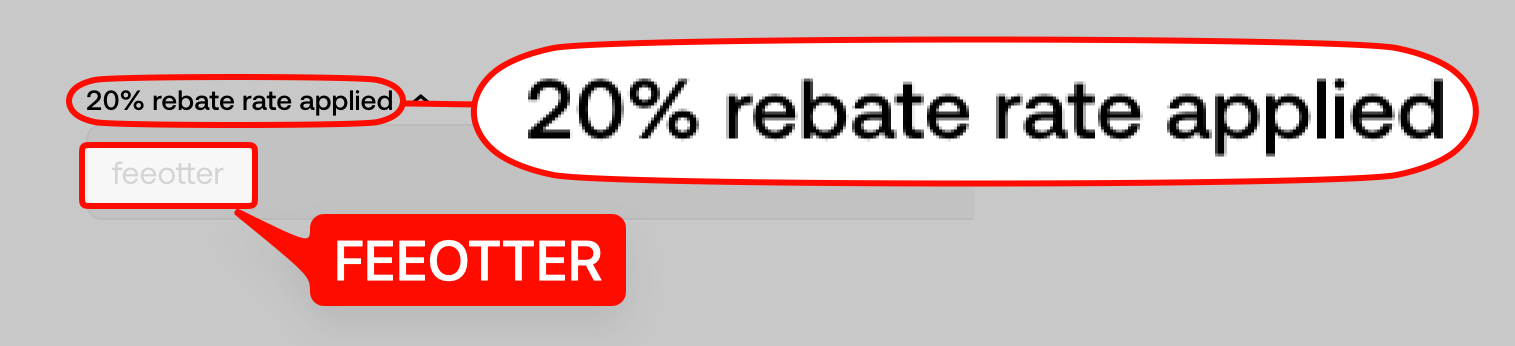
The OKX signup page starts with one question: "What's your email?". Below the email field is a collapsed referral code field. When you expand it and FEEOTTER is already filled in, a check mark appears on the right and the label changes to "20% rebate rate applied". That line is your proof that the code worked. You can also create an account with Google or Apple.
What do you need before signing up?
- An email address. You can also use a Google or Apple account directly.
- An ID document and a phone with a working camera, for identity verification.
- Confirmation that your country or region is not on the restricted list in the OKX user agreement.
- A clear distinction: you are signing up for an OKX exchange account, not OKX Wallet.
OKX signup steps
Step 1: Open the OKX signup page through the dedicated link
A desktop or mobile browser both work, and the link already carries the code FEEOTTER. If you sign up in the app directly, the code is not filled in for you, so the browser link is the easier route.
Step 2: Enter your email and expand the referral code field
Continue only after you see "20% rebate rate applied" and the check mark. If you don't see them, the code wasn't applied; open the signup page through the dedicated link again.
Step 3: Get the verification code and set a password
OKX sends a verification code to your inbox. Then you set your login password.
Step 4: Complete identity verification
OKX requires identity verification before you can use its full trading features. See the next section.
Step 5: Deposit and trade
When you deposit with an on-chain transfer, check the network first. OKX often supports several networks for the same coin, and assets sent on the wrong network usually can't be recovered.
Step 6: Bind your UID
After logging in, tap your avatar to open your profile. The number in your account details is your UID. Go to the Fee Otter rebate dashboard, choose OKX, and paste it in.
OKX KYC: what do you need?
OKX identity verification requires a valid ID plus a face scan, and your details must match your ID. Some countries and regions are outside OKX's service area, so check the restricted regions in the OKX user agreement before you sign up.
Who is OKX for?
OKX is a full-service exchange ranked second by trading volume on CoinGlass. It has deep futures and spot liquidity, plus its own Web3 wallet. It suits you if you mainly trade futures on major coins and also want to use on-chain features.
OKX pays a 20% auto-rebate + exclusive rewards, the lowest rebate rate among the exchanges we cover; ask support about the exclusive rewards. Its spot maker fee of 0.08% is a little lower than the 0.1% most exchanges charge.
What are OKX's fees?
These are the list fees for regular OKX users. The spot maker fee of 0.08% is a little lower than the 0.10% most exchanges charge:
| Trade type | Maker | Taker | Platform token discount |
|---|
| Spot | 0.08% | 0.10% | OKB gives no discount |
| USDT-margined futures | 0.02% | 0.05% |
Fees verified: 2026-09-24 (OKX official fee page) · Data sources and methodology
This table shows list prices as of September 2026. OKX may change them. For the latest fees, see the OKX official fee page. Since November 2025, OKX has used a new fee framework in which your tier is based on assets or 30-day trading volume. See the OKX official fee framework update announcement.
How does OKX's net fee compare with similar exchanges?
The list fee is only the starting point. The "net taker" fee after you bind for rebates is what you actually pay on every futures market order (net fee = list fee × (1 − rebate rate)):
| Exchange | Futures taker list fee | Rebate rate | Net taker after rebate |
|---|
| OKX | 0.05% | 20% | 0.04% |
| Binance | 0.05% | 40% | 0.03% |
| Bybit | 0.055% | 40% | 0.033% |
| Bitget | 0.06% | 50% | 0.03% |
OKX's 20% auto-rebate keeps its net taker at 0.04%.
Data from the September 2026 Exchange Fee and Rebate Index (fees verified 2026-09-24). OKX is a 20% auto-rebate + exclusive rewards.
What is the cheapest way to place your first futures order?
Take 2,500 USDT of margin at 20x leverage. The notional position is 50,000 USDT. Fees are charged on the notional position, not the margin. On OKX:
- Market order (taker 0.05%): the opening fee is 25 USDT. The 20% auto-rebate refunds 5 USDT, so you pay 20 USDT.
- Filled limit order (maker 0.02%): the opening fee is 10 USDT. The 20% refunds 2 USDT, so you pay 8 USDT.
Counting opening and closing as one round trip, you pay 40 USDT with market orders and 16 USDT with limit orders (at the 20% auto-rebate). Use limit orders when you can, then add the rebate on top. That is the most direct way to save on OKX.
How is the rebate calculated after you sign up with a referral code?
The auto-rebate for signing up with our code is 20%, and OKX pays it as charged in full, then refunded. For our exclusive OKX rewards and promotions, contact support.
Based on 500 USDT in monthly fees: the 20% auto-rebate refunds 100 USDT. For our exclusive OKX rewards and promotions, contact support.
How much can you save in a month?
Here are three trading volumes, calculated with OKX's futures list taker fee:
| Monthly futures volume | Monthly fees | Refund at the 20% auto-rebate |
|---|
| 100,000 USDT | 50 | 10 |
| 500,000 USDT | 250 | 50 |
| 2,000,000 USDT | 1,000 | 200 |
All figures assume market orders (taker 0.05%), in USDT per month. For exclusive rewards and promotions, contact support.
If you are already a VIP at an exchange and want to rebind or sign up at another exchange, contact support. We can help you apply for special trading benefits and exclusive rewards.
When does the rebate arrive, and where can you see it?
OKX uses "charged in full, then refunded". You pay the full fee when you place an order, and OKX later refunds the 20% to your account. That is why the fee on the order screen doesn't look lower. Exclusive rewards and promotions are settled by Fee Otter and are added to your available balance on the rebate dashboard, where you can check every entry.
The most common mistakes new OKX users make
- Not expanding the referral code field. The OKX field is collapsed by default. Submitting without seeing "20% rebate rate applied" is leaving it to luck.
- Treating OKX Wallet (the Web3 wallet) as the exchange account. The OKX app has both an exchange account and a Web3 wallet. For rebates, you bind the UID of your exchange account, not a wallet address.
- Not asking about exclusive promotions. Besides the 20% auto-rebate, we run our exclusive OKX rewards and promotions; ask support for details.
- Trying to rebind while still logging in to the old account. OKX's "180-day inactivity reclaim" requires no login, deposit, or trade for 180 days. If you log in along the way, the count restarts (see the OKX official affiliate FAQ).
The first thing to do after signup
- Ask support about OKX's exclusive promotions: besides the 20% auto-rebate, contact support about our exclusive OKX rewards and promotions.
- Bind your UID: rebates count from fees generated after you bind.
- Turn on two-factor authentication, and manage the security settings for your exchange account and Web3 wallet separately.
Already have an OKX account?
On OKX, you can only enter a referral code when you create your account, but there is more than one way to rebind. There are three methods: reclaim after 180 days of inactivity, an official rebind request, and closing your phone number and email to register again; if none works, contact support. For the conditions and steps, see the OKX rebind guide for existing users.
OKX compared with other exchanges
Risks to know before using OKX
Know these risks before you deposit on OKX:
- US guilty plea and penalties: in February 2025 the Seychelles company that operates OKX pleaded guilty in the US to operating an unlicensed money transmitting business and agreed to pay more than $500 million in penalties and forfeiture (SDNY announcement).
- Third-party rating: CoinGecko gives OKX a trust score of 10/10; the score weighs volume legitimacy, liquidity, cybersecurity and past incidents, and is not a guarantee for your assets.
- Don’t keep long-term or large balances on the exchange: keep only the funds you are actively trading; withdraw money you aren’t trading and anything you hold long term.
- Use a cold wallet for long-term holdings: move large, long-term assets to a hardware cold wallet (such as a Ledger) and keep them offline.
- Futures and high leverage are high risk: the higher the leverage, the easier it is to be liquidated. Beginners should avoid high leverage and learn the rules with small amounts first.
FAQ
How do you confirm the OKX referral code worked?
Expand the referral code field. If you see a check mark next to FEEOTTER and the label says "20% rebate rate applied", it worked.
What does the OKX rebate include?
The auto-rebate is 20%; for our exclusive OKX rewards and promotions, contact support.
Can you add a referral code after signing up for OKX?
No. You can only enter it when you create your account. If you already have an account, see the rebind guide.
Do you bind an OKX Wallet address for the rebate?
No. You bind the UID of your OKX exchange account, not a Web3 wallet address.
Is binding your UID safe?
Yes. We only need your UID. No API key, password, or withdrawal permission is required.
Can you enter a referral code when you sign up in the OKX app?
Yes, the app's signup screen has a referral code field where you can enter FEEOTTER. If you sign up in a mobile browser through the link in this article, the code is filled in automatically.
Is the OKX rebate refunded instantly?
No. OKX uses charged in full, then refunded. You pay the full fee when you place an order, and the rebate is refunded later.
Which regions can't use OKX?
The restricted regions listed in the OKX user agreement apply. Check them before you sign up.



%2C2026-10-05%20%E5%8F%96%E6%A8%A3%3A%0A%20%20%20%20%20%20%20%E5%BA%95%E8%89%B2%20%230E3452%2C%E5%AD%97%E7%AC%A6%20%2303CA9B)%E3%80%82%0A%20%20%20%20%20%20%20%E7%94%A8%20potrace%20%E6%8F%8F%E5%AD%97%E7%AC%A6%E8%BC%AA%E5%BB%93%2C%E6%95%B4%E5%BC%B5%E7%95%AB%E5%B8%83%E7%9B%B4%E6%8E%A5%E6%98%A0%E5%B0%84%E5%88%B0%E9%80%99%E8%A3%A1%E7%9A%84%2032%20%E5%96%AE%E4%BD%8D%20%E2%80%94%E2%80%94%20%E4%B8%8D%E9%87%8D%E6%96%B0%E7%BD%AE%E4%B8%AD%2C%E4%BF%9D%E7%95%99%E5%AE%98%E6%96%B9%E7%9A%84%E7%95%99%E7%99%BD%E6%AF%94%E4%BE%8B%E3%80%82%0A%20%20%20%20%20%20%20%E8%A6%81%E6%94%B9%E8%AB%8B%E9%87%8D%E8%B7%91%E6%8F%8F%E5%9C%96%2C%E4%B8%8D%E8%A6%81%E6%86%91%E5%8D%B0%E8%B1%A1%E8%AA%BF%E3%80%82%20--%3E%0A%20%20%3Crect%20x%3D%221.5%22%20y%3D%221.5%22%20width%3D%2229%22%20height%3D%2229%22%20rx%3D%228%22%20fill%3D%22%230E3452%22%2F%3E%0A%20%20%3Cpath%20fill%3D%22%2303CA9B%22%20d%3D%22M23.02%205.97C22.14%206.02%2021.54%206.07%2021.22%206.1C20.72%206.15%2019.6%206.28%2019.41%206.31C19.31%206.33%2019.1%206.37%2018.94%206.39C18.29%206.5%2017.94%206.57%2017.2%206.73C16.92%206.79%2016%207.03%2015.8%207.09C15.36%207.23%2014.42%207.54%2014.39%207.56C14.38%207.57%2014.3%207.6%2014.23%207.62C13.82%207.76%2012.7%208.28%2012.13%208.6C11.95%208.7%2011.8%208.78%2011.79%208.78C11.7%208.78%2010.42%209.71%209.98%2010.08C9.16%2010.79%208.07%2012.09%207.6%2012.91C7.28%2013.46%207.18%2013.65%207.06%2013.91C6.87%2014.3%206.76%2014.53%206.68%2014.74C6.56%2015.08%206.37%2015.64%206.34%2015.73C6.33%2015.78%206.3%2015.91%206.27%2016C6.06%2016.79%205.93%2017.87%205.94%2018.62L5.95%2019.05L6.69%2019.04C7.78%2019.03%208.57%2018.94%209.73%2018.68C10.18%2018.58%2011.05%2018.33%2011.45%2018.18C11.52%2018.15%2011.7%2018.08%2011.84%2018.03C13.58%2017.38%2015.67%2016.19%2017.55%2014.77C17.8%2014.58%2018.67%2013.89%2018.74%2013.83C18.76%2013.81%2018.94%2013.66%2019.14%2013.48C19.34%2013.31%2019.54%2013.14%2019.58%2013.11C19.61%2013.07%2019.78%2012.92%2019.95%2012.77C20.94%2011.88%2022.24%2010.57%2023.2%209.48C23.68%208.94%2023.69%208.93%2023.86%208.73C23.94%208.63%2024.02%208.54%2024.03%208.53C24.17%208.4%2025.09%207.25%2025.52%206.67C25.67%206.47%2025.81%206.28%2025.83%206.26C25.86%206.23%2025.89%206.19%2025.9%206.16C25.92%206.13%2025.94%206.12%2025.95%206.13C25.98%206.15%2025.3%207.5%2024.99%208.07C24.88%208.28%2024.78%208.45%2024.78%208.46C24.78%208.46%2024.66%208.67%2024.51%208.93C24.24%209.4%2024.17%209.52%2024.07%209.69C24%209.81%2023.72%2010.27%2023.39%2010.8C22.69%2011.91%2021.44%2013.66%2020.74%2014.52C20.25%2015.12%2020.09%2015.31%2019.72%2015.73C19.01%2016.55%2018.19%2017.38%2017.42%2018.08C17.07%2018.39%2016.92%2018.52%2016.5%2018.87C16.37%2018.98%2016.24%2019.09%2016.2%2019.12C15.83%2019.43%2014.7%2020.21%2014.16%2020.54C13.69%2020.82%2012.69%2021.34%2012.41%2021.45C12.33%2021.48%2012.23%2021.52%2012.17%2021.55C12.01%2021.62%2011.45%2021.84%2011.11%2021.95C10.97%2022%2010.05%2022.26%209.84%2022.31C9.23%2022.45%208.97%2022.5%208.56%2022.56C8.43%2022.58%208.25%2022.61%208.16%2022.62C8.06%2022.64%207.79%2022.67%207.56%2022.69C7.32%2022.71%207.12%2022.74%207.12%2022.76C7.12%2022.85%207.58%2023.42%207.97%2023.82C9.2%2025.09%2010.67%2025.8%2012.52%2026.02C16.51%2026.48%2020.99%2024.06%2023.2%2020.25C23.32%2020.05%2023.43%2019.86%2023.46%2019.81C23.51%2019.73%2023.96%2018.81%2024.04%2018.62C24.67%2017.21%2025.19%2015.43%2025.52%2013.67C25.66%2012.9%2025.73%2012.45%2025.81%2011.77C25.99%2010.32%2026.05%209.33%2026.05%207.64C26.05%206.06%2026.04%206.01%2025.97%205.98C25.9%205.95%2023.53%205.94%2023.02%205.97Z%22%2F%3E%0A%3C%2Fsvg%3E%0A)


%2C2026-10-05%20%E5%8F%96%E6%A8%A3%3A%0A%20%20%20%20%20%20%20%E5%BA%95%E8%89%B2%20%23FFFFFF%2C%E5%AD%97%E7%AC%A6%20%235227FF)%E3%80%82%0A%20%20%20%20%20%20%20%E7%94%A8%20potrace%20%E6%8F%8F%E5%AD%97%E7%AC%A6%E8%BC%AA%E5%BB%93%2C%E6%95%B4%E5%BC%B5%E7%95%AB%E5%B8%83%E7%9B%B4%E6%8E%A5%E6%98%A0%E5%B0%84%E5%88%B0%E9%80%99%E8%A3%A1%E7%9A%84%2032%20%E5%96%AE%E4%BD%8D%20%E2%80%94%E2%80%94%20%E4%B8%8D%E9%87%8D%E6%96%B0%E7%BD%AE%E4%B8%AD%2C%E4%BF%9D%E7%95%99%E5%AE%98%E6%96%B9%E7%9A%84%E7%95%99%E7%99%BD%E6%AF%94%E4%BE%8B%E3%80%82%0A%20%20%20%20%20%20%20%E5%AE%98%E6%96%B9%E6%98%AF%E7%99%BD%E5%BA%95%E7%B4%AB%E8%89%B2%E5%AD%97%E7%AC%A6%3B%E7%99%BD%E5%BA%95%E5%8A%A0%E6%B7%A1%E9%82%8A%2C%E5%85%8D%E5%BE%97%E5%9C%A8%E7%99%BD%E8%89%B2%E8%83%8C%E6%99%AF%E4%B8%8A%E6%B6%88%E5%A4%B1%E3%80%82%0A%20%20%20%20%20%20%20%E8%A6%81%E6%94%B9%E8%AB%8B%E9%87%8D%E8%B7%91%E6%8F%8F%E5%9C%96%2C%E4%B8%8D%E8%A6%81%E6%86%91%E5%8D%B0%E8%B1%A1%E8%AA%BF%E3%80%82%20--%3E%0A%20%20%3Crect%20x%3D%221.5%22%20y%3D%221.5%22%20width%3D%2229%22%20height%3D%2229%22%20rx%3D%228%22%20fill%3D%22%23FFFFFF%22%20stroke%3D%22%23E4E4E7%22%2F%3E%0A%20%20%3Cpath%20fill%3D%22%235227FF%22%20d%3D%22M13.31%208.92L13.31%2012.28L9.94%2012.28L6.56%2012.28L6.57%2015.71C6.58%2019.51%206.57%2019.29%206.79%2020.2C7.56%2023.33%2010.21%2025.78%2013.38%2026.31C14.1%2026.43%2014.44%2026.44%2019.24%2026.44L23.91%2026.44L23.91%2023.05L23.91%2019.66L19.2%2019.65L14.48%2019.64L14.28%2019.56C13.89%2019.41%2013.63%2019.16%2013.44%2018.76L13.36%2018.58L13.35%2015.46L13.34%2012.34L18.56%2012.34L23.78%2012.34L23.78%208.95L23.78%205.56L18.55%205.56L13.31%205.56L13.31%208.92Z%22%2F%3E%0A%3C%2Fsvg%3E%0A)

 Telegram · @feeotter