WEEX API keys are created on the web, up to 10 per account. A new key is read-only by default; to place orders you tick the Futures or Spot trading permission, and the official docs list no withdrawal permission at all. You can bind IP addresses when you create the key. The passphrase must be letters and numbers only and cannot be recovered if lost. New or edited keys take about 15 minutes to go live everywhere. Futures order placement is capped at 300 requests per minute per account, and the simulation domain api-sim.weex.com lets you test first (WEEX official API docs, checked 2026-10-17).
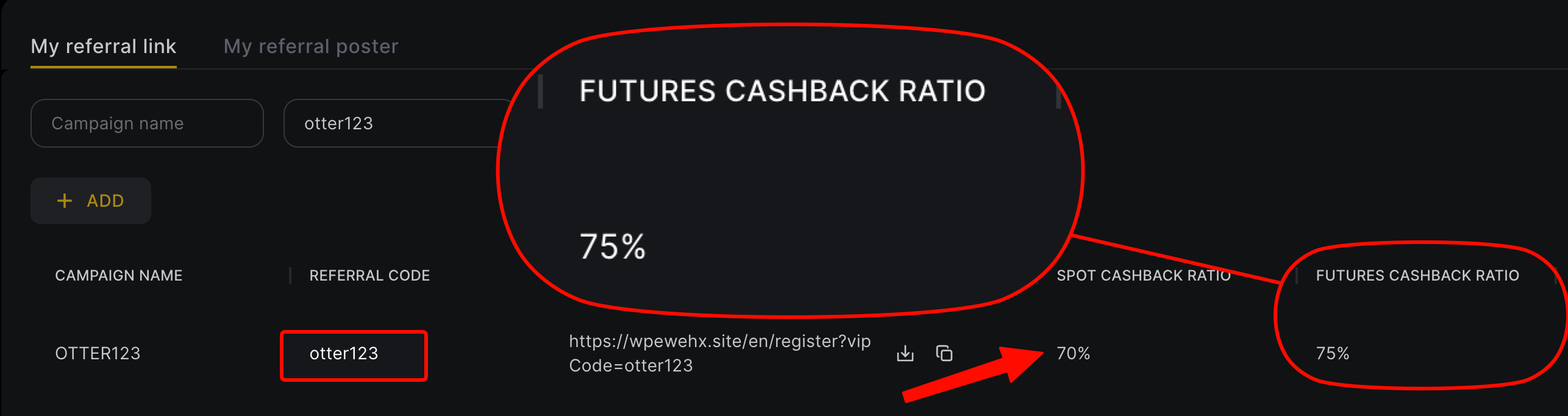
This guide follows the WEEX V3 API docs and WEEX's public API endpoints: creating a key, choosing permissions, signing and timestamps, rate limits by endpoint type, which contracts allow API trading, the simulation environment, and what the official terms say about fees and rebates on API orders. Sign up for WEEX with code otter123 and futures fees are rebated at 70% (60% automatic rebate from the exchange + 10% extra rebate), 3.5 times a typical 20% code, so part of every fee your strategy pays comes back.
Key points
- Created on the web: use the API management page, up to 10 keys per user. You need to keep three things: APIKey, SecretKey and the passphrase you set.
- Permissions: read-only by default. Tick Futures for a futures strategy and Spot for spot. They are independent; without the right one you get
-1052(insufficient permissions). - IP binding: optional at creation. WEEX says keys without an IP binding carry security risk and strongly recommends a whitelist.
- Rate limits: order placement is counted per account, 300 per minute for futures and 100 per 10 seconds for spot. Other endpoints use IP weight. Going over returns HTTP 429, and continuing gets a 10-second ban.
- Not every contract supports the API: WEEX's API list covers 298 of 1,040 contracts, including BTCUSDT, ETHUSDT and SOLUSDT.
- Rebates: binding a rebate needs only your UID, never an API key.
How to create a key
From the WEEX futures API doc Preparation (checked 2026-10-17):
- Log in to WEEX on the web, open the API management page (
weex.com/account/newapi) and create a new key. - Set a passphrase. The FAQ says to use letters and numbers only, with no special characters.
- Choose permissions. New keys are read-only; tick Futures or Spot only if you need to trade.
- Bind IP addresses if you want to.
- Save the APIKey, SecretKey and passphrase. A lost passphrase cannot be recovered or changed; you have to delete the key and make a new one.
The FAQ states that newly created or edited keys usually take about 15 minutes to propagate across the system, so if a fresh key fails authentication, wait before you debug. WEEX's older error-code list also has 40016: the account must have a phone number or Google Authenticator bound (WEEX API error codes). That page dates from 2025 and covers the older API; the V3 docs don't say whether the rule still applies, so bind 2FA first.
If the account trips risk controls (suspicious logins, many invalid requests), API access may be switched off automatically and you have to ask support to restore it. WEEX recommends V3 endpoints; V1 and V2 are being retired.
Permissions: which to enable
From the official futures API FAQ and spot API FAQ (updated 2026-04-14):
| Permission | What it allows | Typical use |
|---|---|---|
| Readonly (default) | Query endpoints only: balances, positions, trade history | Monitoring, bookkeeping, market analysis |
| Futures | Open and close positions, set TP/SL, query futures positions | Futures strategies, hedging |
| Spot | Place and cancel spot orders, query spot assets | Spot bots, rebalancing |
For regular users those are the only permissions in the docs, and no withdrawal permission is listed. Broker sub-account APIs do have deposit and withdrawal permissions, but that is a separate integration for brokers, not something you need to run your own strategy.
Copy trading has its own API too: only traders can create one, each trader account gets 1 key, and copy-trading funds and positions are fully separate from regular futures. It does not support spot (copy trading API FAQ). See WEEX copy trading for how lead trading works.
Signing, timestamps and domains
From the official Signature and General Information pages:
- Domains: futures production
https://api-contract.weex.com, futures simulationhttps://api-sim.weex.com, spothttps://api-spot.weex.com. - Headers: private endpoints need
ACCESS-KEY,ACCESS-SIGN,ACCESS-TIMESTAMPandACCESS-PASSPHRASE, withContent-Type: application/json. - Signature: concatenate timestamp + uppercase method + request path + (if there is a query string) "?" and the query string + body, sign with HMAC SHA256 using the SecretKey, then Base64-encode.
- Timestamp: milliseconds. Requests more than 30 seconds off server time are rejected, so keep the host clock in sync or fetch server time first.
Here is a minimal call to the futures simulation balance endpoint (GET /capi/v3/account/balance, IP weight 5). The key comes from environment variables, never hard-coded:
import base64, hashlib, hmac, os, time, requests

KEY = os.environ["WEEX_API_KEY"]          # read-only is enough for this call
SECRET = os.environ["WEEX_API_SECRET"]
PASSPHRASE = os.environ["WEEX_API_PASSPHRASE"]
HOST = "https://api-sim.weex.com"        # simulation; live: https://api-contract.weex.com
path, query, body = "/capi/v3/account/balance", "", ""

ts = str(int(time.time() * 1000))
message = ts + "GET" + path + ("?" + query if query else "") + body
sign = base64.b64encode(
    hmac.new(SECRET.encode(), message.encode(), hashlib.sha256).digest()
).decode()

r = requests.get(HOST + path, headers={
    "ACCESS-KEY": KEY, "ACCESS-SIGN": sign, "ACCESS-TIMESTAMP": ts,
    "ACCESS-PASSPHRASE": PASSPHRASE, "Content-Type": "application/json",
})
print(r.status_code, r.headers.get("X-USED-WEIGHT-1M"), r.text[:200])
WEEX says every futures REST endpoint works in simulation with the same paths, parameters and signing; you only swap the domain. The docs don't say whether simulation needs a separate key, so test it. The spot docs list no simulation domain.
Rate limits by endpoint type
Per Access Restrictions, every endpoint except order placement is limited by IP weight, regardless of key or UID. Order placement is limited per account (userId) and uses no IP weight. Figures below come from the two API FAQs and the public exchangeInfo endpoint, checked 2026-10-17:
| Market | Item | Limit |
|---|---|---|
| Futures | Place order (per account) | 300 per minute |
| Other REST endpoints (IP weight) | FAQ: 500 weight per 10 seconds; exchangeInfo: 500 weight per 10 minutes | |
| WebSocket | 20 connections per IP | |
| Spot | Place order, single and batch (per account) | 100 per 10 seconds |
| Cancel order | 80 per 10 seconds or 200 per minute | |
| Other REST endpoints (IP weight) | 500 weight per 10 seconds | |
| WebSocket | 20 connections per IP |
The futures IP-weight window doesn't match across sources: the FAQ says per 10 seconds, while exchangeInfo returns interval: MINUTE, intervalNum: 10. WEEX points to exchangeInfo as the source for limits, so plan for 500 weight per 10 minutes to be safe. Each response carries X-USED-WEIGHT-* and X-REMAINING-WEIGHT-* (IP weight) plus X-ORDER-COUNT-* and X-ORDER-REMAINING-* (orders), so your code can throttle itself. The futures place-order page also says each order counts toward both a 10-second and a 1-minute order limit; the 10-second figure isn't published.
When you get a 429, stop: WEEX says that continuing to send requests triggers a 10-second ban.
Which contracts allow API trading
API trading has its own symbol list. On 2026-10-17, exchangeInfo listed 1,040 contracts (564 crypto perpetuals and 476 perpetuals on stocks and other traditional assets), while /capi/v3/market/apiTradingSymbols listed 298. The spot API list had 535 pairs. An API order on a symbol outside the list returns -1052. Call that endpoint before going live rather than assuming that what trades on the website trades through the API.
Other limits in the docs: symbols are case-sensitive and must be uppercase; WebSocket connections must send a User-Agent header or the firewall returns 403; TradingView and FIX API are not supported.
Fees and rebates on API orders
Fees: the public exchangeInfo shows BTCUSDT perpetual at 0.02% maker and 0.08% taker, and 913 of the 1,040 contracts use that pair of rates. Your account's actual rate is available from GET /capi/v3/account/commissionRate. Futures orders support POST_ONLY, which only rests on the book; the maker fee is a quarter of the taker fee. For VIP tiers see WEEX VIP levels. Note that VIP8 requires at least 450 million USDT of the 500 million in futures volume to be non-API, so API-heavy accounts can't reach the top tier.
Rebates: clause 5.1 of the WEEX Affiliate Program Terms (updated 2026-01-08) says commission is based on the trading fees actually paid by eligible referrals, after deducting fee discounts WEEX gives certain customer groups and "Other Fees", which may include fees incurred through third-party trading tools. The terms neither exclude API orders nor say they always count, so check your rebate statement for API or third-party bot volume.
One more program to keep separate: WEEX's market maker program requires the applying UID to have no commission affiliation. An account registered under a referral code doesn't qualify; if you want market-maker rates you need a separate account and an email application to WEEX.
Worked example: 3 million USDT, taker vs maker
Assume a futures strategy trades 3 million USDT a month, at VIP0 list rates with Fee Otter's 70% futures rebate:
| Scenario | Monthly fees | Rebated | Net cost |
|---|---|---|---|
| All taker, no rebate | 2,400 USDT | 0 | 2,400 USDT |
| All taker + typical 20% code | 2,400 USDT | 480 USDT | 1,920 USDT |
| All taker + Fee Otter 70% | 2,400 USDT | 1,680 USDT | 720 USDT |
| All POST_ONLY maker + Fee Otter 70% | 600 USDT | 420 USDT | 180 USDT |
On the same volume, all-taker with no rebate costs 2,400 USDT; maker orders plus the 70% rebate cost 180 USDT. On rate limits, 300 orders per minute averages 5 per second, more than a typical grid or trend strategy uses. Strategies that cancel and replace often should remember that cancels draw on IP weight, not the order limit.
These are estimates from list rates; your fills and rebate statement are what count. The 60% is refunded by WEEX straight into your exchange account and the 10% is settled daily by Fee Otter; see the screenshots on the rebate rates page. Rebates apply to trading fees only, not funding or liquidation. Registration steps are in how to register on WEEX; if you already signed up with someone else's code, see WEEX rebind guide. For multi-exchange numbers see fee rebates for quant traders.
If you are already a VIP at an exchange or trade high volume with bots and want to switch or open another exchange, contact Fee Otter support. We work with the exchanges' official teams to request special trading benefits or a higher rebate rate; what you get is decided by the exchange.
 Telegram · @feeotter