You create a BingX API key on the API Management page, on the web or in the app, and get two pieces of information: an API key and a secret key. BingX recommends setting an IP whitelist and says to delete and recreate a key immediately if it leaks. Permissions cover spot trading, read, perpetual futures trading, universal transfer and sub-account internal transfers, and spot and USDT-M futures share the same key with separately set permissions. Each main account can hold up to 20 keys, request timestamps must be within 5 seconds of server time, and market endpoints are IP-limited to 500 requests per 10 seconds (BingX official API docs, checked 2026-10-17).
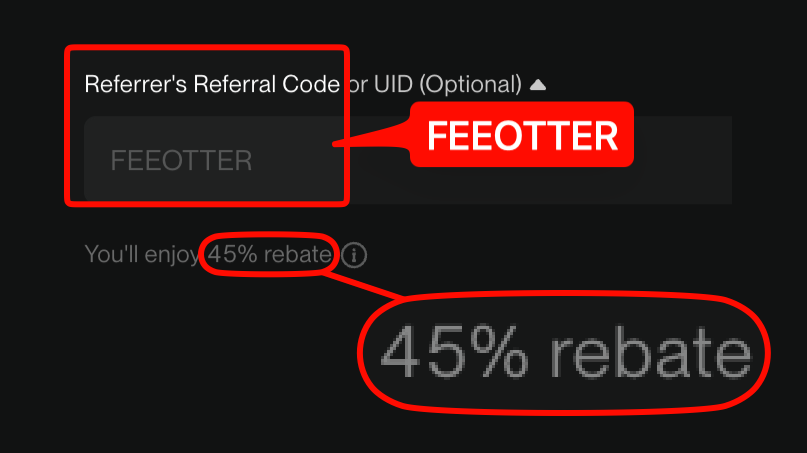
This guide is built from BingX's official API documentation and API FAQ: creating keys and permissions, IP whitelists, signing and timestamps, rate limits and risk controls, demo testing, and fees and rebates on API orders. Register on BingX with our code FEEOTTER and 45% of your fees comes back (all of it BingX's automatic rebate), with no UID binding and no API key handed to Fee Otter.
Quick summary
- Where: the API Management page on BingX's website or app; BingX's FAQ confirms the app supports API key management.
- Permissions: spot trading, read, perpetual futures trading, universal transfer, sub-account internal transfer; the API docs also list a withdrawal permission for sub-account keys.
- How many: up to 20 keys and 20 sub-accounts per main account, and 20 keys per sub-account.
- Signing: HMAC SHA256 with an X-BX-APIKEY header; timestamps may differ from server time by no more than 5 seconds.
- Rate limits: per UID, per endpoint, plus a 500 requests per 10 seconds IP limit on market endpoints; restrictions lift after about 5 minutes.
- Demo: the futures demo domain is open-api-vst.bingx.com, using virtual USDT (VST).
Creating a key
BingX's "Generate an API Key" section is short: create the key on the API Management page, note down the API key and secret key it gives you and never share them, set an IP whitelist when you configure it, and if the key leaks, delete it immediately and generate a new one.
- Log in to BingX, open the API Management page in your account and create an API key.
- Add a label, tick the permissions you need, and enter an IP whitelist if you can.
- Complete the security checks, then copy the API key and secret key somewhere safe.
We didn't find a step-by-step BingX help article on what has to be set up first (KYC, two-factor authentication) or whether the secret is shown only once, so follow the prompts on the creation page. Sources: BingX API docs, BingX API FAQ (updated 2026-10-14).
Permissions: which to enable
| Permission | What it does | Advice |
|---|---|---|
| Read | Query balances, positions and orders | The only one bookkeeping and tax tools need |
| Spot trading | Place and cancel spot orders | Only for spot strategies |
| Perpetual futures trading | Place and cancel USDT-M perpetual orders, adjust leverage | Needed for futures strategies |
| Universal transfer | Move funds between spot, futures and other accounts | Only if the strategy must move funds itself |
| Sub-account internal transfer | Allow internal transfers between sub-accounts | Only when a main account manages sub-accounts |
The permission codes appear in the API docs' "create sub-account API key" endpoint: 1 spot trading, 2 read, 3 perpetual futures trading, 4 universal transfer, 7 allow sub-account internal transfer; the docs changelog adds 5, withdrawal, for sub-account keys. BingX's FAQ also explains that USDT-M futures and spot use the same API key but need their trading permissions set separately. A key for a third-party bot or copy-trading tool gets trading permission only: no withdrawal and no universal transfer.
IP whitelist
BingX's docs recommend setting an IP whitelist when creating a key; requests from an IP that isn't on it return error 100419, "IP does not match IP whitelist". We didn't find in the official docs or help center how many IPs one key can hold, whether ranges are allowed, or whether keys without an IP expire, so go by the creation page. BingX is hosted on AWS in Singapore (ap-southeast-1), so latency-sensitive strategies can run nearby.
Signing, timestamps and domains
- Signature: sign the request parameters with your secret key using HMAC SHA256 and send the result as the signature parameter. Query-string parameters are joined in their original order without sorting; request-body parameters must be sorted a to z first.
- Header: send X-BX-APIKEY: your API key.
- Timestamp: in milliseconds, and it must be within 5 seconds of the API server's time or the request is treated as expired and rejected. If your clock drifts, sync with /openApi/swap/v2/server/time first.
- Domains: live trading on open-api.bingx.com, futures demo on open-api-vst.bingx.com.
A minimal example that queries the USDT perpetual account balance (Python, for illustration only):
import time, hmac, hashlib, requests

API_KEY = "your API key"
SECRET = "your secret key"
HOST = "https://open-api.bingx.com"   # demo: https://open-api-vst.bingx.com
path = "/openApi/swap/v3/user/balance"

params = f"timestamp={int(time.time() * 1000)}"
sign = hmac.new(SECRET.encode(), params.encode(), hashlib.sha256).hexdigest()
r = requests.get(f"{HOST}{path}?{params}&signature={sign}",
                 headers={"X-BX-APIKEY": API_KEY})
print(r.json())
Don't hard-code the key and secret; use environment variables for real use.
Rate limits and risk controls
From the API docs' "Rate limit" section and the API FAQ:
- Per-UID limits: each endpoint has its own independent limit, listed in that endpoint's docs. The X-RateLimit-Requests-Remain (requests left) and X-RateLimit-Requests-Expire (window expiry) response headers let you adjust your rate as you go.
- IP limits: market endpoints allow 500 requests per 10 seconds. Since 2025-12-16 the IP limits on account API groups 2 and 3 (2,000 requests per 10 seconds per group, 300 per endpoint) no longer apply.
- When you hit them: excessive requests are restricted automatically and recover after about 5 minutes; keep sending after a 429 and the IP may be auto-banned (418); a 403 means a firewall rule was triggered, usually a 5-minute ban, longer or permanent if the traffic looks malicious.
- Same order: the same order can only be submitted once per second, and the cancel endpoint accepts the same orderId once per second.
From BingX's API FAQ: trading behaviour that deviates sharply from regular users may be banned from trading for an uncertain period. Frequently occupying the best bid and ask, frequently placing and cancelling orders with no fills, a very low fill rate or trade weight, and continuing to send frequent requests after a 429 all lengthen the ban. (BingX API FAQ-08)
The docs we read don't state a per-UID cap for the futures order endpoint in this section, so rely on the remaining-requests header.
Test on the demo first
BingX's API docs give open-api-vst.bingx.com as the futures demo order domain, with margin and PnL in VST (virtual USDT). When VST runs low you can call /openApi/swap/v2/trade/getVst (upgraded to v2 on 2025-12-18, supporting custom increases and decreases). There's also a /openApi/swap/v2/trade/order/test endpoint that takes and returns the same fields as a real order but places nothing and deducts no funds, which is handy for checking your signature and parameters. The web and app demo rules are in perpetual futures demo trading launch.
Other official limits: the API doesn't support Standard Futures; TradFi perpetual pairs (stocks, forex, commodities, indices) can be traded by API. Price and quantity precision and minimum order sizes come from /openApi/swap/v2/quote/contracts, and anything beyond the precision is truncated.
Fees and rebates on API orders
API orders pay the same fees as manual ones, at your VIP level: 0.02% maker and 0.05% taker on perpetuals for regular users. From VIP 4 up, BingX's volume route requires API trading to be no more than 20% of volume, so quant accounts usually need the asset route to reach higher levels.
On rebates, we didn't find any BingX rule on its public pages saying API trades earn no referral rebate; your BingX rebate records are the reference. That differs from MEXC, whose affiliate FAQ says API trades earn no commission. As an example, 5,000,000 USDT a month of API futures volume at 60% maker and 40% taker gives a blended rate of 0.6 × 0.02% + 0.4 × 0.05% = 0.032%, about 1,600 USDT in monthly fees, of which the 45% rebate returns about 720 USDT. For API rules across exchanges see the exchange API comparison, and for how rebates work for quant traders, fee rebates for quant traders.
Register on BingX with our code FEEOTTER and BingX returns the 45% straight into your BingX account, with no UID to bind on Fee Otter. Fee Otter never needs your API key, password or withdrawal permission. The rate is set under Fee Otter's partnership terms with BingX and may change.

 Telegram · @feeotter