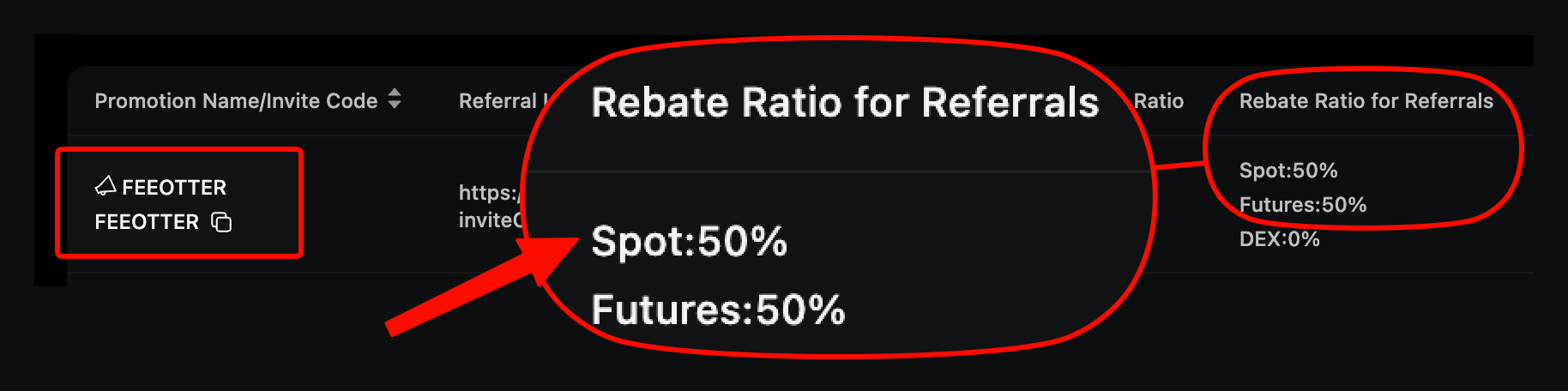
Ourbit has a single KYC level, Advanced Verification, which needs an ID photo and a face scan. Without KYC you can withdraw 30 BTC every 24 hours; after verification the limit is 200 BTC, and the result arrives by email within 48 hours (checked October 2026). KYC does not change your rebate: sign up with Fee Otter's referral code FEEOTTER and you get a 70% futures rebate, 3.5 times the common 20% referral code.
This guide follows Ourbit's help center article How to Complete KYC on Ourbit (updated 2026-08-25), the user agreement and the privacy policy. It covers the two account states, the web and app steps, review time, how many accounts one person may hold, and how your ID and face data are handled. For other exchanges side by side, see our exchange KYC comparison; this page covers Ourbit only.
Ourbit KYC levels and withdrawal limits
| Status | What you submit | Withdrawal limit (per 24 hours) |
|---|---|---|
| Unverified | Nothing | 30 BTC |
| Advanced Verification | Basic identity details, ID photo, facial recognition | 200 BTC |
Source: Ourbit KYC guide. Unlike most exchanges, Ourbit has no Primary or Intermediate tier, so the table is the whole system. You can sign up, trade and withdraw without KYC; the only cap is 30 BTC per 24 hours, which is plenty for most futures traders.
Ourbit lists four reasons to verify: better account security, access to the trading permissions and earn products tied to each level, higher single-transaction limits for buying crypto and withdrawing, and more trial-bonus rewards in promotions. The Ourbit user agreement (updated 2026-05-30) also says users must provide complete and accurate identity information and that Ourbit may request further documents. An unverified account works, but Ourbit can ask you to verify at any time.
Before you submit
- ID document: pick the country or region that issued your ID, then the document type (an ID card, for example). The available types depend on the country you choose.
- Photos: sharp, with all four corners in frame. The web guide asks for the front of the ID; the app guide asks for front and back. Follow the on-screen prompts.
- Face scan: Ourbit says to do it somewhere well lit with a clear view of your face, or the check may fail.
- Third-party page: after you click Start Verification you are sent to an identity verification provider's page. That is part of the official flow.
Advanced Verification on the website
- Log in to the Ourbit website and click [Profile] → [Identification] in the top-right corner.
- Click [Verify].
- Select your nationality and document type for Advanced Verification, then click [Confirm].
- On the third-party verification page, click [Start Verification].
- Select the country or region that issued your document and the document type, then click [Continue].
- Photograph and upload the front of your document, check that it is clear with all four corners visible, then click [Upload Document].
- Click [Continue] and follow the prompts to complete facial recognition.
Advanced Verification in the app
- Log in to the app and tap [Profile] in the top-left corner of the home screen.
- Open your profile details, then tap [KYC] → [Verify].
- Search for and select the country or region that issued your document.
- Choose the document type (an ID card, for example) and tap [Continue].
- On the Verify Your Identity page, photograph the front and back of the document, then take a selfie.
- Tap [Continue] to finish Advanced Verification.
Menu names can change between app versions; follow what you see on screen.
How long does review take?
Ourbit says you get a result within 48 hours, sent to the email address you registered with. If you are rejected, read the reason in the email before you reshoot. The only failure cause the guide spells out is poor lighting or an unclear image during the face scan. If the reason is unclear or it keeps failing, contact Ourbit support through the help center's Submit an Enquiry page.
How many Ourbit accounts can one person have?
The user agreement says each user, whether a person or a company, may maintain only one main account at any given time. Ourbit monitors for related accounts using shared device information, IP addresses and behaviour patterns, and you may not give, lend, rent or transfer an account to anyone else without Ourbit's consent.
This matters if you want to switch referral codes. Ourbit's code can only be entered at sign-up, so moving to our code means registering again with an email or phone number never used on Ourbit (see the Ourbit rebind guide). Given the one-main-account rule, move your assets out of the old account and ask Ourbit support how the old account should be handled before you switch. Whether the new account needs KYC depends on whether you need more than 30 BTC a day in withdrawals.
How your ID and face data are handled
From the Ourbit privacy policy (updated 2026-05-30):
- What is collected: passport or government ID numbers, proof-of-identity documents, and biometric data, such as facial scan data from your selfie or video compared with the photo on your ID.
- Verification providers: third parties providing identity verification or fraud prevention may also collect your personal information.
- No sale of data: Ourbit will not provide, sell, lease, share or trade your personal information to unrelated third parties without your prior consent.
- Retention: no fixed period. Data is destroyed or anonymised once it no longer serves the purpose it was collected for and is not needed for legal or business reasons.
Service regions and account safety
Ourbit is operated by Ourbit Holdings Ltd., incorporated in the British Virgin Islands. The user agreement lists prohibited jurisdictions including the United States, China, Singapore, North Korea, Cuba, Iran, Sudan, France, Germany, the Netherlands, Spain, Italy, Austria, Portugal, the Province of Ontario (Canada) and Russian-controlled regions of Ukraine; the current agreement is the reference. For licences by country, see our exchange licences compared page.
Submit KYC only on the Identification page of the Ourbit website or official app. Ignore anyone who asks you to send ID photos or selfies over a messaging app or to a third-party site for "verification help". You can check accounts claiming to be Ourbit staff with Ourbit Verification.
KYC and your rebate
Your KYC status has no effect on the rebate rate. What counts is the referral code used at sign-up. With our code FEEOTTER, Ourbit automatically returns 50% of your trading fees, and after you bind your UID on Fee Otter we add a 20% extra rebate, 70% in total. Ourbit charges 0% maker and taker on spot, so the rebate comes from futures. On 500 USDT of futures fees a month, a common 20% code returns 100 USDT; our code returns 350 USDT.
If you are already a VIP on an exchange and want to rebind or sign up elsewhere, contact our support; we can help apply for special trading benefits or a higher rebate rate. The code and sign-up steps are in Ourbit referral code and how to register on Ourbit; the numbers are in the Ourbit fee rebate guide.
 Telegram · @feeotter