BingX trading bots have no subscription fee; you pay normal trading fees. Spot Grid pays the spot rate (0.1% for regular users), Futures Grid pays the perpetual futures rate (maker 0.02%, taker 0.05%) plus funding. BingX's bots are Spot Grid, Spot Infinity Grid, Futures Grid, Futures Martingale and Signal Trading for TradingView alerts. You can run up to 30 Futures Grids at once with up to 500 grids each, and Futures Martingale goes up to 25x (BingX Help Center, checked 2026-10-22).
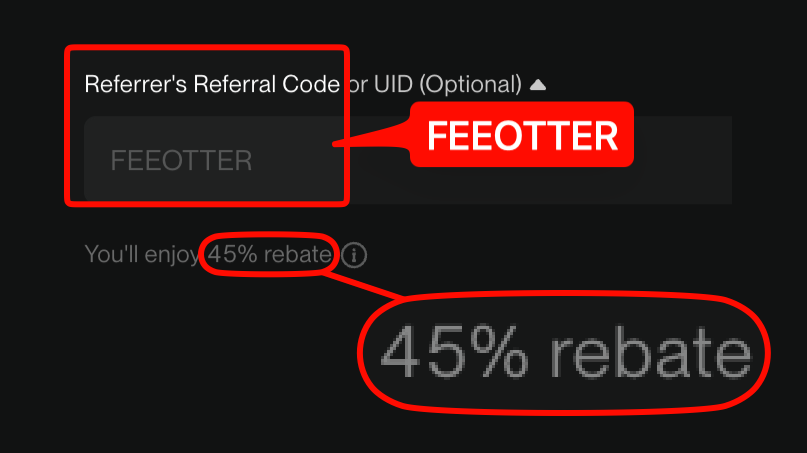
This guide is based on BingX's Help Center bot articles. It covers what each bot does, the parameters and limits BingX publishes, how fees and funding are deducted, what happens when you change parameters or the price leaves the range, and whether bot trades earn the rebate. Sign up for BingX with our referral code FEEOTTER and 45% of your trading fees come back, all paid automatically by BingX, with no UID binding. BingX doesn't state separately whether bot fills count, so below we explain how to check it yourself.
Which bots BingX offers
| Bot | What it does | Key numbers and rules from BingX |
|---|---|---|
| Spot Grid | Buys as the price falls and sells as it rises inside a range | Minimum 10 USDT; no leverage; copy trading supported |
| Spot Infinity Grid | Sets only a lower price, no upper limit, and keeps holdings at the initial value | Profit per grid set directly; no leverage; no copy trading |
| Futures Grid | Grid trading on perpetual futures, long, short or neutral | Up to 150x (varies by pair); up to 500 grids; 30 running at once per user; optional trailing range |
| Futures Martingale (DCA) | Adds to the position by a multiplier at each price step, closes everything at the profit target | Long or short, up to 25x; set entry price, price step, amount multiplier and max additions per round |
| Signal Trading | Receives TradingView alerts and places perpetual futures orders automatically | Perpetual Futures only; instructions created on the web only and can't be edited or deleted; TradingView Essential plan or higher needed |
Sources: BingX Beginners Must Read: Use Bots to Profit in Volatile Markets (2026-02-26), Grid Trading Tutorials All in One, Spot Infinity Grid guide, Futures Grid redesign announcement (2026-04), Martingale Strategy (DCA), Signal Trading FAQ and How to Connect and Use TradingView Trading Signals (2026-06-01), checked 2026-10-22. For the Futures Grid leverage cap, the 2022 tutorial collection says 20x and the 2026 beginners' article says 150x; the creation page is what counts. We didn't find official pages for a spot Martingale or a recurring-buy bot this time.
Spot Grid and Spot Infinity Grid
- Range: Spot Grid needs a max price, a min price and a grid count, or "Auto" for BingX's back-tested suggestions. Infinity Grid needs only a min price and a profit per grid. BingX says the suggested parameters come from historical back-tests and are for reference only.
- Profit per grid: BingX defines it as the estimated profit of one completed buy and sell, after fees. More grids means less profit per grid and a bot that reacts to smaller moves.
- Price leaves the range: the system stops placing buy and sell orders. BingX suggests considering a stop loss and closing the grid at that point, and setting a fairly wide range in the first place.
- How Infinity Grid sells: BingX's example: created with BTC at 20,000 USDT and 1% profit per grid, at 20,200 USDT it sells 200 USDT of BTC so the holding stays worth 20,000 USDT.
- Closing: if a position is still open, you can let the system close it or handle it yourself.
A Spot Grid round trip pays 0.1% twice, so a profit per grid under 0.2% earns nothing. After a 45% rebate the two fees come to about 0.11%. BingX ran a zero-fee Spot Grid promotion in 2022; the current help page says Spot Grid fees match spot.
Futures Grid: direction, leverage and the 2026 redesign
- Direction: a neutral grid opens no initial position, going long below the entry price and short above it; long and short grids open an initial position from your parameters (Beginners Must Read).
- Same rules as perpetuals: pairs, trading fees, funding settlement and leverage limits match Perpetual Futures (Futures Grid FAQ). When the stop loss triggers, the system stops the grid and closes all its positions.
- April 2026 redesign: maximum grids went from 200 to 500. New features: a trailing range (long grids only trail up, short grids only trail down, neutral grids stay fixed), editing parameters while running, adjusting trade size per grid, and a "pending activation" status. Grids created before the upgrade keep the old logic and can't use the new features.
- Editing closes positions first: the FAQ says that when you modify grid parameters, by default all current positions are closed at market price and orders are placed again under the new parameters.
- Limit: each user can run up to 30 Futures Grids at once; at the limit you must stop one before creating another.
BingX: when you modify grid parameters, by default all current positions are closed at market price, and then orders are placed again according to the new parameters. (Futures Grid redesign announcement)
A market close is a taker fill, so the whole position pays 0.05% once, and rebuilding it costs another fee. BingX also says that if the bot account has heavy losses, or frequent edits have run up high fees, available margin may be too low and the edit will be refused.
Futures Martingale and Signal Trading
Futures Martingale: open it under "Grid Trading" in the app or "Wealth" on the web. Four steps: pick the pair, leverage and direction; enter the profit target and total investment; set entry price, price step, amount multiplier and max additions per round; review the calculation and launch. BingX's example uses 10,000 USDT, a 10% target, a 1% step, a 1.1 multiplier and at most 3 additions, and notes that part of the funds is held back to absorb unrealized losses. The calculation excludes closing fees and funding fees, and BingX warns that with a low profit target, funding can turn the result negative.
Signal Trading: you create an order instruction on the BingX website, get a Webhook URL and message content, and paste them into a TradingView strategy alert. It trades Perpetual Futures only, using the perpetual futures account balance. Instructions can't be edited or deleted after creation; long and short need two separate instructions. BingX's listed failure causes include too little balance in the perpetual account, changing leverage or margin mode after creating the instruction, and a TradingView alert set to trigger only once. Signals can also be delayed or lost on the external platform's side.
How bot fees are charged
| Bot | Trading fee (VIP 0) | Other costs |
|---|---|---|
| Spot Grid | Same as spot: 0.1% / 0.1% | None |
| Spot Infinity Grid | Not stated separately on BingX's help page | None |
| Futures Grid | Same as perpetuals: maker 0.02%, taker 0.05%, VIP discounts apply | Funding |
| Futures Martingale | Not stated separately on BingX's help page | Funding |
| Signal Trading | Orders go through the perpetual futures account, on the perpetual fee schedule | Funding; TradingView plan |
Sources: Spot Grid guide, Futures Grid FAQ, Signal Trading FAQ and the spot VIP fee announcement, checked 2026-10-22. Futures Grid fees and funding come out of the strategy's idle margin, then from position or order margin if that runs short. Fee and funding records for grids are kept for only 3 months, so the display may lag after that; the actual charges aren't affected. BingX doesn't say grid orders always fill as maker; check "Fee Info" on the strategy details page for what you actually paid.
For VIP, the BingX VIP Club page counts Spot Grid and Spot Infinity Grid volume as spot volume and Futures Grid volume as futures volume. Fee tables are in BingX VIP fee tiers.
Do bot trades earn the rebate?
BingX's referral program tutorial says the referrer receives a portion of the referee's "trading fees (including spot and futures trading)", and the referee receives a trading fee rebate; the detailed rules are in the in-app terms. The page doesn't mention grids, Martingale or Signal Trading, and we found no text on BingX's public pages saying bot fills do or don't count toward referral rebates (checked 2026-10-22).
- What BingX does say: bots pay ordinary spot or perpetual futures fees, and their volume counts toward VIP.
- What it doesn't say: whether bot fills count for the referral rebate. After registering with FEEOTTER, run one small grid first and check your BingX rebate records for matching refunds before adding more funds.
- API: BingX bots are built into the platform and don't go through the API. Whether API orders count is also not stated on public pages; see BingX API trading setup. MEXC is the counter-example: its affiliate FAQ says API trades earn no commission.
- Not covered: funding and the TradingView plan are not trading fees.


%2C2026-10-05%20%E5%8F%96%E6%A8%A3%3A%0A%20%20%20%20%20%20%20%E5%BA%95%E8%89%B2%20%230E3452%2C%E5%AD%97%E7%AC%A6%20%2303CA9B)%E3%80%82%0A%20%20%20%20%20%20%20%E7%94%A8%20potrace%20%E6%8F%8F%E5%AD%97%E7%AC%A6%E8%BC%AA%E5%BB%93%2C%E6%95%B4%E5%BC%B5%E7%95%AB%E5%B8%83%E7%9B%B4%E6%8E%A5%E6%98%A0%E5%B0%84%E5%88%B0%E9%80%99%E8%A3%A1%E7%9A%84%2032%20%E5%96%AE%E4%BD%8D%20%E2%80%94%E2%80%94%20%E4%B8%8D%E9%87%8D%E6%96%B0%E7%BD%AE%E4%B8%AD%2C%E4%BF%9D%E7%95%99%E5%AE%98%E6%96%B9%E7%9A%84%E7%95%99%E7%99%BD%E6%AF%94%E4%BE%8B%E3%80%82%0A%20%20%20%20%20%20%20%E8%A6%81%E6%94%B9%E8%AB%8B%E9%87%8D%E8%B7%91%E6%8F%8F%E5%9C%96%2C%E4%B8%8D%E8%A6%81%E6%86%91%E5%8D%B0%E8%B1%A1%E8%AA%BF%E3%80%82%20--%3E%0A%20%20%3Crect%20x%3D%221.5%22%20y%3D%221.5%22%20width%3D%2229%22%20height%3D%2229%22%20rx%3D%228%22%20fill%3D%22%230E3452%22%2F%3E%0A%20%20%3Cpath%20fill%3D%22%2303CA9B%22%20d%3D%22M23.02%205.97C22.14%206.02%2021.54%206.07%2021.22%206.1C20.72%206.15%2019.6%206.28%2019.41%206.31C19.31%206.33%2019.1%206.37%2018.94%206.39C18.29%206.5%2017.94%206.57%2017.2%206.73C16.92%206.79%2016%207.03%2015.8%207.09C15.36%207.23%2014.42%207.54%2014.39%207.56C14.38%207.57%2014.3%207.6%2014.23%207.62C13.82%207.76%2012.7%208.28%2012.13%208.6C11.95%208.7%2011.8%208.78%2011.79%208.78C11.7%208.78%2010.42%209.71%209.98%2010.08C9.16%2010.79%208.07%2012.09%207.6%2012.91C7.28%2013.46%207.18%2013.65%207.06%2013.91C6.87%2014.3%206.76%2014.53%206.68%2014.74C6.56%2015.08%206.37%2015.64%206.34%2015.73C6.33%2015.78%206.3%2015.91%206.27%2016C6.06%2016.79%205.93%2017.87%205.94%2018.62L5.95%2019.05L6.69%2019.04C7.78%2019.03%208.57%2018.94%209.73%2018.68C10.18%2018.58%2011.05%2018.33%2011.45%2018.18C11.52%2018.15%2011.7%2018.08%2011.84%2018.03C13.58%2017.38%2015.67%2016.19%2017.55%2014.77C17.8%2014.58%2018.67%2013.89%2018.74%2013.83C18.76%2013.81%2018.94%2013.66%2019.14%2013.48C19.34%2013.31%2019.54%2013.14%2019.58%2013.11C19.61%2013.07%2019.78%2012.92%2019.95%2012.77C20.94%2011.88%2022.24%2010.57%2023.2%209.48C23.68%208.94%2023.69%208.93%2023.86%208.73C23.94%208.63%2024.02%208.54%2024.03%208.53C24.17%208.4%2025.09%207.25%2025.52%206.67C25.67%206.47%2025.81%206.28%2025.83%206.26C25.86%206.23%2025.89%206.19%2025.9%206.16C25.92%206.13%2025.94%206.12%2025.95%206.13C25.98%206.15%2025.3%207.5%2024.99%208.07C24.88%208.28%2024.78%208.45%2024.78%208.46C24.78%208.46%2024.66%208.67%2024.51%208.93C24.24%209.4%2024.17%209.52%2024.07%209.69C24%209.81%2023.72%2010.27%2023.39%2010.8C22.69%2011.91%2021.44%2013.66%2020.74%2014.52C20.25%2015.12%2020.09%2015.31%2019.72%2015.73C19.01%2016.55%2018.19%2017.38%2017.42%2018.08C17.07%2018.39%2016.92%2018.52%2016.5%2018.87C16.37%2018.98%2016.24%2019.09%2016.2%2019.12C15.83%2019.43%2014.7%2020.21%2014.16%2020.54C13.69%2020.82%2012.69%2021.34%2012.41%2021.45C12.33%2021.48%2012.23%2021.52%2012.17%2021.55C12.01%2021.62%2011.45%2021.84%2011.11%2021.95C10.97%2022%2010.05%2022.26%209.84%2022.31C9.23%2022.45%208.97%2022.5%208.56%2022.56C8.43%2022.58%208.25%2022.61%208.16%2022.62C8.06%2022.64%207.79%2022.67%207.56%2022.69C7.32%2022.71%207.12%2022.74%207.12%2022.76C7.12%2022.85%207.58%2023.42%207.97%2023.82C9.2%2025.09%2010.67%2025.8%2012.52%2026.02C16.51%2026.48%2020.99%2024.06%2023.2%2020.25C23.32%2020.05%2023.43%2019.86%2023.46%2019.81C23.51%2019.73%2023.96%2018.81%2024.04%2018.62C24.67%2017.21%2025.19%2015.43%2025.52%2013.67C25.66%2012.9%2025.73%2012.45%2025.81%2011.77C25.99%2010.32%2026.05%209.33%2026.05%207.64C26.05%206.06%2026.04%206.01%2025.97%205.98C25.9%205.95%2023.53%205.94%2023.02%205.97Z%22%2F%3E%0A%3C%2Fsvg%3E%0A)


%2C2026-10-05%20%E5%8F%96%E6%A8%A3%3A%0A%20%20%20%20%20%20%20%E5%BA%95%E8%89%B2%20%23FFFFFF%2C%E5%AD%97%E7%AC%A6%20%235227FF)%E3%80%82%0A%20%20%20%20%20%20%20%E7%94%A8%20potrace%20%E6%8F%8F%E5%AD%97%E7%AC%A6%E8%BC%AA%E5%BB%93%2C%E6%95%B4%E5%BC%B5%E7%95%AB%E5%B8%83%E7%9B%B4%E6%8E%A5%E6%98%A0%E5%B0%84%E5%88%B0%E9%80%99%E8%A3%A1%E7%9A%84%2032%20%E5%96%AE%E4%BD%8D%20%E2%80%94%E2%80%94%20%E4%B8%8D%E9%87%8D%E6%96%B0%E7%BD%AE%E4%B8%AD%2C%E4%BF%9D%E7%95%99%E5%AE%98%E6%96%B9%E7%9A%84%E7%95%99%E7%99%BD%E6%AF%94%E4%BE%8B%E3%80%82%0A%20%20%20%20%20%20%20%E5%AE%98%E6%96%B9%E6%98%AF%E7%99%BD%E5%BA%95%E7%B4%AB%E8%89%B2%E5%AD%97%E7%AC%A6%3B%E7%99%BD%E5%BA%95%E5%8A%A0%E6%B7%A1%E9%82%8A%2C%E5%85%8D%E5%BE%97%E5%9C%A8%E7%99%BD%E8%89%B2%E8%83%8C%E6%99%AF%E4%B8%8A%E6%B6%88%E5%A4%B1%E3%80%82%0A%20%20%20%20%20%20%20%E8%A6%81%E6%94%B9%E8%AB%8B%E9%87%8D%E8%B7%91%E6%8F%8F%E5%9C%96%2C%E4%B8%8D%E8%A6%81%E6%86%91%E5%8D%B0%E8%B1%A1%E8%AA%BF%E3%80%82%20--%3E%0A%20%20%3Crect%20x%3D%221.5%22%20y%3D%221.5%22%20width%3D%2229%22%20height%3D%2229%22%20rx%3D%228%22%20fill%3D%22%23FFFFFF%22%20stroke%3D%22%23E4E4E7%22%2F%3E%0A%20%20%3Cpath%20fill%3D%22%235227FF%22%20d%3D%22M13.31%208.92L13.31%2012.28L9.94%2012.28L6.56%2012.28L6.57%2015.71C6.58%2019.51%206.57%2019.29%206.79%2020.2C7.56%2023.33%2010.21%2025.78%2013.38%2026.31C14.1%2026.43%2014.44%2026.44%2019.24%2026.44L23.91%2026.44L23.91%2023.05L23.91%2019.66L19.2%2019.65L14.48%2019.64L14.28%2019.56C13.89%2019.41%2013.63%2019.16%2013.44%2018.76L13.36%2018.58L13.35%2015.46L13.34%2012.34L18.56%2012.34L23.78%2012.34L23.78%208.95L23.78%205.56L18.55%205.56L13.31%205.56L13.31%208.92Z%22%2F%3E%0A%3C%2Fsvg%3E%0A)