Start BingX futures with USDT perpetuals (BingX calls them USDⓢ-M). On BTC-USDT the minimum order is 0.0001 BTC and at least about 2 USDT, the app defaults to 5x, and BingX's own tutorials put the maximum at 150x. Three things matter before your first order: liquidation is triggered when a position's "risk" reaches 100%; when it happens, the system takes the position over at the bankruptcy price and any better fill in the market goes to the insurance fund; and the liquidation fee is simply your normal taker rate, with no separate liquidation charge (checked 2026-10-17). This guide uses BingX's help center and official API to cover account requirements, margin modes, maintenance margin and the liquidation formula, the insurance fund and ADL, funding, order types and demo trading, then works through a 0.01 BTC position. Check the official pages before you trade.
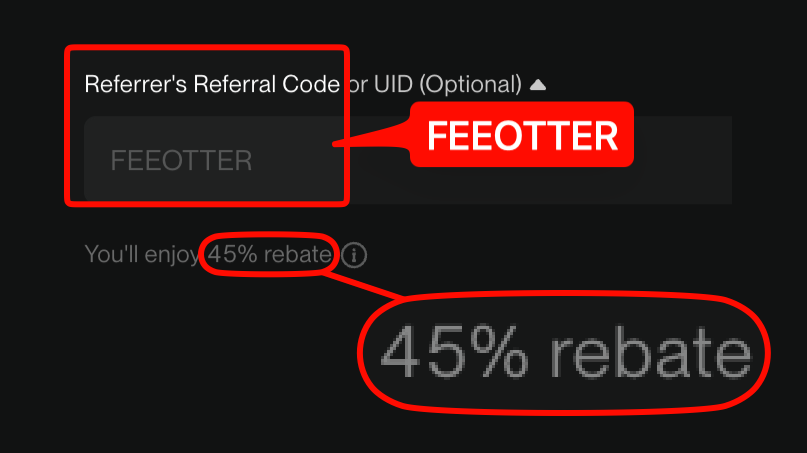
For a side-by-side of beginner futures rules across exchanges, see the futures beginner exchange comparison; this article covers BingX only. If you haven't signed up yet: register on BingX with our code FEEOTTER and get 45% of your futures fees back (all of it BingX's automatic rebate), with no UID binding needed. That is 2.25 times a typical 20% code.
BingX BTC-USDT perpetual at a glance
| Item | USDT perpetual BTC-USDT |
|---|---|
| Margin and settlement | USDT |
| Minimum quantity | 0.0001 BTC |
| Minimum order value | 2 USDT |
| Leverage | 5x by default in the app, up to 150x per BingX's tutorials; larger positions get lower maximum leverage |
| Liquidation trigger | Risk ≥ 100% |
| Funding | Every 8 hours, capped at ±0.3% |
| Regular-user fees | Maker 0.02%, taker 0.05% |
Sources: BingX official API (swap/v2/quote/contracts, premiumIndex), checked 2026-10-17; default and maximum leverage from the perpetual futures app guide and the perpetual vs standard futures comparison; fees from the perpetual futures fee schedule.
BingX also runs "Standard Futures", which work differently: a 0.045% fee charged only on close, no limit orders, and each order managed separately. This guide is about perpetuals.
Before you start: KYC, demo trading and accounts
The table in BingX's KYC benefits by level page marks trading as unavailable for unverified accounts; full trading comes with Advanced KYC. The older trading pairs, leverage and limits page says unverified users are capped at 5x and a 2,000 USDT position on some assets. The two pages don't agree, so go by what your account shows. If you want to use futures normally, finish Advanced KYC first.
To practise, use demo trading: on the web it's Derivatives → Perpetual Futures → Demo Trading, in the app Futures → Perpetual Futures → Demo Trading. Demo accounts use VST (virtual USDT). The perpetual demo account starts with 100,000 VST, and you can apply for more once your total VST drops below 20,000. Demo profits and losses don't touch your real assets, and the same pairs are available as in live trading. Source: perpetual futures demo trading launch.
Funds have to be in the perpetual futures account: transfer them from the Fund Account or the Standard Futures account, or pick the futures account as the receiving account when you deposit on-chain.
Isolated, cross and hedge mode
In isolated margin each position has its own margin, and liquidation costs you at most that amount. In cross margin all cross positions share the account balance, so one liquidation can take all your available margin. If you want a fixed maximum loss per position, use isolated.
- Hedge Mode: BingX's explainer describes holding a long and a short on the same pair at the same time in cross margin mode. When the two sides are equal it's a full hedge, and under normal conditions price moves don't add liquidation risk.
- Isolated in Multi-Assets Mode: since March 2025 Multi-Assets Mode supports isolated margin. To avoid triggering automatic conversion, BingX applies a 0.8 discount to the margin available for an isolated position.
Sources: Hedge Mode, Multi-Assets Mode now supports isolated margin. We didn't find which margin mode a new account starts in on the help center, so check the order panel yourself before your first trade.
Maintenance margin: bigger positions, higher rates
BingX uses tiered maintenance margin. The larger the position's notional value, the lower the maximum leverage and the higher the maintenance margin rate; within a tier the rate doesn't depend on the leverage you pick. The formula:
Maintenance margin = position notional value × maintenance margin rate − maintenance amount, where notional value = mark price × position size.
BingX's 2 October 2026 notice gives one example: with a total BTC/USDT position of 160,000 USDT, the maintenance amount is 30 USDT. The full BTC-USDT tier table sits on BingX's trading rules page, which only renders in a browser, and our check didn't retrieve it, so this guide doesn't list the tiers. When BingX changes a pair's maintenance margin rate, existing positions keep the old rate; the new one applies only when you open a position in a pair where you currently hold none. Sources: leverage and margin, maintenance margin rule update notice.
Liquidation: triggered at 100% risk
When it triggers
BingX measures liquidation with a "risk" figure; at 100% or more the position is partially reduced or fully liquidated:
- Isolated risk = (position maintenance margin + closing fee) ÷ (position margin + unrealized PnL)
- Cross risk = (maintenance margin of all cross positions + their closing fees) ÷ (balance − margin used by isolated positions − frozen assets + unrealized PnL of cross positions)
BingX states that the liquidation fee is charged at the taker rate of your current VIP level. An isolated position under liquidation is frozen, so you can't add margin or place orders. In cross margin the system first cancels all open orders in that margin currency, then offsets long and short positions in the same currency; if risk is still at or above 100%, it liquidates cross positions one by one, starting with the biggest loss. Source: perpetual futures forced liquidation rules.
Estimated liquidation price in isolated margin
The same article gives the USDT perpetual isolated formula:
Long liquidation price = entry price − [(initial margin − maintenance margin) ÷ position size] − (additional margin ÷ position size)
Short liquidation price = entry price + [(initial margin − maintenance margin) ÷ position size] + (additional margin ÷ position size)
BingX notes the estimate is for reference only; the actual liquidation price is wherever risk reaches 100%. Adjusting margin and paying or receiving funding both move an isolated position's estimated liquidation price.
Insurance fund and ADL
From BingX: when a position is liquidated, the system takes it over at the bankruptcy price and works it in the market. If the fill is better than the bankruptcy price, the surplus goes to the insurance fund; if it's worse or can't be filled, the insurance fund covers the shortfall. When the insurance fund is insufficient or depleting fast, auto-deleveraging (ADL) is triggered. (BingX liquidation rules)
Under BingX's ADL mechanism, positions are ranked by PnL ratio × effective leverage, the most profitable high-leverage positions go first, and they are matched at the liquidated position's bankruptcy price. The ADL indicator next to a position has five lights; more lights means higher in the queue. In cross mode fully hedged positions aren't selected, and users who are deleveraged pay the maker fee. To lower your priority, BingX suggests reducing leverage or partly closing profitable positions.
Funding: three times a day
Funding passes between longs and shorts and doesn't go to the exchange: when the rate is positive longs pay shorts, when negative shorts pay longs. BTC-USDT settles every 8 hours at 00:00, 08:00 and 16:00 UTC+8, and you only pay or receive if you hold a position at settlement.
- Formula: funding rate = Clamp(MA(((best bid + best ask) ÷ 2 − spot index) ÷ spot index − interest), a, b). BingX sets interest at 0 and the bounds at a = −0.3%, b = 0.3%.
- Where it's charged: from the position's margin in isolated mode, from the account balance in cross mode (or paid into them).
- Around settlement: positions opened in the 30 seconds before settlement may not be counted; settlement can run up to a minute late and opening positions may be affected meanwhile.
At the time of checking (2026-10-17) the official API showed the latest BTC-USDT funding rate at 0.01%; the next one is whatever the page shows. Sources: perpetual futures fee schedule, official API.
Placing orders: five order types and two price guards
BingX perpetuals offer limit, market, trigger, trailing stop and Post Only orders, and you can tick TP/SL to set them when you open. Beginners should know two price guards first:
| Rule | What it says | What it means for you |
|---|---|---|
| Limit price cap | A limit price can't deviate more than 10% from the 5-minute average mark price (varies by pair) | Orders more than 10% from the mark price for over 7 days are cancelled automatically |
| Market order fill range | Fills can deviate up to 2%; anything beyond isn't filled and is cancelled | A large market order may not fill in one go |
| Post Only | An order that would fill immediately isn't placed; it only fills as a maker | Locks in the 0.02% maker rate |
Source: perpetual futures order types. A market order pays the 0.05% taker fee while a resting order pays 0.02%, so entering and exiting the same trade with limit or Post Only orders cuts the fee by 60%. A triggered order can still fail to fill because of price limits, margin or position limits.
Worked example: liquidation price for 0.01 BTC at 10x isolated
Say you open a 0.01 BTC long on BTC-USDT at 81,500 USDT, isolated at 10x, with no added margin and funding ignored. We couldn't retrieve BTC-USDT's actual maintenance margin rate, so the table uses the 0.4% and 0.5% rates that appear in BingX's own examples, just to show the scale:
| Item | Calculation | MMR 0.4% | MMR 0.5% |
|---|---|---|---|
| Notional value | 81,500 × 0.01 | 815 USDT | 815 USDT |
| Initial margin | 815 ÷ 10 | 81.5 USDT | 81.5 USDT |
| Maintenance margin | 815 × MMR | 3.26 USDT | 4.075 USDT |
| Estimated liquidation price | 81,500 − (81.5 − maintenance margin) ÷ 0.01 | About 73,676 USDT (about 9.6% lower) | About 73,758 USDT (about 9.5% lower) |
At 5x the liquidation price is about 65,526 USDT (about 19.6% lower); at 20x about 77,751 USDT (about 4.6% lower). At 10x isolated, a move of roughly 9.6% against you liquidates the position and the 81.5 USDT margin is essentially gone. Following BingX's example, the bankruptcy price (margin at zero, closing fee included) is about (81,500 − 8,150) ÷ (1 − 0.05%) ≈ 73,387 USDT.
On fees, opening and closing this position with market orders costs 815 × 0.05% × 2 = 0.815 USDT; with limit (maker) orders it's 0.326 USDT. Registered with our code:
| Item | Rebate | Net taker | Net maker | Net taker cost, open and close above |
|---|---|---|---|---|
| Fee Otter code | 45% (all BingX's automatic rebate) | 0.0275% | 0.011% | About 0.45 USDT |
At the 0.01% funding rate seen on 2026-10-17, this position pays or receives about 815 × 0.01% = 0.08 USDT every 8 hours; longs pay when the rate is positive. For how net rates are worked out, see perpetual fees after rebate; for maker versus taker, see maker and taker fees explained.
Restricted regions
BingX's Disclaimer (updated 2023-12-11) lists jurisdictions whose customers it does not seek or accept: Afghanistan, Burundi, Cambodia, Canada, the Central African Republic, Mainland China, Cuba, the Democratic Republic of the Congo, Hong Kong, Iran, Laos, Macau, Myanmar, the Netherlands, North Korea, Panama, Singapore, Somalia, the United Kingdom, the United States (including all territories), and the Crimea, Donetsk and Luhansk regions of Ukraine. It says the list is "not limited to" these, may change, and may differ by service. The Customer Agreement (updated 2026-09-02) requires users not to be residents or passport holders of those jurisdictions (checked 2026-10-17). For licensing by country, see the exchange licenses comparison.
Risk: be sure you can afford the loss
The example above shows the scale: at 10x isolated, a move of less than 10% against you liquidates the position, the margin is essentially lost, and any better fill above the bankruptcy price goes to the insurance fund rather than back to you. Futures can wipe out your margin very quickly. Only use money you can afford to lose entirely, and practise stop-losses and liquidation prices in demo trading first. Ignore anyone who promises copy trading or managed accounts that never lose.
BingX futures and your rebate
Rebates apply only to trading fees. Funding passes between traders, and margin that goes to the insurance fund after liquidation isn't a fee either, so neither earns a rebate; the rebate doesn't change your margin or liquidation price. Register on BingX with our code FEEOTTER and 45% of your futures fees comes back, returned by BingX straight into your BingX account, with no UID to bind on Fee Otter. The rate is set under Fee Otter's partnership terms with BingX and may change. A BingX referrer can't be changed once bound; if you signed up with someone else's code, see the BingX rebind guide. For signup steps see how to register on BingX, and for fees and volume scenarios the BingX fee rebate guide.

 Telegram · @feeotter