Registering on HTX (formerly Huobi) takes six steps: open Fee Otter's dedicated link, sign up with email or phone and set a password, expand "Referral Code (Optional)" and check it shows FEEOTTER, complete KYC as needed, deposit and trade, then bind your UID on Fee Otter. The code can only be entered at signup and can't be changed afterward. Most referral codes pay 20% (some 25%), while binding through Fee Otter gets you 50% on futures (30% automatic from HTX + 20% Fee Otter extra): on 1,000 USDT of monthly fees that's 500 USDT back instead of 200 USDT (checked October 2026).
Key takeaways
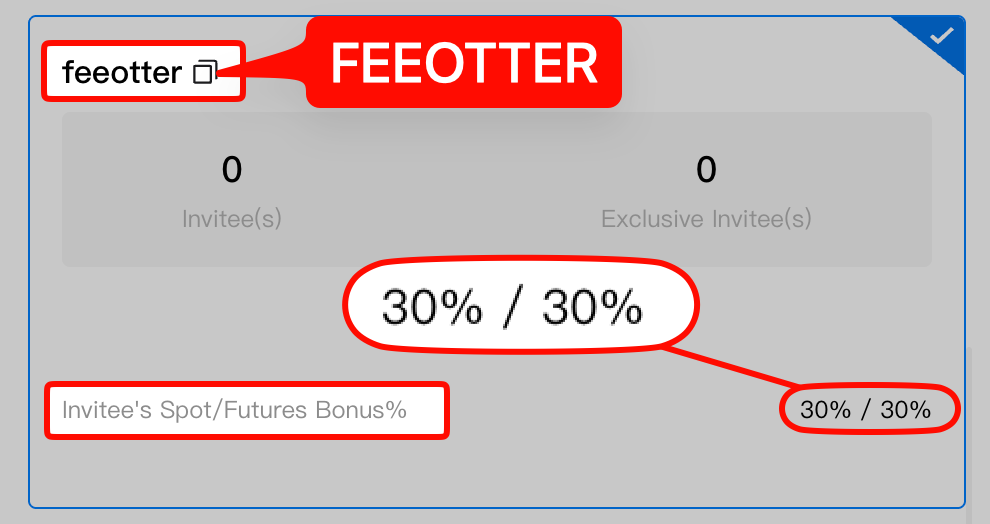
- The HTX referral code is FEEOTTER, and the dedicated link fills it in. A wrong code is the same as leaving it blank.
- The field is collapsed by default: "Referral Code (Optional)" on the HTX sign-up page only shows once you open it, so expand it before you submit.
- The rebate is 2.5 times a common code: through Fee Otter, futures pay 50% and spot 45%; a common code pays 20%.
- Spot at 0.2% is on the high side: the same volume costs more in fees, so the rebate you get back is larger too.
- Bind your UID after signing up: the code goes in on HTX, the UID gets bound on Fee Otter. You need both for the full rebate.
Three things to know before you sign up
- The HTX referral code can only be entered at sign-up; there is no public way to add it once the account exists. Most people discover this too late, so get it right the first time.
- The HTX code is FEEOTTER. The dedicated link fills it in; if you type it yourself, enter it exactly.
- HTX is the old Huobi. Huobi announced its rebrand to HTX in September 2023. An old Huobi account is today's HTX account, so there is no need to sign up again.
HTX (Huobi) registration steps
Step 1: Open the dedicated link with the referral code
Use the sign-up button on this page to reach HTX's official registration page; the dedicated link already carries Fee Otter's code, FEEOTTER. If the main domain does not open, use the backup link. You can also click "Sign Up" from the HTX homepage, but then the code is not filled in for you, so the dedicated link is the safer route. Either way, run the check in Step 3 before you submit.
Step 2: Choose email or phone and set a password
Per HTX's official guide, on the web you click "Sign Up" on the official site, choose email or phone number, set a login password, pass the anti-bot check and enter the verification code sent to your email (or phone). In the app you go to "Me" and then Log In / Sign Up; the flow is the same (see HTX's official sign-up guide). Use a password you have not used anywhere else, and turn on two-factor authentication (2FA) right away.
Step 3: Expand "Referral Code (Optional)" and check it shows FEEOTTER
This is the step that matters most. HTX labels the field "Referral Code (Optional)" and it is collapsed by default, so you cannot see what is in it until you open it. Expand it and confirm it shows FEEOTTER; if it is empty, open the dedicated link again or type FEEOTTER. Once you submit, the referral relationship is fixed and cannot be changed, so look before you click "Next".
Step 4: Complete KYC as needed
HTX identity verification has three levels (see HTX's official KYC guide):
- L1 Basic: nationality, ID number, name and date of birth, with no face scan or ID photo. It lifts the withdrawal limit from 2 BTC per day without KYC to unlimited.
- L2 Primary: upload a passport, ID card or driver's licence to raise deposit and crypto-purchase limits.
- L3 Advanced: face recognition, for higher limits still.
Most people only need L1 or L2. Make sure all four corners of the document are visible with no glare and that your details match the document; review goes faster that way.
Step 5: Deposit and start trading
Transfer crypto in from another exchange or a wallet. Always confirm the network before an on-chain transfer (for USDT, TRC20 or ERC20, for example); assets sent on the wrong network are usually lost. Once you start trading, every fee you pay starts building up the amount that comes back to you.
HTX has a broad product line: spot, margin, USDT-M and coin-M futures, copy trading, trading bots and earn products. Per HTX's public API, on 2026-09-24 there were 604 spot pairs online and 357 USDT-M contracts trading. Any trade that generates a fee earns a rebate; earn products that charge no trading fee have nothing to rebate.
Step 6: Find your UID and bind it on Fee Otter
The UID is the numeric ID of your HTX account. After logging in you can see it on your profile (account info) page, usually with a copy button next to it. Copy it, go to the Fee Otter rebate site, choose HTX, paste the UID and submit. Binding needs only your UID: no API key, no password and no withdrawal permission. Your assets stay in your own HTX account throughout. More on UIDs in What a UID is and where to find it.
How much will you pay in fees?
A rebate is a percentage of your fees, so first see what you pay. HTX list rates for regular users (Prime 0):
| Market | Maker | Taker | Note |
|---|
| Spot | 0.20% | 0.20% | Same as XT.COM |
| USDT-M perpetual futures | 0.02% | 0.06% | Taker same as Bitget and XT.COM |
Fees verified on 2026-09-24 (each exchange's official fee schedule). · Methodology
The latest rates are on HTX's official fee page. HTX also offers token deductions: paying with HTX takes 25% off spot and margin fees and up to 10% off futures; you can use TRX instead (25% off spot, 5% off futures). Only one can be active at a time, switched under Profile > My Fee Rates. A deduction lowers the list rate, and the rebate then returns part of what you actually paid, so the two stack.
On futures: HTX's user agreement (updated 2026-09) bars derivatives for users in some jurisdictions, including Israel and New Zealand, and does not serve places such as mainland China, Hong Kong, the US, the UK or EU member states. Check yours in the HTX user agreement before trading futures.
How much rebate do you get after signing up?
When you bind through Fee Otter, HTX rebates work out as follows; spot and futures rates differ:
| Market | Common KOL code | FEEOTTER via Fee Otter | Multiple |
|---|
| Futures | 20% | 50% | 2.5x |
| Spot | 20% | 45% | 2.25x |
Current rates for each exchange are in the table below:
On 1,000 USDT of monthly fees: a common 20% code returns 200 USDT; futures through Fee Otter return 500 USDT. Over a year the difference is 3,600 USDT.
The effective rate makes it clearer. A 0.06% futures taker fee after a 50% rebate is 0.06% × (1 − 50%) = 0.03%; with a common 20% code it is 0.048%. Spot at 0.2% after a 45% rebate is 0.2% × (1 − 45%) = 0.11%, against 0.16% with a common code.
The high 0.2% spot fee is exactly where a rebate claws back the most: 100,000 USDT of monthly spot volume costs 200 USDT in fees, of which a common 20% code returns 40 USDT, while ours returns 90 USDT.
For futures (only where derivatives are allowed), assume 70% taker and 30% maker, a blended rate of 0.7 × 0.06% + 0.3 × 0.02% = 0.048%:
| Monthly futures volume | Monthly fees | Common 20% code | Fee Otter (50%) |
|---|
| 100,000 USDT | 48 USDT | 9.6 | 24 |
| 500,000 USDT | 240 USDT | 48 | 120 |
| 2,000,000 USDT | 960 USDT | 192 | 480 |
Figures are USDT per month.
If you're already a VIP on an exchange and want to rebind or sign up on another one, contact support. We can help you request special trading benefits or a higher rebate rate.
Settlement is simple: the 30% set on the referral code is returned by HTX automatically, and the rest is settled by Fee Otter. It is paid as on-chain USDT on BNB Smart Chain (BEP20) to an address you own, which can be your HTX USDT deposit address on the BEP20 network (1 USDT minimum per request, 0.015 USDT network fee borne by you, no cap on requests (one at a time)). How settlement works: How fee rebates are settled.
How to think about new-user rewards
Under HTX's official referral rules, invited new users can take part in a Mystery Box worth up to 1,500 USDT and/or a Welcome Bonus Pack worth up to 1,200 USDT (see HTX's official referral rules). These usually come with deposit or volume conditions, are mostly trial funds or vouchers, and expire if unused. The actual terms are on HTX's campaign page.
Treat sign-up rewards as a one-off bonus. What drives your long-term cost is the fee and rebate on every single trade: the welcome gift arrives once, the rebate arrives every month.
Five most common mistakes
- Leaving someone else's code in the field. If the field doesn't show FEEOTTER, you get bound to another referrer, and that can't be changed after you submit.
- Submitting without expanding the field. "Referral Code (Optional)" is collapsed by default; open it and check before clicking "Next".
- Assuming you can add it later. HTX has no public way to add a code afterwards; enter it at sign-up.
- Entering the code but not binding the UID. The code goes in on HTX; the UID has to be bound separately on Fee Otter. Skip that and the rebate is incomplete.
- Binding the wrong UID. The UID is a numeric account ID, not a nickname, email or phone number.
Already have an HTX account?
HTX publishes no rule for adding a code later or switching referrers, and a referral binding cannot be changed. See the HTX rebind guide. The rules for each exchange are collected in Exchange referral rebinding rules.
Who should sign up for HTX through Fee Otter?
If you already plan to trade on HTX, sign up with code FEEOTTER and bind your UID on Fee Otter to get 2.5 times the futures rebate of a common 20% referral code. HTX's 0.2% spot fee is high, which is exactly where the rebate shows up most.
Where derivatives are allowed, the futures rebate is 50%; elsewhere, focus on spot, which pays 45%. Sign up through our link and your rebate starts building from your first trade. For more on entering the code see HTX referral code; for WEEX, see WEEX referral code.
If you are still deciding where to trade most, start with the exchange fee and rebate comparison: HTX futures rebates are 50%, the same as Bitget, while WEEX and XT.COM pay 70% on futures through Fee Otter. Using several exchanges for different kinds of trades is fine; all rebates show in one dashboard.
The first things to do after signing up
- Bind your UID: rebates count from the fees you pay after binding, not before.
- Decide on L1 basic verification: no face scan or ID photo, and it removes the withdrawal limit; without it you can still trade and withdraw 2 BTC a day.
- Set your fee deduction: under My Fee Rate, choose HTX or TRX (one or the other); spot fees drop by up to 25%.
Risks to know before using HTX
HTX's rebate terms are good, but know these risks before you deposit:
- UK sanctions: on 26 May 2026 the UK government designated Huobi Global S.A., the entity operating HTX, under its Russia sanctions regime (UK government notice, CoinDesk). UK residents are bound by those sanctions and should not use it; users elsewhere should watch for knock-on effects.
- Past hot-wallet theft: in November 2023 HTX and Heco Chain were exploited; Justin Sun said HTX would fully cover losses on the exchange side (CoinDesk).
- Registration and ratings: HTX was founded in 2013 and is registered in Seychelles, outside major financial regulators; its CoinGecko trust score is 7/10.
- Don't keep long-term or large balances on the exchange: keep only the funds you are actively trading on HTX; withdraw money you aren't trading and anything you hold long term.
- Use a cold wallet for long-term holdings: move large, long-term assets to a hardware cold wallet (such as a Ledger) and keep them offline.
- Futures and high leverage are high risk: beginners should avoid high leverage and learn the rules with small amounts first.
FAQ
What is the HTX referral code?
It is FEEOTTER. The dedicated link fills it in automatically; if you sign up manually, type it into the "Referral Code (Optional)" field.
Are HTX and Huobi the same exchange?
Yes. Huobi announced its rebrand to HTX in September 2023, and your old Huobi account is now your HTX account.
Can I add a referral code after registering on HTX?
No. HTX has no public way to add one later, so enter it at sign-up; if you already have an account, rebind by registering a new one through our link; see the HTX rebind guide.
How much rebate does Fee Otter give on HTX?
When you bind through Fee Otter, futures pay 50% and spot pays 45%.
Is KYC mandatory on HTX?
Not necessarily. You can withdraw without KYC up to 2 BTC per day; L1 Basic (nationality, ID number, name, date of birth, with no face scan or ID photo) makes withdrawals unlimited. L2 and L3 are optional.
Can everyone trade futures on HTX?
No. HTX's user agreement (updated 2026-09) bars derivatives in some jurisdictions, so check yours before trading futures.
Is binding my UID safe?
Yes. Binding needs only your UID, with no API key, password or withdrawal permission, so Fee Otter cannot touch the assets in your account.
When does the rebate arrive?
After the exchange's daily report is produced, each trade is matched to your UID and the rebate is calculated; it usually lands in your Fee Otter available balance from T+1, where you can check it and request a withdrawal as USDT on BNB Smart Chain (BEP20).
Further reading
For information and research only, not investment advice. Fees are regular-user list rates verified on 2026-09-24 and may change; rebate rates are those that apply when you bind through Fee Otter, and the platform's live figures prevail. Derivatives are high risk and you can lose all of your capital.



%2C2026-10-05%20%E5%8F%96%E6%A8%A3%3A%0A%20%20%20%20%20%20%20%E5%BA%95%E8%89%B2%20%230E3452%2C%E5%AD%97%E7%AC%A6%20%2303CA9B)%E3%80%82%0A%20%20%20%20%20%20%20%E7%94%A8%20potrace%20%E6%8F%8F%E5%AD%97%E7%AC%A6%E8%BC%AA%E5%BB%93%2C%E6%95%B4%E5%BC%B5%E7%95%AB%E5%B8%83%E7%9B%B4%E6%8E%A5%E6%98%A0%E5%B0%84%E5%88%B0%E9%80%99%E8%A3%A1%E7%9A%84%2032%20%E5%96%AE%E4%BD%8D%20%E2%80%94%E2%80%94%20%E4%B8%8D%E9%87%8D%E6%96%B0%E7%BD%AE%E4%B8%AD%2C%E4%BF%9D%E7%95%99%E5%AE%98%E6%96%B9%E7%9A%84%E7%95%99%E7%99%BD%E6%AF%94%E4%BE%8B%E3%80%82%0A%20%20%20%20%20%20%20%E8%A6%81%E6%94%B9%E8%AB%8B%E9%87%8D%E8%B7%91%E6%8F%8F%E5%9C%96%2C%E4%B8%8D%E8%A6%81%E6%86%91%E5%8D%B0%E8%B1%A1%E8%AA%BF%E3%80%82%20--%3E%0A%20%20%3Crect%20x%3D%221.5%22%20y%3D%221.5%22%20width%3D%2229%22%20height%3D%2229%22%20rx%3D%228%22%20fill%3D%22%230E3452%22%2F%3E%0A%20%20%3Cpath%20fill%3D%22%2303CA9B%22%20d%3D%22M23.02%205.97C22.14%206.02%2021.54%206.07%2021.22%206.1C20.72%206.15%2019.6%206.28%2019.41%206.31C19.31%206.33%2019.1%206.37%2018.94%206.39C18.29%206.5%2017.94%206.57%2017.2%206.73C16.92%206.79%2016%207.03%2015.8%207.09C15.36%207.23%2014.42%207.54%2014.39%207.56C14.38%207.57%2014.3%207.6%2014.23%207.62C13.82%207.76%2012.7%208.28%2012.13%208.6C11.95%208.7%2011.8%208.78%2011.79%208.78C11.7%208.78%2010.42%209.71%209.98%2010.08C9.16%2010.79%208.07%2012.09%207.6%2012.91C7.28%2013.46%207.18%2013.65%207.06%2013.91C6.87%2014.3%206.76%2014.53%206.68%2014.74C6.56%2015.08%206.37%2015.64%206.34%2015.73C6.33%2015.78%206.3%2015.91%206.27%2016C6.06%2016.79%205.93%2017.87%205.94%2018.62L5.95%2019.05L6.69%2019.04C7.78%2019.03%208.57%2018.94%209.73%2018.68C10.18%2018.58%2011.05%2018.33%2011.45%2018.18C11.52%2018.15%2011.7%2018.08%2011.84%2018.03C13.58%2017.38%2015.67%2016.19%2017.55%2014.77C17.8%2014.58%2018.67%2013.89%2018.74%2013.83C18.76%2013.81%2018.94%2013.66%2019.14%2013.48C19.34%2013.31%2019.54%2013.14%2019.58%2013.11C19.61%2013.07%2019.78%2012.92%2019.95%2012.77C20.94%2011.88%2022.24%2010.57%2023.2%209.48C23.68%208.94%2023.69%208.93%2023.86%208.73C23.94%208.63%2024.02%208.54%2024.03%208.53C24.17%208.4%2025.09%207.25%2025.52%206.67C25.67%206.47%2025.81%206.28%2025.83%206.26C25.86%206.23%2025.89%206.19%2025.9%206.16C25.92%206.13%2025.94%206.12%2025.95%206.13C25.98%206.15%2025.3%207.5%2024.99%208.07C24.88%208.28%2024.78%208.45%2024.78%208.46C24.78%208.46%2024.66%208.67%2024.51%208.93C24.24%209.4%2024.17%209.52%2024.07%209.69C24%209.81%2023.72%2010.27%2023.39%2010.8C22.69%2011.91%2021.44%2013.66%2020.74%2014.52C20.25%2015.12%2020.09%2015.31%2019.72%2015.73C19.01%2016.55%2018.19%2017.38%2017.42%2018.08C17.07%2018.39%2016.92%2018.52%2016.5%2018.87C16.37%2018.98%2016.24%2019.09%2016.2%2019.12C15.83%2019.43%2014.7%2020.21%2014.16%2020.54C13.69%2020.82%2012.69%2021.34%2012.41%2021.45C12.33%2021.48%2012.23%2021.52%2012.17%2021.55C12.01%2021.62%2011.45%2021.84%2011.11%2021.95C10.97%2022%2010.05%2022.26%209.84%2022.31C9.23%2022.45%208.97%2022.5%208.56%2022.56C8.43%2022.58%208.25%2022.61%208.16%2022.62C8.06%2022.64%207.79%2022.67%207.56%2022.69C7.32%2022.71%207.12%2022.74%207.12%2022.76C7.12%2022.85%207.58%2023.42%207.97%2023.82C9.2%2025.09%2010.67%2025.8%2012.52%2026.02C16.51%2026.48%2020.99%2024.06%2023.2%2020.25C23.32%2020.05%2023.43%2019.86%2023.46%2019.81C23.51%2019.73%2023.96%2018.81%2024.04%2018.62C24.67%2017.21%2025.19%2015.43%2025.52%2013.67C25.66%2012.9%2025.73%2012.45%2025.81%2011.77C25.99%2010.32%2026.05%209.33%2026.05%207.64C26.05%206.06%2026.04%206.01%2025.97%205.98C25.9%205.95%2023.53%205.94%2023.02%205.97Z%22%2F%3E%0A%3C%2Fsvg%3E%0A)


%2C2026-10-05%20%E5%8F%96%E6%A8%A3%3A%0A%20%20%20%20%20%20%20%E5%BA%95%E8%89%B2%20%23FFFFFF%2C%E5%AD%97%E7%AC%A6%20%235227FF)%E3%80%82%0A%20%20%20%20%20%20%20%E7%94%A8%20potrace%20%E6%8F%8F%E5%AD%97%E7%AC%A6%E8%BC%AA%E5%BB%93%2C%E6%95%B4%E5%BC%B5%E7%95%AB%E5%B8%83%E7%9B%B4%E6%8E%A5%E6%98%A0%E5%B0%84%E5%88%B0%E9%80%99%E8%A3%A1%E7%9A%84%2032%20%E5%96%AE%E4%BD%8D%20%E2%80%94%E2%80%94%20%E4%B8%8D%E9%87%8D%E6%96%B0%E7%BD%AE%E4%B8%AD%2C%E4%BF%9D%E7%95%99%E5%AE%98%E6%96%B9%E7%9A%84%E7%95%99%E7%99%BD%E6%AF%94%E4%BE%8B%E3%80%82%0A%20%20%20%20%20%20%20%E5%AE%98%E6%96%B9%E6%98%AF%E7%99%BD%E5%BA%95%E7%B4%AB%E8%89%B2%E5%AD%97%E7%AC%A6%3B%E7%99%BD%E5%BA%95%E5%8A%A0%E6%B7%A1%E9%82%8A%2C%E5%85%8D%E5%BE%97%E5%9C%A8%E7%99%BD%E8%89%B2%E8%83%8C%E6%99%AF%E4%B8%8A%E6%B6%88%E5%A4%B1%E3%80%82%0A%20%20%20%20%20%20%20%E8%A6%81%E6%94%B9%E8%AB%8B%E9%87%8D%E8%B7%91%E6%8F%8F%E5%9C%96%2C%E4%B8%8D%E8%A6%81%E6%86%91%E5%8D%B0%E8%B1%A1%E8%AA%BF%E3%80%82%20--%3E%0A%20%20%3Crect%20x%3D%221.5%22%20y%3D%221.5%22%20width%3D%2229%22%20height%3D%2229%22%20rx%3D%228%22%20fill%3D%22%23FFFFFF%22%20stroke%3D%22%23E4E4E7%22%2F%3E%0A%20%20%3Cpath%20fill%3D%22%235227FF%22%20d%3D%22M13.31%208.92L13.31%2012.28L9.94%2012.28L6.56%2012.28L6.57%2015.71C6.58%2019.51%206.57%2019.29%206.79%2020.2C7.56%2023.33%2010.21%2025.78%2013.38%2026.31C14.1%2026.43%2014.44%2026.44%2019.24%2026.44L23.91%2026.44L23.91%2023.05L23.91%2019.66L19.2%2019.65L14.48%2019.64L14.28%2019.56C13.89%2019.41%2013.63%2019.16%2013.44%2018.76L13.36%2018.58L13.35%2015.46L13.34%2012.34L18.56%2012.34L23.78%2012.34L23.78%208.95L23.78%205.56L18.55%205.56L13.31%205.56L13.31%208.92Z%22%2F%3E%0A%3C%2Fsvg%3E%0A)

 Telegram · @feeotter