By Chang Xu·BingXreferrer changeidentity transferKYC transferfee rebate
BingX Referrer Change Guide 2026: Switch to a 45% Rebate With Identity Transfer
A bound BingX referrer can't be changed. To get FEEOTTER's 45% auto-rebate, move your KYC to a new account. Rules, the 20,000 USDT withdrawal cap, the right order, and the math.
Once a BingX account is bound to a referrer, the referrer cannot be changed or removed. If you already used someone else's referral code and want the 45% auto-rebate on our code FEEOTTER, the official route is Identity Transfer: register a new account with FEEOTTER, then move your old account's Advanced KYC to it. You keep the same ID documents. A new account that has not deposited and has not invited anyone does not need any of this; you can add the referrer under "My Referrer" (checked October 2026).
Watch the withdrawal limit after the transfer. The old account goes back to unverified, and under BingX's official KYC table an unverified account can withdraw at most 20,000 USDT per 24 hours. If your old account holds more than 20,000 USDT, withdraw it before you transfer, or moving it out will take several days.
First: do you need an identity transfer?
Your situation
What to do
Identity transfer?
Just registered, no deposit yet (including crypto sent from other platforms and Buy Crypto), no friends invited
Add FEEOTTER under "My Referrer"
No
Already deposited or bound to another referral code, and the old account has Advanced KYC
Open a new account with FEEOTTER, then transfer the identity verification
Yes
Already deposited or bound to another referral code, but the old account never did KYC
Open a new account with FEEOTTER using a new email or phone number, and complete KYC on it
No
Source: BingX official registration FAQ (a bound referrer cannot be changed; no referrer can be added after a deposit or after inviting friends). Checked 2026-10-13.
This page is only about changing your referrer. If you are doing BingX KYC for the first time and need the document rules, the note for the selfie, review times or rejection reasons, see BingX KYC verification. Don't do KYC on the new account before it receives the transferred identity.
Official identity transfer rules
Who can transfer out: only accounts with Advanced KYC.
Who can receive: only unverified accounts.
Cooldown: neither account can transfer again for 180 days.
P2P: you cannot transfer while you have ongoing P2P orders or active ads; finish the orders or take the ads down first.
Account status: accounts in an abnormal state cannot transfer in or out.
Rewards: verification-related rewards not yet issued to the old account will no longer be issued.
What stays behind: assets, positions, copy trades and the referral relationship all stay on the old account.
Under the official rules, the old account cannot open new futures positions after the transfer. Copy trading opens futures positions too, so our reading is that copy trading on the old account stops taking new trades. Stop copy trading before the transfer and set it up again on the new account.
Switching steps, in this order
A newly registered account is unverified, and under the official KYC table an unverified account cannot deposit. So you can only deposit into the new account after the identity has moved to it. Do not change the order.
Wind down the old account: close positions, stop copy trading, finish or remove P2P orders and ads.
Withdraw your assets first: while the old account still has Advanced KYC, withdraw to your own wallet or another exchange. If you hold more than 20,000 USDT, finish this step completely.
Register a new account with FEEOTTER: use an email or phone number that has never been registered on BingX, sign up through the link below, and check that the rebate notice appears under the referral code field before you submit. Do not complete KYC on the new account.
Check the new account's referrer: open "My Referrer" on the new account. If the page still lets you enter a code, nothing is bound yet, so add FEEOTTER there. Do this before the transfer, because a transfer to the wrong account cannot be redone for 180 days.
Start the identity transfer from the old account; the steps are in the next section.
Deposit into the new account once it shows as verified. From then on, BingX automatically returns 45% of every trading fee.
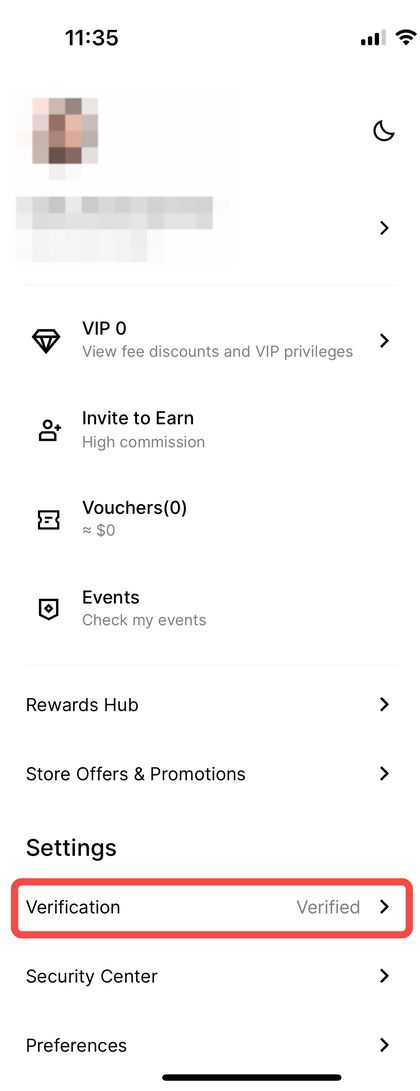
Log in to the BingX app with the old account that has Advanced KYC, tap your avatar in the top left to open the "Personal Center", then tap "Identity Verification".
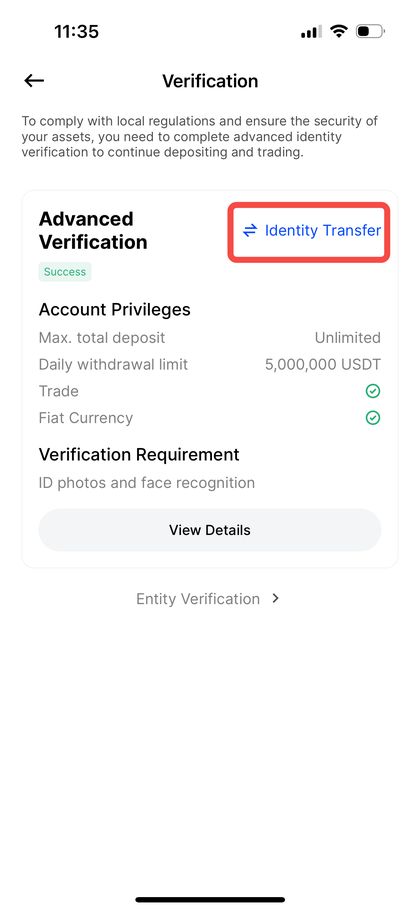
2. Tap "Identity Transfer"
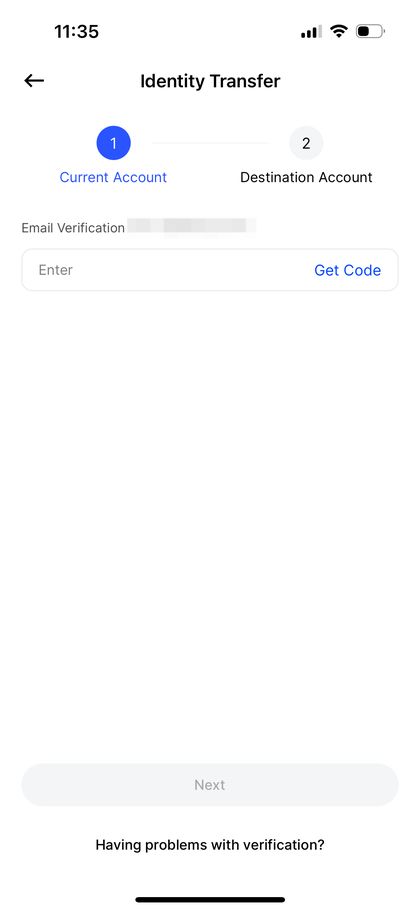
3. Verify the current account
Enter the old account's security verification (email or phone verification code and Google Authenticator code).
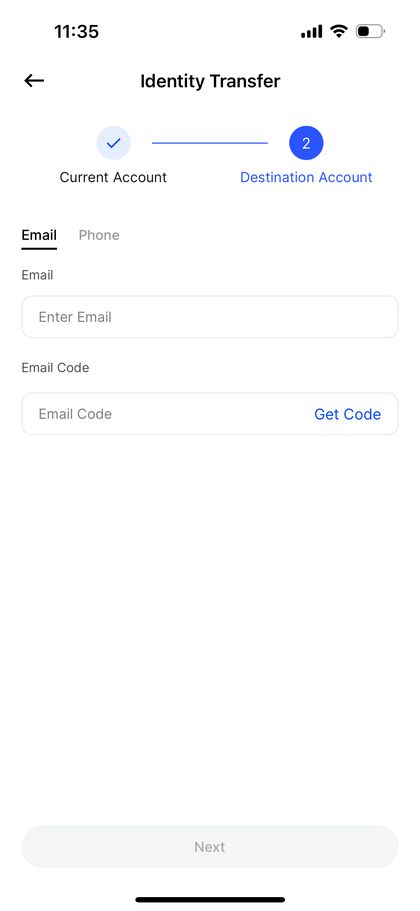
4. Verify the receiving account
Enter the new account you registered with FEEOTTER and complete its verification. The transfer is then done.
The website uses the same path: after logging in, go to avatar → Personal Center → Identity Verification → Identity Transfer. Screenshots: BingX official guide.
How to confirm it worked
The new account's "Identity Verification" page shows verified.
The old account's "Identity Verification" page is back to unverified.
Worked example: is switching worth it?
Using BingX's public perpetual futures rates for regular users (maker 0.02%, taker 0.05%) and a 70% taker / 30% maker mix, the blended rate is 0.7 × 0.05% + 0.3 × 0.02% = 0.041%. The old account uses a typical 20% code; the new one uses FEEOTTER at 45%:
Now the time it takes to move your assets. Say the old account holds 80,000 USDT:
Transfer first, then withdraw: the old account is now unverified and can withdraw at most 20,000 USDT per 24 hours. That is 4 withdrawals, and the last one cannot happen before day 4.
Withdraw first, then transfer: the old account still has Advanced KYC and a 5,000,000 USDT limit, so one withdrawal covers it. After the transfer you deposit into the new account. You pay one extra on-chain withdrawal fee, but you finish the same day.
Above 20,000 USDT, withdrawing before the transfer is almost always the better order; the only extra cost is one network fee.
How to decide
Several hundred thousand USDT or more in monthly futures volume: you get hundreds to thousands of USDT more per year. Worth switching.
Under 100,000 USDT a month: roughly 100 USDT more per year. If the old account still has unissued KYC rewards, you lose them on transfer, so compare the two first.
Just registered, no deposit yet: add the referrer under "My Referrer"; no new account needed.
Old account never did KYC: register again with FEEOTTER using a new email or phone number, and do KYC there.
Risks and limits
No undo for 180 days: if you transfer to the wrong account (for example, one registered without the code), you wait 180 days to transfer again. Confirm the new account is under our code first.
Old account is restricted: it can only sell or close positions, so any open positions stay until you close them yourself.
KYC rewards are lost: unissued verification-related rewards on the old account will not be issued.
Regional differences: BingX notes that KYC levels and benefits may vary by region; the limits shown on your account's product page prevail.
Every rate here is fee paid straight back to you. It excludes VIP fee tiers and platform-token discounts such as BNB or GT; those stack on top and only save you more.
I already used someone else's referral code. Can I change it to FEEOTTER?
No. BingX says a bound referrer cannot be changed or removed. To switch to FEEOTTER, open a new account and move your verification with Identity Transfer.
I forgot to enter a referral code at sign-up. Can I add one?
Yes, as long as you have not deposited (including crypto from other platforms and Buy Crypto) and have not invited friends. In the app, tap the avatar on the home screen → Profile Settings → My Referrer. On the website, hover over the avatar → Account & Security → My Referrer.
Should the new account complete KYC first?
No. The receiving account must be unverified. If it completes KYC, it can no longer receive the transfer.
Do assets and positions move too?
No. Identity Transfer moves only the verification. Withdraw and redeposit your assets, close positions first, and set up copy trading again on the new account.
Can the old account still withdraw after the transfer?
Yes, up to 20,000 USDT per 24 hours (the unverified limit). If you hold more, withdraw before the transfer.
How soon can I transfer again?
After 180 days. Neither account can transfer again within 180 days.
Rules and screenshots are compiled from BingX's official guides. This is not investment advice. Rebate rates follow what the Fee Otter platform shows in real time; BingX may change its rules, and its latest official announcements prevail.


%2C2026-10-05%20%E5%8F%96%E6%A8%A3%3A%0A%20%20%20%20%20%20%20%E5%BA%95%E8%89%B2%20%230E3452%2C%E5%AD%97%E7%AC%A6%20%2303CA9B)%E3%80%82%0A%20%20%20%20%20%20%20%E7%94%A8%20potrace%20%E6%8F%8F%E5%AD%97%E7%AC%A6%E8%BC%AA%E5%BB%93%2C%E6%95%B4%E5%BC%B5%E7%95%AB%E5%B8%83%E7%9B%B4%E6%8E%A5%E6%98%A0%E5%B0%84%E5%88%B0%E9%80%99%E8%A3%A1%E7%9A%84%2032%20%E5%96%AE%E4%BD%8D%20%E2%80%94%E2%80%94%20%E4%B8%8D%E9%87%8D%E6%96%B0%E7%BD%AE%E4%B8%AD%2C%E4%BF%9D%E7%95%99%E5%AE%98%E6%96%B9%E7%9A%84%E7%95%99%E7%99%BD%E6%AF%94%E4%BE%8B%E3%80%82%0A%20%20%20%20%20%20%20%E8%A6%81%E6%94%B9%E8%AB%8B%E9%87%8D%E8%B7%91%E6%8F%8F%E5%9C%96%2C%E4%B8%8D%E8%A6%81%E6%86%91%E5%8D%B0%E8%B1%A1%E8%AA%BF%E3%80%82%20--%3E%0A%20%20%3Crect%20x%3D%221.5%22%20y%3D%221.5%22%20width%3D%2229%22%20height%3D%2229%22%20rx%3D%228%22%20fill%3D%22%230E3452%22%2F%3E%0A%20%20%3Cpath%20fill%3D%22%2303CA9B%22%20d%3D%22M23.02%205.97C22.14%206.02%2021.54%206.07%2021.22%206.1C20.72%206.15%2019.6%206.28%2019.41%206.31C19.31%206.33%2019.1%206.37%2018.94%206.39C18.29%206.5%2017.94%206.57%2017.2%206.73C16.92%206.79%2016%207.03%2015.8%207.09C15.36%207.23%2014.42%207.54%2014.39%207.56C14.38%207.57%2014.3%207.6%2014.23%207.62C13.82%207.76%2012.7%208.28%2012.13%208.6C11.95%208.7%2011.8%208.78%2011.79%208.78C11.7%208.78%2010.42%209.71%209.98%2010.08C9.16%2010.79%208.07%2012.09%207.6%2012.91C7.28%2013.46%207.18%2013.65%207.06%2013.91C6.87%2014.3%206.76%2014.53%206.68%2014.74C6.56%2015.08%206.37%2015.64%206.34%2015.73C6.33%2015.78%206.3%2015.91%206.27%2016C6.06%2016.79%205.93%2017.87%205.94%2018.62L5.95%2019.05L6.69%2019.04C7.78%2019.03%208.57%2018.94%209.73%2018.68C10.18%2018.58%2011.05%2018.33%2011.45%2018.18C11.52%2018.15%2011.7%2018.08%2011.84%2018.03C13.58%2017.38%2015.67%2016.19%2017.55%2014.77C17.8%2014.58%2018.67%2013.89%2018.74%2013.83C18.76%2013.81%2018.94%2013.66%2019.14%2013.48C19.34%2013.31%2019.54%2013.14%2019.58%2013.11C19.61%2013.07%2019.78%2012.92%2019.95%2012.77C20.94%2011.88%2022.24%2010.57%2023.2%209.48C23.68%208.94%2023.69%208.93%2023.86%208.73C23.94%208.63%2024.02%208.54%2024.03%208.53C24.17%208.4%2025.09%207.25%2025.52%206.67C25.67%206.47%2025.81%206.28%2025.83%206.26C25.86%206.23%2025.89%206.19%2025.9%206.16C25.92%206.13%2025.94%206.12%2025.95%206.13C25.98%206.15%2025.3%207.5%2024.99%208.07C24.88%208.28%2024.78%208.45%2024.78%208.46C24.78%208.46%2024.66%208.67%2024.51%208.93C24.24%209.4%2024.17%209.52%2024.07%209.69C24%209.81%2023.72%2010.27%2023.39%2010.8C22.69%2011.91%2021.44%2013.66%2020.74%2014.52C20.25%2015.12%2020.09%2015.31%2019.72%2015.73C19.01%2016.55%2018.19%2017.38%2017.42%2018.08C17.07%2018.39%2016.92%2018.52%2016.5%2018.87C16.37%2018.98%2016.24%2019.09%2016.2%2019.12C15.83%2019.43%2014.7%2020.21%2014.16%2020.54C13.69%2020.82%2012.69%2021.34%2012.41%2021.45C12.33%2021.48%2012.23%2021.52%2012.17%2021.55C12.01%2021.62%2011.45%2021.84%2011.11%2021.95C10.97%2022%2010.05%2022.26%209.84%2022.31C9.23%2022.45%208.97%2022.5%208.56%2022.56C8.43%2022.58%208.25%2022.61%208.16%2022.62C8.06%2022.64%207.79%2022.67%207.56%2022.69C7.32%2022.71%207.12%2022.74%207.12%2022.76C7.12%2022.85%207.58%2023.42%207.97%2023.82C9.2%2025.09%2010.67%2025.8%2012.52%2026.02C16.51%2026.48%2020.99%2024.06%2023.2%2020.25C23.32%2020.05%2023.43%2019.86%2023.46%2019.81C23.51%2019.73%2023.96%2018.81%2024.04%2018.62C24.67%2017.21%2025.19%2015.43%2025.52%2013.67C25.66%2012.9%2025.73%2012.45%2025.81%2011.77C25.99%2010.32%2026.05%209.33%2026.05%207.64C26.05%206.06%2026.04%206.01%2025.97%205.98C25.9%205.95%2023.53%205.94%2023.02%205.97Z%22%2F%3E%0A%3C%2Fsvg%3E%0A)


%2C2026-10-05%20%E5%8F%96%E6%A8%A3%3A%0A%20%20%20%20%20%20%20%E5%BA%95%E8%89%B2%20%23FFFFFF%2C%E5%AD%97%E7%AC%A6%20%235227FF)%E3%80%82%0A%20%20%20%20%20%20%20%E7%94%A8%20potrace%20%E6%8F%8F%E5%AD%97%E7%AC%A6%E8%BC%AA%E5%BB%93%2C%E6%95%B4%E5%BC%B5%E7%95%AB%E5%B8%83%E7%9B%B4%E6%8E%A5%E6%98%A0%E5%B0%84%E5%88%B0%E9%80%99%E8%A3%A1%E7%9A%84%2032%20%E5%96%AE%E4%BD%8D%20%E2%80%94%E2%80%94%20%E4%B8%8D%E9%87%8D%E6%96%B0%E7%BD%AE%E4%B8%AD%2C%E4%BF%9D%E7%95%99%E5%AE%98%E6%96%B9%E7%9A%84%E7%95%99%E7%99%BD%E6%AF%94%E4%BE%8B%E3%80%82%0A%20%20%20%20%20%20%20%E5%AE%98%E6%96%B9%E6%98%AF%E7%99%BD%E5%BA%95%E7%B4%AB%E8%89%B2%E5%AD%97%E7%AC%A6%3B%E7%99%BD%E5%BA%95%E5%8A%A0%E6%B7%A1%E9%82%8A%2C%E5%85%8D%E5%BE%97%E5%9C%A8%E7%99%BD%E8%89%B2%E8%83%8C%E6%99%AF%E4%B8%8A%E6%B6%88%E5%A4%B1%E3%80%82%0A%20%20%20%20%20%20%20%E8%A6%81%E6%94%B9%E8%AB%8B%E9%87%8D%E8%B7%91%E6%8F%8F%E5%9C%96%2C%E4%B8%8D%E8%A6%81%E6%86%91%E5%8D%B0%E8%B1%A1%E8%AA%BF%E3%80%82%20--%3E%0A%20%20%3Crect%20x%3D%221.5%22%20y%3D%221.5%22%20width%3D%2229%22%20height%3D%2229%22%20rx%3D%228%22%20fill%3D%22%23FFFFFF%22%20stroke%3D%22%23E4E4E7%22%2F%3E%0A%20%20%3Cpath%20fill%3D%22%235227FF%22%20d%3D%22M13.31%208.92L13.31%2012.28L9.94%2012.28L6.56%2012.28L6.57%2015.71C6.58%2019.51%206.57%2019.29%206.79%2020.2C7.56%2023.33%2010.21%2025.78%2013.38%2026.31C14.1%2026.43%2014.44%2026.44%2019.24%2026.44L23.91%2026.44L23.91%2023.05L23.91%2019.66L19.2%2019.65L14.48%2019.64L14.28%2019.56C13.89%2019.41%2013.63%2019.16%2013.44%2018.76L13.36%2018.58L13.35%2015.46L13.34%2012.34L18.56%2012.34L23.78%2012.34L23.78%208.95L23.78%205.56L18.55%205.56L13.31%205.56L13.31%208.92Z%22%2F%3E%0A%3C%2Fsvg%3E%0A)

 Telegram · @feeotter