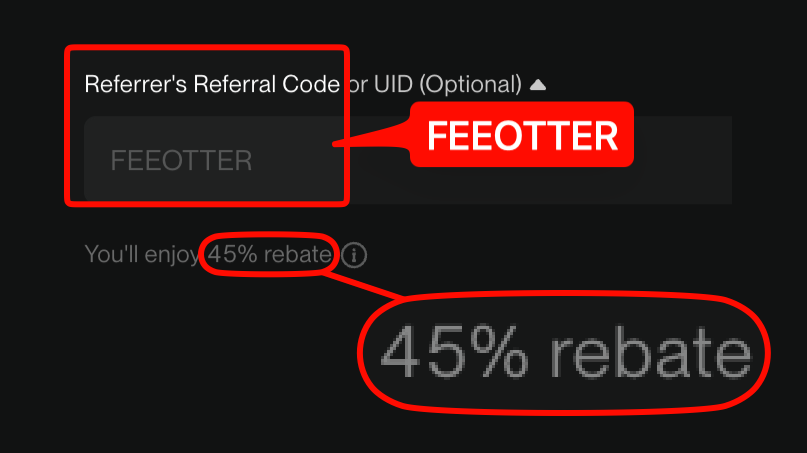
Registering on BingX takes seven steps: open Fee Otter's dedicated link, enter an email or phone number and set a password, check that the referral field shows our code FEEOTTER along with the "You'll enjoy … rebate" notice, turn on 2FA and complete KYC, deposit and trade, find your UID, then check the rate on Fee Otter. With this code BingX automatically returns 45% of your fees, more than twice a typical 20% code: on 1,000 USDT of monthly fees you get back 450 USDT instead of 200 USDT (checked October 2026).
Quick summary
- Referral code FEEOTTER: all caps, pre-filled by our link in the "Referrer's Referral Code or UID (Optional)" field on the signup page.
- 45% auto rebate: under Fee Otter's partnership terms with BingX, our code is set to a 45% auto rebate that BingX returns on every trade.
- No extra layer: Fee Otter adds no extra rebate on BingX, so 45% is the whole rate and binding your UID does not raise it.
Three things to know before you sign up
- Enter the referral code at signup; once you deposit, it can no longer be added. (BingX official FAQ)
- Look for the rebate notice. With our code in the referral field, a "You'll enjoy … rebate" notice appears beneath it. That line is the live proof the code took; if it is missing, do not submit.
- BingX returns the full 45% itself. The code sets that 45%; Fee Otter adds no extra rebate on BingX, so binding your UID does not raise it.
How much more does our code pay than a typical one?
A rebate is a percentage of your fees, so double the rate means double the money back. Most KOL referral codes you can find online pay 20%, a few pay 25%. Here is what the same monthly fees return with a typical 20% code versus ours:
| Monthly fees | Typical 20% code | Fee Otter's code (45%) |
|---|
| 100 USDT | 20 | 45 |
| 500 USDT | 100 | 225 |
| 1,000 USDT | 200 | 450 |
On the same 1,000 USDT of fees, a typical 20% code returns 200 a month while ours returns 450, 3,000 USDT more a year. You only register once and a bound code cannot be changed, so the code you pick decides what comes back on every trade after that.
BingX registration steps, step by step
Step 1: open the official registration link with the referral code
Use the "Register" button on this page to open BingX's official signup page; the link already carries our code and fills in the "Referrer's Referral Code or UID (Optional)" field for you; that field also accepts a referrer's UID. Once you have chosen a code, finish signup from that same link and do not click anyone else's invite link on the way, because the later link overrides the earlier one.
Step 2: enter an email or phone number and set a password
Use an email or phone number you actually check, set a strong password you use only on BingX, and enter the verification code sent to you to create the account. Exchange accounts are rarely lost because the platform was breached; they are lost because the same password leaked from another site.
Step 3: confirm the code and the "You'll enjoy … rebate" notice
Check that the referral field is filled in. The "You'll enjoy … rebate" notice must appear beneath it; that confirms the 45% auto rebate is active. If it does not appear, re-open the signup page from the button on this page. This step decides every rebate you will earn.
Step 4: turn on 2FA and complete KYC
After logging in, turn on two-factor authentication first, then verify your identity. In the app, tap your avatar in the top left to open the "Personal Center" and tap "Identity Verification", then follow the screens with your ID ready. Photos must show all four corners, with no glare and no cropping, and the details you enter must match the document. Verification levels and their limits are whatever BingX shows at the time; the next section sums up what is known.
Step 5: deposit and start trading
You can transfer crypto in from another platform or wallet, or buy crypto through a fiat channel. Always confirm the network before an on-chain transfer: USDT exists on TRC20, ERC20, BSC and others, and assets sent on a mismatched network are usually unrecoverable. Once you trade, 45% of every fee comes back to your account automatically.
Step 6: find your BingX UID
The UID is the plain string of digits BingX assigns to each account, not your nickname or email. It is shown on your account's profile page after you log in; copy it rather than typing it out. If you are not sure which number is the UID, see what a UID is and where to find it.
Step 7: check the rate on the Fee Otter rebate site
Open the Fee Otter rebate site (the "Rebate" page on feeotter.com) and choose BingX to see the current rate. BingX returns the full 45% itself; Fee Otter adds no extra rebate on BingX, so binding your UID does not raise it. If you do bind your UID on Fee Otter, it needs only the UID: no API key, no password, no withdrawal permission.
Which KYC level do you need?
BingX identity verification comes in levels, and the features and withdrawal limits of each are whatever BingX shows at the time. Two things are clear from BingX's official pages:
- Unverified accounts are limited: without verification, trading, campaigns, deposits and withdrawals are subject to restrictions, and the withdrawal limit is lower.
- No UID binding needed for the rebate: the code sets BingX's 45%, so you bind no UID and give Fee Otter no documents, though completing verification gives you full trading and withdrawal limits.
What will you pay in fees?
A rebate is a percentage of your fees, so knowing what comes back starts with knowing what you pay. BingX's published rates for regular users (VIP 0):
Fees verified on 2026-09-24 (each exchange's official fee schedule). · Methodology
After the rebate, the futures taker cost is 0.05% × (1 − 45%) = 0.0275%; with a typical 20% code it is 0.05% × (1 − 20%) = 0.04%. Assuming 70% taker and 30% maker, the blended futures rate is 0.041%: 500,000 USDT of monthly volume costs about 205 USDT in fees, of which a typical 20% code returns 41 USDT and ours about 92 USDT.
How much rebate will you get?
Rebates usually come in two layers; on BingX our code only has the first:
| Layer | How it arrives | Rate | Requirement |
|---|
| Layer 1: auto rebate | Returned by BingX on every trade | 45% | Sign up with referral code |
| Layer 2: extra rebate | Paid by Fee Otter | 0% (BingX has no extra layer) | Not applicable |
Each exchange has a single rate; for how rebates are calculated and paid, see how rebates are settled. The rates by exchange:
On 500 USDT of monthly fees: our code returns 225 USDT, against 100 USDT from a typical 20% code.
The 45% rate comes from Fee Otter's partnership terms with BingX and may be adjusted under those terms; the signup page and the Fee Otter platform's live figures prevail.
Who is BingX a good fit for?
BingX is known for copy trading and grid bots, with perpetual futures at its core. Both involve a lot of fills: copy trading opens and closes positions as often as the trader you follow, and a grid buys low and sells high over and over inside a range. Fees add up fast and, over time, often eat into returns more steadily than any single trade's profit or loss.
Because the fee base is large, the gap between rebate rates is magnified. Orders placed by copy trading or bots that fill in your account and generate trading fees earn rebates on those fees; the exact scope per product is whatever the Fee Otter platform's statement shows. At 2,000,000 USDT of monthly futures volume and a 0.041% blended rate, fees come to about 820 USDT a month: a typical 20% code returns 164 USDT and ours about 369 USDT, more than 2,000 USDT apart over a year.
What about the signup bonus?
Every exchange advertises welcome gifts, trial funds or futures coupons, and the headline numbers look large, but they usually come with conditions: a minimum deposit, a volume target inside a window, and rewards that are often non-withdrawable trial credit that expires if unused. Treat it as a one-off bonus; what really drives long-run cost is the fee and rebate on every single trade. The actual terms are whatever BingX's own campaign page says; we make no promises about them.
A new account with no deposit yet can add a referrer under BingX's official settings (BingX official FAQ).
Five common mistakes
- Depositing first and remembering the code later. Once you deposit or buy crypto, the code can no longer be added. Code first, deposit second.
- Submitting without seeing the rebate notice. If the "You'll enjoy … rebate" line is missing, the code did not take.
- Clicking someone else's invite link midway. The later link overrides the earlier one; enter from the button on this page and finish in one go.
- Sending on the wrong network. USDT exists on TRC20, ERC20, BSC and others, and assets sent on a mismatched network are usually unrecoverable.
- Thinking you still need to bind a UID. The code sets BingX's 45%, so there is no UID to bind on Fee Otter; the rebate notice at signup means it is active.
If you do not have a BingX account yet, register with our code FEEOTTER and get more than twice a typical 20% code's rebate from day one. Code details are in BingX referral code.
The first things to do after signing up
- Check the 45% auto-rebate took effect: if you saw the “You'll enjoy … rebate” notice at signup you are set.
- Turn on 2FA: do it right after logging in, before identity verification.
- Copy trading and grid bots work as usual: trading fees generated in your account earn the same 45% rebate.
Frequently asked questions
Where do I enter the BingX referral code?
In the "Referrer's Referral Code or UID (Optional)" field on the signup page. The link from the button on this page fills in our code FEEOTTER automatically, and a "You'll enjoy … rebate" notice appears beneath the field once it is in.
Can I add a BingX referral code after registering?
A new account with no deposit yet can add a referrer under BingX's official settings. A bound code cannot be changed or removed.
How much rebate does our code pay on BingX?
45%, all of it returned automatically by BingX; Fee Otter adds no extra rebate on BingX.
Is KYC required to register on BingX?
Unverified accounts face restrictions on trading, campaigns, deposits and withdrawals, so verification is recommended. The rebate comes from the code, so there is no UID to bind and you give Fee Otter no documents.
Do I need an API key to bind my UID on Fee Otter?
No. BingX needs no UID binding for the rebate; if you do bind, it takes only the UID, with no API key, password or withdrawal permission, and your assets stay in your own BingX account throughout.
How long does BingX registration take? Can I trade the same day?
The account itself takes minutes, and you can start trading once you deposit, though unverified accounts have limited features and limits. Review times for identity verification depend on BingX at the time and do not stop you binding the code first.
Does registering, binding or claiming cost anything?
No. A rebate returns part of a fee you were paying anyway, and signing up with our code does not raise your fees.
What if another referral code is already bound?
Once a referrer is bound on BingX, it cannot be changed or removed.



%2C2026-10-05%20%E5%8F%96%E6%A8%A3%3A%0A%20%20%20%20%20%20%20%E5%BA%95%E8%89%B2%20%230E3452%2C%E5%AD%97%E7%AC%A6%20%2303CA9B)%E3%80%82%0A%20%20%20%20%20%20%20%E7%94%A8%20potrace%20%E6%8F%8F%E5%AD%97%E7%AC%A6%E8%BC%AA%E5%BB%93%2C%E6%95%B4%E5%BC%B5%E7%95%AB%E5%B8%83%E7%9B%B4%E6%8E%A5%E6%98%A0%E5%B0%84%E5%88%B0%E9%80%99%E8%A3%A1%E7%9A%84%2032%20%E5%96%AE%E4%BD%8D%20%E2%80%94%E2%80%94%20%E4%B8%8D%E9%87%8D%E6%96%B0%E7%BD%AE%E4%B8%AD%2C%E4%BF%9D%E7%95%99%E5%AE%98%E6%96%B9%E7%9A%84%E7%95%99%E7%99%BD%E6%AF%94%E4%BE%8B%E3%80%82%0A%20%20%20%20%20%20%20%E8%A6%81%E6%94%B9%E8%AB%8B%E9%87%8D%E8%B7%91%E6%8F%8F%E5%9C%96%2C%E4%B8%8D%E8%A6%81%E6%86%91%E5%8D%B0%E8%B1%A1%E8%AA%BF%E3%80%82%20--%3E%0A%20%20%3Crect%20x%3D%221.5%22%20y%3D%221.5%22%20width%3D%2229%22%20height%3D%2229%22%20rx%3D%228%22%20fill%3D%22%230E3452%22%2F%3E%0A%20%20%3Cpath%20fill%3D%22%2303CA9B%22%20d%3D%22M23.02%205.97C22.14%206.02%2021.54%206.07%2021.22%206.1C20.72%206.15%2019.6%206.28%2019.41%206.31C19.31%206.33%2019.1%206.37%2018.94%206.39C18.29%206.5%2017.94%206.57%2017.2%206.73C16.92%206.79%2016%207.03%2015.8%207.09C15.36%207.23%2014.42%207.54%2014.39%207.56C14.38%207.57%2014.3%207.6%2014.23%207.62C13.82%207.76%2012.7%208.28%2012.13%208.6C11.95%208.7%2011.8%208.78%2011.79%208.78C11.7%208.78%2010.42%209.71%209.98%2010.08C9.16%2010.79%208.07%2012.09%207.6%2012.91C7.28%2013.46%207.18%2013.65%207.06%2013.91C6.87%2014.3%206.76%2014.53%206.68%2014.74C6.56%2015.08%206.37%2015.64%206.34%2015.73C6.33%2015.78%206.3%2015.91%206.27%2016C6.06%2016.79%205.93%2017.87%205.94%2018.62L5.95%2019.05L6.69%2019.04C7.78%2019.03%208.57%2018.94%209.73%2018.68C10.18%2018.58%2011.05%2018.33%2011.45%2018.18C11.52%2018.15%2011.7%2018.08%2011.84%2018.03C13.58%2017.38%2015.67%2016.19%2017.55%2014.77C17.8%2014.58%2018.67%2013.89%2018.74%2013.83C18.76%2013.81%2018.94%2013.66%2019.14%2013.48C19.34%2013.31%2019.54%2013.14%2019.58%2013.11C19.61%2013.07%2019.78%2012.92%2019.95%2012.77C20.94%2011.88%2022.24%2010.57%2023.2%209.48C23.68%208.94%2023.69%208.93%2023.86%208.73C23.94%208.63%2024.02%208.54%2024.03%208.53C24.17%208.4%2025.09%207.25%2025.52%206.67C25.67%206.47%2025.81%206.28%2025.83%206.26C25.86%206.23%2025.89%206.19%2025.9%206.16C25.92%206.13%2025.94%206.12%2025.95%206.13C25.98%206.15%2025.3%207.5%2024.99%208.07C24.88%208.28%2024.78%208.45%2024.78%208.46C24.78%208.46%2024.66%208.67%2024.51%208.93C24.24%209.4%2024.17%209.52%2024.07%209.69C24%209.81%2023.72%2010.27%2023.39%2010.8C22.69%2011.91%2021.44%2013.66%2020.74%2014.52C20.25%2015.12%2020.09%2015.31%2019.72%2015.73C19.01%2016.55%2018.19%2017.38%2017.42%2018.08C17.07%2018.39%2016.92%2018.52%2016.5%2018.87C16.37%2018.98%2016.24%2019.09%2016.2%2019.12C15.83%2019.43%2014.7%2020.21%2014.16%2020.54C13.69%2020.82%2012.69%2021.34%2012.41%2021.45C12.33%2021.48%2012.23%2021.52%2012.17%2021.55C12.01%2021.62%2011.45%2021.84%2011.11%2021.95C10.97%2022%2010.05%2022.26%209.84%2022.31C9.23%2022.45%208.97%2022.5%208.56%2022.56C8.43%2022.58%208.25%2022.61%208.16%2022.62C8.06%2022.64%207.79%2022.67%207.56%2022.69C7.32%2022.71%207.12%2022.74%207.12%2022.76C7.12%2022.85%207.58%2023.42%207.97%2023.82C9.2%2025.09%2010.67%2025.8%2012.52%2026.02C16.51%2026.48%2020.99%2024.06%2023.2%2020.25C23.32%2020.05%2023.43%2019.86%2023.46%2019.81C23.51%2019.73%2023.96%2018.81%2024.04%2018.62C24.67%2017.21%2025.19%2015.43%2025.52%2013.67C25.66%2012.9%2025.73%2012.45%2025.81%2011.77C25.99%2010.32%2026.05%209.33%2026.05%207.64C26.05%206.06%2026.04%206.01%2025.97%205.98C25.9%205.95%2023.53%205.94%2023.02%205.97Z%22%2F%3E%0A%3C%2Fsvg%3E%0A)


%2C2026-10-05%20%E5%8F%96%E6%A8%A3%3A%0A%20%20%20%20%20%20%20%E5%BA%95%E8%89%B2%20%23FFFFFF%2C%E5%AD%97%E7%AC%A6%20%235227FF)%E3%80%82%0A%20%20%20%20%20%20%20%E7%94%A8%20potrace%20%E6%8F%8F%E5%AD%97%E7%AC%A6%E8%BC%AA%E5%BB%93%2C%E6%95%B4%E5%BC%B5%E7%95%AB%E5%B8%83%E7%9B%B4%E6%8E%A5%E6%98%A0%E5%B0%84%E5%88%B0%E9%80%99%E8%A3%A1%E7%9A%84%2032%20%E5%96%AE%E4%BD%8D%20%E2%80%94%E2%80%94%20%E4%B8%8D%E9%87%8D%E6%96%B0%E7%BD%AE%E4%B8%AD%2C%E4%BF%9D%E7%95%99%E5%AE%98%E6%96%B9%E7%9A%84%E7%95%99%E7%99%BD%E6%AF%94%E4%BE%8B%E3%80%82%0A%20%20%20%20%20%20%20%E5%AE%98%E6%96%B9%E6%98%AF%E7%99%BD%E5%BA%95%E7%B4%AB%E8%89%B2%E5%AD%97%E7%AC%A6%3B%E7%99%BD%E5%BA%95%E5%8A%A0%E6%B7%A1%E9%82%8A%2C%E5%85%8D%E5%BE%97%E5%9C%A8%E7%99%BD%E8%89%B2%E8%83%8C%E6%99%AF%E4%B8%8A%E6%B6%88%E5%A4%B1%E3%80%82%0A%20%20%20%20%20%20%20%E8%A6%81%E6%94%B9%E8%AB%8B%E9%87%8D%E8%B7%91%E6%8F%8F%E5%9C%96%2C%E4%B8%8D%E8%A6%81%E6%86%91%E5%8D%B0%E8%B1%A1%E8%AA%BF%E3%80%82%20--%3E%0A%20%20%3Crect%20x%3D%221.5%22%20y%3D%221.5%22%20width%3D%2229%22%20height%3D%2229%22%20rx%3D%228%22%20fill%3D%22%23FFFFFF%22%20stroke%3D%22%23E4E4E7%22%2F%3E%0A%20%20%3Cpath%20fill%3D%22%235227FF%22%20d%3D%22M13.31%208.92L13.31%2012.28L9.94%2012.28L6.56%2012.28L6.57%2015.71C6.58%2019.51%206.57%2019.29%206.79%2020.2C7.56%2023.33%2010.21%2025.78%2013.38%2026.31C14.1%2026.43%2014.44%2026.44%2019.24%2026.44L23.91%2026.44L23.91%2023.05L23.91%2019.66L19.2%2019.65L14.48%2019.64L14.28%2019.56C13.89%2019.41%2013.63%2019.16%2013.44%2018.76L13.36%2018.58L13.35%2015.46L13.34%2012.34L18.56%2012.34L23.78%2012.34L23.78%208.95L23.78%205.56L18.55%205.56L13.31%205.56L13.31%208.92Z%22%2F%3E%0A%3C%2Fsvg%3E%0A)

 Telegram · @feeotter