Our BingX referral code FEEOTTER is set by BingX at a 45% auto-rebate, more than double the usual 20%. Where to enter it, how to confirm it worked, and how late entry works.
Fee Otter's BingX referral code (also called an invite code) is FEEOTTER. Sign up through our link and it is filled in for you, and BingX then refunds 45% of your fees automatically, more than double a typical 20% code (checked October 2026).
Under Fee Otter's partner terms with BingX, our code is set at a 45% auto-rebate on BingX. Most exchanges' referral codes auto-return 20% (some 25%); ours on BingX returns more than double that. BingX pays the 45% straight back to your account, without going through us, and Fee Otter adds no extra rebate on top. On 1,000 USDT of monthly fees, a typical 20% code returns 200 USDT; ours returns 450 USDT.
What is the BingX referral code?
The code is FEEOTTER. The button below uses a dedicated link that already carries it, so the referral field is filled in for you.
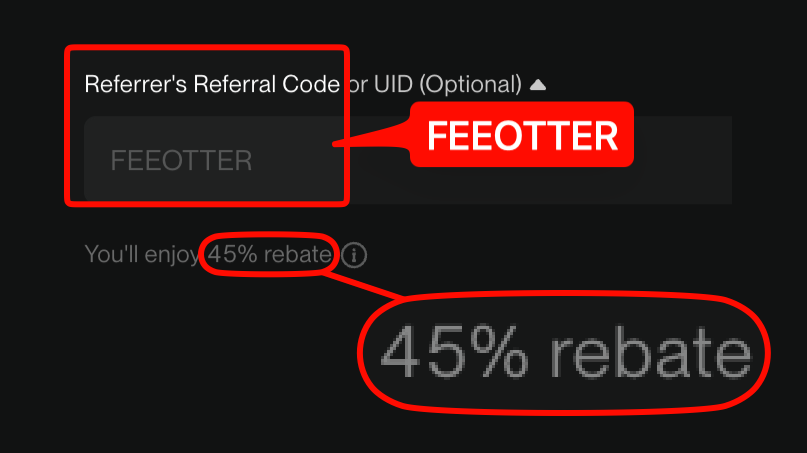
This is the actual BingX signup page opened through our link, with the code already filled in. Plenty of codes that advertise high rebates come without a single screenshot, and people only find out after signing up that no rebate arrives. We put up each exchange's signup page or dashboard so you can check before you register.
Where do you enter the BingX referral code?
At signup, the code goes in the "Referrer's Referral Code or UID (Optional)" field on BingX's registration page. Three steps:
Open BingX's signup page through the Fee Otter dedicated link; the code FEEOTTER is filled in automatically.
Enter your email or phone, set a password, and before submitting check that the "You'll enjoy … rebate" notice appears under the field.
Once registered, BingX returns the 45% automatically. Fee Otter adds no extra rebate, so binding your UID earns nothing more; current rates are on the Fee Otter rebate site.
Every screen, plus notes on KYC, deposits and finding your UID, is covered in the BingX registration guide.
How do I confirm the 45% auto-rebate took effect?
BingX's signup page shows it. With our code in the "Referrer's Referral Code or UID (Optional)" field, a "You'll enjoy … rebate" notice appears right below it showing the code's auto-rebate rate.
After sign-up, you can check twice more:
After you log in: open "My Referrer". In the app, tap the avatar on the home screen → Profile Settings → My Referrer; on the website, hover over the avatar → Account & Security → My Referrer. BingX's official FAQ says accounts without a referrer add a code on this page, so if the page still lets you enter a code, nothing is bound yet.
Bind your UID on Fee Otter: enter your BingX UID on the Fee Otter rebate site. After you submit it, we check BingX's referral list, the first time within about 5 minutes. If you are under our code, the status changes to "Verified" and we email you. If it still says "Pending review" after 5 hours, your UID is not on the list: check that you signed up with FEEOTTER, or contact support.
BingX pays the whole rebate automatically, so binding your UID does not add anything, but it does confirm that you are under our code.
If you trade large volumes and want to confirm before your first trade, contact support and we will check it by hand. If the code did not stick, see the BingX rebinding guide for your options.
How much does it earn?
45%, more than double a typical 20% code. Broken down:
A 45% auto-rebate, under Fee Otter's partner terms with BingX, fixed at signup and returned automatically by BingX on every trade.
Fee Otter's extra rebate: none on BingX, so binding your UID earns nothing more. Rates for each exchange are in the table below:
Rebate rate by exchange
Exchange
Auto-rebate
Extra rebate
Total
BingX
45%
0%
45%
Binance
20%
20%
40%
OKX
20%
20%
Bybit
—
40%
40%
Gate
20%
50%
70%
Bitget
20%
30%
50%
MEXC
20%
40%
60%
Pionex
15%
35%
50%
KuCoin
60%
0%
60%
Bitfinex
6%
0%
6%
WEEX
60%
10%
70%
XT.COM
60%
10%
70%
HTX
30%
20%
50%
CoinW
60%
0%
60%
Ourbit
50%
20%
70%
Every rate here is fee paid straight back to you. It excludes VIP fee tiers and platform-token discounts such as BNB or GT; those stack on top and only save you more.
That is more than double a typical code's rebate. Using BingX's public perpetual rates (maker 0.02%, taker 0.05%) at 70% taker fills, the blended rate is 0.041%:
Monthly volume
Monthly fee
Typical code (20% auto)
Fee Otter's code (45% auto)
Extra per year
100,000 USDT
41 USDT
8.2
18.45
~123
500,000 USDT
205 USDT
41
92.25
~615
2,000,000 USDT
820 USDT
164
369
~2,460
BingX has no extra-rebate layer, so the 45% in the table is the whole rebate.
The 45% rebate: table and worked example
On 1,000 USDT of monthly fees:
Auto-rebate
Extra rebate
Total
On 1,000 USDT of monthly fees
Versus a common 20% code
45%
0%
45%
450 USDT
about 2.25×
Now the fees themselves. BingX's public perpetual rates for regular users, and the net taker after the rebate (net rate = taker × (1 − rebate rate)):
A worked example: 500,000 USDT of perpetual volume a month, all taker, costs 500,000 × 0.05% = 250 USDT in fees. A common 20% code returns 50 USDT; Fee Otter's code returns 112.5 USDT, an extra 750 USDT a year.
Common mistakes
Assuming it can be added any time later.Entering it at signup is the safe route (BingX's official FAQ).
Clicking another referral link mid-signup. The later one overwrites the first. Pick one link and go through it end to end.
Submitting without seeing the rebate notice. That line is the only live proof the code took; glance at it before you submit.
A new account with no deposit yet can add a referrer under BingX's official settings; a bound code can never be changed or removed, so double-check it before you confirm (BingX's official FAQ). Late-entry rules vary a lot between exchanges (Bybit, for example, allows 14 days after signup if you have no referrer); every exchange's rules are in the exchange rebind rules table.
Compared with other exchanges
For futures, BingX is often weighed against Bybit. BingX's 0.05% futures taker is already below Bybit's 0.055%, and the rebate is bigger: BingX pays 45% against Bybit's 40%, leaving a net taker of 0.0275% versus 0.033%. The full numbers are in the BingX vs Bybit fee rebate comparison, and every exchange we cover is side by side in the exchange fee and rebate comparison.
You want a high rate from the moment you sign up: BingX's whole 45% is paid back automatically by the exchange from signup.
Not registered yet? Sign up with code FEEOTTER through the link above and submit once you see the rebate notice; BingX then returns 45% on every trade automatically.
What you see every day after binding
Illustration · sample data, not a real user
This is what the Rebate history on the rebate dashboard looks like. Data for the previous day refreshes daily at 16:00 (UTC+8), and every rebate shows the exchange, date and amount.
Available balance
38.66 USDT
Total earned
412.80 USDT
By exchange (this month)
Gate 34.44Binance 5.51Bitget 6.82
Rebate history
Date
Exchange
Amount
10/22
Gate
+6.30 USDT
10/22
Binance
+1.20 USDT
10/22
Bitget
+1.76 USDT
10/21
Gate
+4.83 USDT
10/21
Binance
+0.94 USDT
10/20
Gate
+7.14 USDT
10/20
Bitget
+2.20 USDT
10/20
Binance
+1.43 USDT
The available balance is extra rebate Fee Otter has not yet paid you (denominated in USDT) — an amount we owe you; the automatic rebate from the referral code is paid by the exchange straight to your exchange account.
Are the BingX referral code and invite code the same thing?
Yes. Referral code and invite code mean the same field entered at signup, and the field also accepts a referrer UID.
Who pays the 45%?
BingX returns it directly to your account. The 45% rate comes from Fee Otter's partner terms with BingX: our code is set at a 45% auto-rebate on BingX's side, and the rate may change with those terms.
What do I do after using the code?
Nothing else. The 45% set by the code is returned by BingX automatically; Fee Otter adds no extra rebate, so binding your UID earns nothing more. Current rates are on the Fee Otter rebate site.
Can I add a BingX referral code after signing up?
A new account with no deposit yet can add a referrer under BingX's official settings. Once bound, it can't be changed or removed.
How much does our code earn on BingX?
45%, all of it returned automatically by BingX. Fee Otter adds no extra rebate.
Is the BingX code uppercase or lowercase?
FEEOTTER is uppercase. The dedicated link fills it in; if you type it yourself, the rebate notice under the field confirms it took.
I'm bound to someone else's code. Can I change it?
Once a referrer is bound on BingX, it cannot be changed or removed.



%2C2026-10-05%20%E5%8F%96%E6%A8%A3%3A%0A%20%20%20%20%20%20%20%E5%BA%95%E8%89%B2%20%230E3452%2C%E5%AD%97%E7%AC%A6%20%2303CA9B)%E3%80%82%0A%20%20%20%20%20%20%20%E7%94%A8%20potrace%20%E6%8F%8F%E5%AD%97%E7%AC%A6%E8%BC%AA%E5%BB%93%2C%E6%95%B4%E5%BC%B5%E7%95%AB%E5%B8%83%E7%9B%B4%E6%8E%A5%E6%98%A0%E5%B0%84%E5%88%B0%E9%80%99%E8%A3%A1%E7%9A%84%2032%20%E5%96%AE%E4%BD%8D%20%E2%80%94%E2%80%94%20%E4%B8%8D%E9%87%8D%E6%96%B0%E7%BD%AE%E4%B8%AD%2C%E4%BF%9D%E7%95%99%E5%AE%98%E6%96%B9%E7%9A%84%E7%95%99%E7%99%BD%E6%AF%94%E4%BE%8B%E3%80%82%0A%20%20%20%20%20%20%20%E8%A6%81%E6%94%B9%E8%AB%8B%E9%87%8D%E8%B7%91%E6%8F%8F%E5%9C%96%2C%E4%B8%8D%E8%A6%81%E6%86%91%E5%8D%B0%E8%B1%A1%E8%AA%BF%E3%80%82%20--%3E%0A%20%20%3Crect%20x%3D%221.5%22%20y%3D%221.5%22%20width%3D%2229%22%20height%3D%2229%22%20rx%3D%228%22%20fill%3D%22%230E3452%22%2F%3E%0A%20%20%3Cpath%20fill%3D%22%2303CA9B%22%20d%3D%22M23.02%205.97C22.14%206.02%2021.54%206.07%2021.22%206.1C20.72%206.15%2019.6%206.28%2019.41%206.31C19.31%206.33%2019.1%206.37%2018.94%206.39C18.29%206.5%2017.94%206.57%2017.2%206.73C16.92%206.79%2016%207.03%2015.8%207.09C15.36%207.23%2014.42%207.54%2014.39%207.56C14.38%207.57%2014.3%207.6%2014.23%207.62C13.82%207.76%2012.7%208.28%2012.13%208.6C11.95%208.7%2011.8%208.78%2011.79%208.78C11.7%208.78%2010.42%209.71%209.98%2010.08C9.16%2010.79%208.07%2012.09%207.6%2012.91C7.28%2013.46%207.18%2013.65%207.06%2013.91C6.87%2014.3%206.76%2014.53%206.68%2014.74C6.56%2015.08%206.37%2015.64%206.34%2015.73C6.33%2015.78%206.3%2015.91%206.27%2016C6.06%2016.79%205.93%2017.87%205.94%2018.62L5.95%2019.05L6.69%2019.04C7.78%2019.03%208.57%2018.94%209.73%2018.68C10.18%2018.58%2011.05%2018.33%2011.45%2018.18C11.52%2018.15%2011.7%2018.08%2011.84%2018.03C13.58%2017.38%2015.67%2016.19%2017.55%2014.77C17.8%2014.58%2018.67%2013.89%2018.74%2013.83C18.76%2013.81%2018.94%2013.66%2019.14%2013.48C19.34%2013.31%2019.54%2013.14%2019.58%2013.11C19.61%2013.07%2019.78%2012.92%2019.95%2012.77C20.94%2011.88%2022.24%2010.57%2023.2%209.48C23.68%208.94%2023.69%208.93%2023.86%208.73C23.94%208.63%2024.02%208.54%2024.03%208.53C24.17%208.4%2025.09%207.25%2025.52%206.67C25.67%206.47%2025.81%206.28%2025.83%206.26C25.86%206.23%2025.89%206.19%2025.9%206.16C25.92%206.13%2025.94%206.12%2025.95%206.13C25.98%206.15%2025.3%207.5%2024.99%208.07C24.88%208.28%2024.78%208.45%2024.78%208.46C24.78%208.46%2024.66%208.67%2024.51%208.93C24.24%209.4%2024.17%209.52%2024.07%209.69C24%209.81%2023.72%2010.27%2023.39%2010.8C22.69%2011.91%2021.44%2013.66%2020.74%2014.52C20.25%2015.12%2020.09%2015.31%2019.72%2015.73C19.01%2016.55%2018.19%2017.38%2017.42%2018.08C17.07%2018.39%2016.92%2018.52%2016.5%2018.87C16.37%2018.98%2016.24%2019.09%2016.2%2019.12C15.83%2019.43%2014.7%2020.21%2014.16%2020.54C13.69%2020.82%2012.69%2021.34%2012.41%2021.45C12.33%2021.48%2012.23%2021.52%2012.17%2021.55C12.01%2021.62%2011.45%2021.84%2011.11%2021.95C10.97%2022%2010.05%2022.26%209.84%2022.31C9.23%2022.45%208.97%2022.5%208.56%2022.56C8.43%2022.58%208.25%2022.61%208.16%2022.62C8.06%2022.64%207.79%2022.67%207.56%2022.69C7.32%2022.71%207.12%2022.74%207.12%2022.76C7.12%2022.85%207.58%2023.42%207.97%2023.82C9.2%2025.09%2010.67%2025.8%2012.52%2026.02C16.51%2026.48%2020.99%2024.06%2023.2%2020.25C23.32%2020.05%2023.43%2019.86%2023.46%2019.81C23.51%2019.73%2023.96%2018.81%2024.04%2018.62C24.67%2017.21%2025.19%2015.43%2025.52%2013.67C25.66%2012.9%2025.73%2012.45%2025.81%2011.77C25.99%2010.32%2026.05%209.33%2026.05%207.64C26.05%206.06%2026.04%206.01%2025.97%205.98C25.9%205.95%2023.53%205.94%2023.02%205.97Z%22%2F%3E%0A%3C%2Fsvg%3E%0A)


%2C2026-10-05%20%E5%8F%96%E6%A8%A3%3A%0A%20%20%20%20%20%20%20%E5%BA%95%E8%89%B2%20%23FFFFFF%2C%E5%AD%97%E7%AC%A6%20%235227FF)%E3%80%82%0A%20%20%20%20%20%20%20%E7%94%A8%20potrace%20%E6%8F%8F%E5%AD%97%E7%AC%A6%E8%BC%AA%E5%BB%93%2C%E6%95%B4%E5%BC%B5%E7%95%AB%E5%B8%83%E7%9B%B4%E6%8E%A5%E6%98%A0%E5%B0%84%E5%88%B0%E9%80%99%E8%A3%A1%E7%9A%84%2032%20%E5%96%AE%E4%BD%8D%20%E2%80%94%E2%80%94%20%E4%B8%8D%E9%87%8D%E6%96%B0%E7%BD%AE%E4%B8%AD%2C%E4%BF%9D%E7%95%99%E5%AE%98%E6%96%B9%E7%9A%84%E7%95%99%E7%99%BD%E6%AF%94%E4%BE%8B%E3%80%82%0A%20%20%20%20%20%20%20%E5%AE%98%E6%96%B9%E6%98%AF%E7%99%BD%E5%BA%95%E7%B4%AB%E8%89%B2%E5%AD%97%E7%AC%A6%3B%E7%99%BD%E5%BA%95%E5%8A%A0%E6%B7%A1%E9%82%8A%2C%E5%85%8D%E5%BE%97%E5%9C%A8%E7%99%BD%E8%89%B2%E8%83%8C%E6%99%AF%E4%B8%8A%E6%B6%88%E5%A4%B1%E3%80%82%0A%20%20%20%20%20%20%20%E8%A6%81%E6%94%B9%E8%AB%8B%E9%87%8D%E8%B7%91%E6%8F%8F%E5%9C%96%2C%E4%B8%8D%E8%A6%81%E6%86%91%E5%8D%B0%E8%B1%A1%E8%AA%BF%E3%80%82%20--%3E%0A%20%20%3Crect%20x%3D%221.5%22%20y%3D%221.5%22%20width%3D%2229%22%20height%3D%2229%22%20rx%3D%228%22%20fill%3D%22%23FFFFFF%22%20stroke%3D%22%23E4E4E7%22%2F%3E%0A%20%20%3Cpath%20fill%3D%22%235227FF%22%20d%3D%22M13.31%208.92L13.31%2012.28L9.94%2012.28L6.56%2012.28L6.57%2015.71C6.58%2019.51%206.57%2019.29%206.79%2020.2C7.56%2023.33%2010.21%2025.78%2013.38%2026.31C14.1%2026.43%2014.44%2026.44%2019.24%2026.44L23.91%2026.44L23.91%2023.05L23.91%2019.66L19.2%2019.65L14.48%2019.64L14.28%2019.56C13.89%2019.41%2013.63%2019.16%2013.44%2018.76L13.36%2018.58L13.35%2015.46L13.34%2012.34L18.56%2012.34L23.78%2012.34L23.78%208.95L23.78%205.56L18.55%205.56L13.31%205.56L13.31%208.92Z%22%2F%3E%0A%3C%2Fsvg%3E%0A)

 Telegram · @feeotter