How do you do BingX KYC? Log in, go to Identity Verification, then Personal Verification, and start Advanced KYC: pick the country that issued your document and the document type, upload photos of your ID card, passport or driver's license, and take a selfie holding the document next to a note that says "BingX" and today's date. BingX says it takes about 2 to 10 minutes. BingX KYC has only two states, unverified and Advanced. Until you finish, you can't deposit, trade, use fiat or join Launchpad, and withdrawals are capped at 20,000 USDT per 24 hours. Once verified, deposits are unlimited and you can withdraw up to 5,000,000 USDT per 24 hours (BingX help center, checked 2026-10-22).
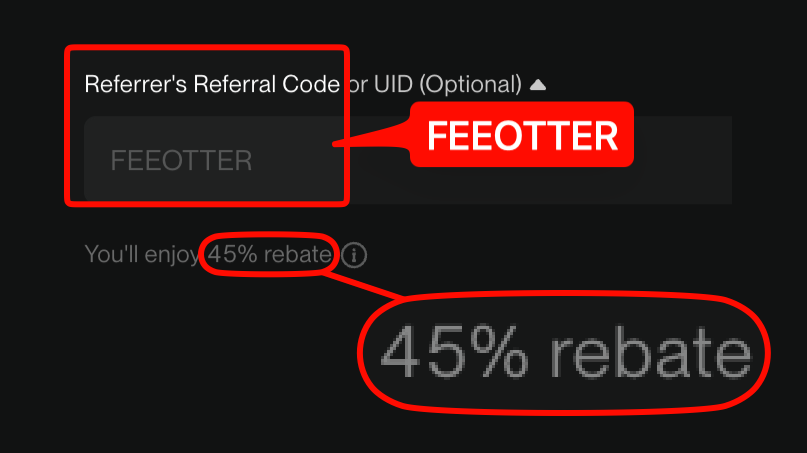
This guide is built from BingX's help center: what each level can do, document and selfie requirements, web and app steps, review times, common rejection reasons, and how many accounts one identity can verify. KYC happens only on BingX and has nothing to do with your Fee Otter rebate: register on BingX with our code FEEOTTER and 45% of your fees comes back (all of it BingX's automatic rebate), with no UID binding and no documents given to Fee Otter.
Quick summary
- Levels: unverified and Advanced; users who completed KYC before 2024-06-13 count as Advanced.
- Documents: ID card, passport or driver's license; Vietnam, Indonesia, Timor-Leste, Thailand and some other places don't accept driver's licenses, only new ID cards and passports.
- Selfie: hold your document, with a paper showing "BingX" and the date of verification in the same shot.
- Time: about 2 to 10 minutes; the result arrives in the in-app Message Center.
- One ID, one account: a document can't verify more than one account; to move accounts, use an identity transfer.
- Switching accounts or referrers: this page covers KYC itself. To move a verified identity to a new account and switch to the 45% rebate, follow the order in the BingX referrer change guide (identity transfer).
Do you have to do KYC on BingX? What each level can do
| Status | Daily deposit | Monthly deposit | 24h max withdrawal | Trade | Fiat | Launchpad |
|---|---|---|---|---|---|---|
| Unverified | No | No | 20,000 USDT | No | No | No |
| Advanced KYC | Unlimited | Unlimited | 5,000,000 USDT | Yes | Yes | Yes |
Sources: KYC benefits by level, how to complete KYC, checked 2026-10-17. BingX notes that its KYC rules were upgraded from 2024-11-19 and roll out by region, so levels and benefits may differ in some places and the product page prevails. Withdrawal limits are converted to USDT equivalent, and the 24-hour limit counts from your last withdrawal.
BingX's how to withdraw crypto page also lists a "Basic Verification" level with a 2,000 USDT cumulative deposit and a 20,000 USDT 24-hour withdrawal limit. The two pages don't use the same levels, so go by your account's verification page. BingX's KYC FAQ adds that if you don't verify in time you won't be able to deposit, use P2P or join Launchpad. If you want to deposit and trade normally, finish Advanced KYC.
Document and photo requirements
From BingX's common reasons for KYC failure:
- Accepted documents: ID card, passport, driver's license. Vietnam, Indonesia, Timor-Leste, Thailand and some other countries or regions don't accept driver's licenses, only new ID cards and passports.
- Valid documents only: expired, invalid or unreadable documents won't pass.
- Matching details: name, date of birth and ID number must match the document, and the country you pick must match it too.
- Selfie holding the document: your face and the document details must be clear, and the same photo must include a paper showing "BingX" and the date of verification; without it the application is sent back.
- Photo quality: not too close or far, not too bright or dark, with all four corners visible and nothing covered or cropped.
- Age: if your document shows you're under 18, you can't verify.
KYC on the web
- Log in to BingX, click the profile icon in the top right → Identity Verification → Individual Verification.
- On the Advanced Verification card, click Verify Now.
- Select the issuing country or region and the document type, upload the document photos, then the selfie holding the document.
- Click Next and follow the screens.
BingX reminds you that the document you hold must be the one you uploaded, and photos must be bright and clear with all corners visible. Source: how to complete KYC.
KYC in the app
- Log in to the BingX app, tap the avatar in the top left and tap Identity Verification in the sidebar.
- On the Advanced Verification card, tap Verify Now → Continue.
- Select the issuing country and document type, let BingX use your camera to photograph the document, then take a selfie holding it.
How long does review take, and why do applications fail?
BingX's individual KYC FAQ says Advanced verification takes about 2 to 10 minutes; if it takes longer or stays pending, contact online support. The result is sent to your Message Center.
BingX groups rejection reasons into four types:
| Type | Typical cases | What to do |
|---|---|---|
| Document details wrong | Details don't match, document expired, document type not accepted, country mismatch | Check the details, use a valid document or the right type, and resubmit |
| Regional restrictions | Local law doesn't allow it, or you're under 18 | Regions not on the supported list can't verify for now |
| Photos not accepted | No "BingX" and date paper in the selfie, face or document unclear, blurry or cropped photos | Retake to spec |
| Document already used | The same document can't verify several accounts | Use another document, or transfer the identity from the verified account |
The KYC FAQ also says that if your document's issuing country or region isn't on the supported list, BingX doesn't currently support identity verification for it. After approval you can't change your KYC details unless legal details such as your legal name or nationality change.
How many BingX accounts can one identity verify?
From BingX: to prevent misuse of identity information, the same document can't be verified on multiple accounts. If your document is already verified on another account, use a different document or transfer your identity information from the verified account to the unverified one. Using multiple accounts may lead to account limitations, and BingX does not recommend creating several. (common reasons for KYC failure)
An identity transfer is also how an existing user switches to a new referral code. A BingX referrer can't be changed once bound, so if you're already bound to someone else's code, you can register a new account with our code and move your identity over. The transfer rules, the withdrawal limit after a transfer and the right order of steps are in the BingX rebind guide and KYC identity transfer and rebates.
What happens to your data
BingX's KYC FAQ says it encrypts personal information, uses it only to verify your identity and provide services, and doesn't share it externally or use it for promotion. That's BingX's statement; before handing over documents you can read its Privacy Policy. For KYC rules across exchanges, see the exchange KYC comparison.
Restricted regions: no service, no verification
BingX's Disclaimer (updated 2023-12-11) lists jurisdictions whose customers it does not seek or accept: Afghanistan, Burundi, Cambodia, Canada, the Central African Republic, Mainland China, Cuba, the Democratic Republic of the Congo, Hong Kong, Iran, Laos, Macau, Myanmar, the Netherlands, North Korea, Panama, Singapore, Somalia, the United Kingdom, the United States (including all territories), and the Crimea, Donetsk and Luhansk regions of Ukraine, "not limited to" these and subject to change. The Customer Agreement (updated 2026-09-02) requires users not to be residents or passport holders of those jurisdictions (checked 2026-10-17). For licensing by country, see the exchange licenses comparison.
Risks
Only do KYC on BingX's official website or app. BingX won't message you asking for document photos over a chat app or a third-party link, and anyone offering to "pass KYC for you", posing as support or lending you documents is running a scam or breaking the rules. Verifying with someone else's documents can get the account and its assets frozen. Give your documents, selfie and verification codes only to BingX's official verification page, never to a person.
Does KYC affect your rebate?
Not directly. The rebate follows the code you registered with; KYC only decides whether you can deposit, trade and withdraw. Register with our code FEEOTTER and BingX returns 45% of every fee into your BingX account automatically, with no UID to bind on Fee Otter. Fee Otter never needs your documents, API key or password. The rate is set under Fee Otter's partnership terms with BingX and may change. Signup steps are in how to register on BingX, and code details in BingX referral code.
An example: after KYC you trade 100,000 USDT of BingX perpetual futures a month, all market orders (taker 0.05%). That is 50 USDT in fees. On an account registered with FEEOTTER, BingX automatically returns 45%, or 22.5 USDT, so you pay 27.5 USDT. A typical 20% code would return 10 USDT on the same volume. Fee rate from the BingX perpetual futures fee schedule (checked 2026-10-22).

 Telegram · @feeotter