To deposit on BingX, go to Assets → Deposit, pick the coin and the same network the sender uses, choose the receiving account (Fund Account or futures account) and copy the address. To withdraw, go to Assets → Withdraw and choose either an on-chain withdrawal or a 0-fee internal transfer to another BingX account by email, phone number or UID. On-chain withdrawals usually arrive in 10 to 120 minutes. With Advanced KYC you can withdraw up to 5,000,000 USDT per 24 hours; unverified accounts are capped at 20,000 USDT (BingX help center, checked 2026-10-17).
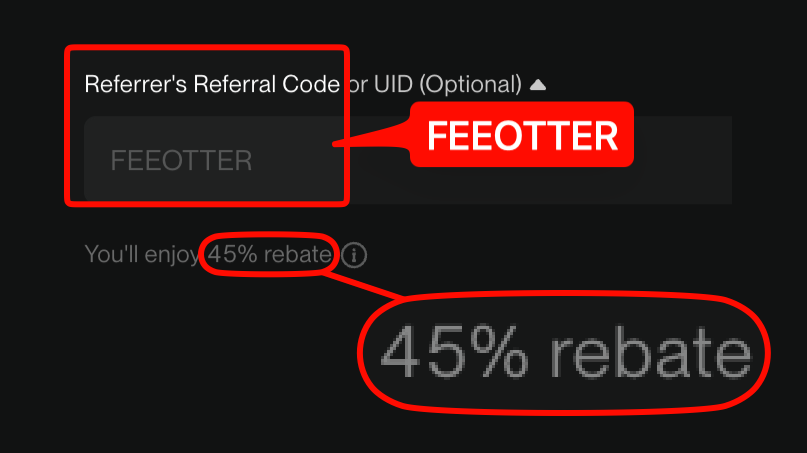
This guide is built from BingX's help center: deposit and withdrawal steps, withdrawal limits, how to see the fee, how to recover a wrong-coin deposit or a missing tag, what to do when a withdrawal bounces back, and the fiat options. Deposits and withdrawals are a fixed cost; trading fees are the biggest bill over time. Register on BingX with our code FEEOTTER and 45% of your fees comes back (all of it BingX's automatic rebate), with no UID binding needed. That is 2.25 times a typical 20% code.
Quick summary
- Do KYC first: BingX's KYC benefits table says unverified accounts can't deposit; deposits, trading and fiat need Advanced verification.
- Withdrawal limits: 20,000 USDT per 24 hours unverified or with basic verification, 5,000,000 USDT with Advanced verification, counted in USDT equivalent.
- Internal transfers are free: send to another BingX account by email, phone or UID, off-chain.
- Withdrawal fee: the withdrawal page shows the fee and the "actual arrival amount" once you pick the coin and network. The withdrawal-fee tab of BingX's fee page didn't load in our check, so this guide lists no figures.
- Wrong coin: BingX generally doesn't recover tokens. If you sent an unsupported coin over a supported network, you can file a "Deposit Not Credited" request; there's a recovery fee and processing takes 7 to 15 working days.
How do you deposit on BingX?
Per BingX's how to deposit crypto tutorial:
- App: on the home screen tap Deposit/Buy Crypto → Deposit, search for and select the coin, then choose the deposit network. Tap View More to pick the receiving account, then copy the address or use Share & Save Address to keep the QR code.
- Web: log in, click Assets in the top right → Deposit, choose the coin, network and receiving account, then copy the address or scan the QR code from the sending platform.
- Paste the address into the sending exchange or wallet, check the network matches, and submit.
BingX deposits can land directly in the futures account or the Fund Account; if you plan to trade futures, pick the futures account and skip a transfer. BingX flags three things:
- Get the coin and network right, or the assets may be lost for good.
- Amounts below the minimum deposit aren't credited. Each coin's minimum is shown on the deposit page.
- Speed isn't up to BingX. Congested networks are slower; use the TxID from the sending platform to track it on a block explorer. It usually takes a few minutes to a few dozen.
Which USDT networks does BingX support?
The deposit and withdrawal pages list each coin's live networks. BingX help articles mention ERC20, BEP20 and TRC20 as supported networks, but the full USDT network list and each network's minimum deposit and withdrawal weren't available on the public pages we checked (the deposit and withdrawal tab of the fee page only renders in a browser). Go by what the deposit and withdrawal pages show at the time.
BEP20 and ERC20 addresses both start with 0x, which makes it easy to pick BEP20 when the recipient only supports ERC20. Before you submit, check all three again: coin, network and address must match the recipient.
How do you withdraw from BingX?
Per BingX's how to withdraw crypto tutorial:
- Web: click Assets → Withdraw. App: tap Assets at the bottom right → Withdraw → Cryptocurrency.
- Pick the coin, then the method:
- On-chain withdrawal: enter the address, select the network and amount, and choose which account pays.
- Internal transfer (0 fees): enter the other BingX account's email, phone number or UID and the amount, and choose which account pays.
- Check the actual arrival amount and the fee, click Withdraw and complete the security checks.
BingX says on-chain withdrawals need full network confirmation and take around 10 to 120 minutes. The system also assesses the account's security during a withdrawal, and abnormal risk can mean a manual review first. Never share your password, SMS code or Google Authenticator code.
Can you cancel? BingX's withdrawing to the wrong address article says a withdrawal can be cancelled before it's broadcast to the chain; once it succeeds it can't be reversed, and BingX can't help trace the recipient.
Withdrawal limits by KYC level
| Verification | Cumulative deposit | 24h max withdrawal |
|---|---|---|
| Unverified | Unsupported | 20,000 USDT |
| Basic verification | 2,000 USDT | 20,000 USDT |
| Advanced verification | Unlimited | 5,000,000 USDT |
Source: how to withdraw crypto, checked 2026-10-17. Every coin is converted to its USDT equivalent, and the 24-hour limit is the total you can withdraw in the 24 hours after your last withdrawal, not a daily reset at a fixed time. BingX's KYC benefits by level page lists only Unverified and Advanced, and says new rules have rolled out region by region since 2024-11-19, with the product page taking precedence. BingX's August 2025 VIP benefits upgrade adds that the 24-hour withdrawal limit rises with VIP level.
We didn't find an official BingX statement on whether, or for how long, withdrawals are locked after you change your password or Google Authenticator. If it happens, go by the prompt on the withdrawal page or what support tells you. For KYC requirements across exchanges, see the exchange KYC comparison.
How do you see the withdrawal fee?
BingX's withdrawal fee varies by coin and network, and the on-chain withdrawal page shows the fee and actual arrival amount as soon as you enter the network and amount. BingX's fee schedule article points to the deposit and withdrawal tab of the fee page, which only renders in a browser and didn't load in our check, so this guide lists no figures. When the money is going to another BingX account, use an internal transfer: BingX marks it 0 fees and there's no block confirmation to wait for. For USDT withdrawal fees across exchanges, see the USDT withdrawal fee comparison.
Wrong coin or missing tag?
From BingX: check the coin and network when you deposit, or the assets will be lost and can't be retrieved. BingX generally doesn't offer token recovery; only where a user has suffered a significant loss may it, at its discretion, help at a controllable cost, which is expected to take at least 30 working days and possibly longer. (depositing the wrong crypto or to the wrong address)
BingX's retrieving failed deposits, withdrawals and transfers article covers the common cases:
| Situation | How to apply | Time and cost |
|---|---|---|
| An unsupported coin sent over a network BingX supports (e.g. ERC20/BEP20/TRC20) | App: Fund Account → Transaction History → Deposit Record → Deposit Not Credited; web: Deposit Not Credited on the deposit page | 7 to 15 working days; a recovery fee based on the review |
| A tag-based coin sent with no tag or the wrong tag | Same route, with the TxID and details | 7 to 15 working days; may be returned to the sending wallet |
| Sent to an address that isn't BingX's | Contact the address owner or its platform | BingX can't help |
| Sent to a deleted BingX account | Ask online support to open an asset recovery ticket; provide a photo holding your ID and a handwritten note, a deposit screenshot, and the UID of another account with Advanced KYC | Case by case |
Deleted-account rules are in deposit to a deleted account. Before moving a large amount to a new address, send a small test first and wait for it to arrive.
When the receiving platform bounces a withdrawal
If you withdraw from BingX to another exchange and it rejects the deposit (wrong tag, unsupported coin and so on) and returns it, BingX has offered a self-service request since September 2026: Help Center → Retrieve failed deposits/withdrawals → reason "Withdrawal is returned". Enter the coin, network, your BingX withdrawal address, amount and withdrawal TxID, plus the refund amount and refund TxID from the other exchange, then upload a screen recording of logging in there and showing the refund record with the full TxID. Don't put BingX's withdrawal TxID in the refund TxID field. Sources: withdrawal refund request process, what to do if a withdrawal fails.
If BingX shows the withdrawal as successful but nothing arrived and nothing came back, give the withdrawal TxID (Fund Account → Asset Records → Withdrawal) to the receiving platform's support.
Buying crypto with fiat
BingX's how to buy crypto via P2P tutorial lists three fiat routes: P2P trading, Quick Buy and bank deposit, and first-time P2P buyers need KYC. According to the P2P user FAQ, prices are set by merchants rather than quoted by BingX, a seller's crypto is frozen on the platform once the ad is live, and BingX charges buyers and sellers no P2P fee, though third-party payment channels may charge their own. After paying, click "Transferred, notify seller" on the order page and wait for the seller to confirm and release.
No payout to claim: BingX returns the rebate to your account
BingX returns the 45% fee rebate straight into your BingX account. Fee Otter has no extra rebate layer on BingX, so there's nothing to withdraw from Fee Otter on-chain and no UID to bind. The rebate sits in your BingX balance, ready to trade or withdraw with the steps above. For rates and settlement, see the BingX fee rebate guide and how rebates are settled.
If you haven't signed up, register with code FEEOTTER; the steps are in how to register on BingX. Rebates apply only to trading fees; deposit and withdrawal fees aren't covered.

 Telegram · @feeotter