To deposit on HTX (formerly Huobi), go to Assets → Deposit, pick the coin, pick the same network the sender will use, and copy the address or scan the QR code. To withdraw, go to Assets → Withdraw, paste the address, choose the same network and enter the amount. USDT currently has 7 networks open for both deposits and withdrawals, and withdrawal fees are fixed amounts: 0.01 USDT on BEP20, 0.3 USDT on ERC20 and 0.5 USDT on TRC20, with a minimum withdrawal of 1 USDT on most networks (HTX official API, checked 2026-10-17).
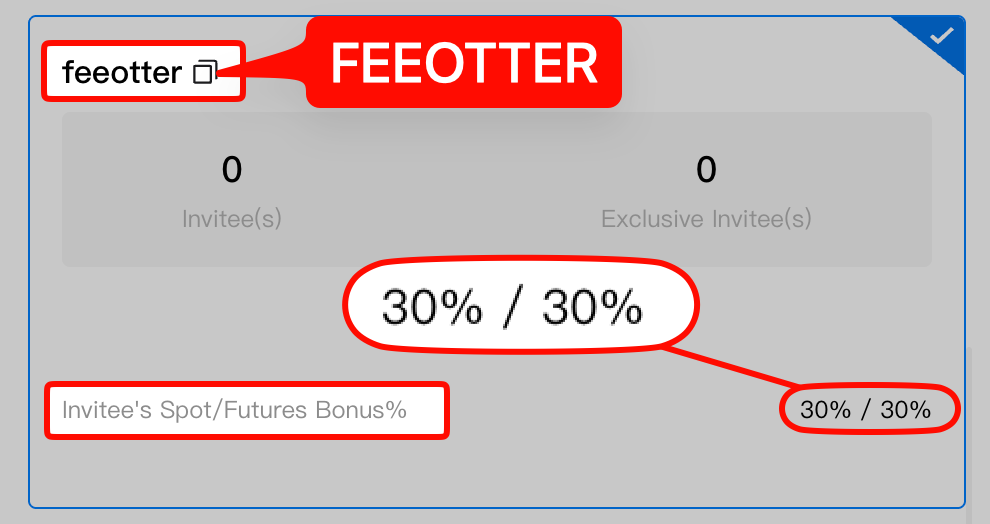
Based on the HTX help center and official API, this guide covers the deposit and withdrawal steps, which USDT networks HTX supports and what each costs, what to do after a wrong-network deposit or missing memo, the official channel for lifting a withdrawal limit, fiat on-ramps, and the minimum deposit to watch when you send your Fee Otter rebate to HTX. Transfer fees are small one-off costs; trading fees are the big long-run cost. Sign up with our code FEEOTTER and bind through Fee Otter for a 50% HTX futures rebate (30% automatic exchange rebate + 20% extra rebate), 2.5 times a common 20% code.
Key points
- KYC: HTX's KYC guide says Level 1 unlocks deposits and withdrawals; Levels 2 and 3 raise the limits.
- USDT networks: TRC20, ERC20, BEP20, Solana, TON, Aptos and AVAX C-Chain allow both; Arbitrum, Polygon, NEAR and three others are deposit-only right now.
- Fees: USDT withdrawal fees are fixed per network, and BEP20 is the cheapest (0.01 USDT).
- Minimum deposit: deposits below the minimum are neither credited nor refunded; for USDT it is 1 USDT on most networks.
- Wrong network: HTX says the assets may not arrive and may not be returned. For cases like a missing memo you can request help through HTX's support link, with no guarantee.
How to deposit on HTX
From HTX's How to Deposit and Withdraw Assets on HTX App:
- Open the HTX app, log in and tap Assets at the bottom.
- Tap Deposit and choose the coin, or search for it.
- Choose the deposit network. It must be the same network the sending platform uses.
- HTX generates your own deposit address. Copy it or scan the QR code.
- Paste the address on the sending exchange or wallet, send, then check your HTX balance.
Arrival time depends on block confirmations. Per How to Deposit into Your HTX Account, you cannot withdraw or transfer until the required confirmations are reached; the number is shown on the deposit page, and you can track a pending deposit on a block explorer with its hash. The official API currently lists 1 confirmation for USDT on TRC20, 15 on BEP20, 64 on ERC20 and 2 for BTC on the Bitcoin network.
Common mistakes:
- Below the minimum deposit: HTX says it will not be credited or refunded.
- Coins that need a tag or memo: USDT on TON needs a memo; both the address and the memo must be right.
- Contract address: tokens with the same name can have different contracts; check the full name and contract address against the one HTX lists.
Which USDT networks does HTX support, and what do they cost?
From the HTX official API (v2/reference/currencies?currency=usdt), checked 2026-10-17:
| Network | Deposit | Withdraw | Withdrawal fee | Min withdrawal |
|---|---|---|---|---|
| BNB Smart Chain (BEP20) | Yes | Yes | 0.01 USDT | 1 USDT |
| AVAX C-Chain | Yes | Yes | 0.04 USDT | 1 USDT |
| Aptos | Yes | Yes | 0.1 USDT | 10 USDT |
| Ethereum (ERC20) | Yes | Yes | 0.3 USDT | 1 USDT |
| Solana | Yes | Yes | 0.3 USDT | 2 USDT |
| TON (memo required) | Yes | Yes | 0.3 USDT | 1 USDT |
| Tron (TRC20) | Yes | Yes | 0.5 USDT | 1 USDT |
| Arbitrum One, BTT, Celo, NEAR, Polygon, Plasma | Yes | Suspended | n/a | n/a |
The minimum deposit is 0.1 USDT on Plasma and 1 USDT on every other network. BTC on the Bitcoin network costs 0.00005 BTC to withdraw, with a 0.0001 BTC minimum. These numbers change with network conditions, so go by the fee shown on the withdrawal page when you submit. BEP20 and ERC20 addresses both start with 0x, which makes it easy to pick BEP20 when the receiver only supports ERC20; check the receiving network once more before you send. USDT withdrawal fees across exchanges are compared in USDT withdrawal fees compared.
How to withdraw from HTX
- In the app, tap Assets → Withdraw and choose the coin.
- Choose the same network as the receiver, paste the address (and memo if needed) and enter the amount.
- Check the fee and the amount you will receive, complete security verification and submit.
- Track the status in your withdrawal history; the transaction hash can be checked on a block explorer.
HTX's guide asks you to double-check the address and amount. Since August 2026, HTX spreads hot wallet funds across several withdrawal addresses and rotates them regularly; it says the exposure of any single address is kept below 1 million USD and covered by the HTX insurance fund. So the sending address on your withdrawals will change from time to time, and the on-chain amount received is the final record (official announcement).
Funds in a futures account have to be transferred back to spot before you can withdraw them. Since July 2026, unrealized PnL in cross margin cannot be transferred, so close the position first.
Withdrawal limits, and what to do if you are restricted
Per How to Complete KYC Identity Verification, Level 1 unlocks deposits and withdrawals, and Levels 2 and 3 raise deposit, withdrawal and crypto purchase limits. We did not find a current table of limits by level in the help center. A 2022 identity verification FAQ says verified users can withdraw up to 100 BTC a day in the app, and a 2021 announcement cut the BTC daily withdrawal limit for unverified accounts to 0.06 BTC. Both are old; the limit shown on your own withdrawal page is what applies.
If your account is restricted, HTX's Guidelines for Requesting Withdrawal Limits Removal recognise only two channels:
- If you can log in: go to Support → User Self Service → Withdrawal Limit and submit a ticket. Support replies within 24 hours; track it under Support → Ticket Status.
- If you cannot log in: email htxsupport@htx-inc.com from the address linked to your account.
Support may ask for a video KYC or proof of funds. HTX says the service is free; anyone asking for an "unfreezing fee", "handling fee" or "security deposit" is a scammer.
Wrong network or missing memo?
HTX's app guide gives this example: if you withdraw BTC on the BTCB network to a Bitcoin-network address, you will not receive it. From How to Deposit into Your HTX Account:
- Mismatched networks: the assets cannot be received and may not be returned.
- Missing tag/memo, a deposit to the platform's outbound address, or an unsupported transfer format: submit your details through the link on HTX's page for a specialist to help. HTX does not guarantee unsupported formats can be resolved, and results vary by case.
- A coin HTX does not list, or an unsupported chain: also submit through the link for a specialist to reply.
HTX: each token has a minimum deposit amount, and any deposit below it will not be credited or refunded. (HTX deposit guide)
HTX's pages do not say whether recovery costs anything or how long it takes. Before sending a large amount to a new address, send a small test first and wait for it to arrive.
Fiat deposits
Per How to Buy Virtual Assets With Fiat Currencies, HTX offers two routes:
- Quick Buy/Sell: pay with a credit or debit card, your account balance or a third-party provider. This 2022 guide lists fiat currencies including USD, VND and MYR.
- P2P: buy from other users under Buy Crypto → P2P and pay by bank transfer. The guide says P2P has no transaction fees; you need to set up a payment method and complete KYC first.
Available currencies and payment methods depend on your region; the page shows what applies to you.
Worked example: four withdrawals a month, which network?
Say you withdraw USDT from HTX four times a month, 1,000 USDT each time. Using the fixed fees from the official API above:
| Network | Fee per withdrawal | Per month (4) | Per year |
|---|---|---|---|
| BEP20 | 0.01 USDT | 0.04 USDT | 0.48 USDT |
| ERC20 | 0.3 USDT | 1.2 USDT | 14.4 USDT |
| TRC20 | 0.5 USDT | 2 USDT | 24 USDT |
If the same person trades 100,000 USDT of spot a month, HTX's Prime 0 spot rate of 0.2% means 200 USDT in fees. Binding through Fee Otter gives a 45% spot rebate (30% automatic exchange rebate + 15% extra rebate): 90 USDT back a month, 1,080 USDT a year, far more than you save by picking the cheapest network.
Sending your rebate back to HTX
Fee Otter pays the extra rebate as on-chain USDT on BNB Smart Chain (BEP20) to your own address, with a 1 USDT minimum per request and a 0.015 USDT network fee paid by you. The 30% automatic rebate is refunded by HTX straight to your HTX account. You can use your HTX USDT deposit address on BEP20; the official API shows HTX's USDT BEP20 deposits are open. HTX's USDT BEP20 minimum deposit is 1 USDT, and anything that arrives below that is neither credited nor refunded, so when sending to HTX, request enough that the amount received after the network fee is still at least 1 USDT, for example 2 USDT or more. Settlement details are in how fee rebates are settled.
Where HTX operates
Under clause 1.2 of the HTX Platform User Agreement (updated September 2026, checked 2026-10-17), HTX provides no services in mainland China, the United States, Cuba, Iran, North Korea, Sudan, Syria, Venezuela, Hong Kong, the United Kingdom, Singapore, Myanmar, occupied Ukrainian regions including Crimea, Russia and all EU member states. Israel, Iraq, Bangladesh, Bolivia, Ecuador, Kyrgyzstan and New Zealand cannot trade derivatives. The agreement says the list may change without notice. For licensing by country, see exchange licenses by country.
Risks
On-chain transfers cannot be reversed, and the wrong network can mean a loss you cannot recover. HTX's hot wallets were hacked in November 2023, and in May 2026 the UK government added Huobi Global S.A., which operates HTX, to its Russia sanctions list (UK government notice); UK residents should not use it. Keep only the funds you are trading on the exchange and move long-term holdings to your own wallet.
If you have not signed up yet, use the code FEEOTTER (steps in how to register on HTX), then submit your UID on the Fee Otter rebate platform. The rebate covers trading fees only; deposit and withdrawal fees are not included. Rebate math is in the HTX fee rebate guide.
 Telegram · @feeotter