XT.COM offers futures and spot copy trading. Futures copy trading has two modes: Custom Copy Trading (fixed margin, multiplier or proportional copying, reverse copying allowed, up to 20 lead traders at once) and Smart Copy Trading (mirrors the lead trader's capital ratio, leverage and margin mode, one lead trader only). Each copied order needs at least 10 USDT of margin and at most 200,000 USDT. Lead traders take a share of your net profit after losses and fees, 12% to 30% depending on their level, settled daily at 00:00 UTC (checked 2026-10-17).
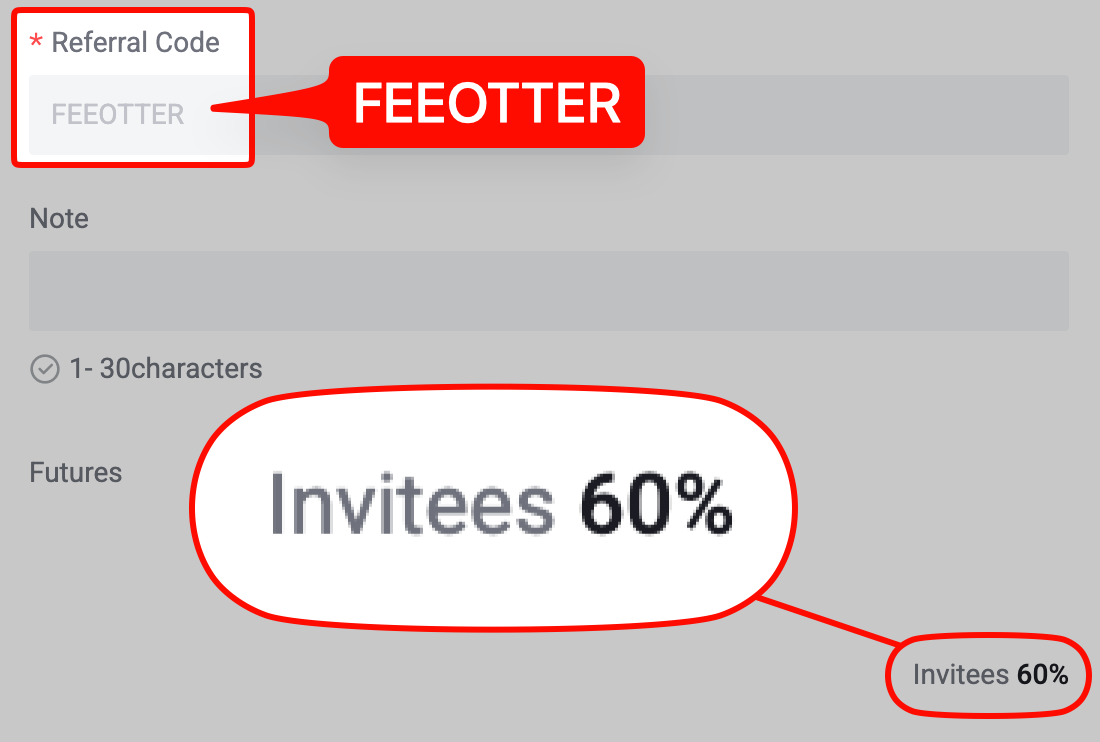
This guide is based on the XT.COM help center's copy trading introduction, the follower and lead trader guides, the profit sharing explanation and the copy trading FAQs. It covers how the two modes differ, every setting and its range, why copies fail, how profit share is pre-deducted and settled, the lead trader level table, and a worked example of fees and profit share on one copied trade. Every copied open and close pays a futures trading fee: sign up on XT.COM with our code FEEOTTER for a 70% futures rebate (60% automatic exchange rebate + 10% extra rebate), 3.5 times a common 20% code.
Key points
- Funds sit in your futures account: Custom mode uses your futures balance directly; Smart mode marks its funds as "in use" for that one lead trader.
- Amounts: minimum 10 USDT and maximum 200,000 USDT margin per copied order for every coin; Smart mode only asks for a total copy amount (minimum 10 USDT).
- Profit share: 12% to 30% by lead trader level, charged on your net profit after losses and fees; pre-deducted when you close, recalculated daily at 00:00 UTC.
- Existing positions: Custom mode does not copy positions the lead trader already holds; Smart mode can copy them at market price with "Copy Open Positions".
- Spot copy trading: 46 pairs at the moment, 10 to 200,000 USDT per order or 0.01x to 100x.
Custom vs Smart Copy Trading
From the official XT Copy Trading Introduction and Smart Copy Trading for Futures (checked 2026-10-17):
| Item | Custom Copy Trading | Smart Copy Trading |
|---|---|---|
| Position size | Fixed margin, multiplier (lead opens 0.1 BTC, 3x setting opens 0.3 BTC) or proportional (same share of available margin as the lead trader) | The lead trader's margin-to-equity ratio at opening, applied to your total copy amount |
| Leverage | You set it; with no history it defaults to 10x on major pairs and 20x on smaller ones | Synced with the lead trader |
| Reverse copy | Yes (lead goes long, you go short) | No |
| Lead traders followed | Up to 20 | 1 |
| Lead trader's open positions | Not copied; copying starts at the next new position | Can be copied at market price |
| Stop loss | Per-order take-profit and stop-loss ratio | Total loss limit; when hit, copying stops, all positions close and the relationship ends |
XT.COM's Smart mode example: a lead trader with 10,000 USDT equity opens a 5x BTCUSDT long with 500 USDT (5% of equity). If your copy amount is 1,000 USDT, the system opens 50 USDT at the same 5x.
Setting up Custom Copy Trading
According to the operation guide for followers, make sure your futures account is funded, pick a lead trader on the copy trading page and set:
- Direction: forward or reverse copy.
- Follow method: fixed amount (for example 100 USDT margin per order), multiplier or proportional. You cannot switch method mid-way; cancel the copy and set it up again.
- Take-profit and stop-loss ratio: applied to each copied order, so at 50% the system closes the order at market once profit or loss passes 50%. If the lead trader's own TP/SL fires first, your copy closes with it and your setting no longer applies.
- Leverage: set separately for long and short; it syncs to the leverage on the trading page.
- Pairs: tick the futures pairs the lead trader offers; all are selected by default.
You can close a copied position yourself without waiting for the lead trader.
Why a copy fails
The Copy Trading FAQs and Why Copy Trading Fails list these cases:
- Not enough margin, or the resulting size or notional value is below the pair's minimum.
- The lead trader's order is still pending and not fully filled.
- Slippage exceeds the limit, or the copy price deviates from the lead price by 0.0500.
- If your copy margin balance is below 10 USDT and 20 copies fail in a row, the system cancels the copy.
- You did not select the pair the lead trader opened; the copy margin exceeds your maximum copy amount; the size exceeds the maximum position for the current leverage.
- During a pair suspension, both automatic and manual closes may fail.
XT.COM's advice: if the lead trader has 10,000 USDT and your ratio is 0.01, keep more than 100 USDT of margin; keep a buffer so you can follow when the lead trader adds to a position; and with large capital, use a fixed ratio, which fails less in volatile markets.
How profit share works
From the Copy Trading System Profit Sharing Explanation:
- Custom mode: when you close a profitable copy, the system pre-deducts the profit share at the lead trader's level. At 00:00 UTC it recalculates on your actual total profit for the day times the share rate, refunding any excess to you or paying the shortfall to the lead trader.
- Smart mode: closing only records a "pre-calculated profit share"; no funds are deducted. XT.COM's formula: profit share = (ending wallet balance − starting wallet balance − net transfer in − funding fees) × share rate. It settles immediately when you stop copying or the total stop loss fires, daily at 00:00 UTC if you are still following with no open positions, and not at all while positions are open.
- Nothing settles until positions close: if you still hold a copied position that day, profit share waits until the day after everything is closed, and gains and losses are netted first.
- The rate is fixed at opening: it uses the lead trader's level when the position opened. After a promotion, old positions keep the old rate and new ones get the new rate.
The actual profit share is calculated after losses and fees, while the "estimated profit share" on screen ignores fees, so the two often differ; any excess pre-deduction comes back the next day.
Lead trader levels and maximum share
The profit sharing policy table in the introduction (requirement 1 must be met, plus either item under requirement 2):
| Level | Avg futures balance (30D) | Followers (7D) | Copy volume (7D) | Max revenue share | Max followers |
|---|---|---|---|---|---|
| L1 Bronze | ≥100 | ≥0 | ≥0 | 12% | 100 |
| L2 Silver | ≥500 | ≥10 | ≥2,000 | 15% | 300 |
| L3 Gold | ≥1,000 | ≥50 | ≥20,000 | 20% | 500 |
| L4 Diamond | ≥5,000 | ≥300 | ≥200,000 | 25% | 1,000 |
| L5 King | ≥10,000 | ≥1,500 | ≥1,000,000 | 30% | 1,500 |
The table gives no units; balance and volume are presumably USDT. The same page says a new lead trader level system is "launching soon", and the profit sharing explanation uses 14% for L2 in its example, not the 15% in the table. Check the rate on the lead trader's profile before you copy.
Worked example: fees, profit share and rebate on one copy
Say you use Custom mode with 100 USDT fixed margin at 10x, so the position is 1,000 USDT notional. BTC_USDT opens and closes at market with a 0.06% taker fee (checked 2026-10-17 on the XT.COM futures API), and the trade makes 50 USDT:
| Item | Amount (USDT) |
|---|---|
| Open + close fees (1,000 × 0.06% × 2) | 1.20 |
| Net profit after fees (50 − 1.20) | 48.80 |
| Profit share: L1 12% / L3 20% / L5 30% | 5.86 / 9.76 / 14.64 |
| You keep (L1 / L3 / L5) | 42.94 / 39.04 / 34.16 |
| Fees returned at Fee Otter's 70% | 0.84 |
Losing trades pay no profit share, but they still pay fees. The more often a lead trader opens and closes, the more fees you pay, and following 20 lead traders means fees on 20 sets of positions. Funding is paid or received as on any futures position; see the XT.COM futures guide.
Spot copy trading
From Spot Copy Trading: Guide for Followers:
- Fixed amount of 10 to 200,000 USDT per order, or a fixed ratio of 0.01x to 100x.
- Per-order TP/SL from 0% to 400%; a cumulative max-loss stop that unfollows automatically, with the holdings sold at market, sold when the trader sells, or left for you to handle.
- Up to 20 lead traders; max slippage 0.05 per order; up to 20 consecutive failures from insufficient funds in total (10 per trader or pair).
- 46 pairs supported, including BTC/USDT, ETH/USDT and SOL/USDT.
- Copied holdings are kept apart from your own spot balance. Selling on the spot trading page only touches non-copy holdings; close copies on the "Open Copies" page.
Becoming a lead trader
From the operation guide for lead traders and the FAQs:
- Complete identity verification, hold at least 100 USDT in the futures account, upload screenshots of trading, earnings or social media activity from the last three months, and wait for review.
- You cannot be following anyone when you apply, lead traders cannot copy others, and each lead trader may use only one account.
- Once the cumulative lead trading limit is reached, followers cannot copy your new positions.
- "Private lead trading" limits followers to people you invite and lets you set a custom share rate for the invite link, but hides you from the lead trader lists and search. It is futures only for now.
XT.COM also runs a "Copy Trading Referral Reward": refer a friend through a lead trader's share page and you get 25% of the commission the lead trader earns from that friend, futures only (official explanation). That is XT.COM's own copy referral scheme, separate from fee rebates.
Do copied trades earn a fee rebate?
XT.COM's referral and affiliate pages say commission is paid on the valid trading fees invited users generate across spot, margin and futures. They do not mention copy trading either way, so whether copy trading fees count is shown in your rebate records. One exception is written down: futures bonuses cannot be used for copy trading or for earning fee rebates (XT.COM futures bonus rules).
After signing up with code FEEOTTER, submit your UID on the Fee Otter rebate platform. XT.COM pays the 60% straight into your exchange account; screenshots are on the rebate rates page. Existing users can follow the XT.COM rebind guide, and copy trading rules across exchanges are compared in copy trading platforms compared.
If you are already a VIP on an exchange and want to switch or sign up elsewhere, contact our support: we can help apply for special trading benefits or a higher rebate rate.
Where XT.COM operates
Section 3.3.4 of the XT.COM User Agreement (checked 2026-10-17) bars users in the United States, Canada, mainland China, Cuba, North Korea, Singapore, Sudan, Venezuela and Crimea, and says the list is non-exclusive and may change. Licensing by country is in exchange licences by country.
Before you copy anyone
Copying does not hand your risk to the lead trader: the positions sit in your futures account, and liquidation, funding and fees are yours. XT.COM's FAQs note that a lead trader can profit while a follower loses, for example when you close early, raise leverage yourself, or fill at a different price on an illiquid coin. A lead trader's win rate and returns are past records and say nothing certain about what comes next. Only use money you can afford to lose entirely, and set a stop loss first.
Fee Otter calculates rebates from your UID only. We never ask for an API key and never trade or copy on your behalf.
 Telegram · @feeotter