To deposit on WEEX, go to Assets → Deposit → On-chain Deposit, pick the right coin and network, and copy the address; funds usually arrive within 10 minutes once the confirmations are done. To withdraw USDT you pay 0.8 USDT on BEP20, 1.5 on TRC20 or 3 on ERC20, with minimum withdrawals of 5, 10 and 20 USDT (official WEEX fee page, checked October 2026).
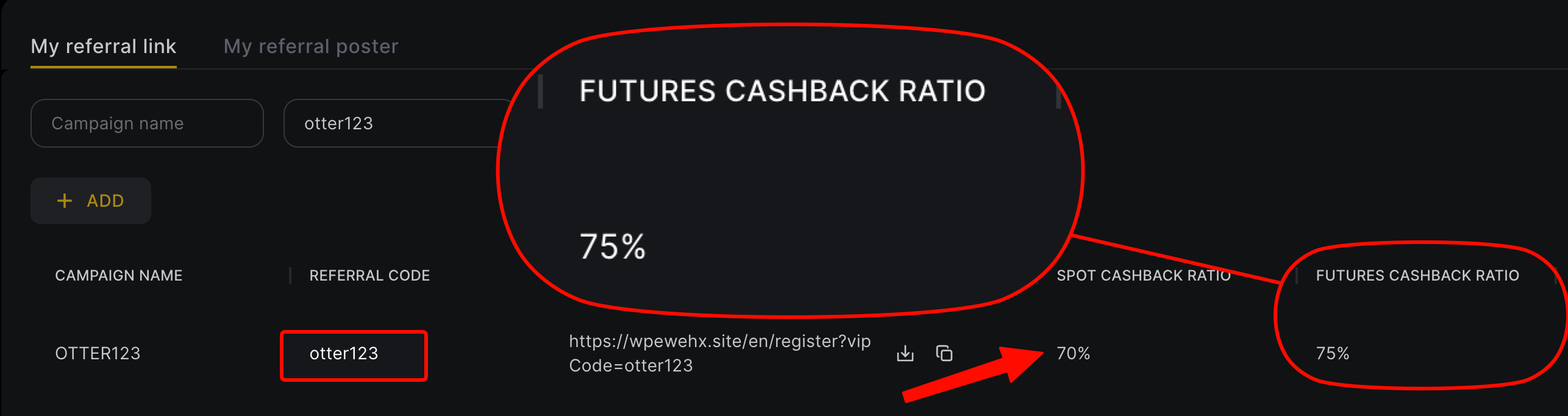
This guide pulls together the deposit and withdrawal rules from the WEEX help center and fee page: supported networks, withdrawal fees by coin, review and suspension rules, what WEEX does about wrong-network deposits, and how P2P fiat trading works. Deposits and withdrawals are a fixed cost; trading fees are the big one over time. Sign up with our referral code otter123 and bind through Fee Otter for a 70% futures rebate, 3.5 times a common 20% code.
Key points
- Deposits: Assets → Deposit → On-chain Deposit; the coin and network must match the sending side. Minimum for TRC20/ERC20 USDT is 1 USDT.
- Withdrawal fees: BEP20 is the cheapest USDT route (0.8 USDT), then TRC20 1.5, ERC20 3 and OMNI 15 USDT.
- Reviews: every withdrawal is reviewed by hand; requests are accepted 24/7. Changing your password or device locks withdrawals for 24 hours.
- Wrong network: deposits of unsupported coins or networks cannot be recovered, and WEEX cannot retrieve withdrawals sent to a wrong address.
- Fiat: WEEX charges no P2P fee, but P2P needs KYC and only works in the fiat of your KYC country.
How to deposit on WEEX
From the official deposit guide:
- Log in to the WEEX app or website.
- Go to Assets → Deposit → On-chain Deposit.
- Pick the coin and network. For USDT that might be TRC20, ERC20 or BEP20, and it must match the network your wallet or exchange sends on.
- Copy the deposit address or scan the QR code. Copy a fresh address before every deposit.
- Paste it on the sending side, check the network matches, and submit.
Arrival time depends on confirmations. The official withdrawal FAQ gives 12 confirmations for ERC20 USDT, 10 for TRC20 and at least 1 for BTC. After that, funds usually show up within 10 minutes; check the status under Assets → History.
Common traps:
- Not every network is supported: WEEX's own examples are that USDT is not supported on OPBNB or XLayer, and BTC only on the native BTC network and BEP20.
- Amounts below the minimum are not credited: 1 USDT for TRC20/ERC20 USDT; other minimums are shown on the deposit page.
- Coins that need a tag or memo, such as XRP and EOS: leave it out and the deposit fails or is delayed.
WEEX withdrawal fees and minimums
From the Withdrawal tab of the official WEEX fee page, checked 2026-10-07:
| Coin | Network | Withdrawal fee | Minimum withdrawal |
|---|---|---|---|
| USDT | BEP20 | 0.8 USDT | 5 USDT |
| USDT | TRC20 | 1.5 USDT | 10 USDT |
| USDT | ERC20 | 3 USDT | 20 USDT |
| USDT | OMNI | 15 USDT | 100 USDT |
| BTC | BTC | 0.00016 BTC | 0.002 BTC |
| ETH | ETH | 0.0015 ETH | 0.01 ETH |
| LTC | LTC | 0.001 LTC | 0.5 LTC |
Withdrawing 1,000 USDT costs 0.8 USDT on BEP20 and 3 USDT on ERC20. The fee is a flat amount regardless of size, so many small withdrawals cost more than one larger one. For other coins and networks, the fee appears at the bottom of the withdrawal screen once you pick them.
Withdrawal process, review and limits
- Saving addresses: on Assets → Withdraw, tap the notepad icon next to the address field and choose "Add Address" to save it for later.
- Hours: WEEX says withdrawals can be requested 24/7.
- Manual review: every withdrawal is checked by hand before it is sent on-chain. If it takes long, support can track it with your UID, phone number or email.
- Daily limits: since 30 April 2025 there is no per-withdrawal cap, only a 24-hour total based on VIP level and verification column: 10,000 USDT (basic) or 1,000,000 USDT (advanced) at VIP0. The full table is in the WEEX KYC guide.
- Large withdrawals or a new address: under the withdrawal security notice, confirm your identity and wallet address with online support first.
Why won't my withdrawal go through?
The official withdrawal FAQ lists these usual causes:
- More than six decimal places: the system rejects it; round to six or fewer.
- A recent security change: changing your password, logging in on a new device or withdrawing from different devices within 24 hours suspends withdrawals for 24 hours. Once the countdown ends you can usually withdraw.
- An outdated app: WEEX suggests uninstalling and downloading the latest version.
Sent to the wrong network or wrong coin?
WEEX's notice on deposit addresses and wrong-chain transfers is blunt:
- A coin WEEX does not support, or a deposit made in a way (network) it does not support, cannot be retrieved, and WEEX is not responsible for the loss.
- If you withdraw from WEEX to a wrong address, WEEX cannot help get it back.
- Amounts under the deposit minimum are not credited, and transfers sent by mistake on OPBNB are neither credited nor recoverable.
- The deposit guide adds that sending a token such as ETH to a USDT address makes the deposit fail and "may require manual recovery".
Before moving a large amount to a new address for the first time, send a small test first and wait for it to arrive. That is far more reliable than asking for a recovery afterwards.
Fiat deposits: P2P rules
From the WEEX P2P FAQ:
- WEEX does not quote prices on P2P; buyers and sellers agree prices between themselves.
- WEEX charges no P2P trading fee, though your payment method may carry provider fees.
- KYC is required, and you can only trade in the fiat currency supported in your KYC country or region, not across borders.
- Order limits are set by each advertiser. P2P support runs 24/7; include your UID, P2P order number and screenshots for faster help.
Getting your rebate paid back to WEEX
The Fee Otter extra rebate is paid as on-chain USDT on BNB Smart Chain (BEP20) to an address you own; your WEEX USDT deposit address on the BEP20 network works too, as long as you mind WEEX's minimum deposit. The minimum is 1 USDT per request and the 0.015 USDT network fee is borne by you. Rates and settlement are covered in the WEEX fee rebate guide. New to WEEX? Sign up with referral code otter123 and submit your UID on the Fee Otter rebate platform. Existing users can follow the WEEX rebind guide.
 Telegram · @feeotter