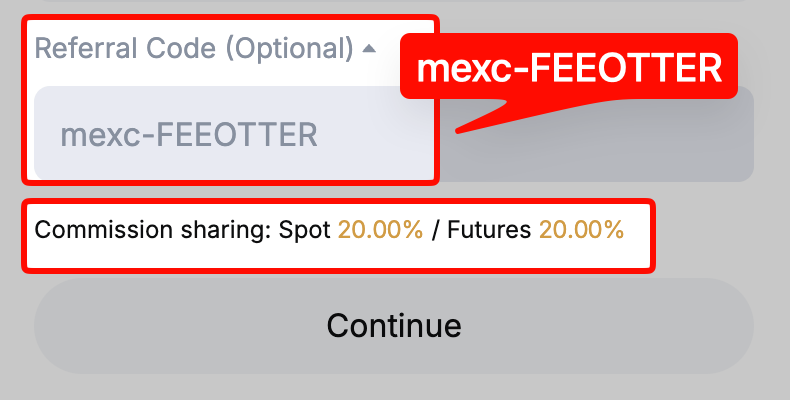
Yes, MEXC requires KYC. Under MEXC's announcement of 2026-02-05, an unverified account can only view market data and announcements: no deposits, no withdrawals and no trading. The "10 BTC a day without KYC" figure you still see quoted comes from a 2024 help page and no longer applies. The entry level is Primary KYC (front and back of an ID), which lets you withdraw 80 BTC per day and use P2P, and Advanced KYC (the same plus a facial recognition check) raises that to 200 BTC per day plus 20,000 USD per day in fiat trading (checked 2026-10-18). Both levels can trade spot and futures, and there is also a web-only address verification. KYC decides whether you can trade and how much you can withdraw; your rebate depends on the referral code. Sign up with our referral code mexc-FEEOTTER and you get a 60% futures rebate, 3 times the common 20% referral code.
This guide follows MEXC's help center and announcements on KYC (checked 2026-10-18): what you can do without KYC, which regions cannot open an account, what each level asks for, the web and app steps and how they differ, photo requirements, review times, the six rejection reasons MEXC lists and how to resubmit, how to fix wrong details, how many accounts one identity can verify, and how MEXC handles your ID and face data. For a side-by-side view of other exchanges, see our exchange KYC comparison; this page covers MEXC only.
MEXC KYC levels and limits
| Item | Unverified | Primary KYC | Advanced KYC |
|---|---|---|---|
| What you submit | Nothing | ID issuing country or region, ID type, front and back photos of the ID | Same, plus facial recognition (liveness selfie) |
| Crypto deposits | No | No cap | No cap |
| Crypto withdrawals | No (withdrawal appeal only) | 80 BTC per day | 200 BTC per day |
| Fiat trading | No | P2P available | 20,000 USD per day |
| Spot and futures trading | No | Yes | Yes |
| Earn and platform events | No | Basic Earn (Flexible, Fixed), events | Yes, plus exclusive events |
| Where to apply | n/a | Web, app | Web, app |
Sources: MEXC announcement: KYC verification required for platform access (2026-02-05), MEXC KYC FAQ (updated 2026-06-02), checked 2026-10-18. Limits are as shown on the official pages at any given time.
Two more verification types sit outside the table. Address verification is an "additional verification" that requires proof of address issued within the last 3 months and can only be submitted on the web. Institutional verification is for company accounts and needs company registration details and board authorization documents; it is also web-only, with a withdrawal limit of 400 BTC per 24 hours (Why is KYC verification necessary). Individual and institutional KYC cannot be converted into each other on the same account; institutional verification needs a new account, and each company registration number can verify only one MEXC account.
Does MEXC require KYC? What happens if you skip it
Yes. MEXC's announcement "KYC Verification Required for Platform Access" (2026-02-05) says unverified users can still view real-time market data and the Announcement Center, but deposits and withdrawals are not available, and trading and integrated account features are restricted. Primary KYC is what unlocks deposits, trading and the 80 BTC daily withdrawal limit.
The help center's KYC FAQ (updated 2026-06-02) uses softer wording: to meet the rules of your region, not completing KYC "may affect" services such as deposits, withdrawals and trading, as the on-screen prompts show. Read together, the two pages say the same thing: to trade on MEXC, you verify first.
The "MEXC lets you withdraw 10 BTC a day without KYC" claim comes from MEXC's "Why is KYC verification necessary" page dated 2024-11-20, which also mentions a combined 1,000 USDT deposit and withdrawal cap for unverified accounts in some regions. Since the February 2026 announcement, those no-KYC limits are no longer something to rely on.
If you already have funds stuck in an unverified account, the help center describes two common pop-ups, each handled differently:
- "Funds are restricted and cannot be credited. Please complete real-name verification before the funds can be credited": your incoming assets are held back. Completing KYC restores normal use; if you cannot verify, you can use the Application for Return page to ask for the restricted funds back.
- "You have not completed real-name verification. Please complete real-name verification before continuing with withdrawals": if you cannot verify, you can submit a Withdrawal Appeal Form through the official self-service channel. Once approved, the account keeps only withdrawal and position-closing permissions, and every other function is off.
So skipping KYC costs more than a lower limit. Once you reach the appeal stage, the account is basically good only for taking your money out. If you plan to trade on MEXC, finishing Primary KYC right after sign-up saves trouble.
Who can verify on MEXC: regions and age
The MEXC User Agreement (updated 2026-10-13) lists these prohibited jurisdictions: North Korea, Cuba, Sudan, Iran, Mainland China, Singapore, Malaysia, the United States, the United Kingdom, Hong Kong, Kazakhstan, Canada and the Russian-controlled regions of Ukraine (Crimea, Donetsk, Luhansk, Zaporizhzhia, Kherson and Sevastopol), plus countries under comprehensive EU or OFAC sanctions or on the FATF blacklist. The list is not exhaustive and MEXC can change it at any time (MEXC User Agreement, checked 2026-10-18). KYC documents cannot be issued by these jurisdictions, and living in one of them breaks the agreement even if you hold another country's ID.
On age, the agreement gives no number; it only requires you to be "of legal age to form a binding contract under applicable laws". The KYC document guide says you must have reached the legal age of majority in your country or region.
Web versus app: what differs
| Item | Web | App |
|---|---|---|
| Primary and Advanced KYC | Yes | Yes |
| Address verification (POA) | Yes | No, web only |
| Institutional verification | Yes | No, web only |
| Entry point | Profile icon at top right, then Identification | Profile, then Verify next to your nickname |
| Facial recognition | Allow the browser to use the camera | Allow the app to use the camera |
If photos keep failing to upload, MEXC suggests switching channel: if the web fails, try the app, and the other way round.
Before you submit: documents and photo rules
MEXC individual KYC accepts four document types: ID card, passport, driver's license and residence permit. Each must be your own, government-issued and still valid (KYC document guide). Which ones you can pick depends on the issuing country you choose on the page. Check this list before uploading:
- Photograph the original: no photocopies, scans or screenshots, and no images edited with graphics software.
- All four corners, readable text: good lighting, with name, ID number and portrait clearly visible and not blocked by fingers or glare.
- File format: JPG, JPEG or PNG, each under 5 MB.
- Age: you must be of legal adult age in your country or region.
- Region: the document must not be issued by a country restricted in the MEXC User Agreement.
- Matching details: the name and ID number you type must match the document exactly, and the name must match your account details.
MEXC states plainly that submitting forged documents or someone else's document is a violation, with no exceptions.
How to complete Primary and Advanced KYC
Web
- Log in to the MEXC website, click the user icon at the top right and select Identification.
- Primary KYC: click Verify via Web, choose the ID issuing country or region and ID type, take or upload the front and back photos, then submit for review.
- Advanced KYC: under Advanced KYC click Verify via Web and complete two steps, Proof of Identity and Facial Verification. Tick the Data and Privacy box, allow camera access and follow the on-screen facial recognition.
App
- Open the MEXC app, tap the user icon to open your profile, then tap Verify next to your nickname.
- Primary KYC: choose the ID issuing country or region and ID type, take or upload both sides, then submit.
- Advanced KYC: choose country and ID type, upload the ID, select your location of residence, then take the facial recognition selfie.
Two details people miss: you can skip Primary and go straight to Advanced, and if you have already passed Primary, Advanced reuses your earlier details so you only pick the ID type again. Do the face check in good light with your whole face in frame, or it may fail. Steps are based on the Primary KYC guide and Advanced KYC guide; button names may change between versions.
Address verification (POA): what to submit
Proof of address must be in your own name and issued within the last 3 months, and must show your full name, residential address, issue date, issuing authority and the issuer's details (such as a business identifier, contact details or website). MEXC's accepted documents include:
- Bank statement, bank letter, mortgage statement or passbook
- Mobile, home phone, internet or TV bills; water, electricity, gas and other utility bills
- Letters or notices from government agencies, voter registration certificate, tax assessment
- Rent bills from real estate agencies, an employer letter confirming the address, a home purchase deed and similar
Two types are rejected: transaction receipts (even with a shipping address) and medical bills. You can upload a photo or scan of a paper bill or the PDF of an e-bill, in PDF, JPG or PNG only; no cropping or editing, and no blurry, reflective or black-and-white scans. Give the full address, including unit number, street and postal code. Review takes up to 24 hours and you are notified automatically; later address changes go through customer service (address verification guide).
How long does review take, and where is the result?
The official FAQ says KYC is normally reviewed within 15 minutes; depending on the complexity of your information and current volume, some applications take 8 to 24 hours. The Primary and Advanced guides both say a result comes within 24 hours. MEXC emails the result to your registered address, with the reason if you were not approved; you can also check status and the failure reason on the Identification page.
Attempts are capped: each account can apply for Primary and for Advanced KYC up to 3 times per day each. Past that you see "KYC verification limit exceeded" and must wait 24 hours. After a rejection, read the reason before re-shooting instead of resubmitting blindly.
Six rejection reasons and how to fix them
MEXC lists these common failure reasons and fixes (Common questions about KYC, Why did my KYC fail):
| Reason | Typical cause | Fix |
|---|---|---|
| Invalid or incomplete document information | Blurry or partly unreadable photo, or an unsupported document type | Re-shoot the original clearly; use an ID card, passport, driver's license or residence permit |
| Document has reached the maximum number of accounts | The same document is already used on other accounts | Use a valid document not linked to another account |
| Document has expired | Past its validity date | Use a document that is still valid |
| Screenshots or photocopies not accepted | A screenshot or copy was uploaded | Upload a photo of the original |
| Incomplete document information | Name, ID number or other key fields are covered | Re-shoot with every field fully visible |
| Primary and Advanced details do not match | The two submissions are inconsistent | Make both submissions consistent and resubmit |
If photos will not upload, check the format and size first (JPG, JPEG or PNG under 5 MB), then wait and retry, clear the browser or app cache, switch browsers, switch between web and app, or update the app. If it still fails, send a screenshot of the error on the KYC page to online support or submit a ticket. To resubmit: on the web, user icon → Identification; in the app, Profile → Complete KYC → Verify or Re-verify.
Wrong details or an expired ID: how to update
- Still at Primary and something is wrong: MEXC suggests going straight to Advanced KYC with the correct document; the Advanced details become the final record.
- Advanced done, but details need correcting or updating: submit a KYC Verification Update through self-service, choosing the reason (for example an expired document or changed details); it is updated after approval.
- Address change: contact customer service.
How many accounts can one identity verify?
The MEXC KYC FAQ says each user may complete verification for up to two MEXC accounts; always go by MEXC's latest official rules and what the verification page shows. If you see "You have already completed KYC verification on another account", your identity is already in use on another MEXC account; once both slots are used, the rejection reads "This document has reached the maximum number of accounts allowed for verification".
This matters when you switch rebate codes: under this FAQ, if your old account uses only one slot, a new account can verify with the same document; if both are used, you must close one first. The full method is in our MEXC rebind guide, and whether other exchanges let you move KYC to a new account is covered in KYC identity transfer for a higher rebate.
How your ID and face data are handled
According to the MEXC Privacy Policy, MEXC collects proof of identity (passport, driver's license, government-issued ID) and may collect biometric data such as facial recognition data used for authentication. The main points:
- Third-party verification providers: identity verification or fraud prevention providers may also collect your personal information while providing their service.
- Not sold: MEXC says it will not provide, sell, lease, share or trade your personal information to unrelated third parties without your prior consent, except parties that provide the service to you together with MEXC.
- Retention: data is kept under the Personal Data Protection Act and other applicable laws, and destroyed or anonymized once it is no longer needed for its purpose or for legal or business reasons. After account deletion, some information may still be kept as required by law.
- Security: the policy mentions backups on other servers and encrypted user passwords, and admits there is no "perfect security measure" online; contact support immediately if your account or password leaks.
MEXC also notes that verified KYC details can help you recover your account faster if you lose your password or security credentials.
Restricted regions and account safety
Prohibited jurisdictions are listed in "Who can verify on MEXC" above. How exchanges are licensed or registered in different countries is covered in exchange licences compared.
Upload KYC documents only on the Identification page of the official MEXC app or website. Ignore anyone who asks you to send ID photos or selfies over LINE, Telegram or a third-party site to "handle verification for you". Never verify with someone else's identity, and never lend your verified account to anyone.
MEXC's anti-fraud notice says its staff will never ask for your password, SMS code, Google Authenticator code or other sensitive information, and you can check whether a social media account claiming to be MEXC is official with MEXC Verify on the website or app (account theft risk warning, how to use MEXC Verify). The User Agreement also prohibits giving, lending, renting out or transferring a MEXC account to a third party.
KYC and your rebate
Your KYC level does not change your rebate rate: Primary or Advanced, with or without address verification, the rebate is the same and depends on the referral code used at sign-up. With our code mexc-FEEOTTER the rebate is 60% in total (20% automatic rebate from the exchange + 40% extra rebate): MEXC returns 20% automatically, and after you bind your UID Fee Otter adds 40%, the same for spot and futures, settled daily. On 500 USDT of monthly fees, a common 20% code returns 100 USDT; our code returns 300 USDT (100 automatically from MEXC + 200 extra from Fee Otter), or 2,400 USDT more a year. The extra rebate is paid on request as on-chain USDT on BEP20, minimum 1 USDT per request, with the 0.015 USDT network fee borne by you. Note that under the MEXC affiliate FAQ, API orders earn no rebate, so bot or API trading does not count. Accounts within 30 days of sign-up and without a referrer can add our code through self-service. See MEXC referral code for sign-up, the MEXC rebind guide if you already have an account, and the MEXC fee rebate guide for examples. If you're already a VIP on an exchange or trade in size and want to rebind or sign up with another exchange, contact Fee Otter support. We work with the exchange's official team and can help arrange special trading perks (such as a VIP tier trial) or a higher rebate rate, subject to the exchange's approval.
 Telegram · @feeotter