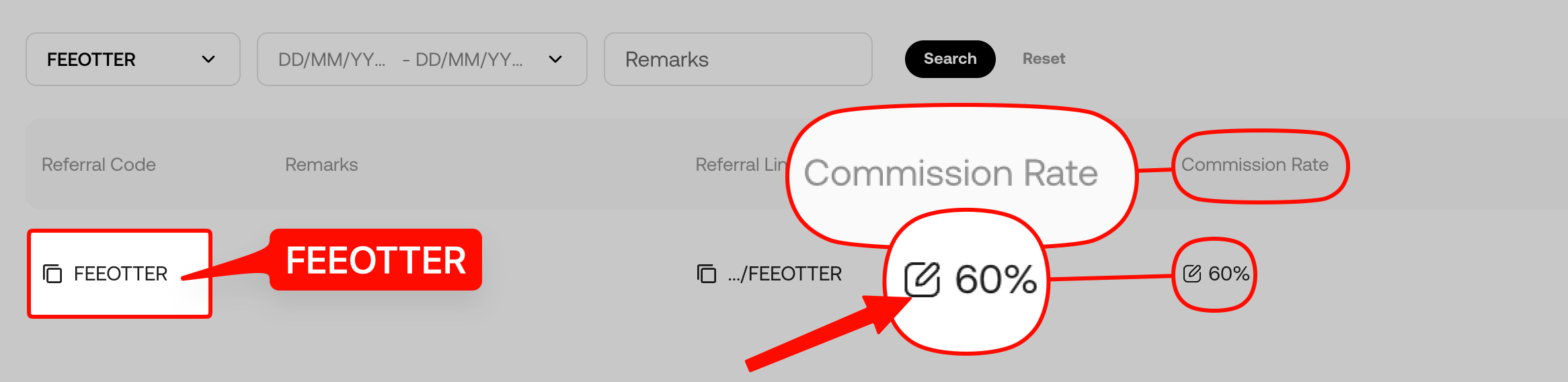
KuCoin charges nothing for deposits, but an account can't deposit until KYC is done. USDT withdrawal fees depend on the network: 0.4 on Plasma, 0.5 on TON and Aptos, 0.8 on Polygon, 1 on BEP20, 1.5 on Solana, 1.99 on TRC20 and from 5.5 USDT on ERC20. Changing your password, 2FA, phone or email locks withdrawals for 24 hours, and internal transfers between KuCoin users are free and instant. Sign up with referral code FEEOTTER and KuCoin rebates 60% of trading fees automatically; deposits and withdrawals don't affect it (checked October 2026).
Moving money in and out looks like copy, paste, send, but problems hide in the details: the wrong network, a missing memo, withdrawing right after a security change, or a P2P counterparty asking you to release first. This guide only covers what KuCoin's Help Center and public API actually state: deposit steps and receiving accounts, withdrawal fees and minimums for USDT, BTC and ETH by network, withdrawal requirements, the lock after security changes, how to recover a wrong deposit, and how P2P works. Data is current as of 2026-10-07.
Sign up on KuCoin with code FEEOTTER and the exchange rebates 60% automatically, 3× the 20% most referral codes give. Deposits and withdrawals don't change the rebate; it only applies to trading fees (see the end of the article).
Before depositing: finish KYC
KuCoin's verification guide says unverified accounts can't make crypto deposits or fiat deposits and withdrawals (identity verification guide). Do KYC right after registering; the steps are in the KuCoin KYC guide.
Deposits: steps and receiving account
- Log in and click Deposit.
- Choose the coin, for example USDT.
- Choose the deposit network. It must match the network you pick when withdrawing from the sending platform.
- Copy the deposit address or scan the QR code; coins that need a memo or tag show it here too.
- Choose the receiving account: Funding, Trading or a sub-account.
- Withdraw from the sending platform and wait for the on-chain confirmations.
KuCoin charges no deposit fee. Some assets are credited early once the minimum block confirmations are reached; how long it takes depends on network congestion. KuCoin also warns against picking whatever network is cheapest on the sending side: choose one KuCoin supports, because funds sent on the wrong network may be lost. Sources: How to deposit crypto to KuCoin (updated 2026-09-17), deposit guide.
Withdrawal fees and minimums
KuCoin charges a fixed fee per withdrawal that varies by coin and network. The table comes from KuCoin's public API, checked on 2026-10-07:
| Coin / network | Withdrawal fee | Minimum withdrawal |
|---|---|---|
| USDT / Plasma | 0.4 USDT | 5 USDT |
| USDT / TON | 0.5 USDT | 1 USDT |
| USDT / Aptos | 0.5 USDT | 1 USDT |
| USDT / Polygon PoS | 0.8 USDT | 1.6 USDT |
| USDT / BEP20 | 1 USDT | 10 USDT |
| USDT / Arbitrum | 1 USDT | 5 USDT |
| USDT / Solana | 1.5 USDT | 3 USDT |
| USDT / TRC20 | 1.99 USDT | 4 USDT |
| USDT / ERC20 | From 5.5 USDT | 30 USDT |
| BTC / Bitcoin mainnet | 0.00009 BTC | 0.00018 BTC |
| ETH / ERC20 | 0.0015 ETH | 0.003 ETH |
| ETH / Base | 0.0001 ETH | 0.0002 ETH |
| ETH / Arbitrum | 0.0002 ETH | 0.0004 ETH |
Source: KuCoin currency API (USDT); swap the code for BTC or ETH. For ERC20 USDT the API lists a 0.2% rate field next to the 5.5 USDT fee, so check the withdrawal page for the exact deduction. Fees move with network conditions; look at the amount on the withdrawal page before you submit.
Withdrawals: requirements and steps
- Source account: funds must be in your Funding or Trading account; move them there first from any other account.
- Security setup: you need either "phone number + trading password" or "email + Google 2FA + trading password".
- Processing: KuCoin says withdrawals are processed within 30 minutes; confirmation time after that depends on the network.
- On the web go to Assets → Withdraw; in the app go to Assets → Overview → Withdraw → Withdraw Crypto.
- Choose the coin and paste the recipient address.
- The system auto-matches the network; make sure the recipient supports it.
- Choose the source account, enter the amount, review and submit, then complete security verification.
Withdrawals sent to the wrong network or address can't be recovered. Source: How to withdraw and transfer internally on KuCoin.
24-hour withdrawal lock after security changes
Any of these pauses withdrawals for 24 hours:
- Deleting a passkey
- Changing or unlinking Google 2FA
- Changing or resetting the trading password
- Changing or unlinking the phone number
- Unfreezing the account
- Changing or unlinking the email
- Resetting the login password through "Forgot password?"
The withdrawal page shows the time remaining, and the lock lifts on its own. A "User Forbidden" notice means the account is restricted for another reason; submit a ticket or use live chat. Source: withdrawal restrictions guide (updated 2026-07-13). If you plan a large withdrawal, leave your security settings alone until it is done.
Sending to another KuCoin user: free internal transfers
If the recipient also uses KuCoin, enter their email, phone number or UID for an internal transfer. It is free and instant, and no on-chain transaction ID is created. If you paste a KuCoin deposit address, the system also recognises it as internal.
Wrong network, wrong coin, missing memo: getting funds back
| Situation | What to do | Fee and time |
|---|---|---|
| Missing or wrong memo/tag (40+ coins with self-service, e.g. ATOM, XRP, XLM, EOS) | In the Help Center choose "Didn't receive crypto deposits", enter coin, amount and transaction ID; once approved, click Pay Fees | The fee is shown on the application page and taken from the Funding account; done within 5 working days after payment |
| Wrong coin, unsupported network, unlisted token, old contract address | Submit a ticket with UID, registered email or phone, coin, amount, transaction ID and a screenshot of the transfer | No published fee or time frame; recovery isn't guaranteed |
Sources: recovering a deposit with a missing or wrong memo/tag (updated 2026-07-13), retrieving a deposit without a memo, what to do after depositing the wrong crypto (updated 2026-07-08).
P2P: buying crypto with fiat
- Go to Buy Crypto → P2P and add your payment methods first.
- Use Fast Trade to be matched automatically, or pick a seller in the P2P zone.
- Choose the fiat currency and coin, enter the amount, pick a payment method and place the order.
- Pay the seller's account within the time limit, then click Pay and confirm.
- Once the seller confirms receipt, the coins are released to your KuCoin account.
You can have at most two orders in progress at once (buying crypto via P2P on the web). KuCoin's blog says P2P has zero trading fees, supports more than 30 fiat currencies, freezes the seller's coins in escrow when you place an order, and requires KYC and a bound phone number before you trade (KuCoin P2P overview). Merchants set their own prices, so quotes for the same coin differ.
Scams: three common lines
- "Release first, I'll pay after": when selling on P2P, release only after the money has actually arrived; a screenshot is not proof.
- "Pay an unlock fee to withdraw": anyone asking you to pay before you can get your own assets back is running a scam.
- "Support" asking for codes or addresses in a DM: enter withdrawal codes, 2FA and your trading password only on the KuCoin page you logged into yourself.
Deposits, withdrawals and your rebate
Deposits, withdrawals and internal transfers earn no rebate and don't affect it. The rebate only applies to trading fees: sign up with code FEEOTTER and KuCoin returns 60% automatically, spot and futures alike, 3× a typical 20% code; Fee Otter adds no extra rebate on KuCoin. The code must be used at registration. See KuCoin referral code and the KuCoin fee rebate guide.
FAQ
Does KuCoin charge deposit fees?
No. KuCoin charges nothing for deposits, though the sending platform may charge a network fee.
Which network is cheapest for USDT withdrawals?
On 2026-10-07, Plasma was lowest at 0.4 USDT, then TON and Aptos at 0.5 USDT; TRC20 was 1.99 USDT and BEP20 1 USDT. The recipient has to support the same network.
Why can't I withdraw after changing my password?
It's a KuCoin security rule: changing your password, 2FA, phone or email, or deleting a passkey, pauses withdrawals for 24 hours. It lifts automatically.
Can I recover a deposit with a missing memo?
For the 40+ coins with self-service recovery, yes: apply in the Help Center, pay the fee, and it's done within 5 working days. Other cases need a ticket and recovery isn't guaranteed.
Are KuCoin internal transfers free?
Yes. Sending to another KuCoin user by email, phone or UID is free and instant.
Further reading
- KuCoin KYC verification
- How to register on KuCoin
- KuCoin fee rebate guide
- MEXC deposits and withdrawals
For information only, not investment advice. Fees, minimums, limits and fiat channels are set by KuCoin and may change at any time; the official pages are the final reference. Rebate rates are set by the exchange and may change; see the Fee Otter rebate rates page.
Data verified: 2026-10-07